Windows Mail

How to Reinstate Windows Mail in Windows 7

   Warning
Microsoft no longer supports Windows Mail, aka WinMail. It's recommended you use another well known supported email client. This Tutorial is for Advanced users who importantly have the Technical Ability to make the changes, have backups of everything including your OS, and to be your own tech support for WinMail going forward. If you decide to complete this tutorial you accept the fact that you are using WinMail as-is. It might be necessary to uninstall other email clients to resolve any WinMail conflicts in some environments. Understand it's likely that new OS updates from Microsoft will break WinMail's operation, and to fix make it necessary to rerun the tutorial again to reinstate it. With those things in mind, this tutorial was written so that you can rerun it without affecting WinMail user data.
Please see this Errata (Bug List) post before you install, to be aware of the current information about known issues using WinMail within Windows 7, these issues are programmatic and in most cases cannot be resolved by this tutorial, and will never be fixed.

Having said all of that disclaimer, if you have the technical ability, and can put up with the annoying minor byproduct bugs, then like so many of us still enjoy using WinMail on Windows 7 ...ymmv!


   Tip
As of January, 2025, the instructions given here supersede all other instructions given in forthcoming older posts. Realize some of the posts that follow are over 16 years old, and many of the link pointers within have become mislinked over time, many of the files or information within them is outdated, incomplete, or superseded with more accurate information - and so be careful. However you can always be sure that the latest info from all research is incorporated into this tutorial post, and its downloads are the latest available. This post is continuously kept up-to-date, and so..
...Always refer to this Tutorial post for the very latest updated information

This is the 4th iteration of the Windows 7, WinMail tutorial.

The process of this tutorial Will Not work to reinstate WinMail on Windows 8/10 !
Windows 8/10 users please go Here


Start here
  1. Download tutorial package TutReWinMail.zip

    Download

  2. Extract the TutReWinMail.zip into your user Downloads folder
    • Note: Be sure once extracted this is the address of the ''TutReWinMail'' folder:
    • C:\Users\username\Downloads\TutReWinMail... ... (if it's not there please put it there)
  3. Navigate to your user Downloads\TutReWinMail folder to be sure the above is correct.
    • (..if you need more verbose install instructions to follow, download this WinMail Local Tutorial.zip)
    • Advanced Users can proceed below:
      (..log in for Full Access, being able to get support, remove ads, like, and even to post, etc..)
Advanced Users: ..use this easy excellent overview of the steps in the local tutorial:
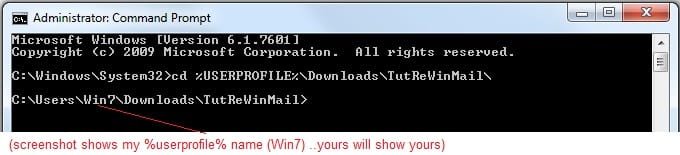
  • Open an Administrator Command Prompt. (screenshot showing in Administrator mode)
  • copy/paste this line into the command prompt: cd %USERPROFILE%\Downloads\TutReWinMail\
  • Your command prompt must now be showing you are at That Same Folder Address ..which contains the tutorial files that the batch file in the next step executes programs and copies files specifically from that folder address - if it's not there the batch file will fail since it cannot find what it needs!
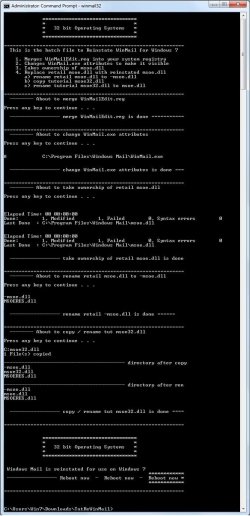
  • Next type in either winmail32 or win64mail <matching OS bit, to interactively process These Next Steps
  • If you've finished to the bottom as shown in last screenshot, restart your machine (sets registry)
  • Create a shortcut from WinMail.exe to your Desktop
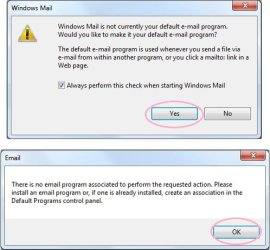
  • Open WinMail - it may prompt you one (or both) of These Two Notices ..click yes, and okay.
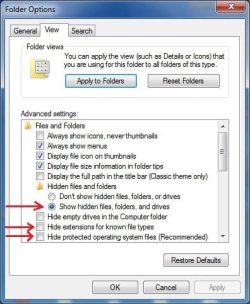
  • They now should be already set, but you can manually check/set at any time These Default Settings
  • That's pretty much all there is to it, and from here you setup the rest of the Windows Mail client (aka: WinMail) as normal within its various tab menus for Accounts, Options, Layout, etc, etc, to suit your individual needs.
  • Lastly, but should be the First thing you do, is to Create A WinMail Backup (new version) ..Go to this next link and when you get there scroll down to the heading: Backup/Restore Procedures for further instructions.
   Information
See How to open an elevated Administrator Command Prompt
Important: The exact text provided by the tutorial must be entered into the Administrator Command Prompt.
Hint: to avoid typos, copy/paste the entire line containing the command into the Command Prompt window.
Also see: How to Enable Copy to Clipboard from the Windows 7 Command Prompt

Every effort has been made to make this a step-by-step process, however, it is beyond the scope of a single tutorial to provide information on every command or concept. Search the Main Tutorial Section if you need greater detail on a concept or command presented in this tutorial.


Good luck, and long live WinMail :thumbsup:


   Note
Made possible by members:
Mark (aka Mr GRiM) - provided the original tutorial
Poppa Bear - continued Mark's work within the 2nd version
endeavor - provided continuous feedback, changes, invaluable testing instrumental to tutorial operations
EKManitis - propose the batch code that made operations easier
Slartybart - updated, tested, and consolidated all of the above into the 3rd version
endeavor - reviewed, updated, tested, and incorporated all of the above into this 4th version
...and also a special thanks to All the other members who presented discovery for this project


Attachments

  • TutReWinMail.zip
    TutReWinMail.zip
    1.8 MB · Views: 4,994
  • msoe_32.zip
    msoe_32.zip
    404 bytes · Views: 1,052
  • msoe_64.zip
    msoe_64.zip
    404 bytes · Views: 1,531
  • WinMailEdit.zip
    WinMailEdit.zip
    404 bytes · Views: 6
  • Win74umsZip.zip
    Win74umsZip.zip
    404 bytes · Views: 106
  • ACP.jpg
    ACP.jpg
    19.6 KB · Views: 1,083
  • DefaultClickYes-OkayAssociation.jpg
    DefaultClickYes-OkayAssociation.jpg
    52.8 KB · Views: 899
  • ProcessingBatch.jpg
    ProcessingBatch.jpg
    194.2 KB · Views: 1,147
  • PasteCDCommand.jpg
    PasteCDCommand.jpg
    33.1 KB · Views: 696
  • WinMail_Local_Tutorial.zip
    WinMail_Local_Tutorial.zip
    6.1 KB · Views: 1,202
  • FolderOptionsSet.jpg
    FolderOptionsSet.jpg
    61.5 KB · Views: 695
  • WinMailAdvanceOptionsBlank.jpg
    WinMailAdvanceOptionsBlank.jpg
    276.4 KB · Views: 93
  • Win7x64AdvancedTab+FileVersions.jpg
    Win7x64AdvancedTab+FileVersions.jpg
    298.9 KB · Views: 112
  • AdvancedTabBefore&After_fixed.jpg
    AdvancedTabBefore&After_fixed.jpg
    106.9 KB · Views: 50
  • CheckManually.jpg
    CheckManually.jpg
    209.5 KB · Views: 136
  • Win10_SetDefault.jpg
    Win10_SetDefault.jpg
    66.2 KB · Views: 33
Last edited by a moderator:
Hey Ron,

Okay so I updated my Windows 8 with every update offered at Windows Update, and my WinMail still works fine with the updates <shrug>.
(Ex_Brit - is yours still working fine too?)

However even though everything seems to work fine for me, test bench observing what all the updates did was very interesting (and another subject) is that MS did replace (actually re-versioned them as well) a few but not all files in the WinMail folder... However having said that, Mine still works fine.

As you know the procedures for installing WinMail on 8 are surly different than it is here on 7, where on 8 when you first install/reinstate WinMail after taking folder ownership, you replace All the files in your WM Programs Folder with what you had in your same working Windows 7 folder; on 7 though you only change the msoe.dll. (not that it matters but interestingly they did not touch msoe on the 8 update) Anyway, the information of replacing your 8 Programs folder with your saved 7 Programs folder following (although maybe not perfectly written) the Tutorial over on the Eight Forum, is the answer to getting you back working.
Also I know you told me last year you use an imaging program to backup your C:\ partition, and so right there, you also have a way to instantly get it working again, and then proceed, etc...

Yes your Outlook Express install renamed your WinMail folder to old and so there you just needed to delete the one they made and rename yours back. However Ron, from our previous conversations last year I was never convinced how or what you did to re-instate your Windows 8 WinMail setup. Also the fact that you have multiple email clients installed now further complicates trouble shooting to the point that I don't know if I want to, only because, said in an appreciative way, you fly by the seat of your pants <smile> with how you roll on the will of the wisp ..and I'm very methodical and need the i's dotted and the t's crossed when I do installs or testing.

Don't do any major installs or updates without first creating a backup partition image. Put yourself in control...in the drivers seat, and don't let software situations control you. Take Control!

I've replied to Your Post over at the Eight Forums rewritten for there, but basically saying the same thing as here.

We don't want to confuse WinMail 7 users with that of what's done on 8, so for the most part except the informative, we should keep things for 8 over there.
 

My Computer

Computer type
PC/Desktop
Computer Manufacturer/Model Number
..all towers built from scratch
OS
Vista/Win7/8/10/11 (x86/x64)
CPU
i7
Well, guys: finally I made Windows 7 x64 work flawllessly with every update: it needs slightly different .reg file, not the same as for x86. Should I make it public or there no any interest for that.
I made working .reg files for windows 8.1 both x86 and x64 too
 

My Computer

Computer type
Laptop
OS
Windows 7 Professional

My Computer

Computer type
PC/Desktop
Computer Manufacturer/Model Number
Self built custom
OS
64-bit Windows 11 Pro for Workstations
CPU
Intel i7-8700K OC'd to 5 GHz
Motherboard
ASUS ROG Maximus XI Formula Z390
Memory
64 GB (4x16GB) G.SKILL TridentZ RGB DDR4 3600 MHz
Graphics Card(s)
ASUS ROG-STRIX-GTX1080TI-O11G-GAMING
Sound Card
Integrated
Monitor(s) Displays
2 x Samsung Odyssey G7 27"
Screen Resolution
2560x1440
Hard Drives
1TB Samsung 990 PRO M.2,
4TB Samsung 990 PRO PRO M.2,
TerraMaster F8 SSD Plus NAS
PSU
Seasonic Prime Titanium 850W
Case
Thermaltake Core P3
Cooling
Corsair Hydro H115i
Keyboard
Logitech wireless K800
Mouse
Logitech MX Master 4
Internet Speed
2 Gb/s Download and 100 Mb/s Upload
Antivirus
Malwarebyte Anti-Malware Premium
Browser
Google Chrome
Other Info
Logitech Z625 speaker system,
Logitech BRIO 4K Pro webcam,
HP Color LaserJet Pro MFP M477fdn,
APC SMART-UPS RT 1000 XL - SURT1000XLI,
Galaxy S23 Plus phone
why not that would be cool!!
 

My Computer

OS
Windows 7 Ultimate
CPU
AMD Athlon II X4 630 (95W) Quad Core Socket AM3
Motherboard
GIGABYTE MA785GMT-UD2H
Memory
Patriot Viper Series DDR3 PC3-10666 1333MHz 4GB CL 7-7-7-20
Graphics Card(s)
Geforce GTX550 TI
Sound Card
built in realtech hd
There are both x86 and x64 versions; they are slightly different against those in Win74umsZip, but absolutely compatible with everything else

Hope Ya' enjoy it. Just substitute original WinMailEdit and it's done
 
Last edited by a moderator:

My Computer

Computer type
Laptop
OS
Windows 7 Professional
and this is just for win mail correct?
 

My Computer

OS
Windows 7 Ultimate
CPU
AMD Athlon II X4 630 (95W) Quad Core Socket AM3
Motherboard
GIGABYTE MA785GMT-UD2H
Memory
Patriot Viper Series DDR3 PC3-10666 1333MHz 4GB CL 7-7-7-20
Graphics Card(s)
Geforce GTX550 TI
Sound Card
built in realtech hd
Sure. Windows Mail for Vista in Windows 7 :)
 

My Computer

Computer type
Laptop
OS
Windows 7 Professional
There are both x86 and x64 versions; they are slightly different against those in Win74umsZip, but absolutely compatible with everything else

Hope Ya' enjoy it. Just substitute original WinMailEdit and it's done

I've only briefly had a chance to look over your reg file, and right away without going to far with it, said with all due respect, the fact that you are posting HKCU entries tells volumes, since absolutely None are needed because WinMail creates all of those automatically on it's own when launched without any intervention by anyone; as a matter of fact it is preferred to let each persons WinMail program create their/it's own personal HKCU settings which it does so Automatically when they first launch WinMail - and moreso as they go along adjusting each one of their own options in WinMail - the appropriate entries get automatically added instantly. For a small instance I see you put in your or some else's, HKCU....Mail\Rules... entry, and naturally we don't want those - we want our own rules settings which again and again will be created automatically when each person sets their own settings. I could on, but I won't.

The fact that you have a half dozen unnecessary "Windows Registry Editor Version 5.00" entries throughout your reg tells all we need to know, and I don't mean that sarcastically, just truthfully.
In truth there is not much you can add to the current supplied WinMailEdit.reg that is needed or hasn't been thought of already. I know you mean well, and you may 'think' things are missing when you first look over the current entries in WinMailEdit.reg, but I assure you there are not, and everything done was intentional all for very very good reasons.

Thank you for your interest though. :)

As to your post over in the Eight forums about Windows Calendar, Bill left that out on purpose, and I agree with him. Also over there I see you're looking for beta testers, well honestly we've all been through this before here.
My suggestion is instead of posting this whole cobbled together reg file, instead just post only the (non HKCU keys) that you think are needed, and why. I do not know how to speak Russian - I wish I did though, so I can't help you there either sorry.

Also fwiw, there is Nothing you can add to the registry file that can stop MS's updates from breaking WM (I don't know why you think there is) because as you must know there is nothing a registry entry can make that will prevent any version of an MS update from changing files or registry around at will - and disrupt your current setup. However as already known when a future MS update breaks things - and they will, all you have to do is re-run the Tutorial and it will automatically put the things back in place; however having said that, when the time comes that MS does something in a Future update that changes that equation and surly it will happen eventually, we have everything in place to track each of those changes, and put them back to a working solution.

Until then the Tutorial is pretty tight the way it is, imvho&e

All the best,
Thank you


...
 
Last edited:

My Computer

Computer type
PC/Desktop
Computer Manufacturer/Model Number
..all towers built from scratch
OS
Vista/Win7/8/10/11 (x86/x64)
CPU
i7
Dear Endeavor!
At first, with all my respect to You and Your great job over that topic, please don't post such huge posts with such little sense of that.
That files are tested since begin of the year because I clearly understand that if propose something for people I need to be sure it's not harmful for their system. If I say "it works" - it works. End of story.

As for Calendar - if YOU think it's over, it's not for others. Moreover, that topic shows WRONG way to start Calendar, that's why notifications only work when system starts and when Calendar is opened. I made it working all the time, but it's a little bit of tricky, so if all others are agree with You, I even don't start messing with explanation, that why I asked in that topic. But again, I asked about someone is interesting. If someone is NOT intersting as You are, keep silence on that topic if quiet enough

As for beta testing, please read carefully what I wrote overe ther. Where You found I asked for speak at Russian with me please? I told about files for Russian and English system are different and personally I have Russian system so I need somebody to test everything in English system.

Honestly, I quiet disappointed personally Yours reaction to my post, because I hoped You will be more constructive. I hoped personally You will help me to improve English version of 8.1, because beta testing needs some kind of knowledge, not only enthusiasm. I'm sorry for misfiring in You plans

P.S. For start use Mail in Windows 7 actualy You don't need all those violation of system with take ownership etc. because You can take rights to msoe.dll exactly in a couple of simple steps. I still think Win74umsZip is great for newbies because of simplicity, but I can show very simple way: take ownership for msoe.dll manualy, replace it and start my .reg file. That's all.
 

My Computer

Computer type
Laptop
OS
Windows 7 Professional
Dear NoMatterWho!
It was not my intention to upset you, and if I did - I apologize.
Don't be as you said disappointed, and don't take it personally; I meant no harm.

As far as Calendar goes I don't use it at all sorry. Yes I know there are those that like to use it like our member Ex_Brit, if you want you can ask him about it.
I know that Calendar thread you posted in is very outdated and may not be current, ask Ex_Brit, but again I never have used calendar and have no interest in it; besides my wife insists I use the calendar she has hanging on the refrigerator.
~~~~~

All I did was take a quick look at the what you offered in the download you give as WinMailEdit_86.reg, and the first thing I saw was some unnecessary personal:
[HKEY_CURRENT_USER\Software\Microsoft\Windows Mail\Rules\Filter\FFF]
"Name"="Ignorierte/gelesene Nachrichten ausbl."
...................../\
(see what I mean)
Same for all the HKCU Toolbar settings... etc
There is more, but the same would be true for all the HKCU entries that you added extra.
Again no HKCU are needed at all. Again each persons WinMail registry HKCU population are software triggered/added 'automatically' and appropriately, the first time a person launches WinMail.exe, and thereafter adds more to it as they start changing their own options the way they want to. If you want to see and prove that for yourself, start fresh with a virgin install, and track all those actions as you go along. I have done that many times and know the process well.
The fact is, no HKCU should be supplied in our reg file, nor should it be.

If you have other specific registry entries you want added, please list them separately, and tell us the reason why please.

When I also saw in your reg file many different entry listings of:
"Windows Registry Editor Version 5.00"
..when only one at the beginning is needed...
I then realized that I'm not the one you want working with you.
You asked me to be constructive, my answer is, this is me being constructive.
Our temperaments and language differences would not communicate or work well together.
This is where, and what I think you were telling me to keep quiet - I'll keep quiet then.

As far as the automatic 'take ownership' of files, which is Slartybarts handywork - and I think a fine one, so please see him if you want to make any changes.

I appreciate you, and I appreciate your enthusiasm, thank you!
Sincerely all the best
 

My Computer

Computer type
PC/Desktop
Computer Manufacturer/Model Number
..all towers built from scratch
OS
Vista/Win7/8/10/11 (x86/x64)
CPU
i7
Dear endeavor!
My apologies for keep silence for a long time – actually it's not a silence at all: I just wrote everything yesterday, but Your session timer threw me out of site silently, so I press submit button and voila – everything gone and reauth page appeared. You guys should to make something for some kind of autosave current message input, it’s not a twitter, it’s a forum in the end.
So, I’ll try to answer for a couple of Your question
1.Your point of view to registry is, let’s say, excessive simple J. Yes, You’re right, global settings are stored in HKLM section and local settings are stored in HKCU. But these things are not equivalent, I mean HKCU is NOT a mirror of HKLM for current user, so Your sentence about “no HKCU should be supplied in our reg file, nor should it be” is completely wrong. I did a pair of investigations J, as You can see for a bunch of “Windows Registry Editor…” titles, and found a better integration to the system when HKCU is included.
2.Yes, You’re right, so many of those titles not needed, but it wasn’t a public project, but a private, so beauty of file was a last thing I thought about.
3.About Calendar. Yes, that topic is quite old and You can imagine, I’m not a big lover of calendar programs too, but You can dig deeper and Googling will help You. Net is full of same WRONG suggestions of WRONG procedure of initializing Calendar in Win7/Win8. The result is non-working notifications. So, who needs calendar app which tells You nothing? Again, I’m too lazy to show right way in “any way” mode. If somebody will show interest, I’ll did it, if not – OK, I’ll have a lot less problems J
4.About reasons why Mail stops working on a regular basis. You point of view suffers of excessive simplicity too. Oh, yeah, You’re right, when update changes msoe.dll for the new one, it stops functioning. In theory J. M$ stopped support of WinMail ages ago, remember? So who cares about new versions of msoe.dll? The REAL reason for problem is start of system self-check when it find “wrong” dll and substitute is “right” dll out of cache. So only thing You need for stopping that annoying manner is throwing link to desired dll out of cache. Actually somebody (I think, it was guy Poppa Bear from this forum) did it for Windows 7 x86, but nobody before me did it for x64, that’s why Win 7 x86 works and x64 has magic problems out of the blue. Window 8.1 appeared to be more complex: at first, they need to do all things from above for every file in Windows Mail folder, and at second, that files are localized. So, I did everything for Russian OS, but English OS is different and my humanism isn’t so big for downloading and installing two Os’s - x86 and x64 (again, there are DIFFERENT tweaks for them), that’s why I asked for beta-testing. Again: guys, if You don’t needed – it’s OK, I’ll have a lot less problems in my life J.

Please, don’t think of me as a total politically incorrect person, but I haven’t any interest of wide discussion of what I did, why I did and why I’m not so smart as I imagine (joke of course). Let me repeat: I started tweaks for both win7 & win8.1 on Christmas holidays and everything works flawlessly until today with all those updates for half of year. What more You’re need please?

And about Take ownership/Remove ownership. You misunderstood me: I don’t think it’s wrong or bad utility, I think You use it (or You teach other peeps to be more precise) in wrong and bad way. Take ownership catch system rights for the object, but Remove ownership doesn’t revert it, it’s just remove it from the context. But system rights are serious part of NTFS system and You shouldn’t change them for every case. For simpliest example let’s look on that Calendar program: wrong rights totally destroy its functioning. I want to be understood clearly: for Windows Mail it’s not problem, so it’s nothing wrong to use it here, but it happend occusionaly. I think it’s not bad idea to show peeps right way, I mean manual take ownership of msoe.dll exclusively -> replace dll -> restore rights for new dll manually. It’s not needed for Mail, but You’ll teach people for right manipulating with system files, when OS “thinks” nothing happened at all.
 

My Computer

Computer type
Laptop
OS
Windows 7 Professional
Dear NoMatterWho!
Yes I agree it would nice if this forum had an auto-save feature like many others forums do, in the mean-time if you have lots of thoughts to write, create it in WinMail as plain text first, then copy/paste to a forum post, just watch out for the spellcheck bug! though.

Anyway I can tell by your replies you are not understanding my meanings, and I apologize if I'm not coming up with the right words to get this across. I know from experience that explaining something in one language with it's nuisances, can be taken as the opposite meaning in another language. I only know how to speak/write English, you have taken the time to be able to speak more than one language and that is great.

I have no questions for you. I still stand behind what I said for the reasons I said them.
~Those personal HKCU settings that I see you added extra in your reg addition are not needed at all. Those are per-user settings that are automatically built/added by each persons first WinMail launch and subsequent options usage, an no other intervention is needed, and afawk there are none that ever get left out being added when a WinMail launch and complete option set builds them - and so because of that you do not need to add them, or should you. You do not need to pre-add what will be automatically added by each users own unique personal settings.
Looking just at some of your HKCR keys you added, are just duplicates of what we already have in there, so what's the point.
What we already have in the WinMailEdit.reg is brilliantly perfect, and the results of many! individuals working on this from day one up until the current day.
If you have some 'specific' registry entries we don't have already, and that are needed, that you want to point out - then by all means please do so and explain them. I have every ability to check and test them out - but I will only do so if it's truly warranted.
I am stating that specifically, WinMail, needs no user added HKCU entries. When WinMail is first time opened on a new install, and then during any subsequent options settings, that is when the completed set of all the HKCU settings keys are written automatically by the program itself. The registry is really driven off HKLM, mostly the per-user keys are built by programs when first launched using HKLM entries as the base or have some built-in self registering, or both. By building only the base HKLM registry entries, user configuration is as it should be, preserved for when each individual has to run the tutorial again, so that it does not and will not interfere/change/overwrite their own options settings already preferred; after all we don't want to give someone else our own settings, or change theirs. That's the beauty of it and that's why we purposefully do not offer any HKCU entries; it was actually Slartybart who finished showing me the light of day about that, and then in my way hands on proved it out doing many numerous virgin test bench installs tracking every single blessed file/registry change along the way. I have proven this out over and over again. I've been using and personally working in the background on this WinMail project all the way back to 2009, even before I registered into this forum.

~ I cannot address the Calendar operation, I do not use it, but I do support anyone who likes it. As far as the taking ownership process on 7, Slartybart does it for the one file needed. On 8 I just do it to the whole folder for ease of use since all the files need to be changed out, so there's no sense doing one file at a time, but since I do not have Calendar in place again I can't speak to that operation. The Windows 8 Tutorial...well it's not really a tutorial at all, but as you can see over there, I just kept editing my original post adding on to it over the years as I went along. It's surly not as pretty as Slartybart's tutorial - he is a good tutorial writer, but it is what it is and I have no plans on making it fancy for the few people it would serve.

~ You mentioned it, but I have never personally taken a lot of extra time to get Windows 7 WinMail to work when it breaks after a newer version msoe.dll given by a new MS update overwrites it - we just put the original one back. That works very well, and we don't try to fix what's not broken. As for Windows 8, and Windows 10, when MS does an update, via reg/file tracking I have seen sometimes they replace numerous files from the programs folder not just the msoe.dll, some of which stop it from working again, but the same thing here, I just overwrite the ones I see necessary back to the working originals to get it working again. I do not try and adapt the newer files to work, I have no reason to - I mean it's not like they are rebuilding them each time to make WinMail better for us.

We have spent so many years on this project, and really, it is rare that anyone posts here in this thread anymore, or over at the Eight forums in that WinMail thread either, because there are less and less people interested to use it anymore - and I don't really blame them, and that's why we don't put any more time into it over and above the thousands of hours we already have! ...it's just not worth it for the few people that still use it - you understand. I personally however will use WinMail for 7, 8, and 10 probably till the day I die - but that's just me. I have the ability to easily instantly fix it every time a new MS update breaks it - and besides I like WinMail.

I think the only way we could make the installation of WinMail for Windows 7 easier (and/or Windows 8, and Windows 10 ..each with their unique differences) ...is if someone with the true ability to do so, would make an .exe installer covering each OS with each of their unique intricacies. I'm sure if there were more people using WinMail these days someone with abilities would get more interested to create a one click installer for it, but there are not, and there have been fewer and fewer users every year.

In closing I will say, I think it's neat we have this person Rafial over at http://runasxp.com/index.php doing what he does with Outlook Express. I even installed it on a test bench setup and played around with it for a little bit.
I like WinMail Much Better though. I wish he would choose WinMail instead of Outlook Express, there must be a reason, probably because of how newer updates keeps breaking it therefore would need to much maintenance for users to keep it going.

I've done all I can and that I have time for.
..as always, all the best..
 

My Computer

Computer type
PC/Desktop
Computer Manufacturer/Model Number
..all towers built from scratch
OS
Vista/Win7/8/10/11 (x86/x64)
CPU
i7
Oh yes, I DID it as a second try to post You (I talk about plain text), but I felt myself, let's say, bumped before, when I lost everything which I tried to explain in not very small time space J
You talk very clearly, believe me, and I don’t see nothing I didn’t understand, so don’t worry about it. So, I need clarify some moment by short historical travel.
I thought absolutely identical with You by the terms of using (or not using to be more precise) HKCU when I started implement WinMail into Win7 (friend of mine asked me for that) and I started from Googling and ended up with this wonderful site and this wonderful topic (it’s not sarcasm, I really think so) and I started from Your helper. I’m very sorry for didn’t log but definitely something went wrong with full integration – maybe default protocol, maybe something else – I can’t remember now), so I needed help, but for some unknown reason You guys refused to register me with e-mail from Russian region (BTW it repeated now again, so I should to blow up dust from almost forgotten old Yahoo account. Seriously, why You don’t like mail.ru so strong and so long?). Anyway I stayed alone against all my problems, so I started combining different “mail” sections of registry from different sources until I got repeated flawless result on VMs (God bless WinMail: I’m highly in doubts I ever dare to start messing with those beautiful things without those tries). Honestly I’m not sure which one of my adds brought desired effect, but everything works now for me, for my friend, for friends of my friend and so on J. And I don’t interesting now which line exactly helped, because I have constantly repeated satisfactory result and it’s the main thing, isn’t it? It’s quiet foolish to deny Your rightness for Your approvements, but at other hand I see what I see: Your file missing something. Or, let’s say it missed at October of 2014. In other words, it’s perfect, yes. But not brilliantly.
I think, some slight language barrier definitely takes place. I talk about ownership problem. You point to different versions of that tool: folder & file rights catching. I mean absolutely different problem: once You catch rights with that utility, You COULDN’T back that rights because it’s impossible. There aren’t in Universe methods to define which rights from which object You catched. To change security settings forever and ever is bad idea generally and You need to explain it to others. And I showed You an example when wrong security changes makes program non-functional.
I can’t understand quite enough Your sentence about You spend very small time to recover WInMail. You make it with ease, I make it with ease, a couple of guys make it with ease, but try to stand to common people point of view: permanently crashing app – for why in the name of God they need it? Of course, it loses users constantly.
And what I don’t understand at all: I repeat You at third time: x64 reg I provided stops crashing WinMail while system update. I’m sorry, but what’s a matter with You? Start sfc /verifyonly for checking after applying that file is against Your religion or what?
 

My Computer

Computer type
Laptop
OS
Windows 7 Professional
Anyway I stayed alone against all my problems, so I started combining different “mail” sections of registry from different sources
Yes and i
t looks like it was cobbled together from all those searches, but realize all those searches lead back to this forum in one way or the other...

until I got repeated flawless result on VMs (God bless WinMail: I’m highly in doubts I ever dare to start messing with those beautiful things without those tries). Honestly I’m not sure which one of my adds brought desired effect, but everything works now for me, for my friend, for friends of my friend and so on J. And I don’t interesting now which line exactly helped, because I have constantly repeated satisfactory result and it’s the main thing, isn’t it?
Yes but you have only been testing it for a few months since this last Christmas you said. You have a long way to go.
Anyway, I am glad you have it working for yourself and your friends, that's very nice, good job well done.
I however do know and do understand about the WinMailEdit.reg and it's entries, and am more than very confident of everything I have told you.
Realize that all of your google searches in the end really draw from this original WinMail thread, and that is where you found the SFC fix you keep clamoring about that stops the occurrence from using sfc /scannow which before replaced the msoe...dll back to the Windows cached version:

(edited the next day - as it turns out this is only for x86 versions, not x64)
[-HKEY_LOCAL_MACHINE\SOFTWARE\Microsoft\Windows\CurrentVersion\SideBySide\Winners\x86_microsoft-windows-mail-core-dll_31bf3856ad364e35_none_67a2bdecbd5f60de]

...and this entry fixes that. You see, this is 'Already Included' in our WinMailEdit.reg and fixes that problem! and you do not need to supply it! ...I don't think you quite realize everything you are talking about has already been done before!

There is no problem with the WinMailEdit.reg 32 or 64 bit, it does not need HKCU in it, trust me on this - or you don't have to that's fine.
Again all the registry entries you provided from your internet googling travels invariably originate from here in the first place, and I will tell you over and over, we don't provide any HKCU because if you could setup your own test bench fresh install and track all of the registry/file changes made, you would see all those entries get automatically and appropriately added by themselves from the WinMail first launch AND then more during each users personal configuration itself, tested, proven, verified, period.
I only use the final WinMailEdit.reg from this tutorial, I know it well, and the final edit we made to it was back on 5/15/2012 where we previously removed all the unnecessary HKCU in it, it simply was not needed and caused more problems disrupting peoples own personal settings than anything else, besides it was redundant - all proven over and over for all the reasons why I have mentioned already; before that we also added other entries to fix other problems.

There is nothing more for me to say, that has not already been said.

I congratulate you for your work and effort with WinMail, and helping your friends.
I do appreciate your enthusiasm.

The WinMail story and re-working it, has pretty much come to a close, you are a little late to the party.
There will be a time when WinMail will be no more, for most people that is.. :)

..take good care
 
Last edited:

My Computer

Computer type
PC/Desktop
Computer Manufacturer/Model Number
..all towers built from scratch
OS
Vista/Win7/8/10/11 (x86/x64)
CPU
i7
Yes, You're right more or less, I think. We should to stop our discussion, because You can't (or it's just pretend, anyway it's don't matter) hear anything don't conforming Your point of view. You cite x86 keys when I talk about x64 keys, which is total nonsense. It's not a talk at all, so I stop it. Sorry for wasting Your time
 

My Computer

Computer type
Laptop
OS
Windows 7 Professional
Dear YouKnowWho,
It's sometimes difficult to understand your written word of English and their meanings the way words are interchanged which can have different meanings, which sometimes could even be taken insultivly, so be careful of that please.

I kept trying to ask you for specific registry keys rather than you just giving me a copy/paste of all these unnecessary keys, and admittedly after looking at all of them I didn't want to take the time to sift through so many irrelevant registry keys researching dead ends, and because you said you weren't sure which one it was or what it did to help you - that didn't help me either. However because of your last post, just for me to be sure I wasn't missing something, I gave another look at your x64, and in fact there was one important registry key out of the many that caught my attention, and so I have to thank you for being persistent because you've brought up an important issue, and so in the end I have to Thank You for that persistence.

But first of all for WinMail, there is only one registry file needed for both x86 and x64, all the entries we give cover both versions at once, but for whatever reason I see now there was that one specific to x64 registry entry that was left out. I vaguely remembered but have found that reference to member glatzfront for his post. And so thanks to glatzfront, and now thanks to YouKnowWho for being so persistent and bringing attention to it!
I don't know how this was missed it in the first place. I went back looking at some of the very first WinMailEdit.reg I have saved from 1/19/2010 and it's not in it. It's probably because at that time there were many more x86 users than there was x64 users to point it out; I'm more surprised that no other x64 users has spoken up since then though until you. Not that many use x64 WinMail anymore I guess.

And so it seems afterall this new registry entry needs to be put into the current WinMailEdit.reg for x64 users, in order for whichever MS update(s) puts in a check for SFC to check the mail core dll, and if msoe64.dll doesn't match its calling then gets switched out.. which stops WinMail from working.
Deleting this folder key removes that check:

[-HKEY_LOCAL_MACHINE\SOFTWARE\Microsoft\Windows\CurrentVersion\SideBySide\Winners\amd64_microsoft-windows-mail-core-dll_31bf3856ad364e35_none_c3c1597075bcd214]

Since I mainly use Windows 7 x86, when I get a chance I'll restore my test bench x64 partition image I made for testing dedicated to WinMail, to verify this registry key 100% and also see if there are any variables! I'm sure it will all prove out, and when it does then I'll get with Slartybart and see if he will edit his download and add the results of this x64 registry entry to put into the WinMailEdit.reg given.

However in the meantime since we now have two members that have confirmed it, if there is anyone else when running x64 and runs SFC and it replaces the original working msoe64.dll with a non-working one and breaks WinMail, then you can remove that registry key above, which will let your run SFC again without it swapping the working msoe64.dll for now, anymore.

Thank you!
 
Last edited:

My Computer

Computer type
PC/Desktop
Computer Manufacturer/Model Number
..all towers built from scratch
OS
Vista/Win7/8/10/11 (x86/x64)
CPU
i7
Wow, finally we could made something creative:). Definitely it's a good idea to throw out our clerical part of discussion "I do believe" - "I do not believe" and focuse on common part of problem. I'm glad somebody else just found the same thing: I'm sorry for didn't found it by myself, because it would help me a lot of time.
Now You'll better understand me for Win 8.1, I hope. I mean, that OS needs completely different keys, that's why I need somebody with both x86 and x64 OS's installed.
BTW I almost sure the same is right for Win 10 as well. Please keep in mind I talk about differences between Win 8/10, not only 7/10
 

My Computer

Computer type
Laptop
OS
Windows 7 Professional
Oh, for deep side of my character:D
A little part of clerical discussion. I use my x64 machines without all those blank "Advanced" option. And I have empty "Deletes" folder after exit and re-enter program. So, You can repeat "I do not believe" any times You like, but I'll better stay with functionality, You know.:D
 

My Computer

Computer type
Laptop
OS
Windows 7 Professional
Okay I had some time this morning to fire up my test bench Windows 7 64bit, with WinMail installed, and do some testing, and here are the results:
100% Confirmed, that on Windows x64 using a working WinMail installation, with this registry entry present:
amd64_microsoft-windows-mail-core-dll_31bf3856ad364e35_none_c3c1597075bcd214
..and running sfc /scannow - it does break a working WinMail installation - WinMail just won't start afterwards and hangs open under processes (end task on WinMail.exe to release)

So as this was happening I did complete Software/Registry tracking of all the changes that SFC did, but I only outline here just what it did to 'to WinMail' to break it, which btw was pretty simple, it just overwrote the 64 bit msoe.dll to its cached version - no big deal at all.
I simply overwrote that msoe.dll back to the working version (which btw is v6.0.6002.18197) ..and WinMail started up again just fine.
So going forward then to stop SFC from doing that for 64 bit users, you can use this simple registry folder key I revised below in a reg file to remove it, or delete it by hand via regedit - and SFC works fine leaving the working msoe.dll alone.
For Tutorial users in future usage, all you need to do is enter this into you current WinMailEdit.reg, right under the other similar x86 SideBySide entry that's in there already right at the bottom:

[-HKEY_LOCAL_MACHINE\SOFTWARE\Microsoft\Windows\CurrentVersion\SideBySide\Winners\amd64_microsoft-windows-mail-core-dll_31bf3856ad364e35_none_c3c1597075bcd214]

Note: the exact same proofing procedure I had done with Windows7 x86, and in the same way it was proven to be 100% effective using that x86 SideBySide registry entry that's ''already in'' the current WinMailEdit.reg taking care of that.

Slartybart (Bill) if you want to add this x64 registry entry to the current WinMailEdit.reg that people download from your Page1 post, that would be great.

@ NoMatterWho, thank you again for bringing this x64 to our attention.
Also to your other questions, I can't yet say for sure what the registry folder key is in Windows 8 or Windows 10 since honestly I haven't checked yet; actually I never even use SFC anywhere, I used other methods for repairs.
I do run 32 bit versions of those Win8 & Win10 OS's, and so next time I have a chance I could check them out running SFC and see if the same thing happens to WinMail, and then easily isolate the registry keys involved and detail it. As for 64 bit versions I would have to install test bench setups for each of those (I need to do that anyway for other software testings) and do the same procedure, which should be pretty easy to detail the results.

Thank you
 
Last edited:

My Computer

Computer type
PC/Desktop
Computer Manufacturer/Model Number
..all towers built from scratch
OS
Vista/Win7/8/10/11 (x86/x64)
CPU
i7
What a great discussion, sorry I missed it. Thanks for the heads up endeavor on the x64 SxS and thank you NoMatterWho for your diligence.

The new package is on post# 1 - either one of you want to take it out for a test drive?

compare files:
Compare: (<) WinMailEdit120515.reg (29522 bytes)
with: (>) WinMailEdit150601.reg (29852 bytes)

573,576c573,578
< @="6.1"
< [-HKEY_LOCAL_MACHINE\SOFTWARE\Microsoft\Windows\CurrentVersion\SideBySide\Winners\x86_microsoft-windows-mail-core-dll_31bf3856ad364e35_none_67a2bdecbd5f60de\6.1]
< "6.1.7600.16385"=hex:01
< @="6.1.7600.16385"
---
> [-HKEY_LOCAL_MACHINE\SOFTWARE\Microsoft\Windows\CurrentVersion\SideBySide\Winners\x86_microsoft-windows-mail-core-dll_31bf3856ad364e35_none_67a2bdecbd5f60de\6.1]
> ;
> ;150601 - Clean up extraneous attribute-value pairs under x86 SxS and include removal of amd64 SideByside keys
> ;
> [-HKEY_LOCAL_MACHINE\SOFTWARE\Microsoft\Windows\CurrentVersion\SideBySide\Winners\amd64_microsoft-windows-mail-core-dll_31bf3856ad364e35_none_c3c1597075bcd214]
> [-HKEY_LOCAL_MACHINE\SOFTWARE\Microsoft\Windows\CurrentVersion\SideBySide\Winners\amd64_microsoft-windows-mail-core-dll_31bf3856ad364e35_none_c3c1597075bcd214\6.1]


There was some garbage left under the x86 SxS keys - that's cleaned up now.
I also added a sub key \6.1 to mirror the x86 process, although it probably isn't necessary since the main key gets deleted first.

I chuckled when I read the exchange - recalling the debate endeavor and I had on whether or not SFC undid the changes. Now I'll have to go look through the archives to see if I ever had these keys in the reg file for testing, but never uploaded it. These things happen ;)

This should close the book on SxS and WinMail.
 

My Computer

Computer type
Laptop
Computer Manufacturer/Model Number
HP Pavilion dv6-6c10us
OS
x64 (6.3.9600) Win8.1 Pro & soon dual boot x64 (6.1.7601) Win7_SP1 HomePrem
CPU
AMD A6-3420M APU with Radeon(tm) HD Graphics
Motherboard
Hewlett-Packard 1805
Memory
6.00 GB
Graphics Card(s)
AMD Radeon(TM) HD 6520G
Sound Card
(1) AMD High Definition Audio Device (2) IDT High Definiti
Monitor(s) Displays
HP W2072a 20" LCD (1600 x 900) @ 60 Hz
Screen Resolution
1366 x 768 x 32 bits (4294967296 colors) @ 60 Hz
Hard Drives
ST640LM0 00 HM641JI SATA Disk Device
Keyboard
Logitech k520 wireless KB
Mouse
Logitech m320 wireless mouse (bundled with KB)
Internet Speed
15/5 | 54 MB Wireless 'n'
Antivirus
Realtime: Defender or Avast | On-demand: Malwarebytes, ESET
Browser
IE 11 on Win8, IE 10 on win 7
Other Info
Media: [Gimp, Audacity, VLC] || Comm: [WEmail 2012, Skype] || Productivity: [OpenOffice,| Textpad] || Utils: [Sysinternals, cCleaner, Speccy, Defraggler]
Back
Top