How to Setup and Use Windows Media Center Parental Controls
Information
You can use Parental Controls in Windows Media Center to prevent children or users from watching objectionable TV shows and movies.
This will show you how to setup and use Media Center Parental Controls.
This will show you how to setup and use Media Center Parental Controls.
- Parental Controls aren't available in some countries or regions.
- Media Center uses the ratings from the TV broadcast signal to determine which shows to block. In rare cases, the Guide rating might not match the rating information received from the TV broadcast signal.
- Only TV shows and movies that don't exceed the maximum allowed rating can be viewed without the access code. Not all TV shows and movies are rated, so you can also configure Parental Controls to block unrated content.
Note
Windows Media Center is not available in the Windows 7 Starter and Windows 7 Home Basic editions.
The N and KN editions of Windows 7 have all the features that normally come with each individual Windows 7 edition, except for Windows Media Player 12 and related programs, such as Windows Media Center or Windows DVD Maker.
The N editions of Windows 7 allow you to choose your own media player and software required to manage and play CDs, DVDs, and other digital media files. If you choose to use Windows Media Player 12, downloading it, along with related software, is free. Download Media Feature Pack for Windows 7 N with Service Pack 1 and Windows 7 KN with Service Pack 1 (KB968211) from Official Microsoft Download Center
The N and KN editions of Windows 7 have all the features that normally come with each individual Windows 7 edition, except for Windows Media Player 12 and related programs, such as Windows Media Center or Windows DVD Maker.
The N editions of Windows 7 allow you to choose your own media player and software required to manage and play CDs, DVDs, and other digital media files. If you choose to use Windows Media Player 12, downloading it, along with related software, is free. Download Media Feature Pack for Windows 7 N with Service Pack 1 and Windows 7 KN with Service Pack 1 (KB968211) from Official Microsoft Download Center
Here's How: 1. Open the Start Menu, and click on All Programs and Windows Media Center to open Windows Media Center.
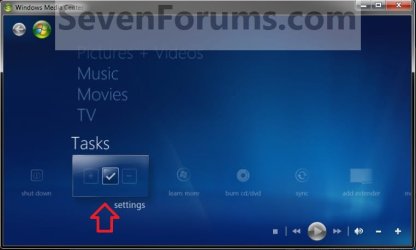
2. In Media Center, scroll down to Tasks and select Settings. (see screenshot below)
3. Select the General option. (see screenshot below)

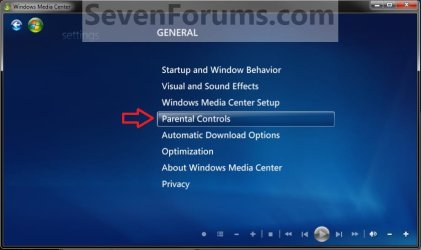
4. Select the Parental Controls option. (see screenshot below)
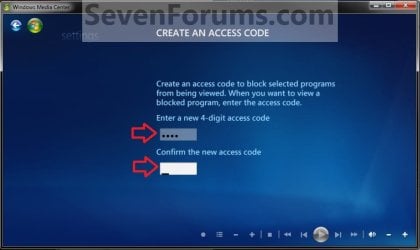
5. If First Time Setting Up Parental Controls in Windows Media Center A) Type in a new 4-digit access code, then type it in again to confirm it. (see screenshot below)
NOTE: This access code is used to access restricted content or to change parental control settings. Be sure to write it down somewhere safe in case you forget it.
B) Go to step 7.
6. If You Have Setup Parental Controls Before in Windows Media Center A) Type in a your 4-digit access code. (see screenshot below)
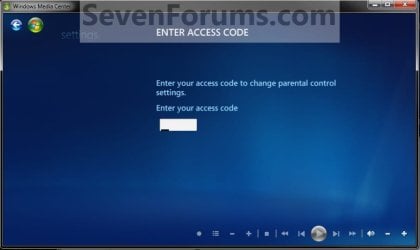
7. From here you can select to setup or change the TV Ratings or Movie/DVD Ratings. (see screenshot below)
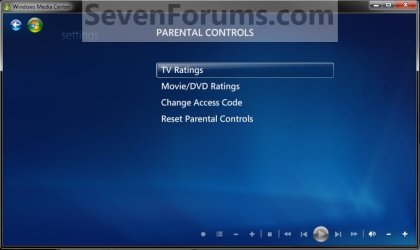
8. To Setup or Change TV Ratings A) Select TV Ratings. (see screenshot above)
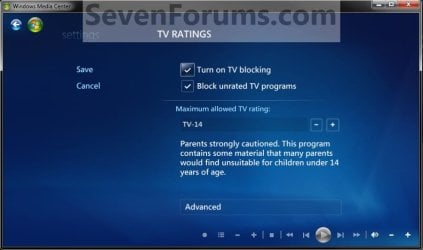
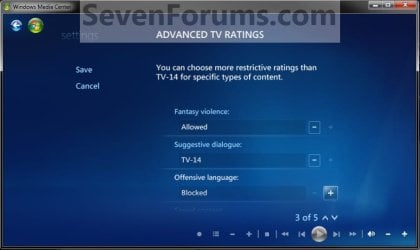
B) You can now make these changes to the TV Ratings: (see screenshots below 8C)
- Select (check) the Turn on TV blocking check box, and then use the plus (+) and minus (-) buttons to select a maximum allowed rating.
- If you want to restrict content that's not rated, then select (check) the Block unrated TV programs box.
- To adjust the settings by content in addition to rating, click Advanced. There are five areas that you can set restrictions for: fantasy violence, suggestive dialogue, offensive language, sexual content, and violence.
9. To Setup or Change Movie/DVD Ratings A) Select Movie/DVD Ratings. (see screenshot below step 7)
B) You can now make these changes to the Movie/DVD Ratings: (see screenshots below 9C)
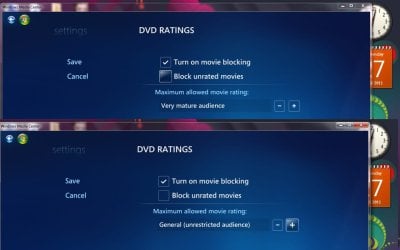
- Select (check) the Turn on movie blocking check box, and then use the plus (+) and minus (-) buttons to select a rating.
- If you want to restrict content that's not rated, then select (check) the Block unrated movies check box.

10. You can now close Windows Media Center when finished if you like.
That's it,
Shawn
Last edited: