Windows Media Player - Changing Background Image

How to Change the Background Image in Windows 7 WMP12

   Information
This tutorial will show you how to change the default background image in Windows Media Player that is shown in Library mode.
   Warning
This tutorial involves hacking the registry, while this hack is safe, you must follow the instructions carefully. If your at all tired or fatiqued then dont do it!


Here's How:
1) Run regedit by going to start menu and entering regedit in the search bar,

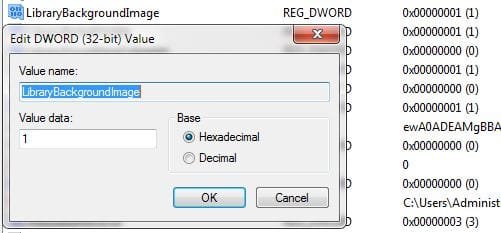
2) Navigate to the following registry key:
HKEY_CURRENT_USER\Software\Microsoft\MediaPlayer\Preferences
regdialog.JPG=
3) Double click on the LibraryBackgroundImage key name and a dialog box will appear asking for a value. The value to be entered is from 0 to 6. Restart WMP each time you change the key value.
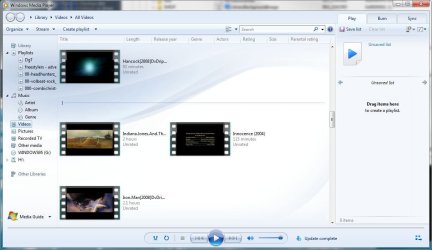
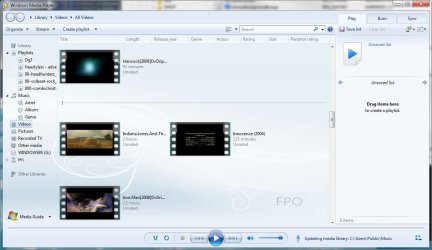
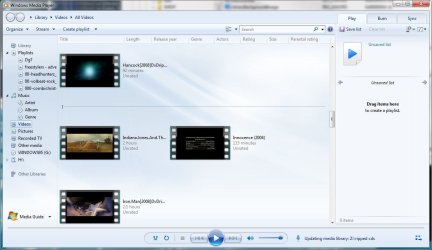
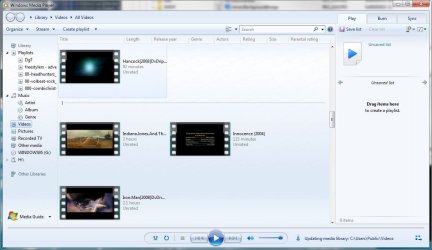
NOTE: Below are screenshots of the various backgrounds.
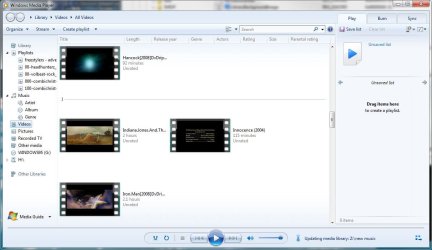
wmp1.JPG

wmp2.JPG

wmp3.JPG

wmp4.JPG

wmp5.JPG

wmp6.JPG

wmp7.JPG
 
Last edited by a moderator:
Very nice. . .thank you. using no. 3 :D
 

My Computer

Computer Manufacturer/Model Number
HP Pavilion a4302f
OS
Win 7 Pro x64, VM Win XP, Win7 Pro Sandbox, Kubuntu 11
CPU
AMD Athlon(tm) II X4 640 @ 3.0 Gbz
Memory
12GB 1066MHz DDR3 SDRAM - 2x4GB, 2x2GB
Graphics Card(s)
ATI Radeon HD 4350 HD Graphics/Audio with 512MB
Sound Card
Realtek High Definition Audio
Monitor(s) Displays
1. Dell 23" SP2307, 2. Mitsublishi 40" HDTV, Hannspree 25"
Screen Resolution
1. 2048x1152, 2. 1920-1080, 3. 1920x1200
Hard Drives
Int: 1 120 Gig SSD i
1 - 2.5" 500 USB External HDD
1 -1 Tb USB External HDD
Case
Mid Tower
Cooling
Standard Fans - 5 fans (very quiet)
Keyboard
Microsoft Wireless 2000
Mouse
Microsoft Wireless Mouse 5000
Internet Speed
10 Mbit (realistically 500 Kbit - 1.2 Mbit)
Other Info
Speakers - Bose Desktop (Excellent Sound)
1 external CD|DVD\Blue-ray Recorders/Players (Sony)
Great! I'm on N°1
 

My Computer

Computer type
PC/Desktop
Computer Manufacturer/Model Number
Custom Build
OS
Windows 7 Professional SP1 - x64 [Non-UEFI Boot]
CPU
Ivy Bridge Core i5 3570K (Delidded)
Motherboard
Asus P8Z77-V LE PLUS
Memory
G.Skill "Ares" DDR3 PC3-12800 - 1600MHz (16Gb)
Graphics Card(s)
Asus Dual-RX480-O4G
Sound Card
Creative Sound Blaster Z w/5.1 sound system
Monitor(s) Displays
Asus IPS 23"
Screen Resolution
16/9
Hard Drives
Internal:
500Go Sata 6Gb/s (x2)
500Go Sata 3Gb/s (x2)
SSD 60Go Sata 6Gb/s
PSU
In Win C 900W Series 80+ Platinum
Case
Thermaltake Chaser A71
Cooling
Custom Water Cooling Loop
Keyboard
Cooler Master QuickFire XTi
Mouse
Razer Imperator 2012 (4G)
Antivirus
MSE
Browser
IE 11.0.xxx Rtm
Other Info
"Raid0" with Intel Smart Response Technology (HDD/SSD)
I'll be damned.:shock:

I used to do that with the very old version on WMP 6.1. I located how to add Open DVD from the File menu.
 

My Computer

Computer Manufacturer/Model Number
Cheap $399.00 E-Machine
OS
Windows 7 Pro & Vista Home Premium
CPU
Athlon 64 3800+ (Orleans) 2.40GHz
Motherboard
Winfast
Memory
2GB DDR2 RAM DIMM
Graphics Card(s)
NVIDIA GeForce 8500 GT 512 MB memory HDMI out
Sound Card
creative X-Fi Exteme 7..1 channel
Monitor(s) Displays
Acer V223W 22" widescreen DVI
Screen Resolution
1680x1050
Hard Drives
WDC WD5 500GB
WDC WD25 250GB
PSU
OCZ 550 watt
Case
Gateway
Cooling
2 fans
Keyboard
Dell
Mouse
Sony Vaio
Internet Speed
18MB/s down - .72MB /s up
Great! On number 4 now, but is there any way to change the color? I wanna make it grey tro match the theme, but I dunno how... Could you help :o
 

My Computer

Computer type
PC/Desktop
Computer Manufacturer/Model Number
Multirama PC Expert [Bulgaria]
OS
Windows 7 Home Premium [64-Bit]
CPU
Intel Core 2 Quad CPU Q8200 @ 2.33 GHz
Motherboard
GIGABYTE GA-G31M-S2C
Memory
4094 MB DDR2
Graphics Card(s)
SAPPHIRE Radeon HD 6970 (2 GB VRAM)
Sound Card
Realtek ALC883 @ Intel 82801GB ICH7 - High Definition Audio
Monitor(s) Displays
Samsung SyncMaster BX2235 [21.5" LCD with LED Backlight]
Screen Resolution
1920x1080
Hard Drives
Hitachi HDT721075SLA360 - 750 GB
PSU
Cooler Master GX750 - 750W
Case
Multirama (Black / 2010 Revision)
Cooling
Stock + Cooler Master
Keyboard
Logitech G510 (Gaming Keyboard)
Mouse
Razer Lachesis (4000 DPI, Blue Version)
Internet Speed
Vivacom Optical [100 Mbps]
Browser
Chrome [Windows]
I guess I was mistaken.

In Windows Media Player 6.2 you can have you own bitmap filling up the entire screen until you played a file.

I choose Budweiser background for mine.
 

My Computer

Computer Manufacturer/Model Number
Cheap $399.00 E-Machine
OS
Windows 7 Pro & Vista Home Premium
CPU
Athlon 64 3800+ (Orleans) 2.40GHz
Motherboard
Winfast
Memory
2GB DDR2 RAM DIMM
Graphics Card(s)
NVIDIA GeForce 8500 GT 512 MB memory HDMI out
Sound Card
creative X-Fi Exteme 7..1 channel
Monitor(s) Displays
Acer V223W 22" widescreen DVI
Screen Resolution
1680x1050
Hard Drives
WDC WD5 500GB
WDC WD25 250GB
PSU
OCZ 550 watt
Case
Gateway
Cooling
2 fans
Keyboard
Dell
Mouse
Sony Vaio
Internet Speed
18MB/s down - .72MB /s up
any way to put in custom images as the background of wmp?

that would be great
 

My Computer

OS
Windows 7
CPU
AMD Phenom 9950 Quad Core
Motherboard
Gigabyte GA-MA78GM-US2H
Memory
4gb
Graphics Card(s)
ATI Radeon HD 3200
Sound Card
Realtek HD Audio
Hard Drives
Seagate 500GB 32MB cache 7200 RPM 3.5" Barracuda
PSU
Stealth X Stream 500W
Case
Xion Solaris
Cooling
G-Power Lite Cooler (GH-PDU22-SC)
Internet Speed
20/5

My Computer

Computer type
PC/Desktop
Computer Manufacturer/Model Number
Multirama PC Expert [Bulgaria]
OS
Windows 7 Home Premium [64-Bit]
CPU
Intel Core 2 Quad CPU Q8200 @ 2.33 GHz
Motherboard
GIGABYTE GA-G31M-S2C
Memory
4094 MB DDR2
Graphics Card(s)
SAPPHIRE Radeon HD 6970 (2 GB VRAM)
Sound Card
Realtek ALC883 @ Intel 82801GB ICH7 - High Definition Audio
Monitor(s) Displays
Samsung SyncMaster BX2235 [21.5" LCD with LED Backlight]
Screen Resolution
1920x1080
Hard Drives
Hitachi HDT721075SLA360 - 750 GB
PSU
Cooler Master GX750 - 750W
Case
Multirama (Black / 2010 Revision)
Cooling
Stock + Cooler Master
Keyboard
Logitech G510 (Gaming Keyboard)
Mouse
Razer Lachesis (4000 DPI, Blue Version)
Internet Speed
Vivacom Optical [100 Mbps]
Browser
Chrome [Windows]
Unfortunately, I haven't found a way for that.

However if you've copied the Windows mail folder from a Vista machine and replaced the files in the C:\Program FilesWindows mail, you can add a custom graphic here.

Copy and paste the info inside the quote into Notepad, choose Save As, then save as ANSI format and type in backbitmaop.reg. Save it to your desktop and double-click on it to merge it intro the registry.


REGEDIT4

[HKEY_CURRENT_USER\Software\Microsoft\Internet Explorer\Toolbar]
"BackBitmap"=""

You need to choose a graphic (*.bmp) that is approximately 1078 x 77 x 24 other wise it will look like a tiled image.
 

My Computer

Computer Manufacturer/Model Number
Cheap $399.00 E-Machine
OS
Windows 7 Pro & Vista Home Premium
CPU
Athlon 64 3800+ (Orleans) 2.40GHz
Motherboard
Winfast
Memory
2GB DDR2 RAM DIMM
Graphics Card(s)
NVIDIA GeForce 8500 GT 512 MB memory HDMI out
Sound Card
creative X-Fi Exteme 7..1 channel
Monitor(s) Displays
Acer V223W 22" widescreen DVI
Screen Resolution
1680x1050
Hard Drives
WDC WD5 500GB
WDC WD25 250GB
PSU
OCZ 550 watt
Case
Gateway
Cooling
2 fans
Keyboard
Dell
Mouse
Sony Vaio
Internet Speed
18MB/s down - .72MB /s up
That is very cool, on N°5
Edit: On N°3, five is ugly.. :rolleyes:
 

My Computer

Computer Manufacturer/Model Number
Desktop
OS
Windows 7 Ultimate x64
CPU
Intel Core i7 2600K
Motherboard
ASRock Fatal1ty P67 Professional
Memory
G.Skill RipJawsX 8GB (2x4GB) DDR3 PC3-12800
Graphics Card(s)
AMD/ATI XFX Radeon HD 6970
Screen Resolution
1920x1080
Hard Drives
WD Caviar Black 1TB
WD Caviar Blue 500GB
Crucial C300 64GB (SSD)
PSU
CM Silent Pro Gold 1000W
Case
CM HAF X
Cooling
Corsair A70
Keyboard
Thermaltake Tt eSPORTS Challenger Pro
Mouse
Thermaltake Tt eSPORTS Black
@reghakr & jblazea50

If you download the demo version of restorator 2007, take ownership of wmploc.dll (sys32)
and then open up wmploc.dll in restorator, navigate to;
wmploc.dll>257>LIBRARY_BACKGROUND4.PNG or 2,3 etc.
from there you can extract the existing image for backup, you can then assign the to any other .PNG image you fancy.

Anyone have any ideas how to change the font color?
 

My Computer

Computer Manufacturer/Model Number
HP Touchsmart IQ771.uk
OS
Windows 7 Ultimate x64
CPU
AMD Turion(tm) 64 X2 Mobile Technology TL-56
Motherboard
ASUS Pheonix
Memory
3GB Nanya PC2-6400 DDR2-SDRAM SO-DIM (400MHz)
Graphics Card(s)
NVIDIA GeForce Go 7600 256MB GDDR3 SDRAM
Sound Card
High Definition Intergrated NVIDIA MCP51
Monitor(s) Displays
46" Sony Bravia HDTV
Screen Resolution
1600x1200
Hard Drives
1.5TB Samsug
320GB Seagate ST3320820AS - SATA 3Gb/s 8MB
500GB Maxtor Basics STM305003EHD301-RK
Internet Speed
↓6.32 Mb/s ↑0.35 Mb/s ↔26ms
Other Info
BIOS - American Megatrends Inc. 5.07
Ethernet Port - NVIDIA nForce 10/100/1000 Mbps
DVD Drive - TSSTcorp DVDR/RW TS-T632L
i use this
01vrv.jpg

2dld.jpg

3znz.jpg

4glg.jpg

5btb.jpg
 

My Computer

OS
Windows seven OEM Ultimate x64
:cry: If only my missus didn't use my PC too. The second one is loooovely :p
 

My Computer

Computer Manufacturer/Model Number
HP Touchsmart IQ771.uk
OS
Windows 7 Ultimate x64
CPU
AMD Turion(tm) 64 X2 Mobile Technology TL-56
Motherboard
ASUS Pheonix
Memory
3GB Nanya PC2-6400 DDR2-SDRAM SO-DIM (400MHz)
Graphics Card(s)
NVIDIA GeForce Go 7600 256MB GDDR3 SDRAM
Sound Card
High Definition Intergrated NVIDIA MCP51
Monitor(s) Displays
46" Sony Bravia HDTV
Screen Resolution
1600x1200
Hard Drives
1.5TB Samsug
320GB Seagate ST3320820AS - SATA 3Gb/s 8MB
500GB Maxtor Basics STM305003EHD301-RK
Internet Speed
↓6.32 Mb/s ↑0.35 Mb/s ↔26ms
Other Info
BIOS - American Megatrends Inc. 5.07
Ethernet Port - NVIDIA nForce 10/100/1000 Mbps
DVD Drive - TSSTcorp DVDR/RW TS-T632L
i use this
01vrv.jpg

2dld.jpg

3znz.jpg

4glg.jpg

5btb.jpg
have restorator but having a hard time doing it.not that good with computer.pls can u be more specific with the instruction.been doing this for some time with no luck.hope u dont mine
 
Last edited:

My Computer

OS
windows 7 nvidia 2010
CPU
pentium d925
Motherboard
gigabyte
Memory
gail 2gb x2
Graphics Card(s)
inno 3d 8800gt
Monitor(s) Displays
samsung 2370
Screen Resolution
1980 x 1020
Hi Swarfega

Great tutorial. I have just 2 questions, and 1 problem:
  1. Is there a way to use a custom image (sort of like a desktop wallpaper) for the library background?
  2. Is there a way to change the background image of WMP when not in Library view? (Playback View)
  3. I tried the tutorial, but for some reason, when "LibraryBackgroundImage" is set to anything other than 6, then WMP will not start...
 

My Computer

Computer type
PC/Desktop
Computer Manufacturer/Model Number
Virtual Machine
OS
Windows 7 Professional 32-bit SP1
CPU
AMD A4/A6
Motherboard
Intel Corporation 440BX Desktop Reference Platform
Memory
3.00GB EDO
Graphics Card(s)
VMware SVGA 3D
Sound Card
High Definition Audio Device
Monitor(s) Displays
Generic Non-PnP Monitor on VMware SVGA 3D
Screen Resolution
1440x900
Hard Drives
1 x 60GB VMware Virtual SATA Hard Drive ATA Device
Antivirus
Kaspersky Total Security
Hi Swarfega


Great tutorial. I have just 2 questions, and 1 problem:
  1. Is there a way to use a custom image (sort of like a desktop wallpaper) for the library background?
  2. Is there a way to change the background image of WMP when not in Library view? (Playback View)
  3. I tried the tutorial, but for some reason, when "LibraryBackgroundImage" is set to anything other than 6, then WMP will not start...

1. See this post.
2. It should display the cover art of the album you're playing as the background.
3. An odd issue, hopefully someone else has an idea.
 

My Computer

Computer Manufacturer/Model Number
HP Touchsmart IQ771.uk
OS
Windows 7 Ultimate x64
CPU
AMD Turion(tm) 64 X2 Mobile Technology TL-56
Motherboard
ASUS Pheonix
Memory
3GB Nanya PC2-6400 DDR2-SDRAM SO-DIM (400MHz)
Graphics Card(s)
NVIDIA GeForce Go 7600 256MB GDDR3 SDRAM
Sound Card
High Definition Intergrated NVIDIA MCP51
Monitor(s) Displays
46" Sony Bravia HDTV
Screen Resolution
1600x1200
Hard Drives
1.5TB Samsug
320GB Seagate ST3320820AS - SATA 3Gb/s 8MB
500GB Maxtor Basics STM305003EHD301-RK
Internet Speed
↓6.32 Mb/s ↑0.35 Mb/s ↔26ms
Other Info
BIOS - American Megatrends Inc. 5.07
Ethernet Port - NVIDIA nForce 10/100/1000 Mbps
DVD Drive - TSSTcorp DVDR/RW TS-T632L
Why does Microsoft hide this from us :(
 

My Computer

Computer Manufacturer/Model Number
Custom
OS
Windows 8 Pro 64-Bit
CPU
Intel Core i5 2500K @ 4.5GHZ
Motherboard
ASUS P8P67 DELUXE
Memory
G.SKILL 8GB DDR3 1600 RAM
Graphics Card(s)
nVIDIA GeForce GTX 670
Sound Card
Integrated
Monitor(s) Displays
ASUS 24" + HP 20"
Screen Resolution
1920 x 1080 + 1600 x 900
Hard Drives
Western Digital Caviar Black 1TB
Seagate Barracuda 250GB
Mushkin Enhanced Chronos 60GB SSD
PSU
Corsair AX580 850 Watt
Case
Cooler Master HAX 932
Cooling
Corsair A70
Keyboard
Razer BlackWidow Ultimate
Mouse
Logitech G500
these are fun things for the serious tweaker to discover.

I feel it's better that way.
 

My Computer

Computer Manufacturer/Model Number
Cheap $399.00 E-Machine
OS
Windows 7 Pro & Vista Home Premium
CPU
Athlon 64 3800+ (Orleans) 2.40GHz
Motherboard
Winfast
Memory
2GB DDR2 RAM DIMM
Graphics Card(s)
NVIDIA GeForce 8500 GT 512 MB memory HDMI out
Sound Card
creative X-Fi Exteme 7..1 channel
Monitor(s) Displays
Acer V223W 22" widescreen DVI
Screen Resolution
1680x1050
Hard Drives
WDC WD5 500GB
WDC WD25 250GB
PSU
OCZ 550 watt
Case
Gateway
Cooling
2 fans
Keyboard
Dell
Mouse
Sony Vaio
Internet Speed
18MB/s down - .72MB /s up

My Computer

Computer Manufacturer/Model Number
Lenovo IdeaPad Y460
OS
64-Bit Windows 7 - Home Premium Edition; Linux Mint 11
CPU
2.67-GHz Intel Core i7-620M
Motherboard
Lenovo KL2
Memory
8-GB DDR3 RAM
Graphics Card(s)
1-GB ATI Radeon HD 5650M; Intel HD Series
Sound Card
Realtek High Definition Audio; Dolby Home Theater 3
Screen Resolution
1366 X 768 (Default); 1280 X 720 (For Video Gaming)
Hard Drives
656-GB Samsung Hybrid HDD (With Integrated 32-GB SSD); 1-TB Seagate HDD (In A.C. Ryan Enclosure And USB)
Mouse
Logitech M305 Wireless Mouse
Internet Speed
2 Mbps (Globe DSL); 1 Mbps (Sun Broadband Wireless Postpaid)
Back
Top