Windows Media Player Error

Starburst

New member
Local time
9:48 AM
Messages
2
Recently, wmp has started showing an unusual error. Whenever I use it to open a music file (mp3, wma, etc), it crashes. Also, all of the song file information that you can see in 'details' view has simply vanished from all of my library of music. When I click a song and try editing its information, an error pops up.

I've tried system restore to couple of days back (though I haven't touched any system files recently) and tried the fix utility from windows club. Neither worked. /sfc scannow was tried less than a week ago too, so I think that's not the problem either.

Error - 0x800700C1 (not registered win32 application). As an example, I tried editing the album to '123'.
Picture:

uqJky.png
- Issue in red.
 

My Computer

Computer Manufacturer/Model Number
HP
OS
Win7 Ultimate (x64)
Memory
4Gb
Graphics Card(s)
Nvidia GT 130M
Go to the Control Panel, go to Troubleshooting and click at the View All button on the left side and troubleshoot Windows Media Player Settings and Windows Media Player Library or anything in there that you might find relevant to Windows Media Player. Could it be a work of malware??? Those are the last things that come into my mind on how to fix this. I don't know if there is a way to reinstall WMP or else you have to use another media player or wait till the next time you reinstall Windows 7.

Are you sure you did not use a registry cleaner or something of that sort of stuff that can corrupt WMP?? You did System Restore so this MAY not be the cause anyway.
 

My Computer

Computer Manufacturer/Model Number
Custom Built
OS
Windows 7 Ultimate 32 Bit, Windows Developer Preview, Linux Mint 9 Gnome 32 Bit
CPU
Intel Pentium Dual CPU E2180@2GHz
Motherboard
Elitegroup 671T-M3
Graphics Card(s)
NVIDIA GeForce 7200 GS
Monitor(s) Displays
AOC TFT1560 15" LCD Monitor
Screen Resolution
1024x768
Keyboard
Logitech USB Keyboard
It says that my library is corrupt when I check the troubleshooter. It doesn't fix the problem either, so I'm not sure how to delete the old library and start a new one.

Also, I regularly use CCleaner which deletes useless registry keys, but I've been doing that for over a year so I doubt it caused this either.
 

My Computer

Computer Manufacturer/Model Number
HP
OS
Win7 Ultimate (x64)
Memory
4Gb
Graphics Card(s)
Nvidia GT 130M
I am a fan of CCleaner and I use it very often but whenever I do on my own computer, I always check which should be safe to remove or fix but you said you have been doing this for a year.

But I do recall seeing complaints from CCleaner in the Piriform forums about it causing a few problems, one in particular is that it supposedly broke WMP 12's ability to rip CD's.

I would think its because of malware. Or perhaps the location in which your media files are being kept is somehow corrupt. Maybe your media files from your libraries are corrupt themselves.

But thanks to Google, I found this site. Its about fixing WMP 12:

How to Fix Windows Media Player 12 | eHow.com

And here is a pool of other choices that might help you.

how to fix windows media player 12 errors - Hanapin sa Google
 

My Computer

Computer Manufacturer/Model Number
Custom Built
OS
Windows 7 Ultimate 32 Bit, Windows Developer Preview, Linux Mint 9 Gnome 32 Bit
CPU
Intel Pentium Dual CPU E2180@2GHz
Motherboard
Elitegroup 671T-M3
Graphics Card(s)
NVIDIA GeForce 7200 GS
Monitor(s) Displays
AOC TFT1560 15" LCD Monitor
Screen Resolution
1024x768
Keyboard
Logitech USB Keyboard
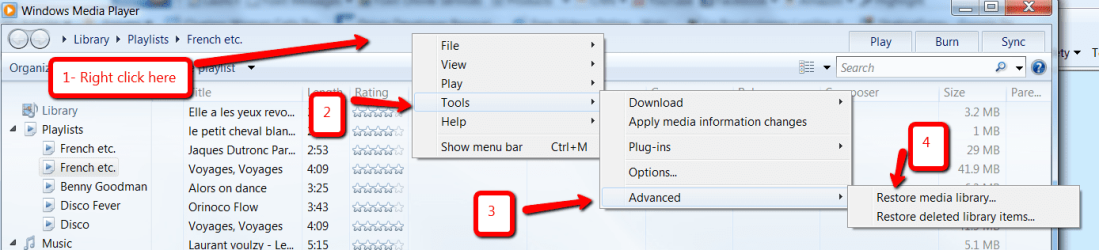
Maybe this can help:
 

Attachments

  • 2010-08-25_1636.png
    2010-08-25_1636.png
    65.7 KB · Views: 47

My Computer

Computer Manufacturer/Model Number
HP, Dell, Gateway, Toshiba - 4 laptops and 2 desktops
OS
Vista, Windows7, Mint Mate, Zorin, Windows 8
CPU
from 1.6GHz Duo to i7
Monitor(s) Displays
2x HP w2207
Hard Drives
5x HDD, 7x SSD, 12x Externals
Keyboard
with trackball - no mices
Mouse
Trackball mice
Internet Speed
DSL 6000
Back
Top