Windows Media Player Hidden Skin

dfs4

New member
Member
VIP
Local time
6:13 PM
Messages
199
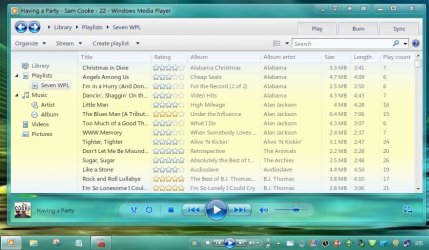
Ok this is kind of new, never noticed it before. WMP default skin is kind of boring so I searched around for a new skin, couldn't find a nice enough skin to my satisfaction. I was playing around and changing skins when I noticed a nice somewhat transparent skin appear suddenly. This is how I found this:

First I applied the default skin.
http://i52.tinypic.com/evcmr5.jpg

2nd the default skin appears.
http://i53.tinypic.com/znrkpj.jpg

3rd you click the 'switch to library mode' button on top right corner of the window, after going to library mode click 'switch to now playing' button on bottom right corner, you get the nice looking hidden windows skin voila!
http://i53.tinypic.com/2f055c0.jpg

=)
anyone knew about this?
 

My Computer My Computer

Computer type
Laptop
Computer Manufacturer/Model Number
Dell Inspiron
OS
Microsoft Windows 7 Home Premium 32-bit 7600 Multiprocessor Free
CPU
Intel(R) Core(TM) i3-4030U CPU @ 1.90GHz
Motherboard
Dell Inc. 0CG89M
Memory
4.00 GB
Graphics Card(s)
Intel(R) HD Graphics Family
Sound Card
High Definition Audio Device
I didn`t see a way to change the colors , like with past versions. So I started using WinAmp.

If there`s a way to change the colors, please let me know.
 

My Computer My Computer

Computer Manufacturer/Model Number
Myself
OS
Windows 7 Ultimate 64Bit
CPU
C2D E8200
Motherboard
XFX 750i
Memory
8GB PNY PC2-6400
Graphics Card(s)
BFG 9600GT x 2
Sound Card
Stock XFX Optical
Monitor(s) Displays
Gateway 22" HD Display
Hard Drives
C: 1 TB G: 500 GB H: 500 GB
PSU
Ultra LSP 550 Pro Lifetime Series
Case
Xion2
Cooling
ThermalTake
Ok this is kind of new, never noticed it before. WMP default skin is kind of boring so I searched around for a new skin, couldn't find a nice enough skin to my satisfaction. I was playing around and changing skins when I noticed a nice somewhat transparent skin appear suddenly. This is how I found this:

First I applied the default skin.
http://i52.tinypic.com/evcmr5.jpg

2nd the default skin appears.
http://i53.tinypic.com/znrkpj.jpg

3rd you click the 'switch to library mode' button on top right corner of the window, after going to library mode click 'switch to now playing' button on bottom right corner, you get the nice looking hidden windows skin voila!
http://i53.tinypic.com/2f055c0.jpg

=)
anyone knew about this?
I'm trying but how is this any different than just applying the now playing mode which shows by default in the bottom right hand corner?

Untitled.jpg
 

My Computer My Computer

Computer Manufacturer/Model Number
Averatec 6130HS-20
OS
Windows 7 Professional 32-bit (6.1, Build 7600)
CPU
Intel(R) Pentium(R) 4 3.00 GHz HT
Memory
2.0 GB
Graphics Card(s)
ATI Mobility Radeon 9600 64MB
Sound Card
Realtek AC'97 Audio
Screen Resolution
1280 x 800
Hard Drives
Seagate 96023A 60GB 7200RPM -
Seagate FreeAgentDesktop 250GB
Cooling
20 Inch Box Fan
Mouse
Targus PAWM10 Wireless Optical Laptop Mouse
It is the same thing. You can do that and see what happens.
 

My Computer My Computer

Computer type
Laptop
Computer Manufacturer/Model Number
Dell Inspiron
OS
Microsoft Windows 7 Home Premium 32-bit 7600 Multiprocessor Free
CPU
Intel(R) Core(TM) i3-4030U CPU @ 1.90GHz
Motherboard
Dell Inc. 0CG89M
Memory
4.00 GB
Graphics Card(s)
Intel(R) HD Graphics Family
Sound Card
High Definition Audio Device
It is the same thing. You can do that and see what happens.
I did follow your instructions but at face value didn't see any difference. Is there a difference that I may have overlooked? You have my curiousity up. To me, the best looking WMP is the Vista version 11. I have reverted back to it quite a few times but have always restored to Seven's 12.
 

My Computer My Computer

Computer Manufacturer/Model Number
Averatec 6130HS-20
OS
Windows 7 Professional 32-bit (6.1, Build 7600)
CPU
Intel(R) Pentium(R) 4 3.00 GHz HT
Memory
2.0 GB
Graphics Card(s)
ATI Mobility Radeon 9600 64MB
Sound Card
Realtek AC'97 Audio
Screen Resolution
1280 x 800
Hard Drives
Seagate 96023A 60GB 7200RPM -
Seagate FreeAgentDesktop 250GB
Cooling
20 Inch Box Fan
Mouse
Targus PAWM10 Wireless Optical Laptop Mouse
It is the same thing. You can do that and see what happens.
I did follow your instructions but at face value didn't see any difference. Is there a difference that I may have overlooked? You have my curiousity up. To me, the best looking WMP is the Vista version 11. I have reverted back to it quite a few times but have always restored to Seven's 12.
Um, the differenc is clear, the default skin is green and the skin I discovered is transparent and colorless. =)

Try once again... change to default 'corporate' skin... go to library mode.. go to now playing mode. VOILA!.

Also Im using WMP version 12.
 

My Computer My Computer

Computer type
Laptop
Computer Manufacturer/Model Number
Dell Inspiron
OS
Microsoft Windows 7 Home Premium 32-bit 7600 Multiprocessor Free
CPU
Intel(R) Core(TM) i3-4030U CPU @ 1.90GHz
Motherboard
Dell Inc. 0CG89M
Memory
4.00 GB
Graphics Card(s)
Intel(R) HD Graphics Family
Sound Card
High Definition Audio Device
It is the same thing. You can do that and see what happens.
I did follow your instructions but at face value didn't see any difference. Is there a difference that I may have overlooked? You have my curiousity up. To me, the best looking WMP is the Vista version 11. I have reverted back to it quite a few times but have always restored to Seven's 12.
Um, the differenc is clear, the default skin is green and the skin I discovered is transparent and colorless. =)

Try once again... change to default 'corporate' skin... go to library mode.. go to now playing mode. VOILA!.

Also Im using WMP version 12.

WMP 12 here also. I guess I'm not seeing a difference because I get the same thing without applying the corporate skin first. As mentioned, I just click the Switch to Now Playing button.
 

My Computer My Computer

Computer Manufacturer/Model Number
Averatec 6130HS-20
OS
Windows 7 Professional 32-bit (6.1, Build 7600)
CPU
Intel(R) Pentium(R) 4 3.00 GHz HT
Memory
2.0 GB
Graphics Card(s)
ATI Mobility Radeon 9600 64MB
Sound Card
Realtek AC'97 Audio
Screen Resolution
1280 x 800
Hard Drives
Seagate 96023A 60GB 7200RPM -
Seagate FreeAgentDesktop 250GB
Cooling
20 Inch Box Fan
Mouse
Targus PAWM10 Wireless Optical Laptop Mouse
It's not exactly a skin (WMP skin to be more specific) since it's not in skin mode. It's just the Now Playing window. It can be accessed by choosing it in the view menu (press Alt or Ctrl+M to see the menu bar) or pressing Ctrl+3. I believe WMP also automatically switches to it when playing videos. You don't exactly need to go into skin mode to access it.


Untitled.png
 

My Computer My Computer

Computer Manufacturer/Model Number
ASUS K42JK
OS
Windows 7 Ultimate x64 (main), Windows 8 Consumer Preview x64

My Computer My Computer

Computer type
PC/Desktop
Computer Manufacturer/Model Number
Self Assembled
OS
Microsoft Windows 10 Pro Insider Preview 64-bit
CPU
Intel(R) Core(TM) i3-4130 CPU @ 3.40GHz
Motherboard
Gigabyte Technology Co., Ltd. B85M-D3H
Memory
Corsair Vengence 4GB x2 (8.00GB Dual-Channel DDR3 @ 798MHz)
Graphics Card(s)
2047MB GeForce GTS 450 (ZOTAC International)
Sound Card
Onboard (Realtek High Definition Audio)
Monitor(s) Displays
LG Flatron E2040T
Screen Resolution
1600x900
Hard Drives
Western Digital 1 TB
Seagate 500 GB
PSU
Corsair VS550
Case
Cooler Master K380
Cooling
Cooler Master Seidon 120V Plus
Keyboard
Logitech MK260r
Mouse
Logitech MK260r
Internet Speed
PMPL Broadband
Antivirus
Windows Defender + MBAM
Browser
Firefox
Other Info
Dell Studio 15" Laptop
Back
Top