

passion4tech
Banned
- Local time
- 3:46 PM
- Messages
- 58
I know burning CDs is old school. Nobody burns cds anymore. But it's for my old 2005 Hyndai Elantra car that has a 10 disc changer cd player. I want to burn cds for my car. I have used windows media player and even iTunes to burn cds. I really use windows media player to burn cds. I made sure I was burning an audio cd and of course windows media player burns cd as a data cd instead of an audio cd. This is really annoying and frustrating. So now I use Power2go and its great. Power2go isn't free but it's worth the money. Power2go was able to burn cd as audio cd while windows media player could not. I made sure when auto play comes up when I insert cd in computer I click burn audio cd and it still burns as data cd. i don' understand that? BTW I use TDK CD-R discs.
My Computer
At a glance
Windows 7 Home Premium 64biti7 4790K16GBSapphire R9 290 Vapor X 4GB
- Computer type
- PC/Desktop
- Computer Manufacturer/Model Number
- Custom Gaming Computer
- OS
- Windows 7 Home Premium 64bit
- CPU
- i7 4790K
- Motherboard
- Asus Z97 Deluxe
- Memory
- 16GB
- Graphics Card(s)
- Sapphire R9 290 Vapor X 4GB
- Sound Card
- Realtek High Definition Audio
- Monitor(s) Displays
- Acer H257HU
- Screen Resolution
- 2560x1440
- Hard Drives
- WD10EZEX 00BN5A0 1 TB HDD and PNY CS1311 256 GB
- PSU
- EVGA 650 G2
- Case
- Enermax Ostrog GT ATX Mid Tower ECA3280A-BR
- Cooling
- Corsair H105
- Keyboard
- Logitech K520
- Mouse
- EasternTimes Tech wireless optical mouse mouse
- Internet Speed
- 60 down and 30 up
- Browser
- Google Chrome

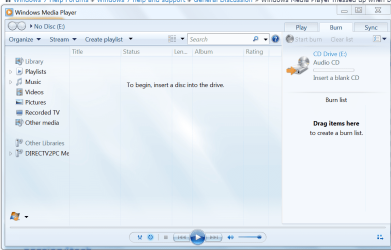


 Thats why I am not using WMP to burn cds anymore. Now I use Power2go. I know Power2go is not free. A free alternative is itunes and I could try itunes to burn a audio cd.


