Windows Media Player Problem

Sem

New member
Local time
7:51 PM
Messages
7
Having a small problem with media player on Windows 7 x64

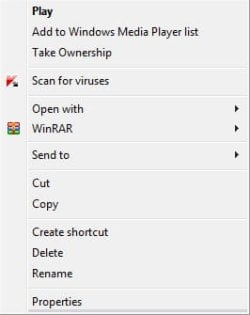
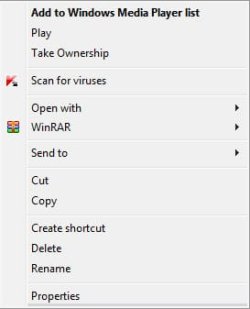
The default action has changed from "Play" to "Add to Windows Media Player list" for some files like .mp3 and .mp4 and it makes trying to play various single mp3s and other files a pain

for some reason .avi files are ok and "Play" is the default action

dont really know when or why it changed i haven't really done anything to make it happen

how do i fix it?

Thanks
 

Attachments
  • wmp.jpg
    wmp.jpg
    27.3 KB · Views: 5
  • wmp2.jpg
    wmp2.jpg
    27 KB · Views: 3

My Computer

OS
Windows 7 x64
Why are you opening the context menu to play a single mp3, just double click the song and it will open WMP and play the song
 

My Computer

Computer Manufacturer/Model Number
Dell XPS 730
OS
Windows 7 Home Premium 64 bit
CPU
Intel Core 2 quad Extreme Q9770 @ 3.2 GHz
Memory
4x2 GB Muskin 1600 MHz ram
Graphics Card(s)
NVidia GTX 250
Sound Card
Soundblaster X-Fi Fatality Champion
Monitor(s) Displays
2 Dell 2007WFP Ultrascans
Screen Resolution
3360 x 1050
Hard Drives
WD Black 1TB sata, 2-WD Black 500 sata, 2-Seagate 500 Go external
PSU
1000 Watt
Cooling
air
Keyboard
MS Natrual Keyboard Pro
Mouse
Logitech Wireless Trackball
Internet Speed
DSL Elite
Im not trying to play the file via the context menu and i only showed the context menu so you can see what the default action is

the problem was if wmp is open and i double click on a mp3 file instead of playing the file it will add it to the list

doesnt matter anyway ive solved it now
 

My Computer

OS
Windows 7 x64
How did you fix it?
 

My Computer

Computer Manufacturer/Model Number
Dell Studio XPS 8100
OS
Windows 7 Home Prem 64 bit
CPU
Intel Core i7 860 @ 2.80GHz
Motherboard
Dell Inc. 0T568R (CPU 1)
Memory
8.0GB Dual-Channel DDR3 @ 532MHz
Graphics Card(s)
ATI Radeon HD 5670
Sound Card
Realtek High Definition Audio
Monitor(s) Displays
46" Samsung LED TV
Screen Resolution
1920x1080
Hard Drives
1500GB Seagate ST31000528AS (SCSI)
PSU
350W
Case
Dell XPS 8100
Cooling
Fans
Keyboard
Multimedia Dell Keyboard
Mouse
Logitech MX Performance Anywere Mouse
Other Info
Ceton infiniTV 4 digital cable tuner
Your default setting may have changed. Windows Media Player may not be the default player, which happens sometimes when another player is installed. In your menu above, select "Open with" and select WMP and enable the checkbox.
 

My Computer

Computer type
PC/Desktop
Computer Manufacturer/Model Number
Custom Build
OS
Windows 7 Home Premium 64 bit
CPU
Intel Core i7-4790
Motherboard
GA-Z87X-D3H
Memory
G.SKILL 8GB (2 x 4GB) DDR3 F3-10666CL9D-8GBNT
Graphics Card(s)
AMD Radeon R7 250
Sound Card
Realtek ALC892
Monitor(s) Displays
Samsung UN32EH5000, Dell 1703FPT
Screen Resolution
1920 x 1080, 1280 x 1024
Hard Drives
WD5003AZEX
WD10EZEX
Samsung HD103SJ
Samsung 128 GB 840 PRO
PSU
SeaSonic M12II SS-500GM
Case
Fractal Design Define R4
Cooling
Zalman CNPS9900ALED
Keyboard
Logitech K800
Mouse
Logitech M705
Internet Speed
16 Mbps
Antivirus
Avast
Browser
Firefox
Other Info
Bose Companion 2 Multimedia Speakers
Your default setting may have changed. Windows Media Player may not be the default player, which happens sometimes when another player is installed. In your menu above, select "Open with" and select WMP and enable the checkbox.

i think mpc-hc might have caused the problem but i already tried what you suggested and it didn't work

How did you fix it?

Default Programs Editor

used that to change the default action to play
 

My Computer

OS
Windows 7 x64
MP4 = Can ONLY be played on iTunes & Any Apple Inc. Products

Just Saying XD
 

My Computer

Computer Manufacturer/Model Number
HP Pavilion dv9000 18" inch
OS
Windows 7 Ultimate x64
Memory
230 GB
MP4 = Can ONLY be played on iTunes & Any Apple Inc. Products

Just Saying XD

excuse you? The fact that you have broken the native filetype associations by installing apple crap on your system doesnt mean you need to tell everyone to break their systems as you have.

MP4 is a native Windows 7 format - it plays without ANY additional software installed.
 

My Computer

Computer Manufacturer/Model Number
Selfbuilt
OS
Windows 7 Ultimate 64bit
CPU
i7 2600k
Motherboard
asus P8Z68-V LE
Memory
16GB (4x4) corsair vengeance
Graphics Card(s)
Intel HD3000 iGPU / AMD HD6870 1024MB
Sound Card
bitstreamed to an Onkyo 609
Monitor(s) Displays
Asus VE278 27" LED / Bravia EX7 60" LED
Screen Resolution
native 1080p x2
Hard Drives
4x 2TB int. + 2x 2TB external and a SSD for the boot drive.
PSU
650w Antec
Case
NZXT tempest evo
Cooling
air/stock
Keyboard
Dell
Mouse
logitech m505
Internet Speed
dual: cable/blackberry tether for travel use
Other Info
BD re-writer //
asus notebook G73Jw
Back
Top