Windows Media Player - Rebuild Corrupted Libraries

How to Rebuild Windows Media Player Corrupted Libraries

   Information
This tutorial will show you how to rebuild your Windows Media Player (WMP) libraries in order to remove corrupted files (for example, files deleted from the hard disk that linger in the WMP library) in just a few, easy steps. This tutorial can also be applied to other issues.
   Note

  • Using this tutorial will not delete any media files physically; instead, it will reset the WMP libraries to their default state, without changing your previously made settings.
  • Windows Libraries are not affected by this tutorial.


The N and KN editions of Windows 7 have all the features that normally come with each individual Windows 7 edition, except for Windows Media Player 12 and related programs, such as Windows Media Center or Windows DVD Maker.

The N editions of Windows 7 allow you to choose your own media player and software required to manage and play CDs, DVDs, and other digital media files. If you choose to use Windows Media Player 12, downloading it, along with related software, is free. Download Media Feature Pack for Windows 7 N with Service Pack 1 and Windows 7 KN with Service Pack 1 (KB968211) from Official Microsoft Download Center
   Tip
Please make sure Windows Media Player is closed during this process.


Here's how:

1. Click on the Start Orb and type "services" into the search, then select Services from the list of search results.
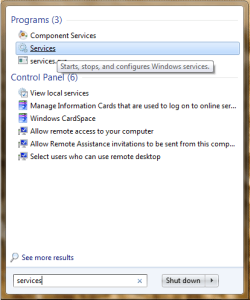
startmenusearch.png

Alternatively, you can right-click the Computer icon, select Manage, then choose Services under "Services and Applications" in Computer Management.
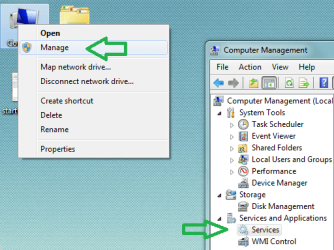
computermanagement.png

2. In the list of services, locate "Windows Media Player Network Sharing Service" and stop it via one of the highlighted options.
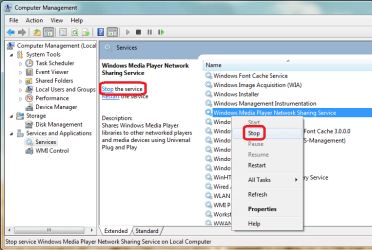
stopWMPNSS.png

   Tip
Please keep the Services window open, you will need it later.


3. Click on the Start Orb and use the search again, this time type in C:\Users\(user)\AppData\Local and click the Local folder from the list of search results.
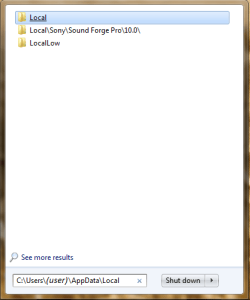
searchappdatalocal.png

4. Inside the "Local" folder, navigate to the "Microsoft", then "Media Player" folder. Delete all the files contained in this folder and close the Explorer window.
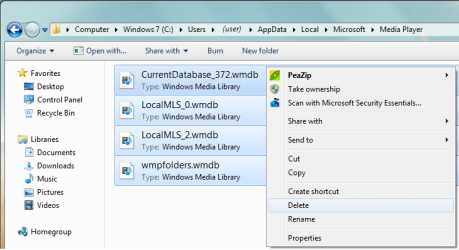
delfiles.png

5. Now go back to the Services window and start the Windows Media Player Network Sharing Service. Next time you start Windows Media Player, it will automatically rebuild all libraries using the information on folders that are included in the Windows Libraries.
 
Last edited by a moderator:
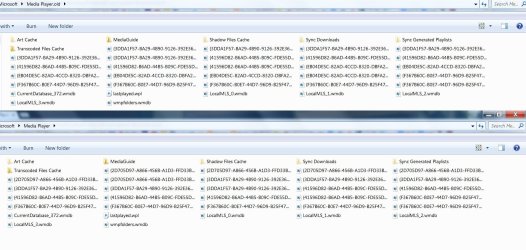
When I go to C:\Users\(user)\AppData\Local. I get two media player folders. One is just titled Media Player and the other is named Media Player.old.

They both have 37 items, 30 .wmdb files each, 24 in curly brackets (archived?) and 6 that aren't. What to do? I'm not sure I want to delete either folder. I wonder if this is why I have to rebuild the library so often. I sometimes do it from within WMP, sometimes when the troubleshooter pops up and sometimes from the Fixit file Microsoft provides online. I've used your method also, Gornot, until now... I don't know what to delete.
 

Attachments

  • 2 MP folders.jpg
    2 MP folders.jpg
    65.7 KB · Views: 316
  • 2 MP folders contents .jpg
    2 MP folders contents .jpg
    162.8 KB · Views: 300

My Computer My Computer

At a glance

Microsoft Windows 7 Home Premium 64-bit 7601 ...Intel(R) Core(TM) i5-2300 CPU @ 2.80GHz6 GBRadeon 6750 1gb
Computer Manufacturer/Model Number
HP Pavilion p6745f
OS
Microsoft Windows 7 Home Premium 64-bit 7601 Multiprocessor Free Service Pack 1
CPU
Intel(R) Core(TM) i5-2300 CPU @ 2.80GHz
Motherboard
PEGATRON CORPORATION 2AB6
Memory
6 GB
Graphics Card(s)
Radeon 6750 1gb
Sound Card
(1) IDT High Definition Audio CODEC (2) Intel(R) Display A
Monitor(s) Displays
Acer x193w
Hard Drives
(1) WDC WD15EARS-60MVWB0 (2) Generic- Compact Flash USB Device (3) Generic- MS/MS-Pro USB Device (4) Generic- SD/MMC USB Device (5) Generic- SM/xD-Picture USB Device (6) WD My Book 1110 USB Device
PSU
Internal 500W (100V-240V)
Case
Mid-size ATX
Cooling
unknown
Keyboard
HP usb multimedia keyboard
Mouse
HP usb compliant mouse
Internet Speed
256 kbps
Other Info
Ver: CHI_713.bin vCHI7.13
Me Too

Had this same problem with a trashed library db.

For me this happened when I tried to upgrade in place from Windows 7 to Windows 10. Turned out that there was some graphics driver incompatibility between the W10 drivers for my Mobo Intel chipset and my NVidia GE200 card. So after about 3 days of trying everything the Internet and Nvidia had to offer, I had to get some real work done (as opposed to working unpaid hours debugging their products for them!:sarc:). I had no choice but to drop back to Windows 7.

After that point my WM library was hosed (I'm surmising because Windows 10 does some changes to it that don't get undone during the drop back and therefore the W7 service manager thinks it's trashed?). Whatever the cause, each time I restarted WMP after that it embarked on a complete library rebuild and volume levelling exercise - which takes a good long while :(

Followed this procedure and now (after a single rebuild cycle lasting over 6 hours - mostly re-volume-levelling - it is a BIG library) all is well again. :D the library persists at the next start-up of the system without a rebuild.

Thanks guys.
 
Last edited:

My Computer My Computer

At a glance

Windows 7 professional
Computer type
PC/Desktop
OS
Windows 7 professional
Back
Top