
How to Enable Windows Mobility Center on a Desktop Computer in Windows 7 and Windows 8
Information
Windows Mobility Center displays the most commonly used laptop settings, such as display brightness, volume, battery status, wireless network status, external display, Sync Center, and Presentation settings in one location for quicker access in Windows.
By default, the Windows Mobility Center feature is only enabled and available on laptops, notebooks, and tablet PCs. This tutorial will show you how to enable Windows Mobility Center to run on a Desktop computer in Windows 7 and Windows 8.
By default, the Windows Mobility Center feature is only enabled and available on laptops, notebooks, and tablet PCs. This tutorial will show you how to enable Windows Mobility Center to run on a Desktop computer in Windows 7 and Windows 8.
Note
- Windows Mobility Center is not available in the Windows 7 Starter edition.
- In Windows 7, Presentation Settings in Windows Mobility Center is only available in the Windows 7 Professional, Windows 7 Ultimate, and Windows 7 Enterprise editions.
- In Windows 8, Presentation Settings in Windows Mobility Center is only available in the Windows RT, Windows 8 Pro, and Windows 8 Enterprise editions.
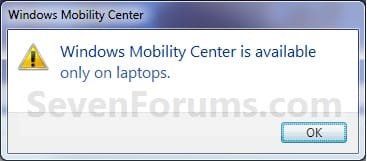
NOTE: This is what you will see if you tried to open Windows Mobility Center on a desktop when it is disabled by default.
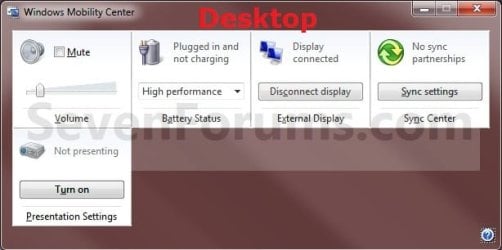
EXAMPLE: Windows Mobility Center Enabled
NOTE: Each available setting is displayed as a tile in Mobility Center. Different tiles are displayed depending on your system hardware and drivers. Not all settings are available on laptops and desktops. The left screenshot is from a laptop, and the right screenshot is from a desktop.

OPTION ONE
To Enable Windows Mobility Center on a Desktop PC
1. Click/tap on the download button below to download the file below.
Enable_Desktop_WMC.reg
Download
2. Save the .reg file to your desktop.
3. Double click/tap on the downloaded .reg file to merge it.
4. Click/tap on Run, Yes (UAC), Yes, and OK when prompted.
5. When finished, you can delete the downloaded .reg file if you like.
6. To Open Windows Mobility Center on a Desktop
A) See step 4 here: http://www.sevenforums.com/tutorials/6549-windows-mobility-center-open-use.html
OPTION TWO
To Disable Windows Mobility Center on a Desktop PC
NOTE: This is the default setting.
1. Click/tap on the download button below to download the file below.
Disable_Desktop_WMC.reg
Download
2. Save the .reg file to your desktop.
3. Double click/tap on the downloaded .reg file to merge it.
4. Click/tap on Run, Yes (UAC), Yes, and OK when prompted.
5. When finished, you can delete the downloaded .reg file if you like.
That's it,
Shawn
Related Tutorials
- How to Open and Use Mobility Center in Windows 7 and Windows 8
- How to Turn Presentation Settings On or Off in Windows 7 and Windows 8
- How to Enable or Disable Presentation Settings in Windows 7 and Windows 8
- How to Create a "Presentation Settings" Shortcut in Windows 7 and Windows 8
- How to Enable or Disable Windows Mobility Center in Windows 7 and Windows 8
- How to Create a "Windows Mobility Center" Shortcut in Windows 7 and Windows 8
- How to Reset Position of Windows Mobility Center to Default in Windows
Attachments
Last edited:


