Solved Windows not detecting my Webroot

bertie11

New member
Member
VIP
Local time
8:34 PM
Messages
254
I'm told that Windows is supposed to be able to recognize if I have a non Microsoft firewall and anti-virus, yet my Home Premium 64 doesn't do this. I have turned off the Windows firewall and have had to turn off notifications telling me to turn it on again.

I use Webroot Secure Anywhere and System Mechanic. The latter does detect my Webroot anti-virus, but not the Webroot firewall. I wrote to System Mechanic and they say they are dependent on Windows detecting what other firewalls and anti-virus programs are installed but mine doesn't.

Is this normal behavior? I don't recall ever seeing whatever firewall I have installed, whatever make, apart from Microsoft's own.
 

My Computer

Computer type
Laptop
Computer Manufacturer/Model Number
HP Envy 15
OS
Windows 8.1.1
CPU
AMD A10-5750M APU with Radeon(tm) HD Graphics
Memory
8gb
Hard Drives
1TB Serial ATA 16mb buffer

My Computer

Computer type
PC/Desktop
Computer Manufacturer/Model Number
Bruce ... somewhere in his 40's
OS
Windows 7 Ultimate 32bit SP1
CPU
Intel(R) Core(TM)2 Quad CPU @ 2.40GHz, 2400 MHz
Motherboard
INTEL/D975XBX2
Memory
4 GB
Graphics Card(s)
ATI Radeon HD 2600 Pro
Monitor(s) Displays
Samsung SyncMaster 914v
Screen Resolution
1280 x 1024
Hard Drives
2/500GB each ... ST3500630AS ATA Device.
One is not connected
PSU
Rocketfish 700 W
Case
G.Skill Gigabyte Chassis
Keyboard
Standard PS/2 Keyboard
Mouse
Microsoft PS/2 Mouse
Internet Speed
DSL
Antivirus
Avira Internet Security
Browser
IE 11
Other Info
ATI HDMI Audio
Hi Jacee, thanks for the response.

Here is the file.

Thanks.
 

Attachments

My Computer

Computer type
Laptop
Computer Manufacturer/Model Number
HP Envy 15
OS
Windows 8.1.1
CPU
AMD A10-5750M APU with Radeon(tm) HD Graphics
Memory
8gb
Hard Drives
1TB Serial ATA 16mb buffer
Uninstall Results of screen317's Security Check version 0.99.85
Windows 7 Service Pack 1 x64 (UAC is enabled)
Internet Explorer 11
``````````````Antivirus/Firewall Check:``````````````
Windows Firewall Enabled!
Windows Firewall Disabled!
Webroot SecureAnywhere
Advanced SystemCare Ultimate
Antivirus up to date!
`````````Anti-malware/Other Utilities Check:`````````
Java 7 Update 60
Adobe Flash Player 14.0.0.145
Mozilla Firefox (30.0)
````````Process Check: objlist.exe by Laurent````````
Malwarebytes Anti-Malware mbamservice.exe
Malwarebytes Anti-Malware mbam.exe
Malwarebytes Anti-Malware mbamscheduler.exe
Firetrust MailWasher MailWasherPro.exe
iolo System Mechanic iologovernor64.exe
iolo Common Lib ioloServiceManager.exe
`````````````````System Health check`````````````````
Total Fragmentation on Drive C: 0%
````````````````````End of Log``````````````````````


Uninstall anything that has to do with Iolo and Advanced SystemCare Ultimate/IObit!
 

My Computer

Computer type
PC/Desktop
Computer Manufacturer/Model Number
Bruce ... somewhere in his 40's
OS
Windows 7 Ultimate 32bit SP1
CPU
Intel(R) Core(TM)2 Quad CPU @ 2.40GHz, 2400 MHz
Motherboard
INTEL/D975XBX2
Memory
4 GB
Graphics Card(s)
ATI Radeon HD 2600 Pro
Monitor(s) Displays
Samsung SyncMaster 914v
Screen Resolution
1280 x 1024
Hard Drives
2/500GB each ... ST3500630AS ATA Device.
One is not connected
PSU
Rocketfish 700 W
Case
G.Skill Gigabyte Chassis
Keyboard
Standard PS/2 Keyboard
Mouse
Microsoft PS/2 Mouse
Internet Speed
DSL
Antivirus
Avira Internet Security
Browser
IE 11
Other Info
ATI HDMI Audio
Did you mean to uninstall these programs to see if Windows then detects my Webroot? And if so, then re-install them?

Thanks
 

My Computer

Computer type
Laptop
Computer Manufacturer/Model Number
HP Envy 15
OS
Windows 8.1.1
CPU
AMD A10-5750M APU with Radeon(tm) HD Graphics
Memory
8gb
Hard Drives
1TB Serial ATA 16mb buffer
Did you mean to uninstall these programs to see if Windows then detects my Webroot? And if so, then re-install them?

Thanks


Yes!
 

My Computer

Computer type
PC/Desktop
Computer Manufacturer/Model Number
Bruce ... somewhere in his 40's
OS
Windows 7 Ultimate 32bit SP1
CPU
Intel(R) Core(TM)2 Quad CPU @ 2.40GHz, 2400 MHz
Motherboard
INTEL/D975XBX2
Memory
4 GB
Graphics Card(s)
ATI Radeon HD 2600 Pro
Monitor(s) Displays
Samsung SyncMaster 914v
Screen Resolution
1280 x 1024
Hard Drives
2/500GB each ... ST3500630AS ATA Device.
One is not connected
PSU
Rocketfish 700 W
Case
G.Skill Gigabyte Chassis
Keyboard
Standard PS/2 Keyboard
Mouse
Microsoft PS/2 Mouse
Internet Speed
DSL
Antivirus
Avira Internet Security
Browser
IE 11
Other Info
ATI HDMI Audio
Well, I've removed Advanced System Care Ultimate, IO bit Malware Fighter. IOBit Smart Defrag, iolo system Mechanic and there is no change to the firewall status. Control Panel\System & Security\Windows firewall still does not recognize my Webroot firewall and anti-virus.

I don't think I've ever seen anything in this window other than Windows firewall over the years. Should I be looking somewhere else?

Also, Webroot was the first program I installed after a Windows re-install, and as far as I can remember, Webroot wasn't recognized even then.
 

My Computer

Computer type
Laptop
Computer Manufacturer/Model Number
HP Envy 15
OS
Windows 8.1.1
CPU
AMD A10-5750M APU with Radeon(tm) HD Graphics
Memory
8gb
Hard Drives
1TB Serial ATA 16mb buffer
I found this info:


Webroot's inbound component works in tandem with Windows firewall. Webroot SecureAnywhere Essentials and Webroot SecureAnywhere Complete both include an intelligent, hassle-free firewall that monitors data traffic traveling in and out of your computer ports. It looks for untrusted processes that try to connect to the Internet and send your personal information to potential thieves and blocks them automatically, or can be configured to force applications to ask permission when trying to connect outbound.

The SecureAnywhere firewall works with the built-in Windows firewall, which blocks malicious data traffic coming into your computer. If the Windows Security Center on your system reports that no firewall is turned on, please enable your Windows Firewall. With both the Webroot and Windows firewalls turned on, your data has complete inbound and outbound protection.

To learn more about the firewall, please click on the following link:
[URL="http://www.webrootcloudav.com/sah_Firewall.asp?n=About_the_firewall"]http://www.webrootcloudav.com/sah_Firewall.asp?n=About_the_firewallhttp://www.webrootcloudav.com/sah_Firewall.asp?n=About_the_firewall[/QUOTE[/URL]http://www.webrootcloudav.com/sah_Firewall.asp?n=About_the_firewall[/QUOTEhttp://www.webrootcloudav.com/sah_Firewall.asp?n=About_the_firewall[/QUOTE


If you have problems, then you may need to ask in the Webroot Forums: https://community.webroot.com/t5/We...Regarding-windows-firewall-settings/td-p/3450
 

My Computer

Computer type
PC/Desktop
Computer Manufacturer/Model Number
Bruce ... somewhere in his 40's
OS
Windows 7 Ultimate 32bit SP1
CPU
Intel(R) Core(TM)2 Quad CPU @ 2.40GHz, 2400 MHz
Motherboard
INTEL/D975XBX2
Memory
4 GB
Graphics Card(s)
ATI Radeon HD 2600 Pro
Monitor(s) Displays
Samsung SyncMaster 914v
Screen Resolution
1280 x 1024
Hard Drives
2/500GB each ... ST3500630AS ATA Device.
One is not connected
PSU
Rocketfish 700 W
Case
G.Skill Gigabyte Chassis
Keyboard
Standard PS/2 Keyboard
Mouse
Microsoft PS/2 Mouse
Internet Speed
DSL
Antivirus
Avira Internet Security
Browser
IE 11
Other Info
ATI HDMI Audio
Ah, that is the answer! good work Jacee!

I hadn't realised (or forgotten) how the Webroot firewall worked. That explains it.

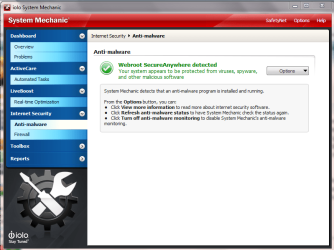
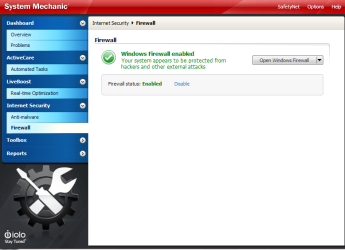
I have added two screenshots from System Mechanic Internet Security tab. Now both firewall and a/v are shown in the Webroot colour green. This didn't happen for the firewall before I uninstalled/re-installed.

I thank you Jacee.
 

Attachments

  • AV.PNG
    AV.PNG
    51.5 KB · Views: 0
  • Firewall.PNG
    Firewall.PNG
    38.2 KB · Views: 0

My Computer

Computer type
Laptop
Computer Manufacturer/Model Number
HP Envy 15
OS
Windows 8.1.1
CPU
AMD A10-5750M APU with Radeon(tm) HD Graphics
Memory
8gb
Hard Drives
1TB Serial ATA 16mb buffer
Back
Top