
Solved Windows not genuine help

MikeFG

New member
Local time
4:24 PM
Messages
21
I actually have the same problem with windows validation. Tried to install the same rapid storage drivers with same results as rescueron1966. I then tried NET STOP CRYPTSVC
REN C:\WINDOWS\SYSTEM32\CATROOT2 CATROOT2OLD
NET START CRYPTSVC.
Was able to get a positive validation, but after a few minutes reverted back to
Validation Code: 0x8004FE21 issue. This is my MGADiag report. any ideas?

Diagnostic Report (1.9.0027.0):
-----------------------------------------
Windows Validation Data-->

Validation Code: 0x8004FE21
Cached Online Validation Code: 0x0
Windows Product Key: *****-*****-MQ3T4-9K8VK-2VVWG
Windows Product Key Hash: wAoa9+xc+iALXvBLnkWQc9cILYY=
Windows Product ID: 00359-030-4996214-85141
Windows Product ID Type: 5
Windows License Type: Retail
Windows OS version: 6.1.7601.2.00010300.1.0.003
ID: {5E357A59-A9AA-4C60-89E6-1EFE0013A4C0}(1)
Is Admin: Yes
TestCab: 0x0
LegitcheckControl ActiveX: N/A, hr = 0x80070002
Signed By: N/A, hr = 0x80070002
Product Name: Windows 7 Home Premium
Architecture: 0x00000009
Build lab: 7601.win7sp1_gdr.140303-2144
TTS Error:
Validation Diagnostic:
Resolution Status: N/A

Vista WgaER Data-->
ThreatID(s): N/A, hr = 0x80070002
Version: N/A, hr = 0x80070002

Windows XP Notifications Data-->
Cached Result: N/A, hr = 0x80070002
File Exists: No
Version: N/A, hr = 0x80070002
WgaTray.exe Signed By: N/A, hr = 0x80070002
WgaLogon.dll Signed By: N/A, hr = 0x80070002

OGA Notifications Data-->
Cached Result: N/A, hr = 0x80070002
Version: N/A, hr = 0x80070002
OGAExec.exe Signed By: N/A, hr = 0x80070002
OGAAddin.dll Signed By: N/A, hr = 0x80070002

OGA Data-->
Office Status: 100 Genuine
Microsoft Office Home and Student 2007 - 100 Genuine
OGA Version: N/A, 0x80070002
Signed By: N/A, hr = 0x80070002
Office Diagnostics: 025D1FF3-364-80041010_025D1FF3-229-80041010_025D1FF3-230-1_025D1FF3-517-80040154_025D1FF3-237-80040154_025D1FF3-238-2_025D1FF3-244-80070002_025D1FF3-258-3_E2AD56EA-765-d003_E2AD56EA-766-0_E2AD56EA-134-80004005_E2AD56EA-765-b01a_E2AD56EA-766-0_E2AD56EA-148-80004005_16E0B333-89-80004005_B4D0AA8B-1029-80004005

Browser Data-->
Proxy settings: N/A
User Agent: Mozilla/4.0 (compatible; MSIE 8.0; Win32)
Default Browser: C:\Program Files (x86)\Google\Chrome\Application\chrome.exe
Download signed ActiveX controls: Prompt
Download unsigned ActiveX controls: Disabled
Run ActiveX controls and plug-ins: Allowed
Initialize and script ActiveX controls not marked as safe: Disabled
Allow scripting of Internet Explorer Webbrowser control: Disabled
Active scripting: Allowed
Script ActiveX controls marked as safe for scripting: Allowed

File Scan Data-->
File Mismatch: C:\Windows\system32\wat\watadminsvc.exe[7.1.7600.16395], Hr = 0x80092003
File Mismatch: C:\Windows\system32\wat\watux.exe[7.1.7600.16395], Hr = 0x80092003
File Mismatch: C:\Windows\system32\sppobjs.dll[6.1.7601.17514], Hr = 0x80092003
File Mismatch: C:\Windows\system32\sppc.dll[6.1.7601.17514], Hr = 0x800b0100
File Mismatch: C:\Windows\system32\sppcext.dll[6.1.7600.16385], Hr = 0x800b0100
File Mismatch: C:\Windows\system32\sppwinob.dll[6.1.7601.17514], Hr = 0x80092003
File Mismatch: C:\Windows\system32\slc.dll[6.1.7600.16385], Hr = 0x800b0100
File Mismatch: C:\Windows\system32\slcext.dll[6.1.7600.16385], Hr = 0x800b0100
File Mismatch: C:\Windows\system32\sppuinotify.dll[6.1.7600.16385], Hr = 0x80092003
File Mismatch: C:\Windows\system32\slui.exe[6.1.7601.17514], Hr = 0x80092003
File Mismatch: C:\Windows\system32\sppcomapi.dll[6.1.7601.17514], Hr = 0x800b0100
File Mismatch: C:\Windows\system32\sppcommdlg.dll[6.1.7600.16385], Hr = 0x800b0100
File Mismatch: C:\Windows\system32\sppsvc.exe[6.1.7601.17514], Hr = 0x80092003
File Mismatch: C:\Windows\system32\drivers\spsys.sys[6.1.7127.0], Hr = 0x80092003
File Mismatch: C:\Windows\system32\drivers\spldr.sys[6.1.7127.0], Hr = 0x80092003
File Mismatch: C:\Windows\system32\systemcpl.dll[6.1.7601.17514], Hr = 0x800b0100
File Mismatch: C:\Windows\system32\user32.dll[6.1.7601.17514], Hr = 0x800b0100

Other data-->
Office Details: <GenuineResults><MachineData><UGUID>{5E357A59-A9AA-4C60-89E6-1EFE0013A4C0}</UGUID><Version>1.9.0027.0</Version><OS>6.1.7601.2.00010300.1.0.003</OS><Architecture>x64</Architecture><PKey>*****-*****-*****-*****-2VVWG</PKey><PID>00359-030-4996214-85141</PID><PIDType>5</PIDType><SID>S-1-5-21-2319976086-3690783286-3578715122</SID><SYSTEM><Manufacturer>Dell Inc. </Manufacturer><Model>Dell DM061 </Model></SYSTEM><BIOS><Manufacturer>Dell Inc. </Manufacturer><Version>2.0.4 </Version><SMBIOSVersion major="2" minor="3"/><Date>20061025000000.000000+000</Date></BIOS><HWID>02BB3B07018400FC</HWID><UserLCID>0409</UserLCID><SystemLCID>0409</SystemLCID><TimeZone>Eastern Standard Time(GMT-05:00)</TimeZone><iJoin>0</iJoin><SBID><stat>3</stat><msppid></msppid><name></name><model></model></SBID><OEM><OEMID>DELL </OEMID><OEMTableID>B8K </OEMTableID></OEM><GANotification/></MachineData><Software><Office><Result>100</Result><Products><Product GUID="{91120000-002F-0000-0000-0000000FF1CE}"><LegitResult>100</LegitResult><Name>Microsoft Office Home and Student 2007</Name><Ver>12</Ver><Val>30755F16D48EF40</Val><Hash>c18y+DRYLESP1z7pcDqLhTgUaQo=</Hash><Pid>81602-928-4575266-68697</Pid><PidType>1</PidType></Product></Products><Applications><App Id="16" Version="12" Result="100"/><App Id="18" Version="12" Result="100"/><App Id="1B" Version="12" Result="100"/><App Id="A1" Version="12" Result="100"/></Applications></Office></Software></GenuineResults>

Spsys.log Content: 0x80070002

Licensing Data-->
Software licensing service version: 6.1.7601.17514

Name: Windows(R) 7, HomePremium edition
Description: Windows Operating System - Windows(R) 7, RETAIL channel
Activation ID: 2e7d060d-4714-40f2-9896-1e4f15b612ad
Application ID: 55c92734-d682-4d71-983e-d6ec3f16059f
Extended PID: 00359-00170-030-499621-01-1033-7601.0000-1852015
Installation ID: 012715631743524641852342644041660810937905079633934775
Processor Certificate URL: SpcService Web Service
Machine Certificate URL: RacService Web Service
Use License URL: UseLicenseService Web Service
Product Key Certificate URL: PkcService Web Service
Partial Product Key: 2VVWG
License Status: Licensed
Remaining Windows rearm count: 4
Trusted time: 7/4/2015 6:27:26 PM

Windows Activation Technologies-->
HrOffline: 0x8004FE21
HrOnline: N/A
HealthStatus: 0x000000000001EFF0
Event Time Stamp: 7:4:2015 17:14
ActiveX: Registered, Version: 7.1.7600.16395
Admin Service: Registered, Version: 7.1.7600.16395
HealthStatus Bitmask Output:
Tampered File: %systemroot%\system32\sppobjs.dll
Tampered File: %systemroot%\system32\sppc.dll|sppc.dll.mui
Tampered File: %systemroot%\system32\sppcext.dll|sppcext.dll.mui
Tampered File: %systemroot%\system32\sppwinob.dll
Tampered File: %systemroot%\system32\slc.dll|slc.dll.mui
Tampered File: %systemroot%\system32\slcext.dll|slcext.dll.mui
Tampered File: %systemroot%\system32\sppuinotify.dll|sppuinotify.dll.mui
Tampered File: %systemroot%\system32\slui.exe|slui.exe.mui|COM Registration
Tampered File: %systemroot%\system32\sppcomapi.dll|sppcomapi.dll.mui
Tampered File: %systemroot%\system32\sppcommdlg.dll|sppcommdlg.dll.mui
Tampered File: %systemroot%\system32\sppsvc.exe|sppsvc.exe.mui
Tampered File: %systemroot%\system32\drivers\spsys.sys


HWID Data-->
HWID Hash Current: MgAAAAEABAABAAEAAAACAAAAAQABAAEAeqhiDjgDeFEu9+zYurJGWa4HIK+4hgyA7Ds=

OEM Activation 1.0 Data-->
N/A

OEM Activation 2.0 Data-->
BIOS valid for OA 2.0: yes
Windows marker version: 0x0
OEMID and OEMTableID Consistent: yes
BIOS Information:
ACPI Table Name OEMID Value OEMTableID Value
APIC DELL B8K
FACP DELL B8K
HPET DELL B8K
BOOT DELL B8K
MCFG DELL B8K
SSDT DELL st_ex
SLIC DELL B8K


My Computer

Computer type
PC/Desktop
OS
Windows7 64bit
Your machine is unlikely to be compatible with any of the Intel SRT drivers - try this version of the Matrix drivers...


Installing theIntel Drivers

try downloadingand installing them from here -

https://downloadcenter.intel.com/Detail_Desc.aspx?agr=Y&ProdId=2101&DwnldID=17882


(IATA89ENU.exe)


Once complete,please reboot twice, then post another MGADiag report.


If they fail to go in, then we'll have to try an earlier set.
 

My Computer

Computer type
Laptop
Computer Manufacturer/Model Number
Asus K52F or Lenovo B51-80
OS
Win 7 x64 Home Premium (and x86 VirtualBox VM)/Win10
CPU
i3 370M/i7 6500U
Motherboard
Asus/Lenovo
Memory
8GB - finally :)/8GB
Graphics Card(s)
it's an i3, dude!/dual Intel&nVidia
Sound Card
onboard
Monitor(s) Displays
15.6" built-in
Screen Resolution
1366x768/1920x1080
Hard Drives
750GB Seagate internal
Sundry external drives attached to other computers on the local network
1TB SSD on the Lenovo
PSU
n/a
Internet Speed
as much as I can get - usually on a dongle/phone, so <1MB/s
Antivirus
MSE/Defender
Browser
IE11/12/Edge/Chrome/FF(if I must)
Your machine is unlikely to be compatible with any of the Intel SRT drivers - try this version of the Matrix drivers...


Installing theIntel Drivers

try downloadingand installing them from here -

https://downloadcenter.intel.com/Detail_Desc.aspx?agr=Y&ProdId=2101&DwnldID=17882


(IATA89ENU.exe)


Once complete,please reboot twice, then post another MGADiag report.


If they fail to go in, then we'll have to try an earlier set.

Sorry Noel the driver did not work either. Received the "this computer did not meet the minimum requirements" error message.
 

My Computer

Computer type
PC/Desktop
OS
Windows7 64bit
Not too surprised - In that case, we'll have to try the Dell ones first.
Hopefully this will work.
http://downloads.dell.com/SATA/R158600.EXE

I do notice however that Dell say that Win7 X64 is not supported - so these are the Vista x64 drivers.

If they won't go in we'll try something with the Device Manager.
 

My Computer

Computer type
Laptop
Computer Manufacturer/Model Number
Asus K52F or Lenovo B51-80
OS
Win 7 x64 Home Premium (and x86 VirtualBox VM)/Win10
CPU
i3 370M/i7 6500U
Motherboard
Asus/Lenovo
Memory
8GB - finally :)/8GB
Graphics Card(s)
it's an i3, dude!/dual Intel&nVidia
Sound Card
onboard
Monitor(s) Displays
15.6" built-in
Screen Resolution
1366x768/1920x1080
Hard Drives
750GB Seagate internal
Sundry external drives attached to other computers on the local network
1TB SSD on the Lenovo
PSU
n/a
Internet Speed
as much as I can get - usually on a dongle/phone, so <1MB/s
Antivirus
MSE/Defender
Browser
IE11/12/Edge/Chrome/FF(if I must)
Not too surprised - In that case, we'll have to try the Dell ones first.
Hopefully this will work.
http://downloads.dell.com/SATA/R158600.EXE

I do notice however that Dell say that Win7 X64 is not supported - so these are the Vista x64 drivers.

If they won't go in we'll try something with the Device Manager.

Nope. Received "Operating system not supported" message.
 

My Computer

Computer type
PC/Desktop
OS
Windows7 64bit
Shucks :(

OK - Open Device Manager
Are any devices showing red or yellow flags? - if so, Uninstall them and reboot. Then go back into Device Manager - are they still showing errors?
In Device Manager...
Enable View > Show hidden devices
does anything show there now with flags? if so, Uninstall them and reboot. Then go back into Device Manager and enable the hidden devices again - are they still showing errors?

If there's no flagged devices, then change the
View > Devices by connection
Find your hard drive(s) and uninstall the drivers for the Controller they are attached to - reboot, and Windows should reinstall them

Reboot again, and post a new MGADiag report.
 

My Computer

Computer type
Laptop
Computer Manufacturer/Model Number
Asus K52F or Lenovo B51-80
OS
Win 7 x64 Home Premium (and x86 VirtualBox VM)/Win10
CPU
i3 370M/i7 6500U
Motherboard
Asus/Lenovo
Memory
8GB - finally :)/8GB
Graphics Card(s)
it's an i3, dude!/dual Intel&nVidia
Sound Card
onboard
Monitor(s) Displays
15.6" built-in
Screen Resolution
1366x768/1920x1080
Hard Drives
750GB Seagate internal
Sundry external drives attached to other computers on the local network
1TB SSD on the Lenovo
PSU
n/a
Internet Speed
as much as I can get - usually on a dongle/phone, so <1MB/s
Antivirus
MSE/Defender
Browser
IE11/12/Edge/Chrome/FF(if I must)
Shucks :(

OK - Open Device Manager
Are any devices showing red or yellow flags? - if so, Uninstall them and reboot. Then go back into Device Manager - are they still showing errors?
In Device Manager...
Enable View > Show hidden devices
does anything show there now with flags? if so, Uninstall them and reboot. Then go back into Device Manager and enable the hidden devices again - are they still showing errors?

If there's no flagged devices, then change the
View > Devices by connection
Find your hard drive(s) and uninstall the drivers for the Controller they are attached to - reboot, and Windows should reinstall them

Reboot again, and post a new MGADiag report.

Ok did all that. There were some flags in the hidden view, cleared those then uninstalled and re-installed drivers for Hard drives. Here is the new report.

Diagnostic Report (1.9.0027.0):
-----------------------------------------
Windows Validation Data-->

Validation Code: 0x8004FE21
Cached Online Validation Code: 0x0
Windows Product Key: *****-*****-MQ3T4-9K8VK-2VVWG
Windows Product Key Hash: wAoa9+xc+iALXvBLnkWQc9cILYY=
Windows Product ID: 00359-030-4996214-85141
Windows Product ID Type: 5
Windows License Type: Retail
Windows OS version: 6.1.7601.2.00010300.1.0.003
ID: {5E357A59-A9AA-4C60-89E6-1EFE0013A4C0}(3)
Is Admin: Yes
TestCab: 0x0
LegitcheckControl ActiveX: N/A, hr = 0x80070002
Signed By: N/A, hr = 0x80070002
Product Name: Windows 7 Home Premium
Architecture: 0x00000009
Build lab: 7601.win7sp1_gdr.140303-2144
TTS Error:
Validation Diagnostic:
Resolution Status: N/A

Vista WgaER Data-->
ThreatID(s): N/A, hr = 0x80070002
Version: N/A, hr = 0x80070002

Windows XP Notifications Data-->
Cached Result: N/A, hr = 0x80070002
File Exists: No
Version: N/A, hr = 0x80070002
WgaTray.exe Signed By: N/A, hr = 0x80070002
WgaLogon.dll Signed By: N/A, hr = 0x80070002

OGA Notifications Data-->
Cached Result: N/A, hr = 0x80070002
Version: N/A, hr = 0x80070002
OGAExec.exe Signed By: N/A, hr = 0x80070002
OGAAddin.dll Signed By: N/A, hr = 0x80070002

OGA Data-->
Office Status: 100 Genuine
Microsoft Office Home and Student 2007 - 100 Genuine
OGA Version: N/A, 0x80070002
Signed By: N/A, hr = 0x80070002
Office Diagnostics: 025D1FF3-364-80041010_025D1FF3-229-80041010_025D1FF3-230-1_025D1FF3-517-80040154_025D1FF3-237-80040154_025D1FF3-238-2_025D1FF3-244-80070002_025D1FF3-258-3_E2AD56EA-765-d003_E2AD56EA-766-0_E2AD56EA-134-80004005_E2AD56EA-765-b01a_E2AD56EA-766-0_E2AD56EA-148-80004005_16E0B333-89-80004005_B4D0AA8B-1029-80004005

Browser Data-->
Proxy settings: N/A
User Agent: Mozilla/4.0 (compatible; MSIE 8.0; Win32)
Default Browser: C:\Program Files (x86)\Google\Chrome\Application\chrome.exe
Download signed ActiveX controls: Prompt
Download unsigned ActiveX controls: Disabled
Run ActiveX controls and plug-ins: Allowed
Initialize and script ActiveX controls not marked as safe: Disabled
Allow scripting of Internet Explorer Webbrowser control: Disabled
Active scripting: Allowed
Script ActiveX controls marked as safe for scripting: Allowed

File Scan Data-->
File Mismatch: C:\Windows\system32\wat\watadminsvc.exe[7.1.7600.16395], Hr = 0x80092003
File Mismatch: C:\Windows\system32\wat\watux.exe[7.1.7600.16395], Hr = 0x80092003
File Mismatch: C:\Windows\system32\sppobjs.dll[6.1.7601.17514], Hr = 0x80092003
File Mismatch: C:\Windows\system32\sppc.dll[6.1.7601.17514], Hr = 0x800b0100
File Mismatch: C:\Windows\system32\sppcext.dll[6.1.7600.16385], Hr = 0x800b0100
File Mismatch: C:\Windows\system32\sppwinob.dll[6.1.7601.17514], Hr = 0x80092003
File Mismatch: C:\Windows\system32\slc.dll[6.1.7600.16385], Hr = 0x800b0100
File Mismatch: C:\Windows\system32\slcext.dll[6.1.7600.16385], Hr = 0x800b0100
File Mismatch: C:\Windows\system32\sppuinotify.dll[6.1.7600.16385], Hr = 0x80092003
File Mismatch: C:\Windows\system32\slui.exe[6.1.7601.17514], Hr = 0x80092003
File Mismatch: C:\Windows\system32\sppcomapi.dll[6.1.7601.17514], Hr = 0x800b0100
File Mismatch: C:\Windows\system32\sppcommdlg.dll[6.1.7600.16385], Hr = 0x800b0100
File Mismatch: C:\Windows\system32\sppsvc.exe[6.1.7601.17514], Hr = 0x80092003
File Mismatch: C:\Windows\system32\drivers\spsys.sys[6.1.7127.0], Hr = 0x80092003
File Mismatch: C:\Windows\system32\drivers\spldr.sys[6.1.7127.0], Hr = 0x80092003
File Mismatch: C:\Windows\system32\systemcpl.dll[6.1.7601.17514], Hr = 0x800b0100
File Mismatch: C:\Windows\system32\user32.dll[6.1.7601.17514], Hr = 0x800b0100

Other data-->
Office Details: <GenuineResults><MachineData><UGUID>{5E357A59-A9AA-4C60-89E6-1EFE0013A4C0}</UGUID><Version>1.9.0027.0</Version><OS>6.1.7601.2.00010300.1.0.003</OS><Architecture>x64</Architecture><PKey>*****-*****-*****-*****-2VVWG</PKey><PID>00359-030-4996214-85141</PID><PIDType>5</PIDType><SID>S-1-5-21-2319976086-3690783286-3578715122</SID><SYSTEM><Manufacturer>Dell Inc. </Manufacturer><Model>Dell DM061 </Model></SYSTEM><BIOS><Manufacturer>Dell Inc. </Manufacturer><Version>2.0.4 </Version><SMBIOSVersion major="2" minor="3"/><Date>20061025000000.000000+000</Date></BIOS><HWID>029B3007018400FC</HWID><UserLCID>0409</UserLCID><SystemLCID>0409</SystemLCID><TimeZone>Eastern Standard Time(GMT-05:00)</TimeZone><iJoin>0</iJoin><SBID><stat>3</stat><msppid></msppid><name></name><model></model></SBID><OEM><OEMID>DELL </OEMID><OEMTableID>B8K </OEMTableID></OEM><GANotification/></MachineData><Software><Office><Result>100</Result><Products><Product GUID="{91120000-002F-0000-0000-0000000FF1CE}"><LegitResult>100</LegitResult><Name>Microsoft Office Home and Student 2007</Name><Ver>12</Ver><Val>30755F16D48EF40</Val><Hash>c18y+DRYLESP1z7pcDqLhTgUaQo=</Hash><Pid>81602-928-4575266-68697</Pid><PidType>1</PidType></Product></Products><Applications><App Id="16" Version="12" Result="100"/><App Id="18" Version="12" Result="100"/><App Id="1B" Version="12" Result="100"/><App Id="A1" Version="12" Result="100"/></Applications></Office></Software></GenuineResults>

Spsys.log Content: 0x80070002

Licensing Data-->
Software licensing service version: 6.1.7601.17514

Name: Windows(R) 7, HomePremium edition
Description: Windows Operating System - Windows(R) 7, RETAIL channel
Activation ID: 2e7d060d-4714-40f2-9896-1e4f15b612ad
Application ID: 55c92734-d682-4d71-983e-d6ec3f16059f
Extended PID: 00359-00170-030-499621-01-1033-7601.0000-1852015
Installation ID: 012715631743524641852342644041660810937905079633934775
Processor Certificate URL: SpcService Web Service
Machine Certificate URL: RacService Web Service
Use License URL: UseLicenseService Web Service
Product Key Certificate URL: PkcService Web Service
Partial Product Key: 2VVWG
License Status: Licensed
Remaining Windows rearm count: 4
Trusted time: 7/5/2015 9:10:50 AM

Windows Activation Technologies-->
HrOffline: 0x8004FE21
HrOnline: N/A
HealthStatus: 0x000000000001EFF0
Event Time Stamp: 7:4:2015 17:14
ActiveX: Registered, Version: 7.1.7600.16395
Admin Service: Registered, Version: 7.1.7600.16395
HealthStatus Bitmask Output:
Tampered File: %systemroot%\system32\sppobjs.dll
Tampered File: %systemroot%\system32\sppc.dll|sppc.dll.mui
Tampered File: %systemroot%\system32\sppcext.dll|sppcext.dll.mui
Tampered File: %systemroot%\system32\sppwinob.dll
Tampered File: %systemroot%\system32\slc.dll|slc.dll.mui
Tampered File: %systemroot%\system32\slcext.dll|slcext.dll.mui
Tampered File: %systemroot%\system32\sppuinotify.dll|sppuinotify.dll.mui
Tampered File: %systemroot%\system32\slui.exe|slui.exe.mui|COM Registration
Tampered File: %systemroot%\system32\sppcomapi.dll|sppcomapi.dll.mui
Tampered File: %systemroot%\system32\sppcommdlg.dll|sppcommdlg.dll.mui
Tampered File: %systemroot%\system32\sppsvc.exe|sppsvc.exe.mui
Tampered File: %systemroot%\system32\drivers\spsys.sys


HWID Data-->
HWID Hash Current: MgAAAAEABAABAAEAAAACAAAAAQABAAEAeqhiDjgDeFEu9+zYurJGWa4HIK+4hgyA7Ds=

OEM Activation 1.0 Data-->
N/A

OEM Activation 2.0 Data-->
BIOS valid for OA 2.0: yes
Windows marker version: 0x0
OEMID and OEMTableID Consistent: yes
BIOS Information:
ACPI Table Name OEMID Value OEMTableID Value
APIC DELL B8K
FACP DELL B8K
HPET DELL B8K
BOOT DELL B8K
MCFG DELL B8K
SSDT DELL st_ex
SLIC DELL B8K
 

My Computer

Computer type
PC/Desktop
OS
Windows7 64bit
Still no change :(

Try the CATROOT2 rename again...


Please run the following commands in an Elevated Command Prompt

NET STOP CRYPTSVC
If EXIST C:\WINDOWS\SYSTEM32\CATROOT2OLD RD C:\WINDOWS\SYSTEM32\CATROOT2OLD /S /Q
REN C:\WINDOWS\SYSTEM32\CATROOT2 CATROOT2OLD
NET START CRYPTSVC

once complete,leave the system alone for at least an hour to rebuild the database, then reboot, and run another MGADiag report and post the results.


Note that thismay delete your Update History - but all updates will remain installed, and canbe viewed in the Installed Updates listing.
 

My Computer

Computer type
Laptop
Computer Manufacturer/Model Number
Asus K52F or Lenovo B51-80
OS
Win 7 x64 Home Premium (and x86 VirtualBox VM)/Win10
CPU
i3 370M/i7 6500U
Motherboard
Asus/Lenovo
Memory
8GB - finally :)/8GB
Graphics Card(s)
it's an i3, dude!/dual Intel&nVidia
Sound Card
onboard
Monitor(s) Displays
15.6" built-in
Screen Resolution
1366x768/1920x1080
Hard Drives
750GB Seagate internal
Sundry external drives attached to other computers on the local network
1TB SSD on the Lenovo
PSU
n/a
Internet Speed
as much as I can get - usually on a dongle/phone, so <1MB/s
Antivirus
MSE/Defender
Browser
IE11/12/Edge/Chrome/FF(if I must)
Still no change :(

Try the CATROOT2 rename again...


Please run the following commands in an Elevated Command Prompt

NET STOP CRYPTSVC
If EXIST C:\WINDOWS\SYSTEM32\CATROOT2OLD RD C:\WINDOWS\SYSTEM32\CATROOT2OLD /S /Q
REN C:\WINDOWS\SYSTEM32\CATROOT2 CATROOT2OLD
NET START CRYPTSVC

once complete,leave the system alone for at least an hour to rebuild the database, then reboot, and run another MGADiag report and post the results.


Note that thismay delete your Update History - but all updates will remain installed, and canbe viewed in the Installed Updates listing.

Ok ran the commands. will check in later.

If this doesn't work. Reinstall windows? It's my son's PC hate to do that to him, but feel like we're at a dead end. Anyway thanks for your help so far. I appreciate your time.
 

My Computer

Computer type
PC/Desktop
OS
Windows7 64bit
I've never yet found a third solution in this scenario, short of a repair install :(
 

My Computer

Computer type
Laptop
Computer Manufacturer/Model Number
Asus K52F or Lenovo B51-80
OS
Win 7 x64 Home Premium (and x86 VirtualBox VM)/Win10
CPU
i3 370M/i7 6500U
Motherboard
Asus/Lenovo
Memory
8GB - finally :)/8GB
Graphics Card(s)
it's an i3, dude!/dual Intel&nVidia
Sound Card
onboard
Monitor(s) Displays
15.6" built-in
Screen Resolution
1366x768/1920x1080
Hard Drives
750GB Seagate internal
Sundry external drives attached to other computers on the local network
1TB SSD on the Lenovo
PSU
n/a
Internet Speed
as much as I can get - usually on a dongle/phone, so <1MB/s
Antivirus
MSE/Defender
Browser
IE11/12/Edge/Chrome/FF(if I must)
I've never yet found a third solution in this scenario, short of a repair install :(

Ok here is the result. Not sure what it means. Still shows mismatched files but I get a 0 activation code.

Diagnostic Report (1.9.0027.0):
-----------------------------------------
Windows Validation Data-->

Validation Code: 0
Cached Online Validation Code: 0x0
Windows Product Key: *****-*****-MQ3T4-9K8VK-2VVWG
Windows Product Key Hash: wAoa9+xc+iALXvBLnkWQc9cILYY=
Windows Product ID: 00359-030-4996214-85141
Windows Product ID Type: 5
Windows License Type: Retail
Windows OS version: 6.1.7601.2.00010300.1.0.003
ID: {5E357A59-A9AA-4C60-89E6-1EFE0013A4C0}(3)
Is Admin: Yes
TestCab: 0x0
LegitcheckControl ActiveX: N/A, hr = 0x80070002
Signed By: N/A, hr = 0x80070002
Product Name: Windows 7 Home Premium
Architecture: 0x00000009
Build lab: 7601.win7sp1_gdr.140303-2144
TTS Error:
Validation Diagnostic:
Resolution Status: N/A

Vista WgaER Data-->
ThreatID(s): N/A, hr = 0x80070002
Version: N/A, hr = 0x80070002

Windows XP Notifications Data-->
Cached Result: N/A, hr = 0x80070002
File Exists: No
Version: N/A, hr = 0x80070002
WgaTray.exe Signed By: N/A, hr = 0x80070002
WgaLogon.dll Signed By: N/A, hr = 0x80070002

OGA Notifications Data-->
Cached Result: N/A, hr = 0x80070002
Version: N/A, hr = 0x80070002
OGAExec.exe Signed By: N/A, hr = 0x80070002
OGAAddin.dll Signed By: N/A, hr = 0x80070002

OGA Data-->
Office Status: 100 Genuine
Microsoft Office Home and Student 2007 - 100 Genuine
OGA Version: N/A, 0x80070002
Signed By: N/A, hr = 0x80070002
Office Diagnostics: 025D1FF3-364-80041010_025D1FF3-229-80041010_025D1FF3-230-1_025D1FF3-517-80040154_025D1FF3-237-80040154_025D1FF3-238-2_025D1FF3-244-80070002_025D1FF3-258-3_E2AD56EA-765-d003_E2AD56EA-766-0_E2AD56EA-134-80004005_E2AD56EA-765-b01a_E2AD56EA-766-0_E2AD56EA-148-80004005_16E0B333-89-80004005_B4D0AA8B-1029-80004005

Browser Data-->
Proxy settings: N/A
User Agent: Mozilla/4.0 (compatible; MSIE 8.0; Win32)
Default Browser: C:\Program Files (x86)\Google\Chrome\Application\chrome.exe
Download signed ActiveX controls: Prompt
Download unsigned ActiveX controls: Disabled
Run ActiveX controls and plug-ins: Allowed
Initialize and script ActiveX controls not marked as safe: Disabled
Allow scripting of Internet Explorer Webbrowser control: Disabled
Active scripting: Allowed
Script ActiveX controls marked as safe for scripting: Allowed

File Scan Data-->
File Mismatch: C:\Windows\system32\wat\watadminsvc.exe[7.1.7600.16395], Hr = 0x800706d1
File Mismatch: C:\Windows\system32\wat\watux.exe[7.1.7600.16395], Hr = 0x800706d1
File Mismatch: C:\Windows\system32\sppobjs.dll[6.1.7601.17514], Hr = 0x800706d1
File Mismatch: C:\Windows\system32\sppc.dll[6.1.7601.17514], Hr = 0x800706d1
File Mismatch: C:\Windows\system32\sppcext.dll[6.1.7600.16385], Hr = 0x800706d1
File Mismatch: C:\Windows\system32\sppwinob.dll[6.1.7601.17514], Hr = 0x800706d1
File Mismatch: C:\Windows\system32\slc.dll[6.1.7600.16385], Hr = 0x800706d1
File Mismatch: C:\Windows\system32\slcext.dll[6.1.7600.16385], Hr = 0x800706d1
File Mismatch: C:\Windows\system32\sppuinotify.dll[6.1.7600.16385], Hr = 0x800706d1
File Mismatch: C:\Windows\system32\slui.exe[6.1.7601.17514], Hr = 0x800706d1
File Mismatch: C:\Windows\system32\sppcomapi.dll[6.1.7601.17514], Hr = 0x800706d1
File Mismatch: C:\Windows\system32\sppcommdlg.dll[6.1.7600.16385], Hr = 0x800706d1
File Mismatch: C:\Windows\system32\sppsvc.exe[6.1.7601.17514], Hr = 0x800706d1
File Mismatch: C:\Windows\system32\drivers\spsys.sys[6.1.7127.0], Hr = 0x800706d1
File Mismatch: C:\Windows\system32\drivers\spldr.sys[6.1.7127.0], Hr = 0x800706d1
File Mismatch: C:\Windows\system32\systemcpl.dll[6.1.7601.17514], Hr = 0x800706d1
File Mismatch: C:\Windows\system32\user32.dll[6.1.7601.17514], Hr = 0x800706d1

Other data-->
Office Details: <GenuineResults><MachineData><UGUID>{5E357A59-A9AA-4C60-89E6-1EFE0013A4C0}</UGUID><Version>1.9.0027.0</Version><OS>6.1.7601.2.00010300.1.0.003</OS><Architecture>x64</Architecture><PKey>*****-*****-*****-*****-2VVWG</PKey><PID>00359-030-4996214-85141</PID><PIDType>5</PIDType><SID>S-1-5-21-2319976086-3690783286-3578715122</SID><SYSTEM><Manufacturer>Dell Inc. </Manufacturer><Model>Dell DM061 </Model></SYSTEM><BIOS><Manufacturer>Dell Inc. </Manufacturer><Version>2.0.4 </Version><SMBIOSVersion major="2" minor="3"/><Date>20061025000000.000000+000</Date></BIOS><HWID>029B3007018400FC</HWID><UserLCID>0409</UserLCID><SystemLCID>0409</SystemLCID><TimeZone>Eastern Standard Time(GMT-05:00)</TimeZone><iJoin>0</iJoin><SBID><stat>3</stat><msppid></msppid><name></name><model></model></SBID><OEM><OEMID>DELL </OEMID><OEMTableID>B8K </OEMTableID></OEM><GANotification/></MachineData><Software><Office><Result>100</Result><Products><Product GUID="{91120000-002F-0000-0000-0000000FF1CE}"><LegitResult>100</LegitResult><Name>Microsoft Office Home and Student 2007</Name><Ver>12</Ver><Val>30755F16D48EF40</Val><Hash>c18y+DRYLESP1z7pcDqLhTgUaQo=</Hash><Pid>81602-928-4575266-68697</Pid><PidType>1</PidType></Product></Products><Applications><App Id="16" Version="12" Result="100"/><App Id="18" Version="12" Result="100"/><App Id="1B" Version="12" Result="100"/><App Id="A1" Version="12" Result="100"/></Applications></Office></Software></GenuineResults>

Spsys.log Content: 0x80070002

Licensing Data-->
Software licensing service version: 6.1.7601.17514

Name: Windows(R) 7, HomePremium edition
Description: Windows Operating System - Windows(R) 7, RETAIL channel
Activation ID: 2e7d060d-4714-40f2-9896-1e4f15b612ad
Application ID: 55c92734-d682-4d71-983e-d6ec3f16059f
Extended PID: 00359-00170-030-499621-01-1033-7601.0000-1852015
Installation ID: 012715631743524641852342644041660810937905079633934775
Processor Certificate URL: SpcService Web Service
Machine Certificate URL: RacService Web Service
Use License URL: UseLicenseService Web Service
Product Key Certificate URL: PkcService Web Service
Partial Product Key: 2VVWG
License Status: Licensed
Remaining Windows rearm count: 4
Trusted time: 7/5/2015 12:25:31 PM

Windows Activation Technologies-->
HrOffline: 0x00000000
HrOnline: 0x00000000
HealthStatus: 0x0000000000000000
Event Time Stamp: 7:5:2015 10:25
ActiveX: Registered, Version: 7.1.7600.16395
Admin Service: Registered, Version: 7.1.7600.16395
HealthStatus Bitmask Output:


HWID Data-->
HWID Hash Current: MgAAAAEABAABAAEAAAACAAAAAQABAAEAeqhiDjgDeFEu9+zYurJGWa4HIK+4hgyA7Ds=

OEM Activation 1.0 Data-->
N/A

OEM Activation 2.0 Data-->
BIOS valid for OA 2.0: yes
Windows marker version: 0x0
OEMID and OEMTableID Consistent: yes
BIOS Information:
ACPI Table Name OEMID Value OEMTableID Value
APIC DELL B8K
FACP DELL B8K
HPET DELL B8K
BOOT DELL B8K
MCFG DELL B8K
SSDT DELL st_ex
SLIC DELL B8K
 

My Computer

Computer type
PC/Desktop
OS
Windows7 64bit
WOW! - never seen that one before!
The 0x800706d1 error is almost unheard of in any context - and is one I can find almost no reference to in a WGA context.

I would guess though, that it relates to failed cryptographics of some kind.

Just in case there's an underlying cause, please follow the WindowsUpdate Posting Instructions and post the requested data


If the file is too large (8MB compressed), remove the older CBSPersist cab files until the final file is below the limit - you can always post them separately after zipping them. (the forum doesn't allow the upload of bare CAB files, for anumber of reasons)
 

My Computer

Computer type
Laptop
Computer Manufacturer/Model Number
Asus K52F or Lenovo B51-80
OS
Win 7 x64 Home Premium (and x86 VirtualBox VM)/Win10
CPU
i3 370M/i7 6500U
Motherboard
Asus/Lenovo
Memory
8GB - finally :)/8GB
Graphics Card(s)
it's an i3, dude!/dual Intel&nVidia
Sound Card
onboard
Monitor(s) Displays
15.6" built-in
Screen Resolution
1366x768/1920x1080
Hard Drives
750GB Seagate internal
Sundry external drives attached to other computers on the local network
1TB SSD on the Lenovo
PSU
n/a
Internet Speed
as much as I can get - usually on a dongle/phone, so <1MB/s
Antivirus
MSE/Defender
Browser
IE11/12/Edge/Chrome/FF(if I must)
WOW! - never seen that one before!
The 0x800706d1 error is almost unheard of in any context - and is one I can find almost no reference to in a WGA context.

I would guess though, that it relates to failed cryptographics of some kind.

Just in case there's an underlying cause, please follow the WindowsUpdate Posting Instructions and post the requested data


If the file is too large (8MB compressed), remove the older CBSPersist cab files until the final file is below the limit - you can always post them separately after zipping them. (the forum doesn't allow the upload of bare CAB files, for a number of reasons)

LOL :eek: Well I guess this is a good one yeah! Ok will do. Should I post a new thread with the data or start a new one?
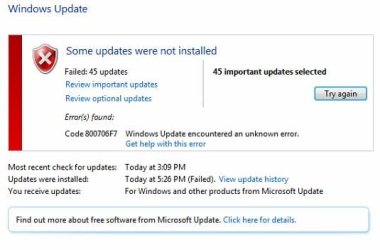
 

My Computer

Computer type
PC/Desktop
OS
Windows7 64bit
Just post it here - it's still part of this thread.
 

My Computer

Computer type
Laptop
Computer Manufacturer/Model Number
Asus K52F or Lenovo B51-80
OS
Win 7 x64 Home Premium (and x86 VirtualBox VM)/Win10
CPU
i3 370M/i7 6500U
Motherboard
Asus/Lenovo
Memory
8GB - finally :)/8GB
Graphics Card(s)
it's an i3, dude!/dual Intel&nVidia
Sound Card
onboard
Monitor(s) Displays
15.6" built-in
Screen Resolution
1366x768/1920x1080
Hard Drives
750GB Seagate internal
Sundry external drives attached to other computers on the local network
1TB SSD on the Lenovo
PSU
n/a
Internet Speed
as much as I can get - usually on a dongle/phone, so <1MB/s
Antivirus
MSE/Defender
Browser
IE11/12/Edge/Chrome/FF(if I must)

Attachments

  • update error code.JPG
    update error code.JPG
    31.2 KB · Views: 38
Last edited:

My Computer

Computer type
PC/Desktop
OS
Windows7 64bit
Here's the CheckSUR log results...
Code:
Checking Component Store
(f) CSI Missing Winning Component Key 0x00000000 amd64_microsoft-windows-crypt32-dll_31bf3856ad364e35_6.1.7601.18648_none_b97943ccf4882112  
(f) CSI Missing Winning Component Key 0x00000000 amd64_6bda1ba56135c536bd4f3ea28f4e2f9d_31bf3856ad364e35_6.1.7601.18526_none_eb5d63bf00622eef  
(fix) CSI Missing Winning Component Key CSI Registry Item Repaired Deleted winners map value 6.1.7601.18526
(f) CSI Missing Winning Component Key 0x00000000 amd64_2db41223ae6486343142d19638678dfc_31bf3856ad364e35_6.1.7601.18205_none_b2c7898d7e2ca3ba  
(fix) CSI Missing Winning Component Key CSI Registry Item Repaired Deleted winners map value 6.1.7601.18205
(f) CSI Missing Winning Component Key 0x00000000 amd64_25282c5e95c306a41cc287d4b4e1d0bd_31bf3856ad364e35_6.1.7601.18648_none_aab533f6ae6b876e  
(fix) CSI Missing Winning Component Key CSI Registry Item Repaired Deleted winners map value 6.1.7601.18648
(f) CSI Missing Winning Component Key 0x00000000 x86_microsoft-windows-crypt32-dll_31bf3856ad364e35_6.1.7601.18648_none_5d5aa8493c2aafdc  
(f) CSI Missing Winning Component Key 0x00000000 amd64_bcfc1e107f7064442c37b89285b62fa9_31bf3856ad364e35_6.1.7601.18526_none_28dc659884053554  
(fix) CSI Missing Winning Component Key CSI Registry Item Repaired Deleted winners map value 6.1.7601.18526
(f) CSI Missing Winning Component Key 0x00000000 amd64_7a56e9bfac1e7e9f583ef39e7739019a_31bf3856ad364e35_6.1.7601.18648_none_315a794ce8a33c24  
(fix) CSI Missing Winning Component Key CSI Registry Item Repaired Deleted winners map value 6.1.7601.18648
(f) CSI Missing Winning Component Key 0x00000000 amd64_70ea68aed5142326825edf6f375bd48f_31bf3856ad364e35_6.1.7601.18526_none_967c53c70d6ba56b  
(fix) CSI Missing Winning Component Key CSI Registry Item Repaired Deleted winners map value 6.1.7601.18526
Summary:
Seconds executed: 2152
 Found 8 errors
 Fixed 6 errors
  CSI Missing Winning Component Key Total count: 8
  Fixed: CSI Missing Winning Component Key.  Total count: 6
..which just leaves these two to fix...

Code:
(f) CSI Missing Winning Component Key 0x00000000 amd64_microsoft-windows-crypt32-dll_31bf3856ad364e35_6.1.7601.18648_none_b97943ccf4882112
(f) CSI Missing Winning Component Key 0x00000000 x86_microsoft-windows-crypt32-dll_31bf3856ad364e35_6.1.7601.18648_none_5d5aa8493c2aafdc

I'll work on them this evening and post a fix protocol when I can.
 

My Computer

Computer type
Laptop
Computer Manufacturer/Model Number
Asus K52F or Lenovo B51-80
OS
Win 7 x64 Home Premium (and x86 VirtualBox VM)/Win10
CPU
i3 370M/i7 6500U
Motherboard
Asus/Lenovo
Memory
8GB - finally :)/8GB
Graphics Card(s)
it's an i3, dude!/dual Intel&nVidia
Sound Card
onboard
Monitor(s) Displays
15.6" built-in
Screen Resolution
1366x768/1920x1080
Hard Drives
750GB Seagate internal
Sundry external drives attached to other computers on the local network
1TB SSD on the Lenovo
PSU
n/a
Internet Speed
as much as I can get - usually on a dongle/phone, so <1MB/s
Antivirus
MSE/Defender
Browser
IE11/12/Edge/Chrome/FF(if I must)
Here's the CheckSUR log results...
Code:
Checking Component Store
(f) CSI Missing Winning Component Key 0x00000000 amd64_microsoft-windows-crypt32-dll_31bf3856ad364e35_6.1.7601.18648_none_b97943ccf4882112  
(f) CSI Missing Winning Component Key 0x00000000 amd64_6bda1ba56135c536bd4f3ea28f4e2f9d_31bf3856ad364e35_6.1.7601.18526_none_eb5d63bf00622eef  
(fix) CSI Missing Winning Component Key CSI Registry Item Repaired Deleted winners map value 6.1.7601.18526
(f) CSI Missing Winning Component Key 0x00000000 amd64_2db41223ae6486343142d19638678dfc_31bf3856ad364e35_6.1.7601.18205_none_b2c7898d7e2ca3ba  
(fix) CSI Missing Winning Component Key CSI Registry Item Repaired Deleted winners map value 6.1.7601.18205
(f) CSI Missing Winning Component Key 0x00000000 amd64_25282c5e95c306a41cc287d4b4e1d0bd_31bf3856ad364e35_6.1.7601.18648_none_aab533f6ae6b876e  
(fix) CSI Missing Winning Component Key CSI Registry Item Repaired Deleted winners map value 6.1.7601.18648
(f) CSI Missing Winning Component Key 0x00000000 x86_microsoft-windows-crypt32-dll_31bf3856ad364e35_6.1.7601.18648_none_5d5aa8493c2aafdc  
(f) CSI Missing Winning Component Key 0x00000000 amd64_bcfc1e107f7064442c37b89285b62fa9_31bf3856ad364e35_6.1.7601.18526_none_28dc659884053554  
(fix) CSI Missing Winning Component Key CSI Registry Item Repaired Deleted winners map value 6.1.7601.18526
(f) CSI Missing Winning Component Key 0x00000000 amd64_7a56e9bfac1e7e9f583ef39e7739019a_31bf3856ad364e35_6.1.7601.18648_none_315a794ce8a33c24  
(fix) CSI Missing Winning Component Key CSI Registry Item Repaired Deleted winners map value 6.1.7601.18648
(f) CSI Missing Winning Component Key 0x00000000 amd64_70ea68aed5142326825edf6f375bd48f_31bf3856ad364e35_6.1.7601.18526_none_967c53c70d6ba56b  
(fix) CSI Missing Winning Component Key CSI Registry Item Repaired Deleted winners map value 6.1.7601.18526
Summary:
Seconds executed: 2152
 Found 8 errors
 Fixed 6 errors
  CSI Missing Winning Component Key Total count: 8
  Fixed: CSI Missing Winning Component Key.  Total count: 6
..which just leaves these two to fix...

Code:
(f) CSI Missing Winning Component Key 0x00000000 amd64_microsoft-windows-crypt32-dll_31bf3856ad364e35_6.1.7601.18648_none_b97943ccf4882112
(f) CSI Missing Winning Component Key 0x00000000 x86_microsoft-windows-crypt32-dll_31bf3856ad364e35_6.1.7601.18648_none_5d5aa8493c2aafdc
I'll work on them this evening and post a fix protocol when I can.

Thanks Noel. I appreciate the help.
 

My Computer

Computer type
PC/Desktop
OS
Windows7 64bit
I think before I post a fix, I'd better check what's already in the registry!

Please open an Elevated Command Prompt, and run the following commands:

Code:
REG QUERY "HKLM\SOFTWARE\Microsoft\Windows\CurrentVersion\SideBySide\Winners\amd64_microsoft-windows-crypt32-dll_31bf3856ad364e35_none_bedf38e7613bbfd6\6.1"
REG QUERY "HKLM\SOFTWARE\Microsoft\Windows\CurrentVersion\SideBySide\Winners\x86_microsoft-windows-crypt32-dll_31bf3856ad364e35_none_62c09d63a8de4ea0\6.1"
 
.
post the results.

Here are some instructions to make lifeeasier :)

1) To open anElevated Command Prompt Window (the ECP window), click on Start, All Programs,Accessories – then right-click on Command Prompt, and select Run asAdministrator. Accept the UAC prompt.

2) To run thecommands easier, highlight the block of commands, and right-click on thehighlight – select Copy. In the CP Window, click on the black/white icon at topleft – select Paste. The commands will run but may not complete the lastcommand, so hit the Enter Key once.

3) To copy theresults... click on the Black/White icon in the top left, and select Edit...'Select All', and hit the Enter key - then use Ctrl+V or r-click+Paste to pasteit into your response.
 

My Computer

Computer type
Laptop
Computer Manufacturer/Model Number
Asus K52F or Lenovo B51-80
OS
Win 7 x64 Home Premium (and x86 VirtualBox VM)/Win10
CPU
i3 370M/i7 6500U
Motherboard
Asus/Lenovo
Memory
8GB - finally :)/8GB
Graphics Card(s)
it's an i3, dude!/dual Intel&nVidia
Sound Card
onboard
Monitor(s) Displays
15.6" built-in
Screen Resolution
1366x768/1920x1080
Hard Drives
750GB Seagate internal
Sundry external drives attached to other computers on the local network
1TB SSD on the Lenovo
PSU
n/a
Internet Speed
as much as I can get - usually on a dongle/phone, so <1MB/s
Antivirus
MSE/Defender
Browser
IE11/12/Edge/Chrome/FF(if I must)
I think before I post a fix, I'd better check what's already in the registry!

Please open an Elevated Command Prompt, and run the following commands:

Code:
REG QUERY "HKLM\SOFTWARE\Microsoft\Windows\CurrentVersion\SideBySide\Winners\amd64_microsoft-windows-crypt32-dll_31bf3856ad364e35_none_bedf38e7613bbfd6\6.1"
REG QUERY "HKLM\SOFTWARE\Microsoft\Windows\CurrentVersion\SideBySide\Winners\x86_microsoft-windows-crypt32-dll_31bf3856ad364e35_none_62c09d63a8de4ea0\6.1"
 
.
post the results.

Here are some instructions to make lifeeasier :)

1) To open anElevated Command Prompt Window (the ECP window), click on Start, All Programs,Accessories – then right-click on Command Prompt, and select Run asAdministrator. Accept the UAC prompt.

2) To run thecommands easier, highlight the block of commands, and right-click on thehighlight – select Copy. In the CP Window, click on the black/white icon at topleft – select Paste. The commands will run but may not complete the lastcommand, so hit the Enter Key once.

3) To copy theresults... click on the Black/White icon in the top left, and select Edit...'Select All', and hit the Enter key - then use Ctrl+V or r-click+Paste to pasteit into your response.

Here you go Noel.


C:\Windows\system32>REG QUERY "HKLM\SOFTWARE\Microsoft\Windows\CurrentVersion\Si
deBySide\Winners\amd64_microsoft-windows-crypt32-dll_31bf3856ad364e35_none_bedf3
8e7613bbfd6\6.1"

HKEY_LOCAL_MACHINE\SOFTWARE\Microsoft\Windows\CurrentVersion\SideBySide\Winners\
amd64_microsoft-windows-crypt32-dll_31bf3856ad364e35_none_bedf38e7613bbfd6\6.1
(Default) REG_SZ 6.1.7601.18648
6.1.7601.17514 REG_BINARY 01
6.1.7601.17856 REG_BINARY 01
6.1.7601.18151 REG_BINARY 01
6.1.7601.18150 REG_BINARY 01
6.1.7601.18277 REG_BINARY 01
6.1.7601.18205 REG_BINARY 01
6.1.7601.18648 REG_BINARY 01


C:\Windows\system32>REG QUERY "HKLM\SOFTWARE\Microsoft\Windows\CurrentVersion\Si
deBySide\Winners\x86_microsoft-windows-crypt32-dll_31bf3856ad364e35_none_62c09d6
3a8de4ea0\6.1"

HKEY_LOCAL_MACHINE\SOFTWARE\Microsoft\Windows\CurrentVersion\SideBySide\Winners\
x86_microsoft-windows-crypt32-dll_31bf3856ad364e35_none_62c09d63a8de4ea0\6.1
(Default) REG_SZ 6.1.7601.18648
6.1.7601.17514 REG_BINARY 01
6.1.7601.17856 REG_BINARY 01
6.1.7601.18151 REG_BINARY 01
6.1.7601.18150 REG_BINARY 01
6.1.7601.18277 REG_BINARY 01
6.1.7601.18205 REG_BINARY 01
6.1.7601.18648 REG_BINARY 01
 

My Computer

Computer type
PC/Desktop
OS
Windows7 64bit
Those all look normal to me - maybe I'd better check my reasoning...

Please run the following command, and post the results...

Code:
REG QUERY "HKLM\SOFTWARE\Microsoft\Windows\CurrentVersion\SideBySide\Winners\amd64_6bda1ba56135c536bd4f3ea28f4e2f9d_31bf3856ad364e35_6.1.7601.18526_none_eb5d63bf00622eef"
 
.
 

My Computer

Computer type
Laptop
Computer Manufacturer/Model Number
Asus K52F or Lenovo B51-80
OS
Win 7 x64 Home Premium (and x86 VirtualBox VM)/Win10
CPU
i3 370M/i7 6500U
Motherboard
Asus/Lenovo
Memory
8GB - finally :)/8GB
Graphics Card(s)
it's an i3, dude!/dual Intel&nVidia
Sound Card
onboard
Monitor(s) Displays
15.6" built-in
Screen Resolution
1366x768/1920x1080
Hard Drives
750GB Seagate internal
Sundry external drives attached to other computers on the local network
1TB SSD on the Lenovo
PSU
n/a
Internet Speed
as much as I can get - usually on a dongle/phone, so <1MB/s
Antivirus
MSE/Defender
Browser
IE11/12/Edge/Chrome/FF(if I must)
Back
Top