Solved Windows not genuine help

Those all look normal to me - maybe I'd better check my reasoning...

Please run the following command, and post the results...

Code:
REG QUERY "HKLM\SOFTWARE\Microsoft\Windows\CurrentVersion\SideBySide\Winners\amd64_6bda1ba56135c536bd4f3ea28f4e2f9d_31bf3856ad364e35_6.1.7601.18526_none_eb5d63bf00622eef"
 
.


Microsoft Windows [Version 6.1.7601]
Copyright (c) 2009 Microsoft Corporation. All rights reserved.

C:\Windows\system32>REG QUERY "HKLM\SOFTWARE\Microsoft\Windows\CurrentVersion\Si
deBySide\Winners\amd64_6bda1ba56135c536bd4f3ea28f4e2f9d_31bf3856ad364e35_6.1.760
1.18526_none_eb5d63bf00622eef"
ERROR: The system was unable to find the specified registry key or value.

Good or bad? lol

If you post back tomorrow, I won't be able to respond until Saturday evening. Have a great day!
 

My Computer

Computer type
PC/Desktop
OS
Windows7 64bit
...just as well - it's going to take me until then to wade through my backlog, and work out what I'm doing wrong here!
 

My Computer

Computer type
Laptop
Computer Manufacturer/Model Number
Asus K52F or Lenovo B51-80
OS
Win 7 x64 Home Premium (and x86 VirtualBox VM)/Win10
CPU
i3 370M/i7 6500U
Motherboard
Asus/Lenovo
Memory
8GB - finally :)/8GB
Graphics Card(s)
it's an i3, dude!/dual Intel&nVidia
Sound Card
onboard
Monitor(s) Displays
15.6" built-in
Screen Resolution
1366x768/1920x1080
Hard Drives
750GB Seagate internal
Sundry external drives attached to other computers on the local network
1TB SSD on the Lenovo
PSU
n/a
Internet Speed
as much as I can get - usually on a dongle/phone, so <1MB/s
Antivirus
MSE/Defender
Browser
IE11/12/Edge/Chrome/FF(if I must)
I think I was right the first time ;)

Please open an ELevated Command Prompt, and run the following commands...

REG DELETE "HKLM\SOFTWARE\Microsoft\Windows\CurrentVersion\SideBySide\Winners\amd64_microsoft-windows-crypt32-dll_31bf3856ad364e35_none_bedf38e7613bbfd6\6.1" /V 6.1.7601.18648
REG DELETE "HKLM\SOFTWARE\Microsoft\Windows\CurrentVersion\SideBySide\Winners\x86_microsoft-windows-crypt32-dll_31bf3856ad364e35_none_62c09d63a8de4ea0\6.1" /V 6.1.7601.18648

Close the window, reboot, and run a new CheckSUR scan.
post the CheckSUR.log file
 

My Computer

Computer type
Laptop
Computer Manufacturer/Model Number
Asus K52F or Lenovo B51-80
OS
Win 7 x64 Home Premium (and x86 VirtualBox VM)/Win10
CPU
i3 370M/i7 6500U
Motherboard
Asus/Lenovo
Memory
8GB - finally :)/8GB
Graphics Card(s)
it's an i3, dude!/dual Intel&nVidia
Sound Card
onboard
Monitor(s) Displays
15.6" built-in
Screen Resolution
1366x768/1920x1080
Hard Drives
750GB Seagate internal
Sundry external drives attached to other computers on the local network
1TB SSD on the Lenovo
PSU
n/a
Internet Speed
as much as I can get - usually on a dongle/phone, so <1MB/s
Antivirus
MSE/Defender
Browser
IE11/12/Edge/Chrome/FF(if I must)
I think I was right the first time ;)

Please open an ELevated Command Prompt, and run the following commands...

REG DELETE "HKLM\SOFTWARE\Microsoft\Windows\CurrentVersion\SideBySide\Winners\amd64_microsoft-windows-crypt32-dll_31bf3856ad364e35_none_bedf38e7613bbfd6\6.1" /V 6.1.7601.18648
REG DELETE "HKLM\SOFTWARE\Microsoft\Windows\CurrentVersion\SideBySide\Winners\x86_microsoft-windows-crypt32-dll_31bf3856ad364e35_none_62c09d63a8de4ea0\6.1" /V 6.1.7601.18648

Close the window, reboot, and run a new CheckSUR scan.
post the CheckSUR.log file

=================================
Checking System Update Readiness.
Binary Version 6.1.7601.22471
Package Version 26.0
2015-07-13 21:12

Checking Windows Servicing Packages

Checking Package Manifests and Catalogs

Checking Package Watchlist

Checking Component Watchlist

Checking Packages

Checking Component Store

Summary:
Seconds executed: 2204
No errors detected

If you need additional logs you can pick them up here:

https://onedrive.live.com/redir?res...23&authkey=!AKVs8J-Oh2Ll3Vw&ithint=folder,cab
 

My Computer

Computer type
PC/Desktop
OS
Windows7 64bit
That cleared that up (at last!)
So - let's check SFC again, and see whether anything needs doing there - Please run SFC /SCANNOW again, and post the new CBS.log file.
 

My Computer

Computer type
Laptop
Computer Manufacturer/Model Number
Asus K52F or Lenovo B51-80
OS
Win 7 x64 Home Premium (and x86 VirtualBox VM)/Win10
CPU
i3 370M/i7 6500U
Motherboard
Asus/Lenovo
Memory
8GB - finally :)/8GB
Graphics Card(s)
it's an i3, dude!/dual Intel&nVidia
Sound Card
onboard
Monitor(s) Displays
15.6" built-in
Screen Resolution
1366x768/1920x1080
Hard Drives
750GB Seagate internal
Sundry external drives attached to other computers on the local network
1TB SSD on the Lenovo
PSU
n/a
Internet Speed
as much as I can get - usually on a dongle/phone, so <1MB/s
Antivirus
MSE/Defender
Browser
IE11/12/Edge/Chrome/FF(if I must)
That cleared that up (at last!)
So - let's check SFC again, and see whether anything needs doing there - Please run SFC /SCANNOW again, and post the new CBS.log file.

Here you go. What do you think? getting close?

Microsoft services
 

My Computer

Computer type
PC/Desktop
OS
Windows7 64bit
SFC is clear, but you have multiple errors of this kind in the background data...

Code:
2015-07-14 16:16:07, Info                  CBS    Appl: Evaluating package applicability for package Package_56_for_KB3037574~31bf3856ad364e35~amd64~~6.1.1.0, applicable state: Absent
2015-07-14 16:16:07, Info                  CBS    Plan: Skipping package since its start state and target state are both absent for package: Package_56_for_KB3037574~31bf3856ad364e35~amd64~~6.1.1.0, current: Absent, pending: Default, start: Absent, applicable: Absent, targeted: Absent, limit: Installed
2015-07-14 16:16:07, Info                  CBS    Perf: Resolve chain started.
2015-07-14 16:16:07, Info                  CSI    0000000b@2015/7/14:20:16:07.972 CSI Transaction @0x311be0 initialized for deployment engine {d16d444c-56d8-11d5-882d-0080c847b195} with flags 00000002 and client id [79]"TI1.30457457_3698765779:2/Package_for_KB3037574~31bf3856ad364e35~amd64~~6.1.1.0"

2015-07-14 16:16:08, Info                  CBS    Failed call to CryptCATAdminAddCatalog. [HRESULT = 0x800706f7 - RPC_X_BAD_STUB_DATA]
I can't find much data on it :(

Try Windows Update anyhow - do a Check for Updates, and attempt to install ONLY the oldest found update.
If it goes in OK, try the rest.
If it fails, post the C:\Windows\windowsudpate.log file.
 

My Computer

Computer type
Laptop
Computer Manufacturer/Model Number
Asus K52F or Lenovo B51-80
OS
Win 7 x64 Home Premium (and x86 VirtualBox VM)/Win10
CPU
i3 370M/i7 6500U
Motherboard
Asus/Lenovo
Memory
8GB - finally :)/8GB
Graphics Card(s)
it's an i3, dude!/dual Intel&nVidia
Sound Card
onboard
Monitor(s) Displays
15.6" built-in
Screen Resolution
1366x768/1920x1080
Hard Drives
750GB Seagate internal
Sundry external drives attached to other computers on the local network
1TB SSD on the Lenovo
PSU
n/a
Internet Speed
as much as I can get - usually on a dongle/phone, so <1MB/s
Antivirus
MSE/Defender
Browser
IE11/12/Edge/Chrome/FF(if I must)
SFC is clear, but you have multiple errors of this kind in the background data...

Code:
2015-07-14 16:16:07, Info                  CBS    Appl: Evaluating package applicability for package Package_56_for_KB3037574~31bf3856ad364e35~amd64~~6.1.1.0, applicable state: Absent
2015-07-14 16:16:07, Info                  CBS    Plan: Skipping package since its start state and target state are both absent for package: Package_56_for_KB3037574~31bf3856ad364e35~amd64~~6.1.1.0, current: Absent, pending: Default, start: Absent, applicable: Absent, targeted: Absent, limit: Installed
2015-07-14 16:16:07, Info                  CBS    Perf: Resolve chain started.
2015-07-14 16:16:07, Info                  CSI    0000000b@2015/7/14:20:16:07.972 CSI Transaction @0x311be0 initialized for deployment engine {d16d444c-56d8-11d5-882d-0080c847b195} with flags 00000002 and client id [79]"TI1.30457457_3698765779:2/Package_for_KB3037574~31bf3856ad364e35~amd64~~6.1.1.0"

2015-07-14 16:16:08, Info                  CBS    Failed call to CryptCATAdminAddCatalog. [HRESULT = 0x800706f7 - RPC_X_BAD_STUB_DATA]
I can't find much data on it :(

Try Windows Update anyhow - do a Check for Updates, and attempt to install ONLY the oldest found update.
If it goes in OK, try the rest.
If it fails, post the C:\Windows\windowsudpate.log file.

Ok will try it tonight when I get home. Should I try to validate first?
 

My Computer

Computer type
PC/Desktop
OS
Windows7 64bit
Why not? ;) - post a new MGADiag report, as well.
 

My Computer

Computer type
Laptop
Computer Manufacturer/Model Number
Asus K52F or Lenovo B51-80
OS
Win 7 x64 Home Premium (and x86 VirtualBox VM)/Win10
CPU
i3 370M/i7 6500U
Motherboard
Asus/Lenovo
Memory
8GB - finally :)/8GB
Graphics Card(s)
it's an i3, dude!/dual Intel&nVidia
Sound Card
onboard
Monitor(s) Displays
15.6" built-in
Screen Resolution
1366x768/1920x1080
Hard Drives
750GB Seagate internal
Sundry external drives attached to other computers on the local network
1TB SSD on the Lenovo
PSU
n/a
Internet Speed
as much as I can get - usually on a dongle/phone, so <1MB/s
Antivirus
MSE/Defender
Browser
IE11/12/Edge/Chrome/FF(if I must)
Why not? ;) - post a new MGADiag report, as well.

Ok updates did not work. Ran another SFC /SCANNOW just for the heck of it.

Microsoft Windows [Version 6.1.7601]
Copyright (c) 2009 Microsoft Corporation. All rights reserved.

C:\Windows\system32>SFC /SCANNOW

Beginning system scan. This process will take some time.

Beginning verification phase of system scan.
Verification 100% complete.
Windows Resource Protection found corrupt files but was unable to fix some of them.
Details are included in the CBS.Log windir\Logs\CBS\CBS.log. For example
C:\Windows\Logs\CBS\CBS.log


Here are all the logs and the MGADiag report Microsoft services
 

My Computer

Computer type
PC/Desktop
OS
Windows7 64bit
Why not? ;) - post a new MGADiag report, as well.

Ok updates did not work. Ran another SFC /SCANNOW just for the heck of it.

Microsoft Windows [Version 6.1.7601]
Copyright (c) 2009 Microsoft Corporation. All rights reserved.

C:\Windows\system32>SFC /SCANNOW

Beginning system scan. This process will take some time.

Beginning verification phase of system scan.
Verification 100% complete.
Windows Resource Protection found corrupt files but was unable to fix some of them.
Details are included in the CBS.Log windir\Logs\CBS\CBS.log. For example
C:\Windows\Logs\CBS\CBS.log


Here are all the logs and the MGADiag report Microsoft services

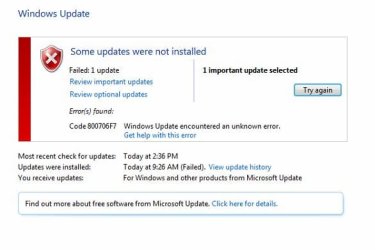
forgot to post the error message:
 

Attachments

  • update error.JPG
    update error.JPG
    31.7 KB · Views: 35

My Computer

Computer type
PC/Desktop
OS
Windows7 64bit
So what do you think Noel? Do we need to give up the ghost? :cry:
 

My Computer

Computer type
PC/Desktop
OS
Windows7 64bit
Sorry - I haven't forgotten you! In the pub at present. .. back later. ;)
 

My Computer

Computer type
Laptop
Computer Manufacturer/Model Number
Asus K52F or Lenovo B51-80
OS
Win 7 x64 Home Premium (and x86 VirtualBox VM)/Win10
CPU
i3 370M/i7 6500U
Motherboard
Asus/Lenovo
Memory
8GB - finally :)/8GB
Graphics Card(s)
it's an i3, dude!/dual Intel&nVidia
Sound Card
onboard
Monitor(s) Displays
15.6" built-in
Screen Resolution
1366x768/1920x1080
Hard Drives
750GB Seagate internal
Sundry external drives attached to other computers on the local network
1TB SSD on the Lenovo
PSU
n/a
Internet Speed
as much as I can get - usually on a dongle/phone, so <1MB/s
Antivirus
MSE/Defender
Browser
IE11/12/Edge/Chrome/FF(if I must)
OK - try this...
Go to the Installed Updates listing and do a search for KB3004394 - when you find it, uninstall it.
reboot TWICE, then post another MGADiag report, and try Windows Update again.
 

My Computer

Computer type
Laptop
Computer Manufacturer/Model Number
Asus K52F or Lenovo B51-80
OS
Win 7 x64 Home Premium (and x86 VirtualBox VM)/Win10
CPU
i3 370M/i7 6500U
Motherboard
Asus/Lenovo
Memory
8GB - finally :)/8GB
Graphics Card(s)
it's an i3, dude!/dual Intel&nVidia
Sound Card
onboard
Monitor(s) Displays
15.6" built-in
Screen Resolution
1366x768/1920x1080
Hard Drives
750GB Seagate internal
Sundry external drives attached to other computers on the local network
1TB SSD on the Lenovo
PSU
n/a
Internet Speed
as much as I can get - usually on a dongle/phone, so <1MB/s
Antivirus
MSE/Defender
Browser
IE11/12/Edge/Chrome/FF(if I must)
OK - try this...
Go to the Installed Updates listing and do a search for KB3004394 - when you find it, uninstall it.
reboot TWICE, then post another MGADiag report, and try Windows Update again.

Yeah checked early on and just re-checked KB3004394 is not installed on the machine.


Diagnostic Report (1.9.0027.0):
-----------------------------------------
Windows Validation Data-->

Validation Code: 0x8004FE21
Cached Online Validation Code: 0x0
Windows Product Key: *****-*****-MQ3T4-9K8VK-2VVWG
Windows Product Key Hash: wAoa9+xc+iALXvBLnkWQc9cILYY=
Windows Product ID: 00359-030-4996214-85141
Windows Product ID Type: 5
Windows License Type: Retail
Windows OS version: 6.1.7601.2.00010300.1.0.003
ID: {5E357A59-A9AA-4C60-89E6-1EFE0013A4C0}(3)
Is Admin: Yes
TestCab: 0x0
LegitcheckControl ActiveX: N/A, hr = 0x80070002
Signed By: N/A, hr = 0x80070002
Product Name: Windows 7 Home Premium
Architecture: 0x00000009
Build lab: 7601.win7sp1_gdr.140303-2144
TTS Error:
Validation Diagnostic:
Resolution Status: N/A

Vista WgaER Data-->
ThreatID(s): N/A, hr = 0x80070002
Version: N/A, hr = 0x80070002

Windows XP Notifications Data-->
Cached Result: N/A, hr = 0x80070002
File Exists: No
Version: N/A, hr = 0x80070002
WgaTray.exe Signed By: N/A, hr = 0x80070002
WgaLogon.dll Signed By: N/A, hr = 0x80070002

OGA Notifications Data-->
Cached Result: N/A, hr = 0x80070002
Version: N/A, hr = 0x80070002
OGAExec.exe Signed By: N/A, hr = 0x80070002
OGAAddin.dll Signed By: N/A, hr = 0x80070002

OGA Data-->
Office Status: 100 Genuine
Microsoft Office Home and Student 2007 - 100 Genuine
OGA Version: N/A, 0x80070002
Signed By: N/A, hr = 0x80070002
Office Diagnostics: 025D1FF3-364-80041010_025D1FF3-229-80041010_025D1FF3-230-1_025D1FF3-517-80040154_025D1FF3-237-80040154_025D1FF3-238-2_025D1FF3-244-80070002_025D1FF3-258-3_E2AD56EA-765-d003_E2AD56EA-766-0_E2AD56EA-134-80004005_E2AD56EA-765-b01a_E2AD56EA-766-0_E2AD56EA-148-80004005_16E0B333-89-80004005_B4D0AA8B-1029-80004005

Browser Data-->
Proxy settings: N/A
User Agent: Mozilla/4.0 (compatible; MSIE 8.0; Win32)
Default Browser: C:\Program Files (x86)\Google\Chrome\Application\chrome.exe
Download signed ActiveX controls: Prompt
Download unsigned ActiveX controls: Disabled
Run ActiveX controls and plug-ins: Allowed
Initialize and script ActiveX controls not marked as safe: Disabled
Allow scripting of Internet Explorer Webbrowser control: Disabled
Active scripting: Allowed
Script ActiveX controls marked as safe for scripting: Allowed

File Scan Data-->
File Mismatch: C:\Windows\system32\wat\watadminsvc.exe[7.1.7600.16395], Hr = 0x80092003
File Mismatch: C:\Windows\system32\wat\watux.exe[7.1.7600.16395], Hr = 0x80092003
File Mismatch: C:\Windows\system32\sppobjs.dll[6.1.7601.17514], Hr = 0x80092003
File Mismatch: C:\Windows\system32\sppc.dll[6.1.7601.17514], Hr = 0x800b0100
File Mismatch: C:\Windows\system32\sppcext.dll[6.1.7600.16385], Hr = 0x800b0100
File Mismatch: C:\Windows\system32\sppwinob.dll[6.1.7601.17514], Hr = 0x80092003
File Mismatch: C:\Windows\system32\slc.dll[6.1.7600.16385], Hr = 0x800b0100
File Mismatch: C:\Windows\system32\slcext.dll[6.1.7600.16385], Hr = 0x800b0100
File Mismatch: C:\Windows\system32\sppuinotify.dll[6.1.7600.16385], Hr = 0x80092003
File Mismatch: C:\Windows\system32\slui.exe[6.1.7601.17514], Hr = 0x80092003
File Mismatch: C:\Windows\system32\sppcomapi.dll[6.1.7601.17514], Hr = 0x800b0100
File Mismatch: C:\Windows\system32\sppcommdlg.dll[6.1.7600.16385], Hr = 0x800b0100
File Mismatch: C:\Windows\system32\sppsvc.exe[6.1.7601.17514], Hr = 0x80092003
File Mismatch: C:\Windows\system32\drivers\spsys.sys[6.1.7127.0], Hr = 0x80092003
File Mismatch: C:\Windows\system32\drivers\spldr.sys[6.1.7127.0], Hr = 0x80092003
File Mismatch: C:\Windows\system32\systemcpl.dll[6.1.7601.17514], Hr = 0x800b0100
File Mismatch: C:\Windows\system32\user32.dll[6.1.7601.17514], Hr = 0x800b0100

Other data-->
Office Details: <GenuineResults><MachineData><UGUID>{5E357A59-A9AA-4C60-89E6-1EFE0013A4C0}</UGUID><Version>1.9.0027.0</Version><OS>6.1.7601.2.00010300.1.0.003</OS><Architecture>x64</Architecture><PKey>*****-*****-*****-*****-2VVWG</PKey><PID>00359-030-4996214-85141</PID><PIDType>5</PIDType><SID>S-1-5-21-2319976086-3690783286-3578715122</SID><SYSTEM><Manufacturer>Dell Inc. </Manufacturer><Model>Dell DM061 </Model></SYSTEM><BIOS><Manufacturer>Dell Inc. </Manufacturer><Version>2.0.4 </Version><SMBIOSVersion major="2" minor="3"/><Date>20061025000000.000000+000</Date></BIOS><HWID>02EF3707018400FC</HWID><UserLCID>0409</UserLCID><SystemLCID>0409</SystemLCID><TimeZone>Eastern Standard Time(GMT-05:00)</TimeZone><iJoin>0</iJoin><SBID><stat>3</stat><msppid></msppid><name></name><model></model></SBID><OEM><OEMID>DELL </OEMID><OEMTableID>B8K </OEMTableID></OEM><GANotification/></MachineData><Software><Office><Result>100</Result><Products><Product GUID="{91120000-002F-0000-0000-0000000FF1CE}"><LegitResult>100</LegitResult><Name>Microsoft Office Home and Student 2007</Name><Ver>12</Ver><Val>30755F16D48EF40</Val><Hash>c18y+DRYLESP1z7pcDqLhTgUaQo=</Hash><Pid>81602-928-4575266-68697</Pid><PidType>1</PidType></Product></Products><Applications><App Id="16" Version="12" Result="100"/><App Id="18" Version="12" Result="100"/><App Id="1B" Version="12" Result="100"/><App Id="A1" Version="12" Result="100"/></Applications></Office></Software></GenuineResults>

Spsys.log Content: 0x80070002

Licensing Data-->
Software licensing service version: 6.1.7601.17514

Name: Windows(R) 7, HomePremium edition
Description: Windows Operating System - Windows(R) 7, RETAIL channel
Activation ID: 2e7d060d-4714-40f2-9896-1e4f15b612ad
Application ID: 55c92734-d682-4d71-983e-d6ec3f16059f
Extended PID: 00359-00170-030-499621-01-1033-7601.0000-1852015
Installation ID: 012715631743524641852342644041660810937905079633934775
Processor Certificate URL: SpcService Web Service
Machine Certificate URL: RacService Web Service
Use License URL: UseLicenseService Web Service
Product Key Certificate URL: PkcService Web Service
Partial Product Key: 2VVWG
License Status: Licensed
Remaining Windows rearm count: 4
Trusted time: 7/19/2015 7:21:13 AM

Windows Activation Technologies-->
HrOffline: 0x8004FE21
HrOnline: N/A
HealthStatus: 0x000000000001EFF0
Event Time Stamp: 7:15:2015 19:41
ActiveX: Registered, Version: 7.1.7600.16395
Admin Service: Registered, Version: 7.1.7600.16395
HealthStatus Bitmask Output:
Tampered File: %systemroot%\system32\sppobjs.dll
Tampered File: %systemroot%\system32\sppc.dll|sppc.dll.mui
Tampered File: %systemroot%\system32\sppcext.dll|sppcext.dll.mui
Tampered File: %systemroot%\system32\sppwinob.dll
Tampered File: %systemroot%\system32\slc.dll|slc.dll.mui
Tampered File: %systemroot%\system32\slcext.dll|slcext.dll.mui
Tampered File: %systemroot%\system32\sppuinotify.dll|sppuinotify.dll.mui
Tampered File: %systemroot%\system32\slui.exe|slui.exe.mui|COM Registration
Tampered File: %systemroot%\system32\sppcomapi.dll|sppcomapi.dll.mui
Tampered File: %systemroot%\system32\sppcommdlg.dll|sppcommdlg.dll.mui
Tampered File: %systemroot%\system32\sppsvc.exe|sppsvc.exe.mui
Tampered File: %systemroot%\system32\drivers\spsys.sys


HWID Data-->
HWID Hash Current: MgAAAAEABAABAAEAAAACAAAAAQABAAEAeqhiDjgDeFEu9+zYurJGWa4HIK+4hgyA7Ds=

OEM Activation 1.0 Data-->
N/A

OEM Activation 2.0 Data-->
BIOS valid for OA 2.0: yes
Windows marker version: 0x0
OEMID and OEMTableID Consistent: yes
BIOS Information:
ACPI Table Name OEMID Value OEMTableID Value
APIC DELL B8K
FACP DELL B8K
HPET DELL B8K
BOOT DELL B8K
MCFG DELL B8K
SSDT DELL st_ex
SLIC DELL B8K

 

My Computer

Computer type
PC/Desktop
OS
Windows7 64bit
Hmm - it certainly should be!

let's try this just in case...

Open an Elevated Command Prompt, and run the following command...

wusa /uninstall /kb:3004394

if it uninstalls, then reboot twice and run another MGADiag - if it can't find it, I think we may be in repair install territory. :(
 

My Computer

Computer type
Laptop
Computer Manufacturer/Model Number
Asus K52F or Lenovo B51-80
OS
Win 7 x64 Home Premium (and x86 VirtualBox VM)/Win10
CPU
i3 370M/i7 6500U
Motherboard
Asus/Lenovo
Memory
8GB - finally :)/8GB
Graphics Card(s)
it's an i3, dude!/dual Intel&nVidia
Sound Card
onboard
Monitor(s) Displays
15.6" built-in
Screen Resolution
1366x768/1920x1080
Hard Drives
750GB Seagate internal
Sundry external drives attached to other computers on the local network
1TB SSD on the Lenovo
PSU
n/a
Internet Speed
as much as I can get - usually on a dongle/phone, so <1MB/s
Antivirus
MSE/Defender
Browser
IE11/12/Edge/Chrome/FF(if I must)
Hmm - it certainly should be!

let's try this just in case...

Open an Elevated Command Prompt, and run the following command...

wusa /uninstall /kb:3004394

if it uninstalls, then reboot twice and run another MGADiag - if it can't find it, I think we may be in repair install territory. :(

(Don't think my post worked. Apologies if this is a duplicate)

Nope kb:3004394 was not present. so looks like I need to go the repair install method. However do I need an ISO that include SP1? I only have the original upgrade disk. Also after combing the blogs and forums it looks like Microsoft does not offer the ISO's anymore. I went to download site and got this error message.

"We encountered a problem with the validation request. Please assure your product key is for a product supported by this site and was entered correctly, then try your request again."


LOL and I thought this was going to be an easy fix!
 

My Computer

Computer type
PC/Desktop
OS
Windows7 64bit
So did I - 95%+ of this particular error are very easily solved in the ways that we've already tried - so far, I've had no success with healing with the other 5% :(

My normal recommendation at this point is a repair install - partly because of the above, and partly because I have less and less time to be able to assist others in need of help.


There are Torrents available (and some direct downloads) - I'm not allowed to recommend them, but if you do happen to try them make sure that you check the Hash values for the download against the known good values before you consider attempting the repair.
 

My Computer

Computer type
Laptop
Computer Manufacturer/Model Number
Asus K52F or Lenovo B51-80
OS
Win 7 x64 Home Premium (and x86 VirtualBox VM)/Win10
CPU
i3 370M/i7 6500U
Motherboard
Asus/Lenovo
Memory
8GB - finally :)/8GB
Graphics Card(s)
it's an i3, dude!/dual Intel&nVidia
Sound Card
onboard
Monitor(s) Displays
15.6" built-in
Screen Resolution
1366x768/1920x1080
Hard Drives
750GB Seagate internal
Sundry external drives attached to other computers on the local network
1TB SSD on the Lenovo
PSU
n/a
Internet Speed
as much as I can get - usually on a dongle/phone, so <1MB/s
Antivirus
MSE/Defender
Browser
IE11/12/Edge/Chrome/FF(if I must)
So did I - 95%+ of this particular error are very easily solved in the ways that we've already tried - so far, I've had no success with healing with the other 5% :(

My normal recommendation at this point is a repair install - partly because of the above, and partly because I have less and less time to be able to assist others in need of help.


There are Torrents available (and some direct downloads) - I'm not allowed to recommend them, but if you do happen to try them make sure that you check the Hash values for the download against the known good values before you consider attempting the repair.

Well my friend I thank you for all your help. I found an iso that is safe and will let you know how I make out in a couple weeks (vacation trip first!)

Again in you ever get to NYC the pints are on me!(d)
 

My Computer

Computer type
PC/Desktop
OS
Windows7 64bit
Back
Top