Windows not recognizing foreign languages

Mel14

New member
Local time
3:39 PM
Messages
1
Location
Latvija
Hi there, everybody!

My computer is not recognizing text written with Cyrillic letters (Russian, Ukrainian etc.).
It is making almost impossible to install some programs, because I can't read anything that is written in installation window.

I've searched on the internet for solutions, but only solution was to change system locale, but it won't help in my case, because I'm using programs in multiple languages. Every language has different character set and it would be taking a lot of time switching locale all the time.
It is the same with many text files (txt, docx etc.).

I have Windows 7 Home Premium SP1
Does anyone know solution to this?
 

Attachments

  • Screenshot_1.png
    Screenshot_1.png
    8.1 KB · Views: 36
Last edited:

My Computer

Computer type
Laptop
Computer Manufacturer/Model Number
HP Pavilion g6
OS
Windows 7 Home Premium SP1 64 bit
CPU
AMD A4-3305M APU with Radeon(tm) HD Graphics 1.90 GHz
Memory
6,00 GB
Hard Drives
1 TB HDD
Antivirus
Microsoft Security Essentials
Browser
Google Chrome
Windows should be able to cope with most languages as data - except in certain areas. However, in the shell, Windows would require shell support for those lanugages, which is only available in Ultimate.

It sounds to me as if you may be using a hack called Vistalizator to achieve similar functionality in Home Premium, and (unsurprisingly) it's broken a few things.


Please follow this tutorial and post an MGADiag report - then we can see what the problem is.

http://www.sevenforums.com/windows-updates-activation/234159-windows-genuine-activation-issue-posting-instructions.html

Ignore errors produced when clicking on the Copy button - they simply mean that the tool could not create the backup files for some reason. The data is still copied to the clipboard for pasting to your response.


My Computer

Computer type
Laptop
Computer Manufacturer/Model Number
Asus K52F or Lenovo B51-80
OS
Win 7 x64 Home Premium (and x86 VirtualBox VM)/Win10
CPU
i3 370M/i7 6500U
Motherboard
Asus/Lenovo
Memory
8GB - finally :)/8GB
Graphics Card(s)
it's an i3, dude!/dual Intel&nVidia
Sound Card
onboard
Monitor(s) Displays
15.6" built-in
Screen Resolution
1366x768/1920x1080
Hard Drives
750GB Seagate internal
Sundry external drives attached to other computers on the local network
1TB SSD on the Lenovo
PSU
n/a
Internet Speed
as much as I can get - usually on a dongle/phone, so <1MB/s
Antivirus
MSE/Defender
Browser
IE11/12/Edge/Chrome/FF(if I must)
NoelDP, I doubt that problem is a result of a Vistalizator activity, because we are talking about system locales/codepages here, not MUI packages.

Mel14, what would be those languages in programs you are using?
Windows-1251 codepage should cover all cyrillic-based languages,
whereas Windows-1257 - all the Baltic languages and possibly German(?) and Polish(?).

That is tiresome to switch between these codepages (locales) all the time.

There is an unofficial unsupported solution offered by ceok777 here
How to change Multiple languages for non-Unicode programs? - Microsoft Community
Please scroll down to his/her post.
 

My Computer

Computer type
PC/Desktop
OS
Windows 8.1 ; Windows 7 x86 (Dec2008-Jan2013)
Other Info
"The scale icon at the top right of a post or tutorial is how you can give rep to the member."
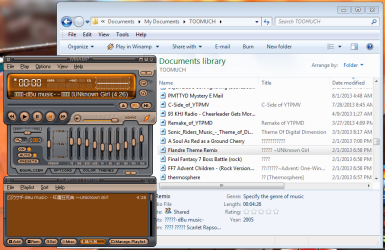
Mine won't read Japanese kana in ID3-tagged MP3 files.

I mean, it WILL work (once), and Winamp will read some of it, but then the title display is just horrendous!
 

Attachments

  • w7_japanese_kana_broken.png
    w7_japanese_kana_broken.png
    66.7 KB · Views: 0

My Computer

Computer type
PC/Desktop
Computer Manufacturer/Model Number
Custom
OS
Microsoft Windows 7 Home Premium 64-bit Service Pack 1
CPU
AMD A10-6800K APU with Radeon(tm)™ HD Graphics 4100
Motherboard
ASRock FM2A85X Extreme4-M
Memory
(2) G.Skill F3-12800CL10-8GBXL
Graphics Card(s)
ASUS R7 250 Series (0x6610)
Sound Card
Realtek High Definition Audio
Monitor(s) Displays
Acer X213H LCD monitor, 21"
Screen Resolution
1920 x 1080 x 32 bits @ 60 Hz
Hard Drives
WD Black, 1.0TB, WDC WD1002FAEX-00Z3A0
PSU
Rosewill Quark-650
Case
Raidmax Comet SECC Steel ATX Mid Tower Computer Case
Cooling
1 x 80mm + 2 x 120mm + Stock cooler
Mouse
Gear Head Wireless Optical 5-button mouse
Internet Speed
FTTx 6000 / 1000
Antivirus
Avast! Free Antivirus 2015.10.0.2208
Browser
Google Chrome Version 40.0.2214.115
Other Info
*AMD Dual-Graphics
*Uses OpenDNS
*Uses Folding@Home
*HP 16x Super-Multi DVD Writer
*Superspeed 74-in-1 Card Reader
*Maximum overclock has not been determined.
Mine won't read Japanese kana in ID3-tagged MP3 files.

I mean, it WILL work (once), and Winamp will read some of it, but then the title display is just horrendous!
HoneycombAG, if you are using only English and Japanese characters, solution for your is very easy (unlike for OP). You just need to set Japanese as a language for non-unicode programs.
Language for Non-Unicode Programs - Change in Windows
 

My Computer

Computer type
PC/Desktop
OS
Windows 8.1 ; Windows 7 x86 (Dec2008-Jan2013)
Other Info
"The scale icon at the top right of a post or tutorial is how you can give rep to the member."
Back
Top