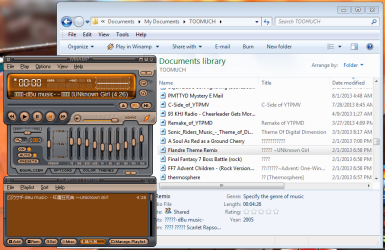
Hi there, everybody!
My computer is not recognizing text written with Cyrillic letters (Russian, Ukrainian etc.).
It is making almost impossible to install some programs, because I can't read anything that is written in installation window.
I've searched on the internet for solutions, but only solution was to change system locale, but it won't help in my case, because I'm using programs in multiple languages. Every language has different character set and it would be taking a lot of time switching locale all the time.
It is the same with many text files (txt, docx etc.).
I have Windows 7 Home Premium SP1
Does anyone know solution to this?
My computer is not recognizing text written with Cyrillic letters (Russian, Ukrainian etc.).
It is making almost impossible to install some programs, because I can't read anything that is written in installation window.
I've searched on the internet for solutions, but only solution was to change system locale, but it won't help in my case, because I'm using programs in multiple languages. Every language has different character set and it would be taking a lot of time switching locale all the time.
It is the same with many text files (txt, docx etc.).
I have Windows 7 Home Premium SP1
Does anyone know solution to this?
Attachments

Last edited:
My Computer
- Computer type
- Laptop
- Computer Manufacturer/Model Number
- HP Pavilion g6
- OS
- Windows 7 Home Premium SP1 64 bit
- CPU
- AMD A4-3305M APU with Radeon(tm) HD Graphics 1.90 GHz
- Memory
- 6,00 GB
- Hard Drives
- 1 TB HDD
- Antivirus
- Microsoft Security Essentials
- Browser
- Google Chrome