Windows or Linux?

armornick

New member
Local time
7:16 AM
Messages
4
Hey everyone

I find myself stuck between two worlds; the free world of Linux and the everything-just-works world of Windows. Now, before any Linux fanboys (no offense, keep reading) tell me to use Linux, hear my story.

For the last three years, I've been using Linux, and everything was fine. Windows XP was a security hazard, and Vista was huge and slow. But now things have changed; I've started college, the latest Ubuntu was released and so was Windows 7.

Thing is, I'm studying to be an IT-technician. I've always been obsessed with computers and I've felt I had to set the example by not using any illicit software. But I've tested (unfortunately an illegal copy of) Windows 7 and it was perhaps the best OS ever released. Add to this that Linux suddenly gave up on me; games which used to work fine suddenly became broken. Even more, I desperately need Visual Studio and Microsoft Office for school.

'So use Windows', you say. Well, there's two things I really don't like about Windows 7 (or Windows in general): the fact that its updates take a long time to install, and the fact that it costs a lot of money. While I can afford the 200 euros, I don't really like that Microsoft is planning to bring out a new version every 3 years, meaning the support for the previous version ends in about 6 years. I know this is really really long-term thinking, but I don't want to have to buy another Windows in 3 years. And an illicit copy is not an option.

Any opinions?
 

My Computer

OS
Unsure
It sounds like a dual boot configuration may be your best solution ... You get the best of both worlds! Ive been dual booting for several years, and I find it fills all of my needs perfectly... Ive never even tried playing games in Linux (Wine or Crossover just doesnt get it for me) and when I need a fix, I just boot up Windows... Windows 7 is probably the best OS that MS has come out with to date, so I dont worry about needing to update it when ever a new version is released... ;)
 

My Computer

Computer type
PC/Desktop
Computer Manufacturer/Model Number
LENOVO K450 @3.0GHZ
OS
64-bit Windows 8.1 Pro
CPU
Core(TM) i5 CPU 4330 Haswell @ 3.20GHz
Motherboard
LENOVO
Memory
12.00 GB
Graphics Card(s)
Intel(R) HD Graphics
Sound Card
Intel HD integtrated
Monitor(s) Displays
HP 25' ISP Monitor
Screen Resolution
1900/1020
Hard Drives
(1) ST1000DM003-1CH162 (2) Generic STORAGE DEVICE USB Device (3) Generic STORAGE DEVICE USB Device
Internet Speed
100mb down/10mb up
the fact that its updates take a long time to install
You mean Windows Updates from the control panel, I haven't seen such a problem here...

I don't really like that Microsoft is planning to bring out a new version every 3 years
At least they are back on schedule, having another 5+ year wait for an upgrade makes stuff like Vista. At least it is not every 6 months like it is with Ubuntu. (There are cost even with Ubuntu, time is not always free.)

but I don't want to have to buy another Windows in 3 years.
Who in the world said you hand to buy the latest and greatest? It is simple, if you do not want to spend money on the next version, then don't.
 

My Computer

Computer type
PC/Desktop
Computer Manufacturer/Model Number
Alienware Aurora ALX R4
OS
Windows 10 Pro (x64)
CPU
Intel Core i7-3930K (3.2GHz - 4.5GHz)
Motherboard
Alienware Aurora-R4 x79
Memory
4x Samsung 4GB PC3-12800 DDR3 (16GB 1600MHz)
Graphics Card(s)
Nvidia Geforce GTX 690
Sound Card
SteelSeries Siberia Elite
Monitor(s) Displays
Dell UltraSharp U3011
Screen Resolution
2560x1600
Hard Drives
Samsung 850 Pro 256 GB, Seagate 1TB Desktop Hybrid HDD, 2x Western Digital 4TB Green HDD
PSU
875W Some Dell PSU <.<
Case
Alienware Aurora ALX
Cooling
Custom Liquid Cooling (EK CPU & GPU blocks) dual EK 480RAD
Keyboard
Logitech G710+ Mechanical
Mouse
Logitech G700s
Internet Speed
Verizon Fios (50 mbps average)
Other Info
Server: Intel NUC D54250WYK: i5-4250U, 16GB, 256 GB mSATA, Windows Server 2012 R2
Hello armornick, welcome to Seven Forums!


After about 3 or 4 years "things" become obsolete, including OSs, don't look so far into the future; sounds like you need Windows 7 for school and you don't really have a choice.
 

My Computer

Computer Manufacturer/Model Number
* BFK Customs *
OS
W 7 64-bit Ultimate
CPU
Intel Q9550 Yorkfield
Motherboard
ASUS P5Q Pro
Memory
8GB Dominator 8500C5D
Graphics Card(s)
ATI : XFX 5870
Sound Card
Realtek HD Audio 7-1
Monitor(s) Displays
1x 47" LCD HDMI & 3x 26" LCD HDMI
Screen Resolution
1920x1080P & 1920x1200
Hard Drives
1x 80GB Intel X25-M G2 SSD : 1x 500GB & 1x 640GB WD Caviar Black(s)
PSU
Corsair 620HX
Case
Cooler Master RC-690
Cooling
Tuniq Tower 120, 2x 140mm and 3x 120mm case fans
Keyboard
Microsoft 500
Mouse
Razer Diamondback 3G
Internet Speed
14 Mb/s
Other Info
1x Koutech 3Gb/s SATA HDD Hot Swap Rack
Linux and the everything-just-works

Are you serious try getting a usb wireless adaptor to work with Linux, if you do have hair I swear you wont for much longer attempting this task.
 

My Computer

Computer type
PC/Desktop
Computer Manufacturer/Model Number
Self Built
OS
Windows 7 Home Premium (64 bit)
CPU
Intel I5 2500K 3.3Ghz Stock
Motherboard
Asus P8H 61-M LE USB 3
Memory
8Gig Kingston DDRIII HyperX Blue 1333 Mhz
Graphics Card(s)
AMD Sapphire 7870 2GB
Sound Card
Creative Fatality Pro
Monitor(s) Displays
27" BENQ LED
Screen Resolution
1920X1080
Hard Drives
1 x OCZ Agility 3 120GB SSD
1 x Seagate 250GB
1 x Western Digital 1000GB
1 x HP 500GB
PSU
700W Coolermaster Stealth Pro etc
Case
Coolermaster Scout
Cooling
Some fans
Keyboard
Some Logitech type.
Mouse
Logitech MX518
Internet Speed
Wireless 8mb
Other Info
Canon Scanner
Epson Printer
Nikon DSLR 3000
Wacom Tablet
It sounds like a dual boot configuration may be your best solution ... You get the best of both worlds! Ive been dual booting for several years, and I find it fills all of my needs perfectly... Ive never even tried playing games in Linux (Wine or Crossover just doesnt get it for me) and when I need a fix, I just boot up Windows... Windows 7 is probably the best OS that MS has come out with to date, so I dont worry about needing to update it when ever a new version is released... ;)
I'm not really a big fan of dual-booting, since it's a hassle with the partitioning. You need to have all your data in one place, but what filesystem since FAT doesn't support large files, NTFS support isn't perfect with Linux, and vice versa with ext4.
You mean Windows Updates from the control panel, I haven't seen such a problem here...
What I meant was that, after installing updates, booting takes quite a bit longer, which is not the case with Linux.
Who in the world said you hand to buy the latest and greatest? It is simple, if you do not want to spend money on the next version, then don't.
Well, as a future technician, I figured I had to be using all the latest technologies so I can help people with their problems. Probably a misconception on my part, since I hear people still use Windows 98... (good old times :p)
After about 3 or 4 years "things" become obsolete, including OSs, don't look so far into the future; sounds like you need Windows 7 for school and you don't really have a choice.
Probably, though I don't agree with things becoming obsolete after a couple of years, since I'm still really happy with my 3-year-old laptop. Then again, certain components are starting to come apart :rolleyes:
Are you serious try getting a usb wireless adaptor to work with Linux, if you do have hair I swear you wont for much longer attempting this task.
the everything-just-works was referring to windows ;)
 

My Computer

OS
Unsure
I'm not really a big fan of dual-booting, since it's a hassle with the partitioning. You need to have all your data in one place, but what filesystem since FAT doesn't support large files, NTFS support isn't perfect with Linux, and vice versa with ext4.

Can use Wubi...part of Ubuntu. Requires no messing of partitions and easily uninstallable. Just pop in a Ubuntu ISO into a virtual CD drive or physical CD should have a Windows ".exe" on it.
 

My Computer

Computer type
PC/Desktop
Computer Manufacturer/Model Number
Alienware Aurora ALX R4
OS
Windows 10 Pro (x64)
CPU
Intel Core i7-3930K (3.2GHz - 4.5GHz)
Motherboard
Alienware Aurora-R4 x79
Memory
4x Samsung 4GB PC3-12800 DDR3 (16GB 1600MHz)
Graphics Card(s)
Nvidia Geforce GTX 690
Sound Card
SteelSeries Siberia Elite
Monitor(s) Displays
Dell UltraSharp U3011
Screen Resolution
2560x1600
Hard Drives
Samsung 850 Pro 256 GB, Seagate 1TB Desktop Hybrid HDD, 2x Western Digital 4TB Green HDD
PSU
875W Some Dell PSU <.<
Case
Alienware Aurora ALX
Cooling
Custom Liquid Cooling (EK CPU & GPU blocks) dual EK 480RAD
Keyboard
Logitech G710+ Mechanical
Mouse
Logitech G700s
Internet Speed
Verizon Fios (50 mbps average)
Other Info
Server: Intel NUC D54250WYK: i5-4250U, 16GB, 256 GB mSATA, Windows Server 2012 R2
I would like to advise you that as a student you are able to get a huge discount on Windows 7 Professional. I don't really know what the discount is where you live, but in the US it is very substantial. You can get a copy of the Windows 7 Professional for 69.98 instead of 300(retail) or 200(upgrade). I am not sure if the offer is available in Europe, but it doesn't hurt to try. I would also like to suggest Wubi. Someone else mentioned it and it is very convenient. No partitioning and messed up Windows installation if you decide to uninstall. It installs Ubuntu to your hard drive just like a regular Windows application. When you don't want it anymore, just uninstall and your done. Linux Mint 9 also has a Mint4Win on the .iso. It is just like Wubi except it is for Mint 9, which in my opinion blows Ubuntu away. It is based on Ubuntu, but just works better. Good luck.
 

My Computer

Computer Manufacturer/Model Number
Asus K60IJ
OS
Windows 7 Ultimate x64
CPU
Intel Pentium Dual Core T4200
Motherboard
HP Laptop
Memory
4gb PC-6400
Graphics Card(s)
Integrated Intel GMA 4500
Sound Card
onboard(laptop)
Monitor(s) Displays
16"
Screen Resolution
1300 X 766 with true 720p HD support
Hard Drives
320GB 5400RPM
Mouse
Microsoft 3000 laptop mouse
Internet Speed
15mbit+ down and 768kbit up
Other Info
1TB external Western Digital Essentials HDD
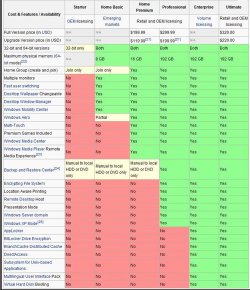
I'm just going to put this up for information sake.

click the image to enlarge
Capture11.JPG
 

My Computer

Computer Manufacturer/Model Number
* BFK Customs *
OS
W 7 64-bit Ultimate
CPU
Intel Q9550 Yorkfield
Motherboard
ASUS P5Q Pro
Memory
8GB Dominator 8500C5D
Graphics Card(s)
ATI : XFX 5870
Sound Card
Realtek HD Audio 7-1
Monitor(s) Displays
1x 47" LCD HDMI & 3x 26" LCD HDMI
Screen Resolution
1920x1080P & 1920x1200
Hard Drives
1x 80GB Intel X25-M G2 SSD : 1x 500GB & 1x 640GB WD Caviar Black(s)
PSU
Corsair 620HX
Case
Cooler Master RC-690
Cooling
Tuniq Tower 120, 2x 140mm and 3x 120mm case fans
Keyboard
Microsoft 500
Mouse
Razer Diamondback 3G
Internet Speed
14 Mb/s
Other Info
1x Koutech 3Gb/s SATA HDD Hot Swap Rack
I would like to advise you that as a student you are able to get a huge discount on Windows 7 Professional. I don't really know what the discount is where you live, but in the US it is very substantial. You can get a copy of the Windows 7 Professional for 69.98 instead of 300(retail) or 200(upgrade). I am not sure if the offer is available in Europe, but it doesn't hurt to try. I would also like to suggest Wubi. Someone else mentioned it and it is very convenient. No partitioning and messed up Windows installation if you decide to uninstall. It installs Ubuntu to your hard drive just like a regular Windows application. When you don't want it anymore, just uninstall and your done. Linux Mint 9 also has a Mint4Win on the .iso. It is just like Wubi except it is for Mint 9, which in my opinion blows Ubuntu away. It is based on Ubuntu, but just works better. Good luck.
Yes! I did a little looking around and it seems I can get Windows 7 Professional For Free!
Thank you for pointing me in this direction. Though it's only valid until I graduate, by then I'll be buying a new laptop with a legitimate copy anyway.
 

My Computer

OS
Unsure
Yes! I did a little looking around and it seems I can get Windows 7 Professional For Free!
Thank you for pointing me in this direction. Though it's only valid until I graduate, by then I'll be buying a new laptop with a legitimate copy anyway.


Glad you found a solution, thanks for posting back!
 

My Computer

Computer Manufacturer/Model Number
* BFK Customs *
OS
W 7 64-bit Ultimate
CPU
Intel Q9550 Yorkfield
Motherboard
ASUS P5Q Pro
Memory
8GB Dominator 8500C5D
Graphics Card(s)
ATI : XFX 5870
Sound Card
Realtek HD Audio 7-1
Monitor(s) Displays
1x 47" LCD HDMI & 3x 26" LCD HDMI
Screen Resolution
1920x1080P & 1920x1200
Hard Drives
1x 80GB Intel X25-M G2 SSD : 1x 500GB & 1x 640GB WD Caviar Black(s)
PSU
Corsair 620HX
Case
Cooler Master RC-690
Cooling
Tuniq Tower 120, 2x 140mm and 3x 120mm case fans
Keyboard
Microsoft 500
Mouse
Razer Diamondback 3G
Internet Speed
14 Mb/s
Other Info
1x Koutech 3Gb/s SATA HDD Hot Swap Rack
If you want a useable, Stable, Rock solid system it has to be Windows 7.
 

My Computer

Computer Manufacturer/Model Number
Packard Bell/I Media B2619UK
OS
Window's 7 Home Premium 32 Bit
CPU
Intel(R)Celeron(R)[email protected],2203Mhz,2 Core(S)2 Logic..
Motherboard
Denver 10
Memory
2GB/DDR2
Graphics Card(s)
nVidia Geforce 7050/Nforce 610i
Sound Card
Microsoft High Def Audio Device
Monitor(s) Displays
Dell 15 In
Screen Resolution
1024X768X60 Hertz
Hard Drives
Specifications
Capacity 160 GB
Speed 7200 rpm
Disk Buffer 8 MB
Brand HGST
Type HDT721016SLA380
Family Deskstar 7K1000.B
Form Factor 3.5"
IDE Interface SATA 3Gb/s
Keyboard
Standard Ps/2
Mouse
Mirosoft Ps/2
Internet Speed
4.1Mbps
Back
Top