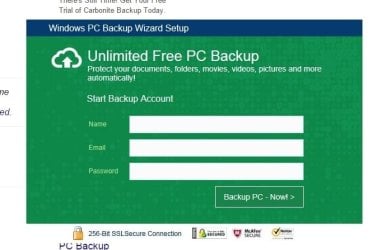
Windows PC Backup Wizard Setup - good or bad?

bula79

New member
Local time
9:30 AM
Messages
7
One of my clients recently started getting a popup on her Windows 7 computer with the text: "Critical Alert, activate windows, backup now!". You can click 'Cancel' to close the popup or 'OK' which opens another box (see attached picture) with the following text: "Windows PC Backup Wizard Setup, Unlimited Free PC Backup, Protect your documents, folders, movies, videos, pictures and more, automatically!". It asks to enter your Name, E-mail, and Password (which we did not do). There seems to be no way to close this box except by logging out of the user account (it's not in the Task Manager applications list). I am thinking this has to be a malware/bad program since there is no way to close it. I ran a malwarebytes scan but we're still getting the pop-up. I tried searching online for somebody else who received this popup but couldn't find anything. I need to get rid of this somehow and would really appreciate your help.

Thank you,
Bob
 

Attachments

  • backup.jpg
    backup.jpg
    31 KB · Views: 56

My Computer

Computer type
PC/Desktop
Computer Manufacturer/Model Number
custom build
OS
Windows 7 Home Premium 32 bit
Start > Run > MSCONFIG > Startup tab: see what's autorunning.
 

My Computer

Computer type
PC/Desktop
Computer Manufacturer/Model Number
dell precision t3400 tower
OS
Linux Lite 3.2 x64; Windows 7, 8.1
CPU
Core2Duo 2.4
Memory
6GB ddr2
Graphics Card(s)
nVidia
Hard Drives
120gb SSD, 1TB HD, 2TB HD; sata II
Internet Speed
12/2
Browser
Vivaldi, Slimjet (Chromium) x64
I appears to be a Carbonite Online Backup Software. See if it's listed in Windows Programs and Features and you're able to uninstall it.

If not, then you might have to manually delete. Instructions can be found here...
Carbonite Support Knowledge Base
 

My Computer

Computer type
PC/Desktop
OS
Windows 7 Home 64-bit
I appears to be a Carbonite Online Backup Software. See if it's listed in Windows Programs and Features and you're able to uninstall it.

If not, then you might have to manually delete. Instructions can be found here...
Carbonite Support Knowledge Base

What makes you think it's Carbonite Online Backup Software?
 

My Computer

Computer type
PC/Desktop
Computer Manufacturer/Model Number
custom build
OS
Windows 7 Home Premium 32 bit
Might be because it says "There's still time to get your free trial of Carbonite Backup Today" in the image you posted. Just a guess.
 

My Computers

System One System Two

  • Computer type
    PC/Desktop
    OS
    7 X64
    CPU
    i5 8400
    Motherboard
    gigabyte b365m ds3h
    Memory
    2x8gb 3200mhz
    Hard Drives
    various
    PSU
    pure power 11 400w cm
    Case
    Coolermaster
    Cooling
    cryorig m9i
  • Computer type
    PC/Desktop
    OS
    7x64
    CPU
    g5400
    Motherboard
    ga b365m ds3h
    Memory
    8gb ddr4 2400
    PSU
    xfx pro 450w
Might be because it says "There's still time to get your free trial of Carbonite Backup Today" in the image you posted. Just a guess.

That's just an ad from google in the background, it's not part of the program.
 
Last edited by a moderator:

My Computer

Computer type
PC/Desktop
Computer Manufacturer/Model Number
custom build
OS
Windows 7 Home Premium 32 bit
Could you post the website you found this Windows PC Backup Wizard?
 

My Computer

Computer type
PC/Desktop
Computer Manufacturer/Model Number
Home made Desktop
OS
Windows 10 Pro. 64/ version 1709 Windows 7 Pro/64
CPU
Intel i7-6800K @ 4.3
Motherboard
ASUS X-99 Deluxe II
Memory
Corsair Platinum 16 gig @2400
Graphics Card(s)
EVGA GTX 1070 OC
Monitor(s) Displays
Asus 27" LED LCD/VE278Q
Screen Resolution
1920-1080 or 1280-720 HDMI
Hard Drives
INTEL SSD 730-240 Gb Sata 3.0/
PSU
EVGA Platium 1200W
Case
Phanteks Luxe Tempered Glass 8 fans/ one radiator
Cooling
XSPC/ Water Cooled CPU
Keyboard
Das 4 Professional
Mouse
Logitech M705/MX Anywhere 2-S
Internet Speed
100 mbits
Antivirus
Microsoft Security Essentials/ Malwarebytes Premium 3.0/ SAS
Browser
I.E. 11 default/Firefox/ ISP Time Warner Cable/Spectrum
Other Info
LG BluRay Burner/
Sound system-KLipsch-THX/
Icy Dock ssd Hot Swap bays.

My Computer

Computer type
PC/Desktop
Computer Manufacturer/Model Number
custom build
OS
Windows 7 Home Premium 32 bit
I understand that.

Did you knowingly download and install this program? ( Windows PC Backup Wizard)
 

My Computer

Computer type
PC/Desktop
Computer Manufacturer/Model Number
Home made Desktop
OS
Windows 10 Pro. 64/ version 1709 Windows 7 Pro/64
CPU
Intel i7-6800K @ 4.3
Motherboard
ASUS X-99 Deluxe II
Memory
Corsair Platinum 16 gig @2400
Graphics Card(s)
EVGA GTX 1070 OC
Monitor(s) Displays
Asus 27" LED LCD/VE278Q
Screen Resolution
1920-1080 or 1280-720 HDMI
Hard Drives
INTEL SSD 730-240 Gb Sata 3.0/
PSU
EVGA Platium 1200W
Case
Phanteks Luxe Tempered Glass 8 fans/ one radiator
Cooling
XSPC/ Water Cooled CPU
Keyboard
Das 4 Professional
Mouse
Logitech M705/MX Anywhere 2-S
Internet Speed
100 mbits
Antivirus
Microsoft Security Essentials/ Malwarebytes Premium 3.0/ SAS
Browser
I.E. 11 default/Firefox/ ISP Time Warner Cable/Spectrum
Other Info
LG BluRay Burner/
Sound system-KLipsch-THX/
Icy Dock ssd Hot Swap bays.
You haven't mentioned if there is anything related in programs and features or if you tried AdwCleaner.

AdwCleaner Download

It's definitely unwanted behavior.
 

My Computer

Computer type
PC/Desktop
Computer Manufacturer/Model Number
Self Built
OS
Win 10 Pro x64
CPU
Intel I5-2500K @3.3GHz
Motherboard
Asrock P67 Extreme4
Memory
16GB G.Skill Ripjaws X (4x4GB)
Graphics Card(s)
EVGA GeForce 750 Ti SC 2GB
Sound Card
ASUS Xonar DG 5.1 Channels 24-bit 96KHz PCI Interface Sound
Monitor(s) Displays
auria eq2367
Screen Resolution
1920 x 1080
Hard Drives
250GB Samsung 850 EVO SSD
1TB WD Blue
1TB Hitachi
PSU
SeaSonic X 650W 80 Plus Gold
Case
Corsair Obsidian 750D
Cooling
Corsair H60, Three 140mm case fans
Keyboard
Logitech Wireless Keyboard K520
Mouse
Logitech Wireless Mouse M310
Internet Speed
Wave Broadband ~ 100 dn 5 up
Antivirus
Windows Defender, Malwarebytes Premium
Browser
Edge, IE11, Chrome
Other Info
Laptop specs: HP g7-1365dx /
CPU: AMD A6-3420M APU with Radeon(tm) HD Graphics /
RAM: Crucial 8Gb (2x4Gb) /
SSD: Crucial M4-CT128M4SSD2 ATA Device/ FW 000F /
GFX: AMD Radeon HD 6520G /
OS: Windows 10 Pro x64
Good idea Derek.

AdwCleaner Download

That is why I asked the question. To know whether the program was install intentionally by the owner/operator of the computer.

The program might also be in msconfig/Startup or Services.

What I don't know is if bula79 intended to install this program or it snuck in his/her computer.

When I Google Windows PC Backup Wizard I find many things. Here are a couple.
Their are many more.

Set up or change automatic backup settings - Windows Help

https://www.barracuda.com/products/backup?&a=[google_na]backup_search&grp=cloud_backup&ad=53122840341&kw=backup%20cloud&gclid=CKvz9sDzrsYCFdgBgQode6MAuw
 

My Computer

Computer type
PC/Desktop
Computer Manufacturer/Model Number
Home made Desktop
OS
Windows 10 Pro. 64/ version 1709 Windows 7 Pro/64
CPU
Intel i7-6800K @ 4.3
Motherboard
ASUS X-99 Deluxe II
Memory
Corsair Platinum 16 gig @2400
Graphics Card(s)
EVGA GTX 1070 OC
Monitor(s) Displays
Asus 27" LED LCD/VE278Q
Screen Resolution
1920-1080 or 1280-720 HDMI
Hard Drives
INTEL SSD 730-240 Gb Sata 3.0/
PSU
EVGA Platium 1200W
Case
Phanteks Luxe Tempered Glass 8 fans/ one radiator
Cooling
XSPC/ Water Cooled CPU
Keyboard
Das 4 Professional
Mouse
Logitech M705/MX Anywhere 2-S
Internet Speed
100 mbits
Antivirus
Microsoft Security Essentials/ Malwarebytes Premium 3.0/ SAS
Browser
I.E. 11 default/Firefox/ ISP Time Warner Cable/Spectrum
Other Info
LG BluRay Burner/
Sound system-KLipsch-THX/
Icy Dock ssd Hot Swap bays.
I doubt it was installed intentionally, probably in some installer. Sounds too aggressive to be bloatware too.

Interesting that MBAM didn't see it as a threat...
 

My Computer

Computer type
PC/Desktop
Computer Manufacturer/Model Number
Self Built
OS
Win 10 Pro x64
CPU
Intel I5-2500K @3.3GHz
Motherboard
Asrock P67 Extreme4
Memory
16GB G.Skill Ripjaws X (4x4GB)
Graphics Card(s)
EVGA GeForce 750 Ti SC 2GB
Sound Card
ASUS Xonar DG 5.1 Channels 24-bit 96KHz PCI Interface Sound
Monitor(s) Displays
auria eq2367
Screen Resolution
1920 x 1080
Hard Drives
250GB Samsung 850 EVO SSD
1TB WD Blue
1TB Hitachi
PSU
SeaSonic X 650W 80 Plus Gold
Case
Corsair Obsidian 750D
Cooling
Corsair H60, Three 140mm case fans
Keyboard
Logitech Wireless Keyboard K520
Mouse
Logitech Wireless Mouse M310
Internet Speed
Wave Broadband ~ 100 dn 5 up
Antivirus
Windows Defender, Malwarebytes Premium
Browser
Edge, IE11, Chrome
Other Info
Laptop specs: HP g7-1365dx /
CPU: AMD A6-3420M APU with Radeon(tm) HD Graphics /
RAM: Crucial 8Gb (2x4Gb) /
SSD: Crucial M4-CT128M4SSD2 ATA Device/ FW 000F /
GFX: AMD Radeon HD 6520G /
OS: Windows 10 Pro x64
Well some of these Windows Backup programs are okay and downloaded by the operator and some are not okay and are a PUP that snuck in without the operator knowledge.

If it is a okay program intentionally installed by the owner, then Malwarebytes would not stop it.

A little more information from bula would be helpful.
 

My Computer

Computer type
PC/Desktop
Computer Manufacturer/Model Number
Home made Desktop
OS
Windows 10 Pro. 64/ version 1709 Windows 7 Pro/64
CPU
Intel i7-6800K @ 4.3
Motherboard
ASUS X-99 Deluxe II
Memory
Corsair Platinum 16 gig @2400
Graphics Card(s)
EVGA GTX 1070 OC
Monitor(s) Displays
Asus 27" LED LCD/VE278Q
Screen Resolution
1920-1080 or 1280-720 HDMI
Hard Drives
INTEL SSD 730-240 Gb Sata 3.0/
PSU
EVGA Platium 1200W
Case
Phanteks Luxe Tempered Glass 8 fans/ one radiator
Cooling
XSPC/ Water Cooled CPU
Keyboard
Das 4 Professional
Mouse
Logitech M705/MX Anywhere 2-S
Internet Speed
100 mbits
Antivirus
Microsoft Security Essentials/ Malwarebytes Premium 3.0/ SAS
Browser
I.E. 11 default/Firefox/ ISP Time Warner Cable/Spectrum
Other Info
LG BluRay Burner/
Sound system-KLipsch-THX/
Icy Dock ssd Hot Swap bays.
To be clear this is not my computer, I am a field technician and it is one of our clients computers. The client did not start receiving this message until a few days ago. It was definitely not installed intentionally.

I have not heard of AdwCleaner before. Do you think running this could pick up something that MalwareBytes may have missed?

Also, the clients Symantec Endpoint Protection definitions were out of date by about 6 months (I had no control over this). When I mentioned this to my boss he said running a scan with up to date definitions wouldn't pick up anything if Malwarebytes didn't pick it up. I'm not sure if I buy that though.

And lastly the Windows automatic updates were set to manual (again, I had no control over this) and there were about 130+ updates that I installed when I was there. Is it possible that the issue could go away after installing the updates? My guess is probably not.
 
Last edited:

My Computer

Computer type
PC/Desktop
Computer Manufacturer/Model Number
custom build
OS
Windows 7 Home Premium 32 bit
Well well well all kinds of new information. Thank

AdwCleaner is use by many forum members and it does work well.

I would recommend getting it from the Bleeping Computer site.

AdwCleaner Download


adwcleaner-1 (2).JPG
 

My Computer

Computer type
PC/Desktop
Computer Manufacturer/Model Number
Home made Desktop
OS
Windows 10 Pro. 64/ version 1709 Windows 7 Pro/64
CPU
Intel i7-6800K @ 4.3
Motherboard
ASUS X-99 Deluxe II
Memory
Corsair Platinum 16 gig @2400
Graphics Card(s)
EVGA GTX 1070 OC
Monitor(s) Displays
Asus 27" LED LCD/VE278Q
Screen Resolution
1920-1080 or 1280-720 HDMI
Hard Drives
INTEL SSD 730-240 Gb Sata 3.0/
PSU
EVGA Platium 1200W
Case
Phanteks Luxe Tempered Glass 8 fans/ one radiator
Cooling
XSPC/ Water Cooled CPU
Keyboard
Das 4 Professional
Mouse
Logitech M705/MX Anywhere 2-S
Internet Speed
100 mbits
Antivirus
Microsoft Security Essentials/ Malwarebytes Premium 3.0/ SAS
Browser
I.E. 11 default/Firefox/ ISP Time Warner Cable/Spectrum
Other Info
LG BluRay Burner/
Sound system-KLipsch-THX/
Icy Dock ssd Hot Swap bays.
I just solved this issue...

I found the culprit, and it's not picked up by most adware/virus cleaners as of yet.

The .exe launcher for this file is located in a folder called PCWDownloader in Program Files / Program Files (x86). Delete the PCWDownloader and PCWUpdated folders, remove references to them in the Registry and remove any scheduled tasks regarding these folders in the Task Scheduler.

As of the time of this post, you have to manually remove this particular pop-up.
 

My Computer

Computer type
PC/Desktop
Computer Manufacturer/Model Number
custom build
OS
Windows 7 Ultimate x64
Any computer that was that far behind in updates could of gathered anything if the computer goes on line.

Is this a company computer?
What Windows 7 is being used?
Does this computer access a company domain or network?


The reason I ask is according to your posted picture the computer is using a SSL connection for this program. My thinking is a infection/PUP would not be using such a connection and the installed backup program hasn't been used just like the security updates haven't been kept up with.

Is this program found in Add and Remove and if so what does the properties claim as the owner?
Example:
*Microsoft
*Carbonite
Does this program show up in msconfig/Startup or Services?

What I'm trying to do is do no harm.
This computer is not yours or is it mine.
So I'm trying not to remove something that should be there but has just been neglected by the user of the computer.

Completing this tutorial by Brink could shine some light on things.
Post the log here in this thread.

http://www.sevenforums.com/windows-...ne-activation-issue-posting-instructions.html

Completing this would also be helpful. Just post the information here also.

http://www.sevenforums.com/tutorials/180324-system-info-see-your-system-specs.html
 

My Computer

Computer type
PC/Desktop
Computer Manufacturer/Model Number
Home made Desktop
OS
Windows 10 Pro. 64/ version 1709 Windows 7 Pro/64
CPU
Intel i7-6800K @ 4.3
Motherboard
ASUS X-99 Deluxe II
Memory
Corsair Platinum 16 gig @2400
Graphics Card(s)
EVGA GTX 1070 OC
Monitor(s) Displays
Asus 27" LED LCD/VE278Q
Screen Resolution
1920-1080 or 1280-720 HDMI
Hard Drives
INTEL SSD 730-240 Gb Sata 3.0/
PSU
EVGA Platium 1200W
Case
Phanteks Luxe Tempered Glass 8 fans/ one radiator
Cooling
XSPC/ Water Cooled CPU
Keyboard
Das 4 Professional
Mouse
Logitech M705/MX Anywhere 2-S
Internet Speed
100 mbits
Antivirus
Microsoft Security Essentials/ Malwarebytes Premium 3.0/ SAS
Browser
I.E. 11 default/Firefox/ ISP Time Warner Cable/Spectrum
Other Info
LG BluRay Burner/
Sound system-KLipsch-THX/
Icy Dock ssd Hot Swap bays.
I doubt it was installed intentionally, probably in some installer. Sounds too aggressive to be bloatware too.

Interesting that MBAM didn't see it as a threat...

I found the culprit, and it's not picked up by most adware/virus cleaners as of yet. <snip>

MBAM is pretty aggressive about PUPs, but it does not pick up all adware.

If you have a sample of a possible PUP or malware that is not yet in the MBAM database, you may wish to submit the sample to the Research Team.

Instructions for doing so are HERE and HERE
The Research Center forum for Rogues is HERE and for malware is HERE

Cheers,
 

My Computer

Computer type
PC/Desktop
Computer Manufacturer/Model Number
Dell Studio XPS 8500
OS
OEM Windows 7 Ult (x64) SP1
CPU
Intel Core-i7 3770 @ 3.4 GHz
Motherboard
"Dell" branded
Memory
16 GB DDR3 SDRAM @ 1333 MHz
Graphics Card(s)
NVidia GeForce GT620 1 GB
Sound Card
THX TruStudio PC
Monitor(s) Displays
Dell U2410 Full HD
Hard Drives
2.0 TB SATA2 @ 7200 RPM
PSU
350W
Keyboard
MS 4000 Ergon - Wired
Mouse
Logitech Anywhere MX
Internet Speed
Cable HSI w/Turbo (router)
Antivirus
KIS-MBAM Premium-MBAE Premium
Browser
Fx (current version); IE
Other Info
And a Win7/64 Pro laptop; And a Win10/64 Pro desktop.
Regarding AdwCleaner and Malwarebytes on this issue

I've already submitted a sample to both software developers.

As for the removal, the "Windows PC Backup Wizard" is a manual-removal pop-up for now. As with all malware/spyware databases, it takes time for these types of things to make it into mainstream databases for automatic removal, which is why I have taken the time to post the manual removal method.

Adwcleaner, at the time of my post, does NOT remove this particular pop-up. This pop-up is nothing more than an executable called by a Scheduled Task within Windows Task Scheduler. It is referenced in the Registry as well, but it isn't in any autorun directories.

I'm only trying to help a fellow tech with this pop-up as I had to deal with it merely a couple of hours ago, and I know first-hand that as of today, June 27, 2015, this pop-up isn't detected by Malwarebytes, Adwcleaner, or any other mainstream antivirus tool. It is new, and I have sent a sample to the powers that be.
 

My Computer

Computer type
PC/Desktop
Computer Manufacturer/Model Number
custom build
OS
Windows 7 Ultimate x64
I doubt it was installed intentionally, probably in some installer. Sounds too aggressive to be bloatware too.

Interesting that MBAM didn't see it as a threat...

I found the culprit, and it's not picked up by most adware/virus cleaners as of yet. <snip>

MBAM is pretty aggressive about PUPs, but it does not pick up all adware.

If you have a sample of a possible PUP or malware that is not yet in the MBAM database, you may wish to submit the sample to the Research Team.

Instructions for doing so are HERE and HERE
The Research Center forum for Rogues is HERE and for malware is HERE

Cheers,

It's not an installed program, which is why Mbam doesn't pick it up as a PUP - it's simply a Scheduled Task that calls on an executable that is placed into the Program Files folder. When searching for this file in the Registry, it isn't in any of the program files directories - only the Scheduled Task references.
 

My Computer

Computer type
PC/Desktop
Computer Manufacturer/Model Number
custom build
OS
Windows 7 Ultimate x64
Back
Top