Windows PE Rescue Disk for Macrium Reflect Free - testing question

maryeleek

New member
Member
Local time
11:29 AM
Messages
69
I have just installed the free Macrium Reflect and created the rescue disk. It is suggested to test it, which I did. The CD did boot and it appeared files were being copied but then, nothing. Nothing ever showed up on my monitor, the screen just remained black.

Do I need to have an image file for it to locate, in order for the process to go any further? I haven't yet created an image.

My thanks,

Mary
 

My Computer My Computer

Computer type
PC/Desktop
Computer Manufacturer/Model Number
Dell Studio XPS 8100
OS
Windows 7 Pro sp1 64 bit
CPU
i7 quad core
Motherboard
Dell flavor
Memory
16
Graphics Card(s)
ATI Radeon HD 5700 series
Hard Drives
esata 1 tb
SS 1 tb
Antivirus
BitDefender
Browser
Firefox; IE
Welcome Mary
When you make the image, for the first time, you will set up the destination. I use an external hard drive. When you want to restore that image, you make sure that the drive is connected. You will then see all the images on the drive.
 

My Computer My Computer

Computer type
PC/Desktop
Computer Manufacturer/Model Number
Dell XPS 420
OS
Windows 10, Home Clean Install
CPU
Intel Core2 processsor Q8200(2.33Ghz 1333FSB) Quad Core Tech
Motherboard
Dell
Memory
6 gb
Graphics Card(s)
ATI Radeon 256MB HD3650
Sound Card
Intergrated 7.1 Channel Audio
Monitor(s) Displays
Dell SP2009W 20"
Hard Drives
640 GB Serial ATA Hard drive
Cooling
Fan
Keyboard
Dell USB Keyboard
Mouse
Dell Premium Optical USB
Internet Speed
DSL 2.85
Thank you for your prompt reply. Do you think this is why, when attempting to test my rescue disk, that the monitor remained black/blank, because there was no image file for the restore function to locate and display on the screen? It kept searching for something that wasn't available?

I've never seen anyone say that to test the rescue CD, you first need to create an image. I had the impression that the testing of the rescue disk came before creating the image (backup) file as it is always stressed to do this. Am I getting ahead of myself? :D

Mary
 

My Computer My Computer

Computer type
PC/Desktop
Computer Manufacturer/Model Number
Dell Studio XPS 8100
OS
Windows 7 Pro sp1 64 bit
CPU
i7 quad core
Motherboard
Dell flavor
Memory
16
Graphics Card(s)
ATI Radeon HD 5700 series
Hard Drives
esata 1 tb
SS 1 tb
Antivirus
BitDefender
Browser
Firefox; IE
I think the rescue media should be able to create a backup image even if none have been created.
If booting the rescue disc shows a blank/black screen something is wrong, imho.
I've never booted a pc with a MR rescue disc that had no backup images for that pc, so i'm just guessing.

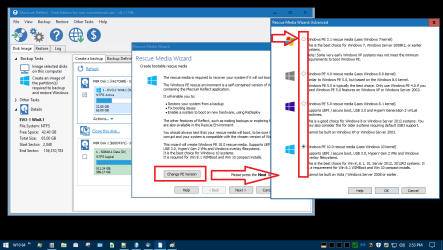
What PE version did you create the rescue disc with ?
Can you try the MR rescue disc on a different pc to see if it displays correctly ?

You can try different PE versions if you want, to see if that makes a difference.

I've tried/tested them all as best i can, and they all work for me, but i do have multi-boot pc's.

MacriumPE.png
 

My Computer My Computer

Computer type
PC/Desktop
Computer Manufacturer/Model Number
home built
OS
Multi-Boot W7_Pro_x64 W8.1_Pro_x64 W10_Pro_x64 +Linux_VMs +Chromium_VM
CPU
AMD Athlon II x4 620
Motherboard
Gigabyte GA-MA785G-UD3H
Memory
6GB GSkill DDR2 800
Graphics Card(s)
AMD 4670 GPU + AMD 4200 IGP
Sound Card
on board Realtek ALC889A
Monitor(s) Displays
RCA 40" LCD TV, Insignia 32" LCD TV, HP 15" LCD monitor
Screen Resolution
1680 x 1050
Hard Drives
OCZ Vertex 3 120GB,
Samsung F3 1TB (3),
Several others - WD, Seagate, Hitachi, ...
PSU
Corsair 500 W
Case
Rosewill mid tower
Cooling
CM 90mm rifle
Keyboard
Gyration wireless, Logitech wireless, Dell USB wired
Mouse
Gyration wireless, Logitech wireless, V7 USB wired
Internet Speed
Spectrum - 100Mbps D / 10Mbps U
Antivirus
Avast, MBAM3, EMET, WinPatrol
Browser
Pale Moon, Firefox, IE
Other Info
2 multi-boot PC's
Mainly HTPC/Office/Gen purpose (no gaming).
Trendnet USB KVM.
LG DVD burner/Blue Ray Player.
Tray system for removable SATA backup drives.

Not currently OCd, under-volted.
I use Hybrid sleep, rarely re-boot or shutdown.

Hauppauge HD-PVR, Avermedia PCIe TV Tuner, Hauppauge PCI TV Tuner.

My Computer My Computer

Computer type
PC/Desktop
Computer Manufacturer/Model Number
Dell XPS 420
OS
Windows 10, Home Clean Install
CPU
Intel Core2 processsor Q8200(2.33Ghz 1333FSB) Quad Core Tech
Motherboard
Dell
Memory
6 gb
Graphics Card(s)
ATI Radeon 256MB HD3650
Sound Card
Intergrated 7.1 Channel Audio
Monitor(s) Displays
Dell SP2009W 20"
Hard Drives
640 GB Serial ATA Hard drive
Cooling
Fan
Keyboard
Dell USB Keyboard
Mouse
Dell Premium Optical USB
Internet Speed
DSL 2.85
I have tried latest version of Macrium Reflect Free, uninstalled and then reinstalled my v5 Macrium Reflect Professional on my desktop with Win 7 Pro OS. I thought maybe the lastest version of Macrium was conflicting with something on my computer so decided to uninstall and reinstall my older purchased version of Macrium v5 Pro. I turned off my Anti Virus software before installing it.

As with the free version of Macrium Reflect, each time I attempt to test the rescue disk just created by the Macrium v5, which always finishes and tells me it is successfully created, it loads at boot but shortly after the screen tells me it is analyzing the disks, my monitor goes black. I cannot see anything and nothing ever displays after this. If I cannot see how to locate and install my backup image, then this is not trustworthy for me. I know it must be something unique to my system. I did some research and it was suggested I remove the drive letter on the small partition that Dell creates as this was causing the free Macrium to throw an error. Once I did that, the free Macrium was able to successfully create a backup image file, which was created on a 1TB USB SSD drive. All reported successful and I can see the files there. It is just the problem with the rescue disk. If it doesn't work, I have no way to restore if the need ever arose.

Has anyone ever experienced this situation and if so, could you share your solution with me? I have no problems with my computer, plenty of unused space on my C drive, which is an internal 1 TB SSD. My monitor is a Samsung SyncMaster 245BW and I've had no problems with it.

I realize the need to have a good backup and would like to have something I feel I can rely on.

Thank you for taking the time to read. All advice gratefully accepted.

Mary

 

My Computer My Computer

Computer type
PC/Desktop
Computer Manufacturer/Model Number
Dell Studio XPS 8100
OS
Windows 7 Pro sp1 64 bit
CPU
i7 quad core
Motherboard
Dell flavor
Memory
16
Graphics Card(s)
ATI Radeon HD 5700 series
Hard Drives
esata 1 tb
SS 1 tb
Antivirus
BitDefender
Browser
Firefox; IE
I just re read one of the replies and I see it is suggested to try different PE versions when creating the rescue disk so I will give that a try. I've always used the 3.1 (?), the first in a list of three versions. I don't remember these different versions being offered on the free Macrium but my v5 does offer a list of three to chose from when creating the rescue disk. Will try creating with a different one. Thanks for the suggestion.

Mary
 

My Computer My Computer

Computer type
PC/Desktop
Computer Manufacturer/Model Number
Dell Studio XPS 8100
OS
Windows 7 Pro sp1 64 bit
CPU
i7 quad core
Motherboard
Dell flavor
Memory
16
Graphics Card(s)
ATI Radeon HD 5700 series
Hard Drives
esata 1 tb
SS 1 tb
Antivirus
BitDefender
Browser
Firefox; IE
I use v5 but use a bootable Macruim Reflect PE USB to boot from. I believe that gets around any driver issues for CD drives.
 

My Computer My Computer

Computer type
Laptop
Computer Manufacturer/Model Number
ASUS
OS
Microsoft Windows 7 Home Premium 64-bit 7601 Multiprocessor Free Service Pack 1
CPU
AMD C-60 APU with Radeon(tm) HD Graphics
Motherboard
ASUSTeK COMPUTER INC. X501U
Memory
4.00 GB
Graphics Card(s)
AMD Radeon HD 6290 Graphics
Sound Card
(1) AMD High Definition Audio Device (2) Realtek High Defi
Screen Resolution
1366 x 768 x 32 bits (4294967296 colors) @ 60 Hz
Hard Drives
Hitachi HTS545050A7E380 SATA Disk Device
Antivirus
Comodo CIS & FW, SecureAplus App Whitelisting, Threatfire
Browser
Cyberfox 64bit, Opera 64bit, Airfox
Other Info
Spy-The-Spy, HitmanPro.Alert, Norton Connect Safe, MJRegWatcher, BitDefender TrafficLight, Voodoo Shield, Zemana AntiMalware
Mary,
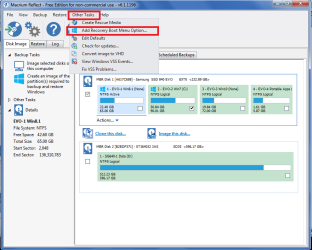
Another thing you can try is to add a Boot Menu option for Macrium.

To do this, run Macrium (installed) in Windows.
In the MR menu select Other Tasks and then select Add Recovery Boot Menu Option
Then add it for whatever PE version you want.
This is not a substitute for a reliable rescue CD/USB,
If the HD/SSD fails, this boot option won't work !
It's just something you can test to see if the issue is with a bootable CD/USB.
If you do this, when you boot the PC you should be able to select Macrium as the "boot device".

Here's a snip of what i'm trying to explain:

MacriumBootOption.png
 

My Computer My Computer

Computer type
PC/Desktop
Computer Manufacturer/Model Number
home built
OS
Multi-Boot W7_Pro_x64 W8.1_Pro_x64 W10_Pro_x64 +Linux_VMs +Chromium_VM
CPU
AMD Athlon II x4 620
Motherboard
Gigabyte GA-MA785G-UD3H
Memory
6GB GSkill DDR2 800
Graphics Card(s)
AMD 4670 GPU + AMD 4200 IGP
Sound Card
on board Realtek ALC889A
Monitor(s) Displays
RCA 40" LCD TV, Insignia 32" LCD TV, HP 15" LCD monitor
Screen Resolution
1680 x 1050
Hard Drives
OCZ Vertex 3 120GB,
Samsung F3 1TB (3),
Several others - WD, Seagate, Hitachi, ...
PSU
Corsair 500 W
Case
Rosewill mid tower
Cooling
CM 90mm rifle
Keyboard
Gyration wireless, Logitech wireless, Dell USB wired
Mouse
Gyration wireless, Logitech wireless, V7 USB wired
Internet Speed
Spectrum - 100Mbps D / 10Mbps U
Antivirus
Avast, MBAM3, EMET, WinPatrol
Browser
Pale Moon, Firefox, IE
Other Info
2 multi-boot PC's
Mainly HTPC/Office/Gen purpose (no gaming).
Trendnet USB KVM.
LG DVD burner/Blue Ray Player.
Tray system for removable SATA backup drives.

Not currently OCd, under-volted.
I use Hybrid sleep, rarely re-boot or shutdown.

Hauppauge HD-PVR, Avermedia PCIe TV Tuner, Hauppauge PCI TV Tuner.

My Computer My Computer

Computer type
PC/Desktop
Computer Manufacturer/Model Number
home built
OS
Multi-Boot W7_Pro_x64 W8.1_Pro_x64 W10_Pro_x64 +Linux_VMs +Chromium_VM
CPU
AMD Athlon II x4 620
Motherboard
Gigabyte GA-MA785G-UD3H
Memory
6GB GSkill DDR2 800
Graphics Card(s)
AMD 4670 GPU + AMD 4200 IGP
Sound Card
on board Realtek ALC889A
Monitor(s) Displays
RCA 40" LCD TV, Insignia 32" LCD TV, HP 15" LCD monitor
Screen Resolution
1680 x 1050
Hard Drives
OCZ Vertex 3 120GB,
Samsung F3 1TB (3),
Several others - WD, Seagate, Hitachi, ...
PSU
Corsair 500 W
Case
Rosewill mid tower
Cooling
CM 90mm rifle
Keyboard
Gyration wireless, Logitech wireless, Dell USB wired
Mouse
Gyration wireless, Logitech wireless, V7 USB wired
Internet Speed
Spectrum - 100Mbps D / 10Mbps U
Antivirus
Avast, MBAM3, EMET, WinPatrol
Browser
Pale Moon, Firefox, IE
Other Info
2 multi-boot PC's
Mainly HTPC/Office/Gen purpose (no gaming).
Trendnet USB KVM.
LG DVD burner/Blue Ray Player.
Tray system for removable SATA backup drives.

Not currently OCd, under-volted.
I use Hybrid sleep, rarely re-boot or shutdown.

Hauppauge HD-PVR, Avermedia PCIe TV Tuner, Hauppauge PCI TV Tuner.
I have just installed the free Macrium Reflect and created the rescue disk. It is suggested to test it, which I did. The CD did boot and it appeared files were being copied but then, nothing. Nothing ever showed up on my monitor, the screen just remained black.

Do I need to have an image file for it to locate, in order for the process to go any further? I haven't yet created an image.

My thanks,

Mary

When you are using or testing the Rescue Disc is does take sometime for the disc to load & the system to respond, so don't get alarmed if it seems not to be responding, just give it plenty of time.
 

My Computer My Computer

Computer type
PC/Desktop
Computer Manufacturer/Model Number
Self built using existing case
OS
Windows 7 Home Premium 64 bit sp1
CPU
Intel i5 3570 3.4Ghz Ivy Bridge SKT 1155 quad core
Motherboard
Gigabyte Z77-HD3 SKT 1155 2xSata 3, 4x USB 3.0
Memory
G-Skill Rip Jaws 16Gb (8x2) DDR3 -1600 PC3 12800 CL 10 red
Graphics Card(s)
Gigabyte NVIDIA GT610 1Gb DDR3 810/1200 PCI-E 2.0 Silent
Sound Card
NVIDIA High Definition & Realtech High Definition Audio
Monitor(s) Displays
2 x Philips 226V4L 16:9 aspect ratio
Screen Resolution
1920 x 1080 HD
Hard Drives
Samsung 840 Pro 256gb SSD, SATA 3.
Hitachi Touro Portable 1tb, USB 3.0 HDD used for image b/ups.
PSU
Corsair VS450
Case
Codeng
Cooling
PSU fan & CPU fan
Keyboard
Logitech
Mouse
Logitech Wireless trackball M570
Internet Speed
Wireless 3G. 3mg down & 550kb up.
Antivirus
Bitdefender Internet Security 2020
Browser
Opera (Current Version) & Firefox
Other Info
MS Office 2013 Pro. Davis weather station software. MGE Nova 600 avr UPS.
I use the newest version of Macrium Reflect.
I have found that a (PE) Recovery Disk disk that was set up on a MBR computer would not work on a UEIF computer.
Simple problem to solve. I now have a (PE) Recovery Disk for MBR and one for UEIF.

This may or may not be a problem in your case.

Jack
 

My Computer My Computer

Computer type
PC/Desktop
Computer Manufacturer/Model Number
Home made Desktop
OS
Windows 10 Pro. 64/ version 1709 Windows 7 Pro/64
CPU
Intel i7-6800K @ 4.3
Motherboard
ASUS X-99 Deluxe II
Memory
Corsair Platinum 16 gig @2400
Graphics Card(s)
EVGA GTX 1070 OC
Monitor(s) Displays
Asus 27" LED LCD/VE278Q
Screen Resolution
1920-1080 or 1280-720 HDMI
Hard Drives
INTEL SSD 730-240 Gb Sata 3.0/
PSU
EVGA Platium 1200W
Case
Phanteks Luxe Tempered Glass 8 fans/ one radiator
Cooling
XSPC/ Water Cooled CPU
Keyboard
Das 4 Professional
Mouse
Logitech M705/MX Anywhere 2-S
Internet Speed
100 mbits
Antivirus
Microsoft Security Essentials/ Malwarebytes Premium 3.0/ SAS
Browser
I.E. 11 default/Firefox/ ISP Time Warner Cable/Spectrum
Other Info
LG BluRay Burner/
Sound system-KLipsch-THX/
Icy Dock ssd Hot Swap bays.
I still have the last version of free V5 on my main PC using the v3.1 rescue pe. I have V6 of Macrium free on another PC and the v5 pe. I generally boot from a USB flash drive but if I boot a v5 pe CD it seems to take a long time as stated by Ranger4 but it eventually gets there and you should see the appropriate Macrium rescue screen. You definitely don't need an existing image for this screen to appear.
 

My Computer My Computer

Computer type
PC/Desktop
Computer Manufacturer/Model Number
Own build
OS
Windows 7x64 Home Premium SP1
CPU
Intel i7 2600k
Motherboard
ASUS P8Z68 Deluxe
Memory
G.Skill Ripjaws (DDR3-1600) 2x4GB
Graphics Card(s)
Nvidia GeForce GTS 450; Intel HD Graphics 3000(GT2+)
Monitor(s) Displays
Dell Ultrasharp IPS panel U2311H, Samsung SyncMaster P2350
Screen Resolution
1920x1080
Hard Drives
Samsung 850 Pro SSD 256GB, Samsung SSD 840 120GB, Seagates 1TB Barracuda ST31000528AS x2
PSU
Seasonic M12II 520W
Case
Lian Li Lancool PC-K60
Cooling
Case: 1x120mm, 3x140mm CPU: Hyper 212+
Keyboard
Logitech MK520 (wireless)
Mouse
Logitech MK520
Internet Speed
6-7 Mbps
Antivirus
Norton Security Premium, Malwarebytes on 2 (MSE on 3rd PC)
Browser
FireFox
Other Info
Audio: Logitech Z523 2.1
I normally use a USB thumb drive to create a rescue media but I do have an existing CD rescue media I created long ago with Win PE 3 that uses the W7 kernel. It seems to boot fine on my old Dell desktop and doesn't take very long (less than a minute) to get to the Macrium User Interface screen.

I would try to create another rescue media using a brand new CD, or different CD/DVD drive if you have one. It's also possible the CD/DVD drive you're using in creating the rescue media is responsible, too. If that's the case, the alternative is to use a USB thumb drive instead if feasible.
 

My Computer My Computer

Computer type
PC/Desktop
OS
Windows 7 Home 64-bit
I normally use a USB thumb drive to create a rescue media but I do have an existing CD rescue media I created long ago with Win PE 3 that uses the W7 kernel. It seems to boot fine on my old Dell desktop and doesn't take very long (less than a minute) to get to the Macrium User Interface screen.

I would try to create another rescue media using a brand new CD, or different CD/DVD drive if you have one. It's also possible the CD/DVD drive you're using in creating the rescue media is responsible, too. If that's the case, the alternative is to use a USB thumb drive instead if feasible.

As you say the wait time is probably about a minute, but that minute can seem an eternity when all you see is a blank screen & you are in a state of panic after suffering a major crash & have to reinstall an image to recover.
 

My Computer My Computer

Computer type
PC/Desktop
Computer Manufacturer/Model Number
Self built using existing case
OS
Windows 7 Home Premium 64 bit sp1
CPU
Intel i5 3570 3.4Ghz Ivy Bridge SKT 1155 quad core
Motherboard
Gigabyte Z77-HD3 SKT 1155 2xSata 3, 4x USB 3.0
Memory
G-Skill Rip Jaws 16Gb (8x2) DDR3 -1600 PC3 12800 CL 10 red
Graphics Card(s)
Gigabyte NVIDIA GT610 1Gb DDR3 810/1200 PCI-E 2.0 Silent
Sound Card
NVIDIA High Definition & Realtech High Definition Audio
Monitor(s) Displays
2 x Philips 226V4L 16:9 aspect ratio
Screen Resolution
1920 x 1080 HD
Hard Drives
Samsung 840 Pro 256gb SSD, SATA 3.
Hitachi Touro Portable 1tb, USB 3.0 HDD used for image b/ups.
PSU
Corsair VS450
Case
Codeng
Cooling
PSU fan & CPU fan
Keyboard
Logitech
Mouse
Logitech Wireless trackball M570
Internet Speed
Wireless 3G. 3mg down & 550kb up.
Antivirus
Bitdefender Internet Security 2020
Browser
Opera (Current Version) & Firefox
Other Info
MS Office 2013 Pro. Davis weather station software. MGE Nova 600 avr UPS.
Just to clarify. My if I boot a pe3 rescue media for my version 5 Macrium then it does relatively quickly. If I boot a pe5 rescue media for my version 6 Macrium then it takes considerably longer. The first time I thought something was wrong - be patient.
 

My Computer My Computer

Computer type
PC/Desktop
Computer Manufacturer/Model Number
Own build
OS
Windows 7x64 Home Premium SP1
CPU
Intel i7 2600k
Motherboard
ASUS P8Z68 Deluxe
Memory
G.Skill Ripjaws (DDR3-1600) 2x4GB
Graphics Card(s)
Nvidia GeForce GTS 450; Intel HD Graphics 3000(GT2+)
Monitor(s) Displays
Dell Ultrasharp IPS panel U2311H, Samsung SyncMaster P2350
Screen Resolution
1920x1080
Hard Drives
Samsung 850 Pro SSD 256GB, Samsung SSD 840 120GB, Seagates 1TB Barracuda ST31000528AS x2
PSU
Seasonic M12II 520W
Case
Lian Li Lancool PC-K60
Cooling
Case: 1x120mm, 3x140mm CPU: Hyper 212+
Keyboard
Logitech MK520 (wireless)
Mouse
Logitech MK520
Internet Speed
6-7 Mbps
Antivirus
Norton Security Premium, Malwarebytes on 2 (MSE on 3rd PC)
Browser
FireFox
Other Info
Audio: Logitech Z523 2.1
Back
Top