Windows Photo Viewer can't open .jpg

synezis

New member
Local time
1:31 AM
Messages
4
Location
Niš, Серб&#
Since few days ago there are no thumbnails on my newly downloaded .jpg's. I'm using Opera 16.0 Internet browser. When I open my pictures in Windows Photo Viewer it says:

"Windows Photo Viewer can't open this picture because either Photo Viewer doesn't support this file format, or you don't have the latest updates to Photo Viewer"

I wasn't installing any programs lately or messing around with drivers, and I even tried opening these pictures with Microsoft Office Picture Manager and it just shows broken picture icon.

I am doing a lot of graphic design on my notebook so this is very important to me. And if anyone have any idea on how to fix this and what is causing this problem, please help.
 
Last edited:

My Computer My Computer

At a glance

Windows 7 Ultimate 32-bitIntel® Premium® CPU P6200 (2.13GHz, 3MB L3 ca...3GB DDR3 MemoryyAMD Radeon™ HD 6370M 512MBVRAM
Computer type
Laptop
Computer Manufacturer/Model Number
Acer
OS
Windows 7 Ultimate 32-bit
CPU
Intel® Premium® CPU P6200 (2.13GHz, 3MB L3 cache)
Memory
3GB DDR3 Memoryy
Graphics Card(s)
AMD Radeon™ HD 6370M 512MBVRAM
Monitor(s) Displays
Generic PnP Monitor
Hard Drives
500GB WDC WD5000BEVT-22A0RT0 ATA Device
Antivirus
AVG Internet Security 2011
Browser
Opera 16.0
Welcome to the Seven Forums

Are you sure they are being saved as a .jpg?

Have you tried a different browser(IE, Firefox)?

Post a link to one of the images you are having trouble with and I will look at it.

Jerry
 

My Computer My Computer

At a glance

Win 7 Pro x64 / Win 10 ProIntel(R) Core(TM) i7-3630QM CPU @ 2.40GHz12 GB(1) Intel(R) HD Graphics 4000 (2) NVIDIA GeFo...
Computer type
Laptop
Computer Manufacturer/Model Number
Sager NP9170
OS
Win 7 Pro x64 / Win 10 Pro
CPU
Intel(R) Core(TM) i7-3630QM CPU @ 2.40GHz
Motherboard
CLEVO P170EM
Memory
12 GB
Graphics Card(s)
(1) Intel(R) HD Graphics 4000 (2) NVIDIA GeForce GTX 675M
Sound Card
(1) Realtek High Definition Audio (2) Intel(R) Display Aud
Monitor(s) Displays
17.3
Screen Resolution
1920x1080
Hard Drives
(1) Samsung 860 EVO 500GB(OS) (1) Samsung 860 EVO 500GB(Data)
Keyboard
Backlite
Antivirus
MSE, Malwarebytes Pro
Browser
Firefox
Other Info
DESKTOP: Custom-built.
OS: Win 10 Pro x64.
CASE: Rosewill R5.
CPU: Intel I5 4670K CPU @ 3.40GHz.
CPU COOLER: Cool Master Hyper 212 EVO.
MOTHERBOARD: Asus Z87-A.
MEMORY: Kingston HyperX 2x4 GB.
GPU: Nvidia Geforce 650 TI.
PSU: Corsair TX750.
DRIVES: (1) Samsung 840 120 GB SSD (2) Western Digital blue 500 GB 7200 RPM.
I'm sure it's saving in .jpg
I have just tried saving one of the pictures in IE and its OK. So the problem is probably in Opera browser...
 

My Computer My Computer

At a glance

Windows 7 Ultimate 32-bitIntel® Premium® CPU P6200 (2.13GHz, 3MB L3 ca...3GB DDR3 MemoryyAMD Radeon™ HD 6370M 512MBVRAM
Computer type
Laptop
Computer Manufacturer/Model Number
Acer
OS
Windows 7 Ultimate 32-bit
CPU
Intel® Premium® CPU P6200 (2.13GHz, 3MB L3 cache)
Memory
3GB DDR3 Memoryy
Graphics Card(s)
AMD Radeon™ HD 6370M 512MBVRAM
Monitor(s) Displays
Generic PnP Monitor
Hard Drives
500GB WDC WD5000BEVT-22A0RT0 ATA Device
Antivirus
AVG Internet Security 2011
Browser
Opera 16.0
Yeah sounds like Opera, you may want to uninstall it and reinstall it to see if it corrects your problem.

Jerry
 

My Computer My Computer

At a glance

Win 7 Pro x64 / Win 10 ProIntel(R) Core(TM) i7-3630QM CPU @ 2.40GHz12 GB(1) Intel(R) HD Graphics 4000 (2) NVIDIA GeFo...
Computer type
Laptop
Computer Manufacturer/Model Number
Sager NP9170
OS
Win 7 Pro x64 / Win 10 Pro
CPU
Intel(R) Core(TM) i7-3630QM CPU @ 2.40GHz
Motherboard
CLEVO P170EM
Memory
12 GB
Graphics Card(s)
(1) Intel(R) HD Graphics 4000 (2) NVIDIA GeForce GTX 675M
Sound Card
(1) Realtek High Definition Audio (2) Intel(R) Display Aud
Monitor(s) Displays
17.3
Screen Resolution
1920x1080
Hard Drives
(1) Samsung 860 EVO 500GB(OS) (1) Samsung 860 EVO 500GB(Data)
Keyboard
Backlite
Antivirus
MSE, Malwarebytes Pro
Browser
Firefox
Other Info
DESKTOP: Custom-built.
OS: Win 10 Pro x64.
CASE: Rosewill R5.
CPU: Intel I5 4670K CPU @ 3.40GHz.
CPU COOLER: Cool Master Hyper 212 EVO.
MOTHERBOARD: Asus Z87-A.
MEMORY: Kingston HyperX 2x4 GB.
GPU: Nvidia Geforce 650 TI.
PSU: Corsair TX750.
DRIVES: (1) Samsung 840 120 GB SSD (2) Western Digital blue 500 GB 7200 RPM.
What would the browser have to do with opening an image with Windows Photo Viewer? I don't have Opera. I have no browser open, but cannot open many photos I was previously able to open.
 

My Computer My Computer

At a glance

Windows 7 Home PremiumDual Core T42004 GB
Computer Manufacturer/Model Number
HP G60
OS
Windows 7 Home Premium
CPU
Dual Core T4200
Motherboard
HP
Memory
4 GB
Hi there

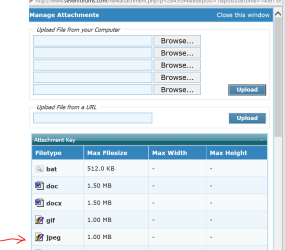
Can you upload one of your jpg's to the forum -- just start a reply to this thread ==>go advanced==>manage attachments==>upload file==>close window==>save changes.

Cheers
jimbo
 

Attachments

  • jpeg.png
    jpeg.png
    25.1 KB · Views: 18

My Computer My Computer

At a glance

Linux CENTOS 7 / various Windows OS'es and se...Intel i7 Intel i58GB, 16GBOn Motherboard
Computer type
PC/Desktop
Computer Manufacturer/Model Number
Custom built, several laptops HP/ASUS
OS
Linux CENTOS 7 / various Windows OS'es and servers
CPU
Intel i7 Intel i5
Memory
8GB, 16GB
Graphics Card(s)
On Motherboard
Sound Card
Realtek HD audio
Monitor(s) Displays
Apple Cinema display, Samsung LCD
Screen Resolution
1920 X 1080
Hard Drives
4 X 1TB SATA
Mouse
Toshiba wireless laser
Internet Speed
> 20MB up
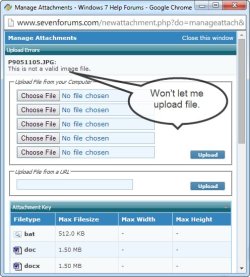
I couldn't even upload the file. The image I attached shows the message I got. I tried two different image files.
 

Attachments

  • Can't upload.jpg
    Can't upload.jpg
    50 KB · Views: 31

My Computer My Computer

At a glance

Windows 7 Home PremiumDual Core T42004 GB
Computer Manufacturer/Model Number
HP G60
OS
Windows 7 Home Premium
CPU
Dual Core T4200
Motherboard
HP
Memory
4 GB
Hi there

You might have saved a PNG file but saved it under the name .JPG or .RAW (if a camera file). Try changing the name of the file to say .PNG - I've saved a few image files with the wrong type by mistake. Might also be a .gif or any other image file.

Try a bog standard Snipping tool capture and save as .png and see if that works. That will test if you CAN view standard image files.

Cheers
jimbo
 

My Computer My Computer

At a glance

Linux CENTOS 7 / various Windows OS'es and se...Intel i7 Intel i58GB, 16GBOn Motherboard
Computer type
PC/Desktop
Computer Manufacturer/Model Number
Custom built, several laptops HP/ASUS
OS
Linux CENTOS 7 / various Windows OS'es and servers
CPU
Intel i7 Intel i5
Memory
8GB, 16GB
Graphics Card(s)
On Motherboard
Sound Card
Realtek HD audio
Monitor(s) Displays
Apple Cinema display, Samsung LCD
Screen Resolution
1920 X 1080
Hard Drives
4 X 1TB SATA
Mouse
Toshiba wireless laser
Internet Speed
> 20MB up
I had previously tried changing the extension, but I tried again with a different file. No luck. What is a "bog standard Snipping tool?" I doubt these files are anything but jpg because they were saved right out of the camera with no processing of any kind.
 

My Computer My Computer

At a glance

Windows 7 Home PremiumDual Core T42004 GB
Computer Manufacturer/Model Number
HP G60
OS
Windows 7 Home Premium
CPU
Dual Core T4200
Motherboard
HP
Memory
4 GB
Interesting issue,
What type model camera ?
if you can't open the file with Microsoft paint or Photo viewer I'm not sure what the snipping tool would do ?
But both free utilities are located at Start/ All Programs/ Accessories folder,

Either way,
Right click the file or one of them and click on Properties,
On the Details section take screen shots of that entire page,
See the link above my signature on how to take screen shots,
Cheers.
 

My Computer My Computer

At a glance

Win-7-Pro64bit 7-H-Prem-64biti7-5930K 2nd i9-9940x both water blocked VRM'...Trident-z 3200C14 2nd Trident-z 3600C16EVGA 1080ti ftw3 2nd Titan Xp both water blocked
Computer type
PC/Desktop
Computer Manufacturer/Model Number
Custom assembled by me :}
OS
Win-7-Pro64bit 7-H-Prem-64bit
CPU
i7-5930K 2nd i9-9940x both water blocked VRM's too
Motherboard
ASUS SABERTOOTH X99 2nd ASUS x299 Apex
Memory
Trident-z 3200C14 2nd Trident-z 3600C16
Graphics Card(s)
EVGA 1080ti ftw3 2nd Titan Xp both water blocked
Sound Card
Built-in Realtek
Monitor(s) Displays
1-AOC G2460PG 24"G-Sync 144Hz/ 2nd 1-ASUS VG248QE 24" 144Hz
Screen Resolution
1920 x 1080 144Hz
Hard Drives
2-Samsung M.2 Evo & Evo Plus
2-Samsung 850 EVO 500GB SSD's/ 3-2.5 W.D. Black 1tb-&3-1tb/3-3.5 WD Black 1tb hdd's
PSU
EVGA SuperNOVA 1000-P2 2nd 1200-P2
Case
2-Corsair Obsidian Series 450D Black ATX Mid Tower
Cooling
Custom water loops
Keyboard
Logitech G710+/ 2nd Logitech G910
Mouse
2-RedDragon M901 Perdition 16400 dpi Gaming mouse = wired
Internet Speed
Comcast Ping 19ms 89.31mbps download speed 6.12mbps upload
Antivirus
Malwarebytes Pro/ Superantispyware Pro
Browser
FireFox & Pale moon
Other Info
2nd ASUS X299 Apex/Intel i9-9940x with Custom water loop/7H-Prem-x64/Corsair 450D case/Ram Trident-z 3600C16 4x8gb / Samsung970Evo plus 500gb SSD/Dual ssd EZ swap evo/PSU EVGA SuperNova 1200w-P2 80+Platinum/GPU Titan Xp /8-ML-140 on push-pull on 2-280GTX rads
Back
Top