
Windows Protected Fonts

ellenc

New member
Member
VIP
Local time
4:56 AM
Messages
147
I'm a font fanatic; I have several thousands in my collection (not installed) but I've run across a one of Microsoft's oddities: Microsoft Protected Fonts. Those listed below and others appear in my installed Windows Fonts. They can't be cut even
with font manager programs. Why would MS prevent deleting these weird typefaces? ellenc
 

Attachments

  • Protected Fonts.JPG
    Protected Fonts.JPG
    11.8 KB · Views: 23

My Computer

Computer Manufacturer/Model Number
Dell Inspiron 546
OS
Windows 7 Professional
CPU
2.70gigahertz AMD Athlon 7750 Dual-Core
Motherboard
Dell, Inc. 0F896N A02
Memory
3328 Megabytes Usable Installed Memory
Graphics Card(s)
ATI Radcon HD 3200 Graphics
Monitor(s) Displays
Dell E1709W 17,2" monitor
Hard Drives
309.54G usable hard drive capacity
161.25G hard drive free space
Seagate FreeAgent Go 500G external drive
Seagate FreeAgent Go 160G external drive
Maxtor One Touch 250G external drive
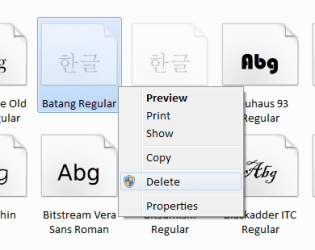
Strange

Windows offers (me) the option to delete "Batang" in the Context menu.
Font Delete.png
Note
I did not actually try to delete that font.
 

My Computer

Computer type
PC/Desktop
Computer Manufacturer/Model Number
n/a
OS
W7 Ultimate SP1, LM19.2 MATE, W10 Home 1703, W10 Pro 1703 VM, #All 64 bit
CPU
AMD Phenom II x6 1100T, 3.3 GHz
Motherboard
ASUS M4A88T-M/USB3 (AM3)
Memory
12GB DDR3 1333 G-Skill (4GB x 2), G-Skill (2GB x 2)
Graphics Card(s)
NVIDIA GeForce GTX 660
Sound Card
Realtek?
Monitor(s) Displays
Samsung S23B350
Screen Resolution
1920x1080
Hard Drives
WD Green 2TB (SATA), WD Green 3TB (SATA), WD Blue 4TB (SATA), WD Blue 6TB (SATA)
PSU
Cooler Master
Case
Antec GX300 Tower
Cooling
3x Antec TRICOOL 120mm Fans
Mouse
Wired Optical
Internet Speed
DSL
Antivirus
Avast
Browser
Pale Moon (64 bit)
Other Info
2018-12-27 Upgraded HDDs
2015-12-10 Upgraded case, graphics card, storage
2015-08-15 Upgraded motherboard & RAM
2015-07-15 Upgraded LM17.1 to LM17.2
Those typefaces may seem weird to you but in some countries like Korea they are core system fonts used by Windows itself. All such fonts are protected, even if they are not used in a specific locale. I suppose that Microsoft could have set the protected fonts according to locale but that would be complex, not always appropriate, and save only a trivial amount of disk space.

And if you really must delete these fonts any admin level user can do this with the correct procedure. But you had better know what you are doing. I will not describe the procedure.

I believe that the context menu is not aware of which fonts are protected. The delete would probably fail. I don't wish to try this.
 

My Computer

Computer type
PC/Desktop
Computer Manufacturer/Model Number
HP
OS
Windows 7 Pro 64 bit
CPU
Xeon W3520
Memory
8 GB
Graphics Card(s)
Nvidia Geforce 210
@ellenc There's a (longish) thread about this here: Removing foreign language fonts - Microsoft Community

Personally one of the first things I do after a clean install in Win7, Wn8 or Win10 is to delete all the non-Latin fonts. There are a lot of them and they waste several hundred megabytes.

The link above has a batch file for doing the whole lot from the command prompt. The individual steps are to use 'takeown /f <filename>' to transfer ownership from 'TrustedInstaller' to yourself. Having done that you give yourself or Administrators Full Control with 'icacls <filename> /grant administrators:F /t'
Then you can remove them from the command-line or from within a font manager. The difficult bit is matching the font name to the shortish file name.

I've never noticed any problems after doing this.

bob
 

My Computer

Computer type
PC/Desktop
OS
win7 x64
Interesting

Those typefaces may seem weird to you but in some countries like Korea they are core system fonts used by Windows itself. All such fonts are protected, even if they are not used in a specific locale.
It's only the previews that are weird (I posted a question about changing these many moons ago).

Those fonts still display standard characters.
Font Faces.png
I believe that the context menu is not aware of which fonts are protected. The delete would probably fail. I don't wish to try this.
You are correct.

I attempted to delete Batang and after clicking through several prompts, Windows told me it wasn't going to delete the file.
 

My Computer

Computer type
PC/Desktop
Computer Manufacturer/Model Number
n/a
OS
W7 Ultimate SP1, LM19.2 MATE, W10 Home 1703, W10 Pro 1703 VM, #All 64 bit
CPU
AMD Phenom II x6 1100T, 3.3 GHz
Motherboard
ASUS M4A88T-M/USB3 (AM3)
Memory
12GB DDR3 1333 G-Skill (4GB x 2), G-Skill (2GB x 2)
Graphics Card(s)
NVIDIA GeForce GTX 660
Sound Card
Realtek?
Monitor(s) Displays
Samsung S23B350
Screen Resolution
1920x1080
Hard Drives
WD Green 2TB (SATA), WD Green 3TB (SATA), WD Blue 4TB (SATA), WD Blue 6TB (SATA)
PSU
Cooler Master
Case
Antec GX300 Tower
Cooling
3x Antec TRICOOL 120mm Fans
Mouse
Wired Optical
Internet Speed
DSL
Antivirus
Avast
Browser
Pale Moon (64 bit)
Other Info
2018-12-27 Upgraded HDDs
2015-12-10 Upgraded case, graphics card, storage
2015-08-15 Upgraded motherboard & RAM
2015-07-15 Upgraded LM17.1 to LM17.2
Weird fontrs

Thanks ever so much to all for taking the time to give valuable info. ellenc
 

My Computer

Computer Manufacturer/Model Number
Dell Inspiron 546
OS
Windows 7 Professional
CPU
2.70gigahertz AMD Athlon 7750 Dual-Core
Motherboard
Dell, Inc. 0F896N A02
Memory
3328 Megabytes Usable Installed Memory
Graphics Card(s)
ATI Radcon HD 3200 Graphics
Monitor(s) Displays
Dell E1709W 17,2" monitor
Hard Drives
309.54G usable hard drive capacity
161.25G hard drive free space
Seagate FreeAgent Go 500G external drive
Seagate FreeAgent Go 160G external drive
Maxtor One Touch 250G external drive
Back
Top