
Windows Script Host Error

xchan

New member
Local time
11:13 PM
Messages
17
I got this error after having malwares removed in my laptop. I used Malwarebytes to remove malwares that disables me from opening regedit and task manager, and hides folder options in the control panel. I have screenshot of it:
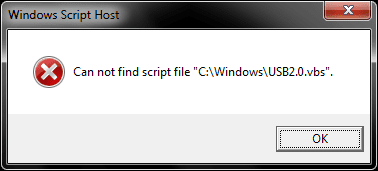
error_usb2.0.png
 

My Computer

Computer type
Laptop
Computer Manufacturer/Model Number
Samsung
OS
Windows 7 Ultimate 32 bit
CPU
AMD E-450 APU
Motherboard
SAMSUNG
Memory
2GB
Graphics Card(s)
AMD Radeon HD 6320 Graphics
Screen Resolution
1366 x 768
Cooling
Some fan
Keyboard
Genius
Mouse
Genius
Internet Speed
F*cking slow
Antivirus
Avast
Browser
Mozilla Firefox
I got this error after having malwares removed in my laptop. I used Malwarebytes to remove malwares that disables me from opening regedit and task manager, and hides folder options in the control panel. I have screenshot of it:

View attachment 287990

Hi xchan,

There might be some infection on your system that caused this issue. Assuming malware bytes was able to remove any malware that was present on the system. It would be better if you run a SFC on the system:

SFC/SCANNOW

If the issue still persists then please perform a system restore following the steps below:

System Restore

Keep us posted with the results so we can advise you further.
 

My Computer

Computer type
PC/Desktop
OS
Winndows 7 32 bit
sorry for very late respond, i really have a tight schedule and cannot even give time to scan but i still managed tho.

it stopped at 46%, and said "Windows Resource Protection could not perform the required operation".
 

My Computer

Computer type
Laptop
Computer Manufacturer/Model Number
Samsung
OS
Windows 7 Ultimate 32 bit
CPU
AMD E-450 APU
Motherboard
SAMSUNG
Memory
2GB
Graphics Card(s)
AMD Radeon HD 6320 Graphics
Screen Resolution
1366 x 768
Cooling
Some fan
Keyboard
Genius
Mouse
Genius
Internet Speed
F*cking slow
Antivirus
Avast
Browser
Mozilla Firefox
I notice from from system specs that you say Anti Virus is not applicable. Does that mean that you have no anti virus software installed? If that is the case then I fear that your laptop may be badly infected and would suggest that your best option would be a clean install of Windows
Then download and install Windows Security Essentials.
 

My Computer

Computer type
PC/Desktop
OS
Microsoft Windows 7 Home Premium 64-bit 7601 Multiprocessor Free Service Pack 1
CPU
Intel(R) Core(TM) i7-3770 CPU @ 3.40GHz
Motherboard
ASUSTeK COMPUTER INC. P8H77-M
Memory
8.00 GB
Graphics Card(s)
Intel(R) HD Graphics 4000
Sound Card
On Board
Monitor(s) Displays
Dell 24"
Screen Resolution
1920 x 1080
Hard Drives
(1) INTEL SSDSC2CT180A3 ATA Device (2) ST500DM002-1BD142 ATA Device (3) WDC WD3200AAKS-75L9A0 ATA Device (4) Generic- Compact Flash USB Device (5) Generic- MS/MS-Pro USB Device (6) Generic- SD/MMC USB Device (7) Generic- SM/xD-Picture USB
PSU
500w Corsair
Case
Cooler Master
Cooling
3 Fans
Keyboard
Logitech MK300
Mouse
Logitech WOM
Internet Speed
75Mb
Antivirus
Norton 360
Browser
Firefox, Opera, IE
Yes i removed my anti virus because it seem to cause heavy lags and delays on my laptop especially during start ups.

Are there any other suggestions concerning how badly my device is infected? can i just scan it with an anti-virus(in this case i will install one)?
 

My Computer

Computer type
Laptop
Computer Manufacturer/Model Number
Samsung
OS
Windows 7 Ultimate 32 bit
CPU
AMD E-450 APU
Motherboard
SAMSUNG
Memory
2GB
Graphics Card(s)
AMD Radeon HD 6320 Graphics
Screen Resolution
1366 x 768
Cooling
Some fan
Keyboard
Genius
Mouse
Genius
Internet Speed
F*cking slow
Antivirus
Avast
Browser
Mozilla Firefox
You could try Microsoft Security Essentials but you will need to run a lot more than that to be anywhere near cleaning your system. When you said you didn't really have time to scan your system then I thought it best to guide you to the quickest, best result and that is a Clean Install. You could do half a dozen scans with different softwares, spend a lot of time and still need to re install. Others may have different views but that is my best bet for what it is worth!
 

My Computer

Computer type
PC/Desktop
OS
Microsoft Windows 7 Home Premium 64-bit 7601 Multiprocessor Free Service Pack 1
CPU
Intel(R) Core(TM) i7-3770 CPU @ 3.40GHz
Motherboard
ASUSTeK COMPUTER INC. P8H77-M
Memory
8.00 GB
Graphics Card(s)
Intel(R) HD Graphics 4000
Sound Card
On Board
Monitor(s) Displays
Dell 24"
Screen Resolution
1920 x 1080
Hard Drives
(1) INTEL SSDSC2CT180A3 ATA Device (2) ST500DM002-1BD142 ATA Device (3) WDC WD3200AAKS-75L9A0 ATA Device (4) Generic- Compact Flash USB Device (5) Generic- MS/MS-Pro USB Device (6) Generic- SD/MMC USB Device (7) Generic- SM/xD-Picture USB
PSU
500w Corsair
Case
Cooler Master
Cooling
3 Fans
Keyboard
Logitech MK300
Mouse
Logitech WOM
Internet Speed
75Mb
Antivirus
Norton 360
Browser
Firefox, Opera, IE
ok thank you for your help mitchell65 i will try to have it clean install.
 

My Computer

Computer type
Laptop
Computer Manufacturer/Model Number
Samsung
OS
Windows 7 Ultimate 32 bit
CPU
AMD E-450 APU
Motherboard
SAMSUNG
Memory
2GB
Graphics Card(s)
AMD Radeon HD 6320 Graphics
Screen Resolution
1366 x 768
Cooling
Some fan
Keyboard
Genius
Mouse
Genius
Internet Speed
F*cking slow
Antivirus
Avast
Browser
Mozilla Firefox

My Computer

Computer type
PC/Desktop
OS
Winndows 7 32 bit
ok thank you for your help mitchell65 i will try to have it clean install.

Hi xchan,

I concur with mitchell65 clean reinstall would be the best for the system. Please check these tutorial which would be best to follow:

http://www.sevenforums.com/tutorials/1649-clean-install-windows-7-a.html

http://www.sevenforums.com/tutorials/219487-clean-reinstall-factory-oem-windows-7-a.html

Keep us posted with the results so we can advise you further.
Thanks Sandeep, I thought I had put the link to a Clean Install in my post but clearly didn't!
 

My Computer

Computer type
PC/Desktop
OS
Microsoft Windows 7 Home Premium 64-bit 7601 Multiprocessor Free Service Pack 1
CPU
Intel(R) Core(TM) i7-3770 CPU @ 3.40GHz
Motherboard
ASUSTeK COMPUTER INC. P8H77-M
Memory
8.00 GB
Graphics Card(s)
Intel(R) HD Graphics 4000
Sound Card
On Board
Monitor(s) Displays
Dell 24"
Screen Resolution
1920 x 1080
Hard Drives
(1) INTEL SSDSC2CT180A3 ATA Device (2) ST500DM002-1BD142 ATA Device (3) WDC WD3200AAKS-75L9A0 ATA Device (4) Generic- Compact Flash USB Device (5) Generic- MS/MS-Pro USB Device (6) Generic- SD/MMC USB Device (7) Generic- SM/xD-Picture USB
PSU
500w Corsair
Case
Cooler Master
Cooling
3 Fans
Keyboard
Logitech MK300
Mouse
Logitech WOM
Internet Speed
75Mb
Antivirus
Norton 360
Browser
Firefox, Opera, IE
Hi mitchell65,

You are most welcome. We all are here to provide anything that can be useful for the OP to resolve the issue.
 

My Computer

Computer type
PC/Desktop
OS
Winndows 7 32 bit
Back
Top