
Windows Search Index not working

This jogged my memory about dependencies:
it gave a new error message of 'some services stop automatically if they aren't in use by other services or programmes'
It wouldn't hurt to open Services; A short refresher on how to get there.
  • >Go to Start Orb click on Run in the right panel and type/copy/paste services.msc

  • >Click on OK,

  • >When open go to and right click on Windows Search then click on Properties, when open click on the Dependencies tab.

  • >Check to see if the DCOM Process Server Launcher and the RPC Endpoint Mapper are both set to Started Status and Startup Type is Automatic.

  • If you need to make any changes go to either entry there in Services, then right click >Properties > General Tab.

  • Reference: My Windows Search service is set to Started , Automatic (Delayed Start).
si4.PNG


Related:
Ranger4, LevelBest; Did I miss the fact that you have an SSD installed?? I don't see it anywhere in this thread or your system specs, perhaps it's in another thread of yours that Ranger4 saw??


I just noticed; Looking at your system specs I see you only have Windows 7 Home Premium 64 Bit listed, and not Windows 7 Home Premium Service Pack 1 (SP1) 64 Bit.

  • Do you have SP1 installed and it is an error of omission that you do not have it listed correctly in your specs?
The reason I ask is, I am going to offer this website: Black Viper’s Windows 7 Service Pack 1 Service Configurations | Black Viper | www.blackviper.com to help you make sure your Services are set correctly and under which column to look.

To cut the clutter you can go to the Show/hide Columns button to the top right of the lists, click on it and deselect the operating system columns you don't need. You will also note there is no entry for RPC Endpoint Mapper, but its executable path [-k rpcss] is the same as Black Viper's Remote Procedure Call [RPC] entry.

After covering as much ground as we have, one of the last items I can think of would be to create a new User Account in case there is a corruption problem with the one you're using, Option One or Three, you can't use two because Home Premium doesn't have a group policy editor: http://www.sevenforums.com/tutorials/181024-user-account-create.html You would need at least a standard or administrator account not guest.
For later if you decide to: How to Delete a User Account in Windows 7

The "last item?" a http://www.sevenforums.com/tutorials/3413-repair-install.html
 

My Computer My Computer

Computer type
PC/Desktop
Computer Manufacturer/Model Number
Gateway DX4831-01e (Mid-Tower Desktop)
OS
Originally Win 7 Hm Prem x64 Ver 6.1.7600 Build 7601-SP1 | Upgraded to Windows 10 December 14, 2019
CPU
Intel i3 530 2.93GHz, 2933MHz 2 Cores 4 Logical Processors
Motherboard
Gateway H57M01 133 megahertz
Memory
6GB of 1,333MHz DDR3 SDRAM
Graphics Card(s)
32MB Intel Graphics Media Accelerator HD IGChip
Sound Card
Realtek High Definition Audio
Monitor(s) Displays
Gateway HX2000 20inch TFT active matrix TN
Screen Resolution
1600 x 900 x 59 hertz
Hard Drives
WDC WD10EADS-00M2B0 [HDD] (1000.20 GB) -- drive 0,
HL-DT-ST DVDRAM GH41N [CD-ROM dr]
Four card readers, and Four USB 2.0
PSU
300watts.
Case
Mid-Tower Desktop
Cooling
Stock from Gateway
Keyboard
Natural Ergonomic Keyboard 4000, see Other Info
Mouse
Orig. Gateway wore out now using Insignia USB wired optical
Internet Speed
Vz FIOS 10ms png 57.64Mbps down 65.53Mbps up Speedtest.org
Antivirus
Zamana Anti-logger with Anti-malware, MSE, Windows Firewall,
Browser
IE11.0.9600.19399-Upd ver11.0.135, Firefox 68.0.1 x64
Other Info
System Specs by Belarc.

BIOS: American Megatrends Inc. P01-A0 11/17/2009

Replaced the MS 'Natural' Standard PS/2 Enhanced 101-102 Keyboard with a new Natural Ergonomic Keyboard 4000 on August 1st 2014.

Canon Pixma MG3222 Printer.

Updated to IE11 on 12102015 | Fios Quantum Router g1100

Additional AV: SpywareBlaster, manual Mbam, SAS
@ Anak. No, you did not miss anything. I just asked as the OP's hard Drive listings is a bit vague & I thought he may have a SSD installed.

He has replied & he doesn't, so sorry if I caused any problems.
 

My Computer My Computer

Computer type
PC/Desktop
Computer Manufacturer/Model Number
Self built using existing case
OS
Windows 7 Home Premium 64 bit sp1
CPU
Intel i5 3570 3.4Ghz Ivy Bridge SKT 1155 quad core
Motherboard
Gigabyte Z77-HD3 SKT 1155 2xSata 3, 4x USB 3.0
Memory
G-Skill Rip Jaws 16Gb (8x2) DDR3 -1600 PC3 12800 CL 10 red
Graphics Card(s)
Gigabyte NVIDIA GT610 1Gb DDR3 810/1200 PCI-E 2.0 Silent
Sound Card
NVIDIA High Definition & Realtech High Definition Audio
Monitor(s) Displays
2 x Philips 226V4L 16:9 aspect ratio
Screen Resolution
1920 x 1080 HD
Hard Drives
Samsung 840 Pro 256gb SSD, SATA 3.
Hitachi Touro Portable 1tb, USB 3.0 HDD used for image b/ups.
PSU
Corsair VS450
Case
Codeng
Cooling
PSU fan & CPU fan
Keyboard
Logitech
Mouse
Logitech Wireless trackball M570
Internet Speed
Wireless 3G. 3mg down & 550kb up.
Antivirus
Bitdefender Internet Security 2020
Browser
Opera (Current Version) & Firefox
Other Info
MS Office 2013 Pro. Davis weather station software. MGE Nova 600 avr UPS.
Hi

I had checked those dependencies before, but I've re-checked them and all are ticked to automatic or automatic delayed, as appropriate.

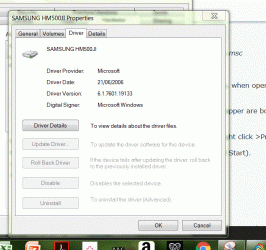
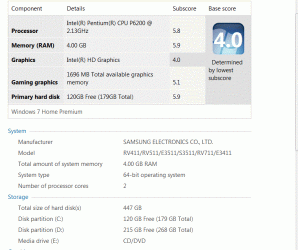
I had to google hard drives and SSD! As far as I am aware I have a standard hard disc drive (screenshot attached).

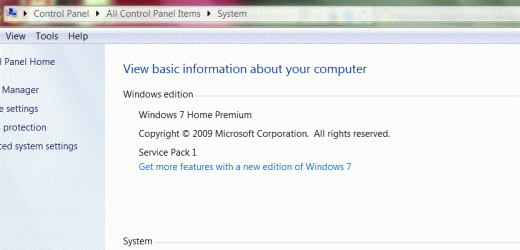
Yes I do have service pack 1 installed. I'll update specs.

I've taken a look at the Black Viper link and (unless I've misunderstood this) it says that indexing on W Home Premium is not installed by default as 'search' replaces it.

http://www.blackviper.com/windows-services/indexing-service/
I have a Sony Vaio which also runs Windows 7 and it was purchased for the sole purpose of storing docs/pics/music and it's never been linked to the net. I've compared settings on both and noticed that on the Vaio, under 'indexing' in 'programmes and features' the tickbox (for indexing) is unticked! Would that kinda fit with indexing not be installed by default?

If I search for something via the start orb on the Vaio it does return results including word documents etc whereas this doesn't happen on the Samsung. On the Samsung, if I go into explorer and bring up C drive, users/my name it will bring up system files and word/excel documents, so it is performing some sort of search, it's just not giving me the same results searching via the start orb. I think as a workaround, I'll just search that way.

Thanks Anak for your patience and input, it's much appreciated.

LevelBest
 

Attachments

  • Capture samsung harddrive.GIF
    Capture samsung harddrive.GIF
    84.7 KB · Views: 31
  • Capture service pack 1.GIF
    Capture service pack 1.GIF
    49 KB · Views: 0
  • Capture winodws experience 5 july 16.GIF
    Capture winodws experience 5 july 16.GIF
    71.8 KB · Views: 0

My Computer My Computer

Computer type
Laptop
Computer Manufacturer/Model Number
Samsung S3511
OS
Windows 7 Home Premium 64 Bit (Service Pack 1)
CPU
Premium Dual Core P6200
Motherboard
Samsung S3511
Memory
4 GB
Graphics Card(s)
Intel (R) HD Graphic
Sound Card
Realtek High Definition Audio
Screen Resolution
1366 x 768
Hard Drives
C: D: E: (NTFS)
Cooling
Drive temperature: 38 / 100
Mouse
Wired Logitech B100
Antivirus
McAfee Total Protection
Browser
Supermium Portable and r3dfox
Okay on the first three...Ranger4, my apologies if I sounded frantic.

No, you understood correctly, the terminology got blurred sometime between Vista and Win7. It's a "You like to-may-toes, and I like to-mah-toes" kinda thing.

It's always there but yes, making that tick in Features completes the install.

You're welcome, I'm just a little disappointed that we couldn't solve this issue for you. Some setups are like that, you can throw the book at a problem and nothing will help, but I would consider a repair install because some of your option boxes have tabs missing and others have areas greyed out, that or a new user profile but that's your call if you want to go any further.


Edit:
I have since found out that LevelBest has tried a new user profile so I'm withdrawing that part of my guidance.
Anak
 
Last edited:

My Computer My Computer

Computer type
PC/Desktop
Computer Manufacturer/Model Number
Gateway DX4831-01e (Mid-Tower Desktop)
OS
Originally Win 7 Hm Prem x64 Ver 6.1.7600 Build 7601-SP1 | Upgraded to Windows 10 December 14, 2019
CPU
Intel i3 530 2.93GHz, 2933MHz 2 Cores 4 Logical Processors
Motherboard
Gateway H57M01 133 megahertz
Memory
6GB of 1,333MHz DDR3 SDRAM
Graphics Card(s)
32MB Intel Graphics Media Accelerator HD IGChip
Sound Card
Realtek High Definition Audio
Monitor(s) Displays
Gateway HX2000 20inch TFT active matrix TN
Screen Resolution
1600 x 900 x 59 hertz
Hard Drives
WDC WD10EADS-00M2B0 [HDD] (1000.20 GB) -- drive 0,
HL-DT-ST DVDRAM GH41N [CD-ROM dr]
Four card readers, and Four USB 2.0
PSU
300watts.
Case
Mid-Tower Desktop
Cooling
Stock from Gateway
Keyboard
Natural Ergonomic Keyboard 4000, see Other Info
Mouse
Orig. Gateway wore out now using Insignia USB wired optical
Internet Speed
Vz FIOS 10ms png 57.64Mbps down 65.53Mbps up Speedtest.org
Antivirus
Zamana Anti-logger with Anti-malware, MSE, Windows Firewall,
Browser
IE11.0.9600.19399-Upd ver11.0.135, Firefox 68.0.1 x64
Other Info
System Specs by Belarc.

BIOS: American Megatrends Inc. P01-A0 11/17/2009

Replaced the MS 'Natural' Standard PS/2 Enhanced 101-102 Keyboard with a new Natural Ergonomic Keyboard 4000 on August 1st 2014.

Canon Pixma MG3222 Printer.

Updated to IE11 on 12102015 | Fios Quantum Router g1100

Additional AV: SpywareBlaster, manual Mbam, SAS
Hi

I found on the net last night that the problem of documents not showing up in searches using the 'start orb' is acknowledged by Microsoft to be a bug with Windows 7. Info below

How To Fix Windows 7 Search Problems

There is a hotfix available which I've had emailed to me but it comes with several warnings about not being fully tested etc, and given my recent problems which have now been resolved, I'm reluctant to try it, given that I can still search via C:users etc.

So I think I'll call it day with very many thanks for your help.

LevelBest
 

My Computer My Computer

Computer type
Laptop
Computer Manufacturer/Model Number
Samsung S3511
OS
Windows 7 Home Premium 64 Bit (Service Pack 1)
CPU
Premium Dual Core P6200
Motherboard
Samsung S3511
Memory
4 GB
Graphics Card(s)
Intel (R) HD Graphic
Sound Card
Realtek High Definition Audio
Screen Resolution
1366 x 768
Hard Drives
C: D: E: (NTFS)
Cooling
Drive temperature: 38 / 100
Mouse
Wired Logitech B100
Antivirus
McAfee Total Protection
Browser
Supermium Portable and r3dfox
Here is Microsoft's page: The "Search programs and files" box does not display search results correctly in Windows 7 and in Windows 2008 R2 , that says the same thing but offers a bit more information.

You could try the manual fix, I went looking at my: HKEY_CURRENT_USER\Software\Microsoft\Windows\CurrentVersion\Explorer\FolderTypes\ Key and it did not have the {ef87b4cbf2ce4785-8658-4ca6c63e38c6} sub-key. If you have it and do try fixing it remember the backup drill.

I need to make an edit on my previous post and then I'm going to also call it a day.


Edit:
After some further thinking on the matter of this hotfix; The sub-key {ef87b4cbf2ce4785-8658-4ca6c63e38c6} may have been placed by a well intentioned security update and was never superseded [think removed] by later updates in Windows attempt to fix it.
 
Last edited:

My Computer My Computer

Computer type
PC/Desktop
Computer Manufacturer/Model Number
Gateway DX4831-01e (Mid-Tower Desktop)
OS
Originally Win 7 Hm Prem x64 Ver 6.1.7600 Build 7601-SP1 | Upgraded to Windows 10 December 14, 2019
CPU
Intel i3 530 2.93GHz, 2933MHz 2 Cores 4 Logical Processors
Motherboard
Gateway H57M01 133 megahertz
Memory
6GB of 1,333MHz DDR3 SDRAM
Graphics Card(s)
32MB Intel Graphics Media Accelerator HD IGChip
Sound Card
Realtek High Definition Audio
Monitor(s) Displays
Gateway HX2000 20inch TFT active matrix TN
Screen Resolution
1600 x 900 x 59 hertz
Hard Drives
WDC WD10EADS-00M2B0 [HDD] (1000.20 GB) -- drive 0,
HL-DT-ST DVDRAM GH41N [CD-ROM dr]
Four card readers, and Four USB 2.0
PSU
300watts.
Case
Mid-Tower Desktop
Cooling
Stock from Gateway
Keyboard
Natural Ergonomic Keyboard 4000, see Other Info
Mouse
Orig. Gateway wore out now using Insignia USB wired optical
Internet Speed
Vz FIOS 10ms png 57.64Mbps down 65.53Mbps up Speedtest.org
Antivirus
Zamana Anti-logger with Anti-malware, MSE, Windows Firewall,
Browser
IE11.0.9600.19399-Upd ver11.0.135, Firefox 68.0.1 x64
Other Info
System Specs by Belarc.

BIOS: American Megatrends Inc. P01-A0 11/17/2009

Replaced the MS 'Natural' Standard PS/2 Enhanced 101-102 Keyboard with a new Natural Ergonomic Keyboard 4000 on August 1st 2014.

Canon Pixma MG3222 Printer.

Updated to IE11 on 12102015 | Fios Quantum Router g1100

Additional AV: SpywareBlaster, manual Mbam, SAS
Hi

Yes, I saw that potential fix regarding the registry key. I had in fact exported the registry in order to try it but when I went in there, I didn't have that key. Am real glad for your confirmation that your computer didn't have that key either.

I don't suppose MS will role out an update to fix the problem now but you never know.

Many thanks again for your help.

LevelBest
 

My Computer My Computer

Computer type
Laptop
Computer Manufacturer/Model Number
Samsung S3511
OS
Windows 7 Home Premium 64 Bit (Service Pack 1)
CPU
Premium Dual Core P6200
Motherboard
Samsung S3511
Memory
4 GB
Graphics Card(s)
Intel (R) HD Graphic
Sound Card
Realtek High Definition Audio
Screen Resolution
1366 x 768
Hard Drives
C: D: E: (NTFS)
Cooling
Drive temperature: 38 / 100
Mouse
Wired Logitech B100
Antivirus
McAfee Total Protection
Browser
Supermium Portable and r3dfox
You're welcome, its been my pleasure,

You're probably gonna hate me but I found a link describing a search problem because of permissions, if you want to look into it, it's here: http://Windows 7 Search Problem Solved!!! | www.ams.jhu.ed

Sounds logical, but tedious in comparing which folders/files have the System Read attribute.
It would be easy to run a CMD in an elevated prompt to view the attributes of all the Folders and Files on your HDD, but I'm a bit rusty in my CMD verbiage and I'd hate to give you one less it strips or changes your attributes. Then there'd be He** to pay. :p
 

My Computer My Computer

Computer type
PC/Desktop
Computer Manufacturer/Model Number
Gateway DX4831-01e (Mid-Tower Desktop)
OS
Originally Win 7 Hm Prem x64 Ver 6.1.7600 Build 7601-SP1 | Upgraded to Windows 10 December 14, 2019
CPU
Intel i3 530 2.93GHz, 2933MHz 2 Cores 4 Logical Processors
Motherboard
Gateway H57M01 133 megahertz
Memory
6GB of 1,333MHz DDR3 SDRAM
Graphics Card(s)
32MB Intel Graphics Media Accelerator HD IGChip
Sound Card
Realtek High Definition Audio
Monitor(s) Displays
Gateway HX2000 20inch TFT active matrix TN
Screen Resolution
1600 x 900 x 59 hertz
Hard Drives
WDC WD10EADS-00M2B0 [HDD] (1000.20 GB) -- drive 0,
HL-DT-ST DVDRAM GH41N [CD-ROM dr]
Four card readers, and Four USB 2.0
PSU
300watts.
Case
Mid-Tower Desktop
Cooling
Stock from Gateway
Keyboard
Natural Ergonomic Keyboard 4000, see Other Info
Mouse
Orig. Gateway wore out now using Insignia USB wired optical
Internet Speed
Vz FIOS 10ms png 57.64Mbps down 65.53Mbps up Speedtest.org
Antivirus
Zamana Anti-logger with Anti-malware, MSE, Windows Firewall,
Browser
IE11.0.9600.19399-Upd ver11.0.135, Firefox 68.0.1 x64
Other Info
System Specs by Belarc.

BIOS: American Megatrends Inc. P01-A0 11/17/2009

Replaced the MS 'Natural' Standard PS/2 Enhanced 101-102 Keyboard with a new Natural Ergonomic Keyboard 4000 on August 1st 2014.

Canon Pixma MG3222 Printer.

Updated to IE11 on 12102015 | Fios Quantum Router g1100

Additional AV: SpywareBlaster, manual Mbam, SAS
I know I was comparing permissions on the Vaio with the same on the Samsung, I can't remember exactly what files/folders but all seemed the same.

I think we've gone as far as we can now and the reason I didn't want to try the hotfix was just in case it caused a new problem. To be honest, given the amount I've done to the computer in terms of downloading software to scan, test and run things for the other, now resolved problem, I feel fortunate not to have caused any new problems (as I know can happen).

Today has been the first day I've logged on in almost three months and not be searching, testing, investigating etc, so really overall I'm well happy! :D

All the best to you.

LB
 

My Computer My Computer

Computer type
Laptop
Computer Manufacturer/Model Number
Samsung S3511
OS
Windows 7 Home Premium 64 Bit (Service Pack 1)
CPU
Premium Dual Core P6200
Motherboard
Samsung S3511
Memory
4 GB
Graphics Card(s)
Intel (R) HD Graphic
Sound Card
Realtek High Definition Audio
Screen Resolution
1366 x 768
Hard Drives
C: D: E: (NTFS)
Cooling
Drive temperature: 38 / 100
Mouse
Wired Logitech B100
Antivirus
McAfee Total Protection
Browser
Supermium Portable and r3dfox
And, all the best to you too!

Steve
 

My Computer My Computer

Computer type
PC/Desktop
Computer Manufacturer/Model Number
Gateway DX4831-01e (Mid-Tower Desktop)
OS
Originally Win 7 Hm Prem x64 Ver 6.1.7600 Build 7601-SP1 | Upgraded to Windows 10 December 14, 2019
CPU
Intel i3 530 2.93GHz, 2933MHz 2 Cores 4 Logical Processors
Motherboard
Gateway H57M01 133 megahertz
Memory
6GB of 1,333MHz DDR3 SDRAM
Graphics Card(s)
32MB Intel Graphics Media Accelerator HD IGChip
Sound Card
Realtek High Definition Audio
Monitor(s) Displays
Gateway HX2000 20inch TFT active matrix TN
Screen Resolution
1600 x 900 x 59 hertz
Hard Drives
WDC WD10EADS-00M2B0 [HDD] (1000.20 GB) -- drive 0,
HL-DT-ST DVDRAM GH41N [CD-ROM dr]
Four card readers, and Four USB 2.0
PSU
300watts.
Case
Mid-Tower Desktop
Cooling
Stock from Gateway
Keyboard
Natural Ergonomic Keyboard 4000, see Other Info
Mouse
Orig. Gateway wore out now using Insignia USB wired optical
Internet Speed
Vz FIOS 10ms png 57.64Mbps down 65.53Mbps up Speedtest.org
Antivirus
Zamana Anti-logger with Anti-malware, MSE, Windows Firewall,
Browser
IE11.0.9600.19399-Upd ver11.0.135, Firefox 68.0.1 x64
Other Info
System Specs by Belarc.

BIOS: American Megatrends Inc. P01-A0 11/17/2009

Replaced the MS 'Natural' Standard PS/2 Enhanced 101-102 Keyboard with a new Natural Ergonomic Keyboard 4000 on August 1st 2014.

Canon Pixma MG3222 Printer.

Updated to IE11 on 12102015 | Fios Quantum Router g1100

Additional AV: SpywareBlaster, manual Mbam, SAS
Three years on and I still have this problem of not being able to switch on the indexing.

I have a Sony Windows 7 computer that has never been connected to the internet, hence an unaffected programme and the indexing on that works fine.

Is there a folder / programme on the Sony that I could copy to the Samsung to rectify this?
 

My Computer My Computer

Computer type
Laptop
Computer Manufacturer/Model Number
Samsung S3511
OS
Windows 7 Home Premium 64 Bit (Service Pack 1)
CPU
Premium Dual Core P6200
Motherboard
Samsung S3511
Memory
4 GB
Graphics Card(s)
Intel (R) HD Graphic
Sound Card
Realtek High Definition Audio
Screen Resolution
1366 x 768
Hard Drives
C: D: E: (NTFS)
Cooling
Drive temperature: 38 / 100
Mouse
Wired Logitech B100
Antivirus
McAfee Total Protection
Browser
Supermium Portable and r3dfox
Back
Top