Windows Security Center can't be started because of virus/malware

Started Windows Firewall - no problem :)

"I'm confused enough with what I do!"

You have been excellent!!!! :) and it seems like you know what you're doing :D
Maybe I'll try the Craphic Cards forum if the screen drive problem continues.

Is my computer OK now (regarding the virus/malware), or do you think there's something left??
 

My Computer My Computer

At a glance

Windows 7 Ultimate, 32bit
OS
Windows 7 Ultimate, 32bit
Crumble,

Thank you for the kind words.
I am retired, and enjoy doing this kind of stuff. No expert here, though.

There is one more scan we should do to make sure the malware is gone...

Please go to Post #2, and Posts #14 and 17 where Pauly and UsernameIssues suggest using Windows Defender Offline (WDO).

When done with the scan, its log file is stored in an MPLog-MM/DD/YYYY-HH/MM/SS .txt file in the folder
below:
C:\Windows\Windows Defender Offline\Support

Please make sure you post the MPLog in your reply.
 

My Computer My Computer

At a glance

Windows 7 Home Premium
Computer type
PC/Desktop
Computer Manufacturer/Model Number
An ol' eMachines
OS
Windows 7 Home Premium
Internet Speed
Fine for me...I'm retired!
Great :)
I just need to find an empty CD - I'll try to get it done soon :)
 

My Computer My Computer

At a glance

Windows 7 Ultimate, 32bit
OS
Windows 7 Ultimate, 32bit
Whenever you are ready. :)
 

My Computer My Computer

At a glance

Windows 7 Home Premium
Computer type
PC/Desktop
Computer Manufacturer/Model Number
An ol' eMachines
OS
Windows 7 Home Premium
Internet Speed
Fine for me...I'm retired!
Some computers do not automatically start from removable media (CD/DVD or USB flash drive).
If yours does not, restart, and look for how to enter the BIOS Setup Utility at the bottom of the first screen that comes up.

Most PCs use F2, F10, ESC, or DEL key to begin the BIOS Setup.

Once in, look for a tab in the BIOS Setup Utility that is labeled Boot (or Boot Order, or something similar).
Use the arrows to go to the Boot order.

Locate the CD (DVD, or USB flash drive) in the Boot list.
Use the arrows to move the drive up so that it appears first in the Boot list.
Press: Enter
Press F10 to save your changes and to exit the BIOS Setup Utility.
Select Yes in the confirmation window.
Then, allow the PC to boot from the CD.


~~~~
Here are some of the screens you are presented with when running WDO after you create the media (CD/DVD, USB flash drive), and then boot your computer from the media:

http://blogs.technet.com/b/security...-security-tools-windows-defender-offline.aspx

http://ask-leo.com/windows_defender_offline_scan_your_computer_for_malware_without_booting_windows.html

When the program opens, it runs a scan.

If WDO finds malware, see if you can use the option to Quarantine, so we can see a report before getting rid of anything.

Do not expect any problems, however, we do not want to remove anything like the following:

boot:\\.\PHYSICALDRIVE0\PARTITION0 (Type 27)

Removing this entry impacts your Master Boot Record and/or Partition Table, and you may end up not being able to boot.
 
Last edited:

My Computer My Computer

At a glance

Windows 7 Home Premium
Computer type
PC/Desktop
Computer Manufacturer/Model Number
An ol' eMachines
OS
Windows 7 Home Premium
Internet Speed
Fine for me...I'm retired!
I'm back ;)
The CD with the WDO didn't start automatically and I was able to enter the BIOS setup. But in the setup mode all the letters were grey and impossible to click on. So I tried to click the button that said "unlock" and it asked for the admin password. I entered the password I use to log on my PC as I thought this was the right password and I am the administrator. Even so I got the message "you have entered the wrong password". Now I don't know what to do! Hope you can help :)
 

My Computer My Computer

At a glance

Windows 7 Ultimate, 32bit
OS
Windows 7 Ultimate, 32bit
The easiest thing would be to ask the school that you got the laptop from if they would remove the BIOS password for you.

Sorry, had I known that there was a BIOS password involved, I wouldn't have suggested WDO.

There are infections that can hide themselves for the Windows operating system. They do that by starting before the Windows operating system starts. The recovery mode that you used to run some scans from is still a Windows operating system (I think) and thus infections can hide from it and any scans started from it. The safest scans are made when you know that nothing loaded from the suspect hard drive.

I could be wrong - so to any member reading this: feel free to correct me.
 

My Computer My Computer

At a glance

W7 Pro SP1 64biti78GBIntel HD Graphics
Computer type
Laptop
Computer Manufacturer/Model Number
Employer provided Dell Latitude
OS
W7 Pro SP1 64bit
CPU
i7
Memory
8GB
Graphics Card(s)
Intel HD Graphics
Hard Drives
crappy SSD
Antivirus
Employer mandated Symantec Endpoint Protection
Browser
Pale Moon 64bit, IE11 64bit & Chrome 64bit
To my understanding...

...the RE is separate from the Operating System, and the System Recovery Options / Command Prompt performs actions without being in Windows.

If a User is infected with malware, the Recovery Environment is a well recognized asset among the malware removal community to clean rootkits or malware, as they will not be started in this environment.

There are tools we can use in the RE that can spot a hidden Rootkit in a flash. ;)

Anyone, please correct me if I am wrong.
 

My Computer My Computer

At a glance

Windows 7 Home Premium
Computer type
PC/Desktop
Computer Manufacturer/Model Number
An ol' eMachines
OS
Windows 7 Home Premium
Internet Speed
Fine for me...I'm retired!
Crumble,

I hate to see this...

I entered the password I use to log on my PC as I thought this was the right password...

Unfortunately, it is not.

As UsernameIssues suggests, contact the school. If they do not want to remove the BIOS password, at least they should know what it is.

They can also set the PC to boot from CD as first option.
 

My Computer My Computer

At a glance

Windows 7 Home Premium
Computer type
PC/Desktop
Computer Manufacturer/Model Number
An ol' eMachines
OS
Windows 7 Home Premium
Internet Speed
Fine for me...I'm retired!
I agree that RE "is a well recognized asset among the malware removal community to clean rootkits or malware".

"...as they will not be started in this environment." This is the part that I'm wondering about.

Does the RE use the same Windows APIs? I think so.
Can an infection load before the RE? I'm not sure.

If both are yes, then any scan run from the RE is flawed - if that RE was loaded from the suspect hard drive.

If the RE is loaded from a clean DVD, then scans run on top of it are as good as they can be.


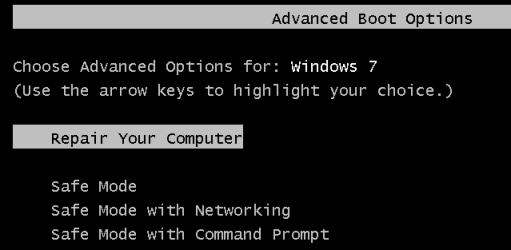
To put it another way:

Can an infection load before one sees this screen?
RE.png
...or just after that screen and before the RE - if that RE was loaded from the suspect hard drive?

I don't know (nor can I find an article that describes) how alureon (or the like) loads from its active partition before Windows loads... but that seems to be what alureon does. My fear is that alureon could load before (and thus hide from) RE - if that RE was loaded from the suspect hard drive.

I don't want to hijack the thread while someone educates me - feel free to send me a PM.
 

My Computer My Computer

At a glance

W7 Pro SP1 64biti78GBIntel HD Graphics
Computer type
Laptop
Computer Manufacturer/Model Number
Employer provided Dell Latitude
OS
W7 Pro SP1 64bit
CPU
i7
Memory
8GB
Graphics Card(s)
Intel HD Graphics
Hard Drives
crappy SSD
Antivirus
Employer mandated Symantec Endpoint Protection
Browser
Pale Moon 64bit, IE11 64bit & Chrome 64bit
It's a bit problematic to contact the school (as it is on another continent... ;) ), but maybe they are willing to send me the password by mail. If not; are there any ways to change/remove this password? :)
 

My Computer My Computer

At a glance

Windows 7 Ultimate, 32bit
OS
Windows 7 Ultimate, 32bit
Today I got a popup message saying that avast! had been deactivated :confused: I opened avast! manually, and it said that the real-time protection was running so I'm a bit confused. I am now running a full scan to check if the program can come up with some virus/malware. Any suggestions on what to do? I would be greatful :)
 

My Computer My Computer

At a glance

Windows 7 Ultimate, 32bit
OS
Windows 7 Ultimate, 32bit
Crumble,

Are you also running SuperAntiSpyware, by any chance?

Try a repair of avast!:

Go to Control Panel > Programs & Features > uninstall a program, select: 'avast! Anti-Virus

Click the Uninstall/Change, and select: Repair

Reboot after the repair.
 

My Computer My Computer

At a glance

Windows 7 Home Premium
Computer type
PC/Desktop
Computer Manufacturer/Model Number
An ol' eMachines
OS
Windows 7 Home Premium
Internet Speed
Fine for me...I'm retired!
No, I'm not running SuperAntiSpyware.
The popup message said that both Windows Defender and avast! have been deactivated. Maybe the combination of these two programs caused this? I remember reading somewhere that you should only have one anti-virus program at a time, and I didn't know that I had the Windows Defender too.
The avast! full scan came up clean, and the program seems to be working. That's why I get confused when my computer tells me something else :confused:
The security center is still active though :)
The reparation of avast! was successful, but when I click the "Turn on now" next to the message in the Action Center that says avast! is deactivated a popup message appears asking "do you trust this program?". I then click yes, but the program doesn't start. I can start it manually though but the message "avast! has been deactivated" is still present in the Action Center even though avast! itself tells that all protection is turned on and everything is fine.
 

My Computer My Computer

At a glance

Windows 7 Ultimate, 32bit
OS
Windows 7 Ultimate, 32bit
Will have to do some checking, and get back to you. I'm about ready to call it quits, gotta get some ZZzzsss.

Thought that Windows Defender was not an AntiVirus, but an AntiMalware program. There is a difference.

However, in Windows 8, WD evolves into an AntiVirus program.
 

My Computer My Computer

At a glance

Windows 7 Home Premium
Computer type
PC/Desktop
Computer Manufacturer/Model Number
An ol' eMachines
OS
Windows 7 Home Premium
Internet Speed
Fine for me...I'm retired!
The following is an free application you may want to keep and use once a week to keep the computer clean.

Please download CCleaner:
Redirecting...

Double-click the downloaded setup file.
Under Install options, uncheck everything except:
Automatically check for updates to CCleaner
Click: Install

On the next prompt, uncheck: Release notes
If it gives you the option to install Chrome, or anything else, uncheck the box next to it.

Run CCleaner...

Please obtain a list of installed programs:
1547__CCleaner3.png

1. Click the Tools icon on the left.
2. In the Uninstall screen, click: Save to text file...
3. Select a location (Desktop) for the text file (the default name is install.txt)
4. Click: Save

The install.txt opens in Notepad. Please provide it in your reply.


Now, click the Cleaner icon on the left.
1545__CCleaner1.png


Under the Windows tab...
Keep the checks in Internet Explorer and Windows Explorer as they are.

Under System, check:
Empty Recycle Bin
Temporary Files

Under the Application tab, keep the items as they are.
Click: Run Cleaner

When done, close CCleaner.
 

My Computer My Computer

At a glance

Windows 7 Home Premium
Computer type
PC/Desktop
Computer Manufacturer/Model Number
An ol' eMachines
OS
Windows 7 Home Premium
Internet Speed
Fine for me...I'm retired!
Greetings Crumble,

Sorry that you are getting conflicting info from your computer. When you see popups like that or when you just want to show us stuff without having to type a lot to describe it - you can use the info in this tutorial to post a screenshot of what you want us to see: http://www.sevenforums.com/tutorials/9733-screenshots-files-upload-post-seven-forums.html

Here is a description of Windows Defender as it applies to W7:
Windows Defender - Microsoft Windows

Microsoft (unwisely?) named another product Windows Defender Offline:
What is Windows Defender Offline?

Like cottonball mentioned, Windows Defender is a full blown antivirus tool in Windows 8. Some have speculated that this is for some EU legal reasons.


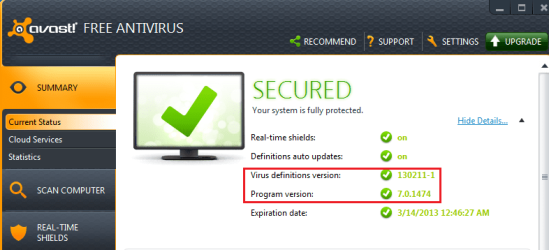
I updated (via Windows Update) the list of things that Windows Defender looks for and then I installed and updated Avast. The two of the seem to be getting along just fine (as they should). If Avast did not want Windows Defender to run, it could simply disable it. Other antivirus tools disable Windows Defender without any problems... so this tells me that Avast expects to get along with Windows Defender. Here is the version that I have:
avast.png

I did a repair of Avast (even though it was working for me) and I did not see any issues. My Action Center has no messages - even when I disable the 8 parts of Avast - so I cannot test that.

:::back to lurking:::
 

My Computer My Computer

At a glance

W7 Pro SP1 64biti78GBIntel HD Graphics
Computer type
Laptop
Computer Manufacturer/Model Number
Employer provided Dell Latitude
OS
W7 Pro SP1 64bit
CPU
i7
Memory
8GB
Graphics Card(s)
Intel HD Graphics
Hard Drives
crappy SSD
Antivirus
Employer mandated Symantec Endpoint Protection
Browser
Pale Moon 64bit, IE11 64bit & Chrome 64bit
I didn't know there were a difference between anti-virus and anti-malware programs - when it comes to computer issues I'm an amateur :o

Here is the install.txt:

Adobe AIR Adobe Systems Incorporated 07.12.2012 3.4.0.2710
Adobe Flash Player 11 ActiveX Adobe Systems Incorporated 08.02.2013 6,00MB 11.5.502.149
Adobe Flash Player 11 Plugin Adobe Systems Incorporated 08.02.2013 6,00MB 11.5.502.149
Adobe Reader X - Norsk Adobe Systems Incorporated 23.05.2011 112MB 10.0.0
Adobe Shockwave Player 11.5 Adobe Systems, Inc. 24.09.2012 11.5.9.620
Apple Mobile Device Support Apple Inc. 22.01.2013 24,5MB 6.0.1.3
Apple Software Update Apple Inc. 25.09.2012 2,38MB 2.1.3.127
Apple-programsupport Apple Inc. 22.01.2013 65,0MB 2.3.2
AuthenTec TrueSuite AuthenTec, Inc. 20.05.2011 6,54MB 2.0.0.57
avast! Free Antivirus AVAST Software 12.02.2013 7.0.1474.0
AviSynth 2.5 26.09.2012
BitTorrent BitTorrent Inc. 25.09.2012 7.7.0.27987
Bonjour Apple Inc. 25.09.2012 1,02MB 3.0.0.10
CCleaner Piriform 23.01.2013 3.27
ConvertHelper 2.2 DownloadHelper 25.09.2012
DVD Decrypter (Remove Only) 26.09.2012
Google Chrome Google Inc. 07.10.2012 24.0.1312.57
Google Drive Google, Inc. 01.02.2013 16,0MB 1.7.4018.3496
Google Toolbar for Internet Explorer Google Inc. 15.12.2012 7.4.3607.2246
iTunes Apple Inc. 22.01.2013 189MB 11.0.1.12
Java 7 Update 11 Oracle 18.01.2013 128MB 7.0.110
Java(TM) 6 Update 35 Oracle 25.09.2012 95,7MB 6.0.350
Malwarebytes Anti-Malware versjon 1.70.0.1100 Malwarebytes Corporation 19.01.2013 18,4MB 1.70.0.1100
Microsoft .NET Framework 4 Client Profile Microsoft Corporation 20.05.2011 38,8MB 4.0.30319
Microsoft .NET Framework 4 Client Profile NOR Language Pack Microsoft Corporation 20.05.2011 2,93MB 4.0.30319
Microsoft Office Outlook Connector Microsoft Corporation 16.01.2013 3,37MB 14.0.6123.5001
Microsoft Office Professional Plus 2010 Microsoft Corporation 27.09.2012 14.0.6029.1000
Microsoft Silverlight Microsoft Corporation 26.11.2012 62,5MB 5.1.10411.0
Microsoft Visual C++ 2008 Redistributable - x86 9.0.30729 Microsoft Corporation 26.10.2012 608KB 9.0.30729
Microsoft Visual C++ 2008 Redistributable - x86 9.0.30729.4148 Microsoft Corporation 01.02.2013 224KB 9.0.30729.4148
Microsoft Visual C++ 2008 Redistributable - x86 9.0.30729.6161 Microsoft Corporation 01.11.2012 600KB 9.0.30729.6161
Microsoft Visual C++ 2010 x86 Redistributable - 10.0.40219 Microsoft Corporation 13.10.2012 14,2MB 10.0.40219
Min CEWE FOTOVERDEN CEWE COLOR AG u Co. OHG 26.10.2012 231MB 4.8.5
Mozilla Firefox 18.0.1 (x86 en-US) Mozilla 20.01.2013 44,1MB 18.0.1
Mozilla Maintenance Service Mozilla 20.01.2013 330KB 18.0.1
Skype™ 6.0 Skype Technologies S.A. 29.11.2012 20,3MB 6.0.126
Synaptics Pointing Device Driver Synaptics Incorporated 20.05.2011 46,4MB 15.0.24.0
Tweaking.com - Windows Repair (All in One) Tweaking.com 28.01.2013 1.9.6
Videora iPhone Converter 6 Red Kawa 26.09.2012 6
Windows Media Player Firefox Plugin Microsoft Corp 18.01.2013 296KB 1.0.0.8
WinPcap 4.1.2 CACE Technologies 16.01.2013 4.1.0.2001

 

My Computer My Computer

At a glance

Windows 7 Ultimate, 32bit
OS
Windows 7 Ultimate, 32bit
avast! AntiVirus is insatlled, and so is Malwarebytes AntiMalware. So, you are good.


Thanks for the info, UsernamIssues.

Came up with the same...Windows Defender (WD) is an AntiSpyware program in Windows Seven.

Also, early on, from Post #4, FSS shows that WD has been disabled:
Windows Defender:
==============
WinDefend Service is not running. Checking service configuration:
The start type of WinDefend service is set to Disabled. The default start type is Auto.
The ImagePath of WinDefend service is OK.
The ServiceDll of WinDefend service is OK.

Looks as if we all have the same version of avast!

On avast! deactivated in Action Center although avast! is running windows seven issue...

Please follow these instructions:
https://support.avast.com/index.php?_m=knowledgebase&_a=viewarticle&kbarticleid=1501
They deal with the issue of Action Center in Windows 7 reporting that antivirus program cannot be found on the computer although avast 7.x is completely installed and fully active.

Read them first, and, if you have any questions, let us know.

If, after you are done, the same problem appears, then, uninstall avast!
Use the following:
avast! Uninstall Utility | Download aswClear for avast! Removal

Once the program is uninstalled, an the computer is restarted, install avast! once again, and let us know how it is going.
 

My Computer My Computer

At a glance

Windows 7 Home Premium
Computer type
PC/Desktop
Computer Manufacturer/Model Number
An ol' eMachines
OS
Windows 7 Home Premium
Internet Speed
Fine for me...I'm retired!
I had Avast just literally chit the bed in her Win7 Home Premium computer one day, it just wouldn't run. Did a whole bunch of uninstalling reinstalling, googling, forum reading, cussing and couldn't figure out what happened nor could I get it to run again.
The avast in my Win7 Ultimate works just fine so I dunno.
Ended up installing MSE on her computer and just gave up on why Avast stopped working on her comp that day.
 

My Computer My Computer

At a glance

Microsoft Windows 7 Ultimate 64-bitIntel(R) Pentium(R) CPU G2030 @ 3.00GHz12.00 GB Kingston DIMM 3x4 gig sticksAMD Radeon HD 5450
Computer Manufacturer/Model Number
Custom Build
OS
Microsoft Windows 7 Ultimate 64-bit
CPU
Intel(R) Pentium(R) CPU G2030 @ 3.00GHz
Motherboard
ASUSTeK COMPUTER INC. P8H77-V LE
Memory
12.00 GB Kingston DIMM 3x4 gig sticks
Graphics Card(s)
AMD Radeon HD 5450
Sound Card
AMD High Definition Audio Device
Monitor(s) Displays
Dual displays
Screen Resolution
1280 x 1024 x 4294967296 colors
Hard Drives
ST3500320AS 465.76 GB
WDC WD10EZEX-00BN5A0 931.51 GB
WDC WD10 EARS-00MVWB0 USB Device 931.51 GB
PSU
XION SuperNova 600 watt
Keyboard
Razer Tarantula Gaming Keyboard
Mouse
Razer Imperator Gaming Mouse
Internet Speed
DSL 6 down & 1 up with Netgear R6300 Wireless router
Back
Top