Windows Security Center won't turn on

Status
Not open for further replies.
I just can't believe this can't be fixed. How do we get the sfc scan to work? If we can get rid of that repair pending that requies reboot"... error is says maybe we can get results from it?
 

My Computer My Computer

Computer type
PC/Desktop
Computer Manufacturer/Model Number
HP Pavillion p6837c
OS
windows 7 64 bit
CPU
AMD Athalon II 645 Quad Core
Memory
14 gig (upgraded from 6 gig)
Graphics Card(s)
on board/integrated ati radeon HD 4200
Monitor(s) Displays
Samsung 245bw
Hard Drives
1.5 tb wd
Internet Speed
100mb down
Antivirus
Windows Secuity Essentials, Windows defender, Malwarebytes
Browser
IE & firefox
Have you confirmed no remaining infection?

You've already been told you have the worst install possible. Yet you're satisfied keeping it?

If you don't want the best install offered then run HP recovery from F8 Repair menu or F11 Key at rEboot. Rescuiing files is in the reinstall tutorial.
 
Last edited:
Personally, I think it is time to fold the cards and walk away.

Good luck, Jackie1.
 

My Computer My Computer

Computer type
PC/Desktop
Computer Manufacturer/Model Number
An ol' eMachines
OS
Windows 7 Home Premium
Internet Speed
Fine for me...I'm retired!
I need to just have a working desktop with programs and files I can open. I missing install disks for the particular files I need to open. Yes, the data is still there, but I somehow just need this thing to boot. I can't believe this can't be booted with some type of unofficial boot disk? I have a feeling it's probably just one file that's bad, but we can't find it.
 

My Computer My Computer

Computer type
PC/Desktop
Computer Manufacturer/Model Number
HP Pavillion p6837c
OS
windows 7 64 bit
CPU
AMD Athalon II 645 Quad Core
Memory
14 gig (upgraded from 6 gig)
Graphics Card(s)
on board/integrated ati radeon HD 4200
Monitor(s) Displays
Samsung 245bw
Hard Drives
1.5 tb wd
Internet Speed
100mb down
Antivirus
Windows Secuity Essentials, Windows defender, Malwarebytes
Browser
IE & firefox
The only ones I know of are Hirens and UBD but we do not support them here

It will not start if infected.

Have you set SysReserved partition Active and run 3 repairs. If not then there's been no attempt.
 
The only ones I know of are Hirens and UBD but we do not support them here

It will not start if infected.

Have you set SysReserved partition Active and run 3 repairs. If not then there's been no attempt.

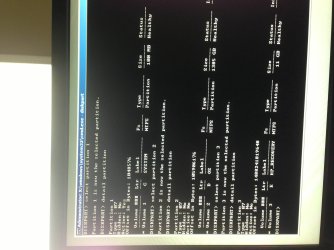
I may be doing this wrong...I don't show sysReserved partition. I have 3 shown here....

316162d1398973941-windows-security-center-won-t-turn-diskpart-next.jpg
 

My Computer My Computer

Computer type
PC/Desktop
Computer Manufacturer/Model Number
HP Pavillion p6837c
OS
windows 7 64 bit
CPU
AMD Athalon II 645 Quad Core
Memory
14 gig (upgraded from 6 gig)
Graphics Card(s)
on board/integrated ati radeon HD 4200
Monitor(s) Displays
Samsung 245bw
Hard Drives
1.5 tb wd
Internet Speed
100mb down
Antivirus
Windows Secuity Essentials, Windows defender, Malwarebytes
Browser
IE & firefox
Ok, I was doing this wrong I think... Which one should I be making ACTIVE and please tell me the order of steps following me making active.. see screen shot.. 1 is active currently....
 

Attachments

  • 1-3.jpg
    1-3.jpg
    459.4 KB · Views: 0

My Computer My Computer

Computer type
PC/Desktop
Computer Manufacturer/Model Number
HP Pavillion p6837c
OS
windows 7 64 bit
CPU
AMD Athalon II 645 Quad Core
Memory
14 gig (upgraded from 6 gig)
Graphics Card(s)
on board/integrated ati radeon HD 4200
Monitor(s) Displays
Samsung 245bw
Hard Drives
1.5 tb wd
Internet Speed
100mb down
Antivirus
Windows Secuity Essentials, Windows defender, Malwarebytes
Browser
IE & firefox
Code:
diskpart
list vol
select disk 0
select part 1
detail part
exit
It is ACTIVE already I think?
the 100MB partition is "System Reserved" I assume?
11GB partition is some reset to factory settings partition?
--------
anyway the ACTIVE partition is the one you boot from. It has the bootsector that loads bootmgr. bootmgr loads the bootmenu and loads win7. All is working fine so why change the ACTIVE partition???!!!
Unless you expect a virus in the bootsector or bootmgr.
 

My Computer My Computer

Computer type
Laptop
Computer Manufacturer/Model Number
ACER ASPIRE 5742G
OS
Microsoft Windows 7 Home Premium 64-bits 7601 Multiprocessor Free Service Pack 1
CPU
Intel(R) Core(TM) i3 CPU M 370 @ 2.40GHz
Motherboard
Acer Aspire 5742G
Memory
4,00 GB
Graphics Card(s)
ATI Mobility Radeon HD 5400 Series
Sound Card
(1) AMD High Definition Audio Device (2) Realtek High Defi
Screen Resolution
1366 x 768 x 32 bits (4294967296 colors) @ 60 Hz
Hard Drives
WDC WD5000BEVT-22ZAT0
Code:
diskpart
list vol
select disk 0
select part 1
detail part
exit
It is ACTIVE already I think?
the 100MB partition is "System Reserved" I assume?
11GB partition is some reset to factory settings partition?
--------
anyway the ACTIVE partition is the one you boot from. It has the bootsector that loads bootmgr. bootmgr loads the bootmenu and loads win7. All is working fine so why change the ACTIVE partition???!!!
Unless you expect a virus in the bootsector or bootmgr.


11gb is the c: windows, where my user account is... Yea, the 100mb is the hp recovery partition
 

My Computer My Computer

Computer type
PC/Desktop
Computer Manufacturer/Model Number
HP Pavillion p6837c
OS
windows 7 64 bit
CPU
AMD Athalon II 645 Quad Core
Memory
14 gig (upgraded from 6 gig)
Graphics Card(s)
on board/integrated ati radeon HD 4200
Monitor(s) Displays
Samsung 245bw
Hard Drives
1.5 tb wd
Internet Speed
100mb down
Antivirus
Windows Secuity Essentials, Windows defender, Malwarebytes
Browser
IE & firefox
100 mb is not HP recovery but is the correct partition to mark active as you were first told. You were to confirm it is active to run Startup Repair x3. Have you done this yet??
 
Sorry, no. I did it wrong... I'm going to try it right now again. Mark the 100mb partition as active. Now, can I just hit f8 to get to the repair tool installed locally on the machine, instead of using the cd I burned with the repair on it. Does it matter? I was using the cd most of the time, and realized the repair can be found by hitting f8 on my system with no CD needed...
 

My Computer My Computer

Computer type
PC/Desktop
Computer Manufacturer/Model Number
HP Pavillion p6837c
OS
windows 7 64 bit
CPU
AMD Athalon II 645 Quad Core
Memory
14 gig (upgraded from 6 gig)
Graphics Card(s)
on board/integrated ati radeon HD 4200
Monitor(s) Displays
Samsung 245bw
Hard Drives
1.5 tb wd
Internet Speed
100mb down
Antivirus
Windows Secuity Essentials, Windows defender, Malwarebytes
Browser
IE & firefox
Did it with F8, 3 times after making the 100mb partition active, each repair said no problems found, and same end result. I can't get this thing to behave any differently than it has been.

What about running combofix from the usb drive?
 

My Computer My Computer

Computer type
PC/Desktop
Computer Manufacturer/Model Number
HP Pavillion p6837c
OS
windows 7 64 bit
CPU
AMD Athalon II 645 Quad Core
Memory
14 gig (upgraded from 6 gig)
Graphics Card(s)
on board/integrated ati radeon HD 4200
Monitor(s) Displays
Samsung 245bw
Hard Drives
1.5 tb wd
Internet Speed
100mb down
Antivirus
Windows Secuity Essentials, Windows defender, Malwarebytes
Browser
IE & firefox
I always use repair on the DVD because the onboard one can be infected too. But if it ran to completion then maybe not.

Does an install show up to repair and report the correct size?

Have you been doing other repairs that we are not aware of? This can scramble the OS so that it is irreparable. But you can't even judge until it is cleaned up. Go back to the top and check off everything the malware experts have told you, work with them until you get a clean bill of health before trying the repair regimen again.

Everything else that can be done to start Win7 is in Troubleshooting Windows 7 Failure to Start http://www.sevenforums.com/tutorials/220165-troubleshooting-steps-windows-7-a.html
 

My Computer My Computer

Computer type
PC/Desktop
Computer Manufacturer/Model Number
An ol' eMachines
OS
Windows 7 Home Premium
Internet Speed
Fine for me...I'm retired!
I always use repair on the DVD because the onboard one can be infected too. But if it ran to completion then maybe not.

Does an install show up to repair and report the correct size?

Have you been doing other repairs that we are not aware of? This can scramble the OS so that it is irreparable. But you can't even judge until it is cleaned up. Go back to the top and check off everything the malware experts have told you, work with them until you get a clean bill of health before trying the repair regimen again.

Everything else that can be done to start Win7 is in Troubleshooting Windows 7 Failure to Start

What do you mean does an install show up to repair?

I haven't done any other repairs, but get advice and had another post that didn't get replied to right away, then did, but nothing has been changed. ALso, had a few friends look at my logs that can't deal this deep.

The other thing I did was run an offline scan of windows defender via usb stick 30 min ago, and it found 0 errors. I still just can't believe something can't be repairable
 

My Computer My Computer

Computer type
PC/Desktop
Computer Manufacturer/Model Number
HP Pavillion p6837c
OS
windows 7 64 bit
CPU
AMD Athalon II 645 Quad Core
Memory
14 gig (upgraded from 6 gig)
Graphics Card(s)
on board/integrated ati radeon HD 4200
Monitor(s) Displays
Samsung 245bw
Hard Drives
1.5 tb wd
Internet Speed
100mb down
Antivirus
Windows Secuity Essentials, Windows defender, Malwarebytes
Browser
IE & firefox
Status
Not open for further replies.
Back
Top