Windows Server 2008 AD & WSUS Errors

acurasd

New member
Guru
Local time
2:25 PM
Messages
972
Location
North Carolina
Thank you for the help if anyone can give...

I have a dedicated server running: Windows 2008 R2 64-BIT

Server IP:
192.168.1.5 --> Static IP of Server
255.255.255.0 --> Subnet
192.168.1.1 --> Pointed towards Gateway of Router

I understand that when you install AD it will also install the DNS server.

Therefore changing my DNS numbers to: 127.0.0.1

========================================
I do have a Linksys E2000 with DDWRT Firmware BIG installed.

Router IP:
192.168.1.1 -->IP of Router
255.255.255.0 -->Subnet
Blank --> Blank

I am running Class C network with 254 Users at "192.168.1"

========================================
I am having a lot of issues with Windows 2008 Server Deploying the updated Group Policies to each computer and also having issues having the WSUS server deploying updates because it will not find the other computers on the network even though they are on the same domain.

My question is what is the best way to have my client computers configured when it comes to the IPv4...

I am not sure if I have to piont the gateway to the Windows 2008 r2 as 192.168.1.5 or do i keep it the same pointing to the Router's gateway?

I have two computers setup as:
192.168.1.2 --> My computer
192.168.1.3 --> Second Computer

Both on the Windows 2008 Domain

Domain Address:
Server--> server.ball.local
192.168.1.2--> kevin.ball.local
192.168.1.3--> maria.ball.local

I just needs someone's advice on the best way to set these computers up to make them talk to the server correctly.
 

My Computer

Computer Manufacturer/Model Number
HP Pavilion Elite HPE-410f
OS
Windows 7 Ultimate x64
CPU
AMD Phenom x6 1045t
Motherboard
N/A
Memory
8 GB
Graphics Card(s)
ATI Radeon HD 5570
Sound Card
Realtek Highdefinition Audio / 5.1 Dolby Setup
Monitor(s) Displays
HP w2207h Widescreen
Screen Resolution
1680*1050
Hard Drives
1 TB (fixed), 320 Portable maxtor, Server Hard drives
PSU
350 Watt
Case
HP CASE
Cooling
Bass
Keyboard
Logitech MX 5500
Mouse
Logitech MX 5500
Internet Speed
ROAD RUNNER 16MB D/512 U
Hi acurasd,

Improper DNS configuration in your Server causes a lot of networking issue including GPO and other things.
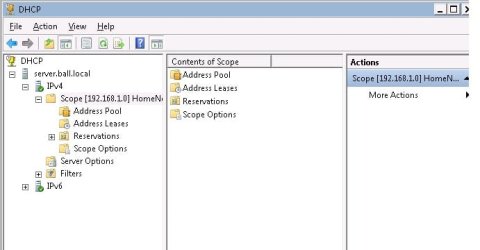
Make sure that DHCP is enabled and configured from your Win08 Server, disable DHCP from your router if you have not.

For your Server (Main DC), here's a proper config:
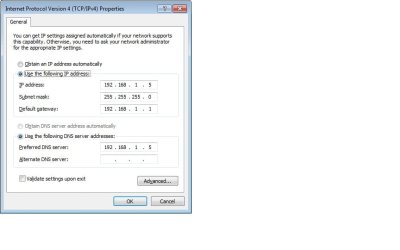
192.168.1.5 --> Static IP of Server
255.255.255.0 --> Subnet
192.168.1.1 - Default Gateway

192.168.1.5 - DNS - You have to point the DNS Address to the Server itself.

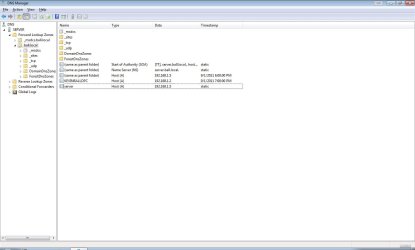
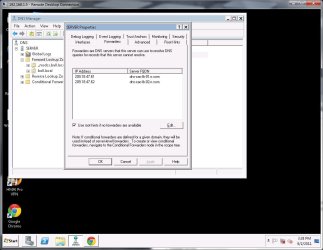
In DNS Manager from your Win08 Server, right click on the Server Name, choose Properties, locate Forwarders Tab and add the DNS Resolvers here. If you don't know those DNS's you may call your ISP.

Assign DHCP to all Client PC's on your network, match the ipconfig /all from your Server, make sure that the Client PC has a DNS of 192.168.1.5, Def. Gateway of 192.168.1.1 and Subnet of 255.255.255.0.

Now, test your GPO and WSUS, see if issue persist. Pls. keep us posted.
 

My Computer

Computer Manufacturer/Model Number
Lenovo Desktop/Samsung Laptop
OS
Win7 & Win8 64bit
CPU
Intel i5
Internet Speed
Charter-20 Mbps
Antivirus
Avast
Browser
FF, IE9 and Chrome
In DNS Manager from your Win08 Server, right click on the Server Name, choose Properties, locate Forwarders Tab and add the DNS Resolvers here. If you don't know those DNS's you may call your ISP.

My ec.rr.com Road Runner DNS are:


DNS 1
209.18.47.61

DNS 2
209.18.47.62

Not sure when I press right click, which option I should choose.
 

Attachments

  • DNS Resolve.jpg
    DNS Resolve.jpg
    133.1 KB · Views: 28
  • ipv4.jpg
    ipv4.jpg
    71.4 KB · Views: 17

My Computer

Computer Manufacturer/Model Number
HP Pavilion Elite HPE-410f
OS
Windows 7 Ultimate x64
CPU
AMD Phenom x6 1045t
Motherboard
N/A
Memory
8 GB
Graphics Card(s)
ATI Radeon HD 5570
Sound Card
Realtek Highdefinition Audio / 5.1 Dolby Setup
Monitor(s) Displays
HP w2207h Widescreen
Screen Resolution
1680*1050
Hard Drives
1 TB (fixed), 320 Portable maxtor, Server Hard drives
PSU
350 Watt
Case
HP CASE
Cooling
Bass
Keyboard
Logitech MX 5500
Mouse
Logitech MX 5500
Internet Speed
ROAD RUNNER 16MB D/512 U
You have to right click on 'SERVER', that's your Server Name, according from your print screen?
Then follow the rest of my instruction, then add those DNS's in Forwarders Tab.

BTW..you Server's TCP/IP screen looks good now. :D
 

My Computer

Computer Manufacturer/Model Number
Lenovo Desktop/Samsung Laptop
OS
Win7 & Win8 64bit
CPU
Intel i5
Internet Speed
Charter-20 Mbps
Antivirus
Avast
Browser
FF, IE9 and Chrome
Alright.. this is what I got in the properties field.

I will test everything to see if its working.

Just want to verify everything;

Server:
IP: 192.168.1.5
Subnet: 255.255.255.0
Gateway: 192.168.1.1
DNS: 192.168.1.5

Computer 1:
IP: 192.168.1.2
Subnet: 255.255.255.0
Gateway: 192.168.1.1
DNS: 192.168.1.5
DNS2: 192.168.1.1

Computer 1:
IP: 192.168.1.3
Subnet: 255.255.255.0
Gateway: 192.168.1.1
DNS: 192.168.1.5
DNS2: 192.168.1.1
 

Attachments

  • DNS servers.jpg
    DNS servers.jpg
    148.7 KB · Views: 10
  • dhcp.jpg
    dhcp.jpg
    50 KB · Views: 9

My Computer

Computer Manufacturer/Model Number
HP Pavilion Elite HPE-410f
OS
Windows 7 Ultimate x64
CPU
AMD Phenom x6 1045t
Motherboard
N/A
Memory
8 GB
Graphics Card(s)
ATI Radeon HD 5570
Sound Card
Realtek Highdefinition Audio / 5.1 Dolby Setup
Monitor(s) Displays
HP w2207h Widescreen
Screen Resolution
1680*1050
Hard Drives
1 TB (fixed), 320 Portable maxtor, Server Hard drives
PSU
350 Watt
Case
HP CASE
Cooling
Bass
Keyboard
Logitech MX 5500
Mouse
Logitech MX 5500
Internet Speed
ROAD RUNNER 16MB D/512 U
Correct
Server:
IP: 192.168.1.5
Subnet: 255.255.255.0
Gateway: 192.168.1.1
DNS: 192.168.1.5

Both client computers need to have DHCP enabled, it shd auto assign IP's correctly coming from your server. Are you doing Fixed IP?
DNS2 - Wrong - just remove it, you don't need it.
Computer 1:
IP: 192.168.1.2
Subnet: 255.255.255.0
Gateway: 192.168.1.1
DNS: 192.168.1.5
DNS2: 192.168.1.1

DNS2 - Wrong
- just remove it, you don't need it.
Computer 1:
IP: 192.168.1.3
Subnet: 255.255.255.0
Gateway: 192.168.1.1
DNS: 192.168.1.5
DNS2: 192.168.1.1
 

My Computer

Computer Manufacturer/Model Number
Lenovo Desktop/Samsung Laptop
OS
Win7 & Win8 64bit
CPU
Intel i5
Internet Speed
Charter-20 Mbps
Antivirus
Avast
Browser
FF, IE9 and Chrome
I just put it to DHCP

Do you have any idea why I am getting these DNS servers:

208.67.222.222
208.67.220.220

even though I forced my Road Runner DNS servers on the server itself.
 

Attachments

  • ipv4DHCP on.jpg
    ipv4DHCP on.jpg
    74.1 KB · Views: 6

My Computer

Computer Manufacturer/Model Number
HP Pavilion Elite HPE-410f
OS
Windows 7 Ultimate x64
CPU
AMD Phenom x6 1045t
Motherboard
N/A
Memory
8 GB
Graphics Card(s)
ATI Radeon HD 5570
Sound Card
Realtek Highdefinition Audio / 5.1 Dolby Setup
Monitor(s) Displays
HP w2207h Widescreen
Screen Resolution
1680*1050
Hard Drives
1 TB (fixed), 320 Portable maxtor, Server Hard drives
PSU
350 Watt
Case
HP CASE
Cooling
Bass
Keyboard
Logitech MX 5500
Mouse
Logitech MX 5500
Internet Speed
ROAD RUNNER 16MB D/512 U
As long as is showing the Server's DNS, that's fine.

You shd also check the Event Viewer for any DNS Errors.

Have you tested your GPO? You may just do gpupdate /force on the user's computers to see if your GPO works.

WSUS - do a manual force WU, see if it works this time.
 

My Computer

Computer Manufacturer/Model Number
Lenovo Desktop/Samsung Laptop
OS
Win7 & Win8 64bit
CPU
Intel i5
Internet Speed
Charter-20 Mbps
Antivirus
Avast
Browser
FF, IE9 and Chrome
I am curious to find out what's an udpate on this.....:D

Will be nice to know.
 

My Computer

Computer Manufacturer/Model Number
Lenovo Desktop/Samsung Laptop
OS
Win7 & Win8 64bit
CPU
Intel i5
Internet Speed
Charter-20 Mbps
Antivirus
Avast
Browser
FF, IE9 and Chrome
I got tired of having dedicated computers to do this because it caused a lot of errors so I started to use VMware Workstation to Install Windows 2008 r2 and Windows 7 Ultimate.

I think the biggest problem I am having are my DNS servers. I think that I am setting them up correctly. They are all in the same domain and class C network and subnet... It is just giving me so many issues.

When I use WSUS, it will only find the server computer.
 

My Computer

Computer Manufacturer/Model Number
HP Pavilion Elite HPE-410f
OS
Windows 7 Ultimate x64
CPU
AMD Phenom x6 1045t
Motherboard
N/A
Memory
8 GB
Graphics Card(s)
ATI Radeon HD 5570
Sound Card
Realtek Highdefinition Audio / 5.1 Dolby Setup
Monitor(s) Displays
HP w2207h Widescreen
Screen Resolution
1680*1050
Hard Drives
1 TB (fixed), 320 Portable maxtor, Server Hard drives
PSU
350 Watt
Case
HP CASE
Cooling
Bass
Keyboard
Logitech MX 5500
Mouse
Logitech MX 5500
Internet Speed
ROAD RUNNER 16MB D/512 U
Just to let you know that if DNS resolvers are not up to date or they have been changed by your ISP, you will not be informed. Here's a good example of an outdated DNS's. I've dealt with a few DNS issues in the past and I would always advise to contact their ISP.

Just my 2 cents...:D
 

My Computer

Computer Manufacturer/Model Number
Lenovo Desktop/Samsung Laptop
OS
Win7 & Win8 64bit
CPU
Intel i5
Internet Speed
Charter-20 Mbps
Antivirus
Avast
Browser
FF, IE9 and Chrome
Back
Top