windows seven pixilated

jhoiemarie

New member
Local time
3:05 AM
Messages
4
hi, i have installed a clean copy of windows seven ultimate and i noticed that whenever i watched a movie and hit fullscreen the screen's a bit jagged. pixel's too noticeable.

here's an example:

2s77yid.jpg


i would appreciate any help regarding this issue.

p.s
attached is my system specifications. also, i have an Intel HD for Graphics if that will help.
 

Attachments

  • sys.jpg
    sys.jpg
    13.4 KB · Views: 16
Last edited by a moderator:

My Computer

Computer Manufacturer/Model Number
eMachines
OS
windows vista home basic 32-bit
CPU
eMD732Z
Motherboard
InsydeH2O Version V1.01
Memory
2GB
Graphics Card(s)
Intel(R) HD Graphics
Sound Card
Speakers (Realtek High Definition Audio)
Monitor(s) Displays
Generic PnP Monitor
Hard Drives
320 GB HDD
SATA
PSU
HIPRO HP-A0652R3B
Case
built-in
Cooling
N/A
Is this movie from your own DVD, or streamed from elsewhere? If elsewhere, it could be the resolution of the source - something you can't control.

Make sure you have the latest drivers for your Intel video graphics.
 

My Computer

Computer Manufacturer/Model Number
Dell and Custom
OS
Systems 1 and 2: Windows 7 Enterprise x64, Win 8 Developer
CPU
System 1: i7 [email protected], System 2: AMD FX-4100 Zambezi 3.6G
Motherboard
System 1:Dell 06NWYK System 2: ASUS M5A97 AM3+
Memory
System 1: 8GB System 2: 8GB
Graphics Card(s)
System 1: ATI FirePro V4800 System 2: Radeon HD 6850
Sound Card
System 1: onboard System 2: onboard
Monitor(s) Displays
System1: Viewsonic HDMI 24"
Screen Resolution
System 1: 1920x1080 System 2: 1920x1080
Hard Drives
System 1: Mirrored .5B drives System 2: Seagate Barracuda ST1000DM003 1TB 7200 RPM 64MB Cache SATA 6.0Gb/s
Case
System 1: Dell System 2: Cooler Master
Internet Speed
10 MBPS
Is this movie from your own DVD, or streamed from elsewhere? If elsewhere, it could be the resolution of the source - something you can't control.

Make sure you have the latest drivers for your Intel video graphics.


,it's from my own computer.
 

My Computer

Computer Manufacturer/Model Number
eMachines
OS
windows vista home basic 32-bit
CPU
eMD732Z
Motherboard
InsydeH2O Version V1.01
Memory
2GB
Graphics Card(s)
Intel(R) HD Graphics
Sound Card
Speakers (Realtek High Definition Audio)
Monitor(s) Displays
Generic PnP Monitor
Hard Drives
320 GB HDD
SATA
PSU
HIPRO HP-A0652R3B
Case
built-in
Cooling
N/A
The "pixelated" effect you see in the video is due to the video renderer used by whichever program you use to play video files. I would suggest that you change that.

You could download Media Player Classic - Home Cinema and install it. By default, MPC-HC uses the EVR renderer which does not create the effect you're currently experiencing.
 

My Computer

Computer type
Laptop
Computer Manufacturer/Model Number
Custom
OS
Windows 7 Home Premium x64
CPU
Intel Core i5 2500K
Motherboard
MSI MS-7750
Memory
8GB DDR3
Graphics Card(s)
nVidia GeForce GTX650 Ti BOOST
Sound Card
Realtek
Monitor(s) Displays
21' Philips
Screen Resolution
Full HD
Hard Drives
1TB
PSU
500W
It could also be that the video card you have can't produce the sort of quality you want from it. This is just like the problem some people have when they play a Blue Ray on their computer and they see the same pixel problem.
 

My Computer

Computer type
PC/Desktop
Computer Manufacturer/Model Number
Self made
OS
windows 7 home premium 64, and Windows 10 64 bit
CPU
I7 940
Motherboard
ASUS P6TX58D Premium- BIOS VERSION 1402
Memory
12 GB Dominator 3 channel 1600
Graphics Card(s)
Radeon R9 Fury Nitro
Sound Card
Z1
Monitor(s) Displays
50 Inch Panasonic TV
Screen Resolution
1920x1080
Hard Drives
Main drive OCZ Revodrive V2 and 8 TB multi drives
PSU
Coolermaster 1000
Case
CoolerMaster 932
Cooling
Coolermaster Dual fan
Keyboard
mx 5500 revolution
Mouse
mx 5500 revolution
Internet Speed
12 mb
Browser
Chrome
Other Info
set up for 3D Blue Ray applications with a surround room of 12 speaker Definitive Technology and multi amps, main is driven by yamaha M-65
Hi jhoiemarie
I think Lemur had the answer to this. You say the video clip "Came from your computer". But looking at the clip would suggest that this is not a home movie from a camcorder. I think it was downloaded to your computer. That being so then it is important to know the resolution of the original clip. If you right click on the file in Windows Explorer then choose "Properties" then click the "Details" tab you should see the size in pixels and I would guess it is something like 640 x 480 pixels. If the pixel size is not shown then you will need a video analyser, this will do the job:
AVIcodec 1.2 beta b113 - VideoHelp.com Downloads
Please post the details back here.
 

My Computer

Computer type
PC/Desktop
OS
Microsoft Windows 7 Home Premium 64-bit 7601 Multiprocessor Free Service Pack 1
CPU
Intel(R) Core(TM) i7-3770 CPU @ 3.40GHz
Motherboard
ASUSTeK COMPUTER INC. P8H77-M
Memory
8.00 GB
Graphics Card(s)
Intel(R) HD Graphics 4000
Sound Card
On Board
Monitor(s) Displays
Dell 24"
Screen Resolution
1920 x 1080
Hard Drives
(1) INTEL SSDSC2CT180A3 ATA Device (2) ST500DM002-1BD142 ATA Device (3) WDC WD3200AAKS-75L9A0 ATA Device (4) Generic- Compact Flash USB Device (5) Generic- MS/MS-Pro USB Device (6) Generic- SD/MMC USB Device (7) Generic- SM/xD-Picture USB
PSU
500w Corsair
Case
Cooler Master
Cooling
3 Fans
Keyboard
Logitech MK300
Mouse
Logitech WOM
Internet Speed
75Mb
Antivirus
Norton 360
Browser
Firefox, Opera, IE
Hi, I have faced this problem with certain files too. I agree with the person who suggested a renderer problem. The same file that would appear blocky like that on VLC player would appear fine on BSplayer for me.
 

My Computer

OS
windows 7
Hi jhoiemarie
I think Lemur had the answer to this. You say the video clip "Came from your computer". But looking at the clip would suggest that this is not a home movie from a camcorder. I think it was downloaded to your computer. That being so then it is important to know the resolution of the original clip. If you right click on the file in Windows Explorer then choose "Properties" then click the "Details" tab you should see the size in pixels and I would guess it is something like 640 x 480 pixels. If the pixel size is not shown then you will need a video analyser, this will do the job:
AVIcodec 1.2 beta b113 - VideoHelp.com Downloads
Please post the details back here.

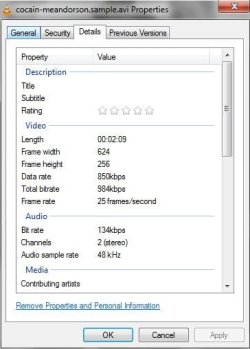
hi, yes i downloaded this movie to my computer. this is the file's property:
 

Attachments

  • details.jpg
    details.jpg
    26.7 KB · Views: 8

My Computer

Computer Manufacturer/Model Number
eMachines
OS
windows vista home basic 32-bit
CPU
eMD732Z
Motherboard
InsydeH2O Version V1.01
Memory
2GB
Graphics Card(s)
Intel(R) HD Graphics
Sound Card
Speakers (Realtek High Definition Audio)
Monitor(s) Displays
Generic PnP Monitor
Hard Drives
320 GB HDD
SATA
PSU
HIPRO HP-A0652R3B
Case
built-in
Cooling
N/A
The answer to your problem is now revealed. The video clip that you have is only 624 x 256 pixels a little smaller than my estimate above. When you show this clip in full screen you are "stretching" each individual pixel in the clip to your screen resolution which I guess is something like 1280 x 960 px. So to fill your screen you are zooming to 400% of the original. That's why you get the pixelation. There's nothing you can do about that.
With a very sophisticated video editing software you could improve the view slightly by playing with the contrast and some other filters but at the end of the day "You cannot make a silk purse out of a sows ear"
 

My Computer

Computer type
PC/Desktop
OS
Microsoft Windows 7 Home Premium 64-bit 7601 Multiprocessor Free Service Pack 1
CPU
Intel(R) Core(TM) i7-3770 CPU @ 3.40GHz
Motherboard
ASUSTeK COMPUTER INC. P8H77-M
Memory
8.00 GB
Graphics Card(s)
Intel(R) HD Graphics 4000
Sound Card
On Board
Monitor(s) Displays
Dell 24"
Screen Resolution
1920 x 1080
Hard Drives
(1) INTEL SSDSC2CT180A3 ATA Device (2) ST500DM002-1BD142 ATA Device (3) WDC WD3200AAKS-75L9A0 ATA Device (4) Generic- Compact Flash USB Device (5) Generic- MS/MS-Pro USB Device (6) Generic- SD/MMC USB Device (7) Generic- SM/xD-Picture USB
PSU
500w Corsair
Case
Cooler Master
Cooling
3 Fans
Keyboard
Logitech MK300
Mouse
Logitech WOM
Internet Speed
75Mb
Antivirus
Norton 360
Browser
Firefox, Opera, IE
The answer to your problem is now revealed. The video clip that you have is only 624 x 256 pixels a little smaller than my estimate above. When you show this clip in full screen you are "stretching" each individual pixel in the clip to your screen resolution which I guess is something like 1280 x 960 px. So to fill your screen you are zooming to 400% of the original. That's why you get the pixelation. There's nothing you can do about that.
With a very sophisticated video editing software you could improve the view slightly by playing with the contrast and some other filters but at the end of the day "You cannot make a silk purse out of a sows ear"

,hi. actually the movie is not only my problem. my screen is kinda "pixilated", the screen is a bit jagged as well. and when i open a picture or a wallpaper, same thing happens. i mean, it is very different from vista and xp. i had used those OS before and i did not
have any problem with regards to the graphics. my laptop is 14.0 inches 16:9 HD LCD, by the way. this laptop is designed for this latest OS from MS, and with the Intel HD Graphis it should work fine, right? I wonder why I am having this kind of issue.

,thanks for taking time to red this,btw. any help will be again appreciated. Thanks.
 

My Computer

Computer Manufacturer/Model Number
eMachines
OS
windows vista home basic 32-bit
CPU
eMD732Z
Motherboard
InsydeH2O Version V1.01
Memory
2GB
Graphics Card(s)
Intel(R) HD Graphics
Sound Card
Speakers (Realtek High Definition Audio)
Monitor(s) Displays
Generic PnP Monitor
Hard Drives
320 GB HDD
SATA
PSU
HIPRO HP-A0652R3B
Case
built-in
Cooling
N/A

My Computer

Computer type
PC/Desktop
OS
Microsoft Windows 7 Home Premium 64-bit 7601 Multiprocessor Free Service Pack 1
CPU
Intel(R) Core(TM) i7-3770 CPU @ 3.40GHz
Motherboard
ASUSTeK COMPUTER INC. P8H77-M
Memory
8.00 GB
Graphics Card(s)
Intel(R) HD Graphics 4000
Sound Card
On Board
Monitor(s) Displays
Dell 24"
Screen Resolution
1920 x 1080
Hard Drives
(1) INTEL SSDSC2CT180A3 ATA Device (2) ST500DM002-1BD142 ATA Device (3) WDC WD3200AAKS-75L9A0 ATA Device (4) Generic- Compact Flash USB Device (5) Generic- MS/MS-Pro USB Device (6) Generic- SD/MMC USB Device (7) Generic- SM/xD-Picture USB
PSU
500w Corsair
Case
Cooler Master
Cooling
3 Fans
Keyboard
Logitech MK300
Mouse
Logitech WOM
Internet Speed
75Mb
Antivirus
Norton 360
Browser
Firefox, Opera, IE
The answer to your problem is now revealed. The video clip that you have is only 624 x 256 pixels a little smaller than my estimate above. When you show this clip in full screen you are "stretching" each individual pixel in the clip to your screen resolution which I guess is something like 1280 x 960 px. So to fill your screen you are zooming to 400% of the original. That's why you get the pixelation. There's nothing you can do about that.
With a very sophisticated video editing software you could improve the view slightly by playing with the contrast and some other filters but at the end of the day "You cannot make a silk purse out of a sows ear"

,hi. actually the movie is not only my problem. my screen is kinda "pixilated", the screen is a bit jagged as well. and when i open a picture or a wallpaper, same thing happens. i mean, it is very different from vista and xp. i had used those OS before and i did not
have any problem with regards to the graphics. my laptop is 14.0 inches 16:9 HD LCD, by the way. this laptop is designed for this latest OS from MS, and with the Intel HD Graphis it should work fine, right? I wonder why I am having this kind of issue.

,thanks for taking time to red this,btw. any help will be again appreciated. Thanks.

The problem lies in the resolution of the movie, you can try to update the Intel HD graphics Intel® Driver Update Utility
 

My Computer

Computer type
PC/Desktop
Computer Manufacturer/Model Number
Custom Build
OS
Windows 10 Pro x64, Arch Linux
CPU
Intel Core 2 Quad Q8200 OC'd 3.08GHz
Motherboard
Asus Rampage formula LGA775
Memory
8GB DDR2 900Mhz
Graphics Card(s)
MSI GT730 2GB GDDR5 (Kepler)
Sound Card
Supreme FX2
Monitor(s) Displays
Samsung LS22F350 LED
Screen Resolution
1080P
Hard Drives
Kingston SSDNow UV400 120GB, 500GB Hitachi, 2TB Samsung, 500GB Seagate FreeAgent, 640GB Samsung, 160GB Toshiba (Arch)
PSU
AeroCool 500W Bronze
Cooling
Cooler Master V6 + 3X fans
Keyboard
Prolink keyboard
Mouse
Logitech M705
Internet Speed
1MiB/s
Browser
Chrome Beta
But I understood that the problems occurs when the OP opens a picture or a wallpaper as well!
 

My Computer

Computer type
PC/Desktop
OS
Microsoft Windows 7 Home Premium 64-bit 7601 Multiprocessor Free Service Pack 1
CPU
Intel(R) Core(TM) i7-3770 CPU @ 3.40GHz
Motherboard
ASUSTeK COMPUTER INC. P8H77-M
Memory
8.00 GB
Graphics Card(s)
Intel(R) HD Graphics 4000
Sound Card
On Board
Monitor(s) Displays
Dell 24"
Screen Resolution
1920 x 1080
Hard Drives
(1) INTEL SSDSC2CT180A3 ATA Device (2) ST500DM002-1BD142 ATA Device (3) WDC WD3200AAKS-75L9A0 ATA Device (4) Generic- Compact Flash USB Device (5) Generic- MS/MS-Pro USB Device (6) Generic- SD/MMC USB Device (7) Generic- SM/xD-Picture USB
PSU
500w Corsair
Case
Cooler Master
Cooling
3 Fans
Keyboard
Logitech MK300
Mouse
Logitech WOM
Internet Speed
75Mb
Antivirus
Norton 360
Browser
Firefox, Opera, IE
Back
Top