Solved Windows Seven strange start-up Problem

Will do Greg i will make sure no externals are connected when irepair or reinstall Thanks again i will hold a bit in case something is found in the Speccy results Post #54
 

My Computer My Computer

Computer type
PC/Desktop
Computer Manufacturer/Model Number
Dell Optiplex 990
OS
Windows 7 Ultimate x64
CPU
Intel i7 2600 3.4ghz
Motherboard
Dell OVNP2H
Memory
16GB
Graphics Card(s)
[ASUS] Nvidia GTX970 4GB (Mini Direct)
Sound Card
Intergraded
Monitor(s) Displays
3 Monitors 1# ViewSonic 23'" 2# ViewSonic 23'" 3# DELL 23"
Screen Resolution
1920X1080P X 3
Hard Drives
3 Internal Satas's (Two 7200RPM 1TB (WD) (1 Sata Velocirapto 10,000RPM 500GB)
1 External Mybook 4TB USB. 1External Passport 2TB.
PSU
650W
Internet Speed
50up 50down Fios
Just a few notes from reading your Speccy snapshot
User Variables
path:
%CommonProgramFiles%\Microsoft Shared\Windows Live

Machine Variables
Path:
C:\Program Files (x86)\AMD APP\bin\x86_64
C:\Program Files (x86)\AMD APP\bin\x86
%CommonProgramFiles%\Microsoft Shared\Windows Live
C:\Windows\system32
C:\Windows
C:\Windows\System32\Wbem
C:\Windows\System32\WindowsPowerShell\v1.0\
C:\Program Files (x86)\ATI Technologies\ATI.ACE\Core-Static
C:\Program Files\Intel\DMIX

Two things
... first having the Windows live path statement in the user variables overrides the machine variable. This isn't causing any immediate issues, but might down the road if MS changes WL path.
... second, I see no references to SysWOW64 or Program Files. This might not be important becasue I've seen references to machines without it. It just caught my attention.
Most of this is junk that steals processing when active. The CCleanerSkipUACOpen task circumvents UAC when you launch it, so that can stay.
I always update manually so I know what goes on my system. All updater tasks EXCEPT AntiVirus can be safely removed from msconfig->startup tab and Task Scheduler if not cleared after you modify the startup tab.

OpenCandy is comsidered unwanted software that usually gets on your system as a toolbar add-on when you install a wanted piece of software. ESET Online scanner or Malwarebytes normally takes care of removing it.

SmartDefrag sounds as though it is part of Adv SysCare

AWC - don't know, but a quick Google makes it out to be part of Adv SysCare
Scheduler
2/20/2013 1:15 PM;: Scheduled Update for Ask Toolbar
2/20/2013 1:19 PM;: OpenCandyHelper
2/20/2013 1:40 PM;: GoogleUpdateTaskMachineUA
2/20/2013 1:54 PM;: Adobe Flash Player Updater
2/21/2013 8:40 AM;: GoogleUpdateTaskMachineCore
2/27/2013 6:47 AM;: RealUpgradeScheduledTaskS-1-5-21-3717573752-3641179098-1415789313-1001
AWC Startup
CCleanerSkipUACOpen
CandyHelper
RunRealUpgradeLogonTaskS-1-5-21-3717573752-3641179098-1415789313-1001
SmartDefragUpdate
SmartDefrag_Startup
Part of Adv SysCare, should go away when you uninstall AdvSysCare
datamngrui.exe
Process ID: 2024
User: grciamk3Domain: TECHPC
Path: C:\Program Files (x86)\Settings Alerter\Datamngr\datamngrUI.exe
Memory Usage: 9.34 MB
Peak Memory Usage: 11 MB
Uninstall DAEMON Tools
dtshellhlp.exe
Process ID: 3232
User: grciamk3Domain: TECHPC
Path: C:\Program Files (x86)\DAEMON Tools Pro\DTShellHlp.exe
Memory Usage: 23 MB
Peak Memory Usage: 23 MB
Uninstall MagicDisc and if a similar utiltity is needed replace with ISOMagic:Download ISOMagic Free
7-Zip works too, just not as a reader - you have to open the ISO and extract the files
magicdisc.exe
Process ID: 3532
User: grciamk3
Domain: TECHPC
Path: C:\Program Files (x86)\MagicDisc\MagicDisc.exe
Memory Usage: 8.86 MB
Peak Memory Usage: 9.31 MB
Uninstall PerfectDisk Pro - another unecessary Tune-up utility. A quick search tells me you might have paid for this one. Still, the windows defrag does it's job better than it's predecessors and the Piriform Defraggler is free and unobstruisive to a system.
pdagent.exe
Process ID: 1716User: SYSTEM
Domain: NT AUTHORITY
Path: C:\Program Files\Raxco\PerfectDisk\PDAgent.exe
Memory Usage: 16 MB
Peak Memory Usage: 18 MB

pdagents1.exe
Process ID: 2884
User: grciamk3
Domain: TECHPC
Path: C:\Program Files\Raxco\PerfectDisk\PDAgentS1.exe
Memory Usage: 5.46 MB
Peak Memory Usage: 5.74 MB
Tango media player or Tango virus? I don't know - a quick search tells me that if it is a virus, ESET removes it. Run a full scan and search archives.
Free Online Virus Scanner | ESET
tango.exe
Process ID: 168
0User: grciamk3
Domain: TECHPCP
ath: C:\Program Files (x86)\Tango\Tango.exe
Memory Usage: 40 MB
Peak Memory Usage: 41 MB

Please don't wait on me - finish the trouble shooting tutorial and many things I might suggest will already have been completed.

When you're finished with that, then folow the next path.

The Speccy snapshot showed a few things - not too bad, just a bunch of utilities that lots of people think will help.

The only real concerning items are AdvSysCare (which you said you would or will remove) and DEAMON tools (known to cause BSODs).

 

My Computer My Computer

Computer type
Laptop
Computer Manufacturer/Model Number
HP Pavilion dv6-6c10us
OS
x64 (6.3.9600) Win8.1 Pro & soon dual boot x64 (6.1.7601) Win7_SP1 HomePrem
CPU
AMD A6-3420M APU with Radeon(tm) HD Graphics
Motherboard
Hewlett-Packard 1805
Memory
6.00 GB
Graphics Card(s)
AMD Radeon(TM) HD 6520G
Sound Card
(1) AMD High Definition Audio Device (2) IDT High Definiti
Monitor(s) Displays
HP W2072a 20" LCD (1600 x 900) @ 60 Hz
Screen Resolution
1366 x 768 x 32 bits (4294967296 colors) @ 60 Hz
Hard Drives
ST640LM0 00 HM641JI SATA Disk Device
Keyboard
Logitech k520 wireless KB
Mouse
Logitech m320 wireless mouse (bundled with KB)
Internet Speed
15/5 | 54 MB Wireless 'n'
Antivirus
Realtime: Defender or Avast | On-demand: Malwarebytes, ESET
Browser
IE 11 on Win8, IE 10 on win 7
Other Info
Media: [Gimp, Audacity, VLC] || Comm: [WEmail 2012, Skype] || Productivity: [OpenOffice,| Textpad] || Utils: [Sysinternals, cCleaner, Speccy, Defraggler]
Very thorough analysis, Bill. What I also spotted is Google Toobar which is spyware and should be uninstalled. Use only the stable search box built into your browser. Of course anything Google is spyware but the toolbar is worst. You need no 3rd party toolbars or search services which are always spyware.

Run SUPERAntiSpyware.com - Downloads to dig into registry to rid these spywares, declining Trial during install, then turn it off from starting with Windows in Preferences and msconfig.

Establishing a Clean Boot is paramount, also in Troubleshooting Steps for Windows 7
 
Ok now that was allot of information,Im really glad you took the time to run all that by me and it is greatly apreciated, i will uninstall the programs as you suggested
 

My Computer My Computer

Computer type
PC/Desktop
Computer Manufacturer/Model Number
Dell Optiplex 990
OS
Windows 7 Ultimate x64
CPU
Intel i7 2600 3.4ghz
Motherboard
Dell OVNP2H
Memory
16GB
Graphics Card(s)
[ASUS] Nvidia GTX970 4GB (Mini Direct)
Sound Card
Intergraded
Monitor(s) Displays
3 Monitors 1# ViewSonic 23'" 2# ViewSonic 23'" 3# DELL 23"
Screen Resolution
1920X1080P X 3
Hard Drives
3 Internal Satas's (Two 7200RPM 1TB (WD) (1 Sata Velocirapto 10,000RPM 500GB)
1 External Mybook 4TB USB. 1External Passport 2TB.
PSU
650W
Internet Speed
50up 50down Fios
Will do Greg Does the free edition do as good of a job as the payware version or would you recommend the payware version?

Never mind just read the description downloading it now
 

My Computer My Computer

Computer type
PC/Desktop
Computer Manufacturer/Model Number
Dell Optiplex 990
OS
Windows 7 Ultimate x64
CPU
Intel i7 2600 3.4ghz
Motherboard
Dell OVNP2H
Memory
16GB
Graphics Card(s)
[ASUS] Nvidia GTX970 4GB (Mini Direct)
Sound Card
Intergraded
Monitor(s) Displays
3 Monitors 1# ViewSonic 23'" 2# ViewSonic 23'" 3# DELL 23"
Screen Resolution
1920X1080P X 3
Hard Drives
3 Internal Satas's (Two 7200RPM 1TB (WD) (1 Sata Velocirapto 10,000RPM 500GB)
1 External Mybook 4TB USB. 1External Passport 2TB.
PSU
650W
Internet Speed
50up 50down Fios
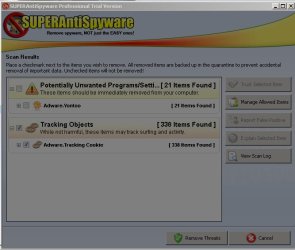
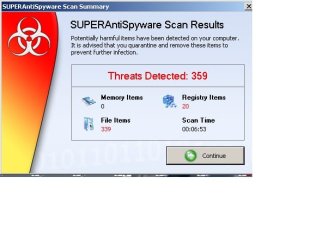
Wow that most definitely found alot of threats:sleepy:

12.jpg

15.jpg
 

My Computer My Computer

Computer type
PC/Desktop
Computer Manufacturer/Model Number
Dell Optiplex 990
OS
Windows 7 Ultimate x64
CPU
Intel i7 2600 3.4ghz
Motherboard
Dell OVNP2H
Memory
16GB
Graphics Card(s)
[ASUS] Nvidia GTX970 4GB (Mini Direct)
Sound Card
Intergraded
Monitor(s) Displays
3 Monitors 1# ViewSonic 23'" 2# ViewSonic 23'" 3# DELL 23"
Screen Resolution
1920X1080P X 3
Hard Drives
3 Internal Satas's (Two 7200RPM 1TB (WD) (1 Sata Velocirapto 10,000RPM 500GB)
1 External Mybook 4TB USB. 1External Passport 2TB.
PSU
650W
Internet Speed
50up 50down Fios
Ok Update, Sorry it took me a while to post back I think the Super Anti Spyware may have fixed the issue I have rebooted a couple of times no black screen. I also ran a Critical Scan Using the Super Anti Spyware and the results where good. Although i no longer see Google Chrome :p I will perform a few more reeboots and post back little later tonight
 

My Computer My Computer

Computer type
PC/Desktop
Computer Manufacturer/Model Number
Dell Optiplex 990
OS
Windows 7 Ultimate x64
CPU
Intel i7 2600 3.4ghz
Motherboard
Dell OVNP2H
Memory
16GB
Graphics Card(s)
[ASUS] Nvidia GTX970 4GB (Mini Direct)
Sound Card
Intergraded
Monitor(s) Displays
3 Monitors 1# ViewSonic 23'" 2# ViewSonic 23'" 3# DELL 23"
Screen Resolution
1920X1080P X 3
Hard Drives
3 Internal Satas's (Two 7200RPM 1TB (WD) (1 Sata Velocirapto 10,000RPM 500GB)
1 External Mybook 4TB USB. 1External Passport 2TB.
PSU
650W
Internet Speed
50up 50down Fios
I'd use MSE for AV, Malwarebytes on demand for scanning semi-regularly, ditto SAS. Only allow MSE into msconfig>Startups and >Services after Hiding All MS Services. Exceptions are gadgets/stickies, a sync service like Skydrive, anything else that you can't do without starting with Windows because you need it open and running at startup.
 
@Gar: The majority of the threats are just tracking cookies that don't cause harm. They just keep track of you on the net, mostly for targeted advertising.

I can't tell if you processed the threats (quarantine/remove) from you screen shot. It sounds as though you did though when you posted that you think the issue is resolved.

Uninstall Google Toolbar if superAntiSpyware didn't already remove it.

Do you use Chrome as your browser or was it installed along with something you menat to install. You really need to pay attention (not just you, everyone) when installing stuff. Too many installs include cling-on applications, utilties or browser add-ons, that you really don't want or need on your system.

When you're done house keeping on your machine - publish a new Speccy.


@Greg:
Thanks - yeah, I saw the Google toolbar, but I guess my eyes hurt at that point - thanks for picking up the slack.

I was aslo going to suggest the clean boot, but that is already in the trouble shooting tutorial.

Very thorough analysis, Bill. What I also spotted is Google Toobar which is spyware and should be uninstalled. Use only the stable search box built into your browser. Of course anything Google is spyware but the toolbar is worst. You need no 3rd party toolbars or search services which are always spyware.

Run SUPERAntiSpyware.com - Downloads to dig into registry to rid these spywares, declining Trial during install, then turn it off from starting with Windows in Preferences and msconfig.

Establishing a Clean Boot is paramount, also in Troubleshooting Steps for Windows 7
 

My Computer My Computer

Computer type
Laptop
Computer Manufacturer/Model Number
HP Pavilion dv6-6c10us
OS
x64 (6.3.9600) Win8.1 Pro & soon dual boot x64 (6.1.7601) Win7_SP1 HomePrem
CPU
AMD A6-3420M APU with Radeon(tm) HD Graphics
Motherboard
Hewlett-Packard 1805
Memory
6.00 GB
Graphics Card(s)
AMD Radeon(TM) HD 6520G
Sound Card
(1) AMD High Definition Audio Device (2) IDT High Definiti
Monitor(s) Displays
HP W2072a 20" LCD (1600 x 900) @ 60 Hz
Screen Resolution
1366 x 768 x 32 bits (4294967296 colors) @ 60 Hz
Hard Drives
ST640LM0 00 HM641JI SATA Disk Device
Keyboard
Logitech k520 wireless KB
Mouse
Logitech m320 wireless mouse (bundled with KB)
Internet Speed
15/5 | 54 MB Wireless 'n'
Antivirus
Realtime: Defender or Avast | On-demand: Malwarebytes, ESET
Browser
IE 11 on Win8, IE 10 on win 7
Other Info
Media: [Gimp, Audacity, VLC] || Comm: [WEmail 2012, Skype] || Productivity: [OpenOffice,| Textpad] || Utils: [Sysinternals, cCleaner, Speccy, Defraggler]
Don't recall if chrome was installed with another program but most definitely the Spyware scan removed it when I asked to to repair the issues. Windows started just fine a couple of times but unfortunately just ran into the black screen once again. I'm now just running the program again through safe mode found Trojan horse (Reset DB) not sure what that means looks like I may try installing windows using the upgrade method to prevent loosing other programs if that doesn't work guess I may have to re-install

Ha yet another Trojan was found during safe mode scan svchost.exe
 

My Computer My Computer

Computer type
PC/Desktop
Computer Manufacturer/Model Number
Dell Optiplex 990
OS
Windows 7 Ultimate x64
CPU
Intel i7 2600 3.4ghz
Motherboard
Dell OVNP2H
Memory
16GB
Graphics Card(s)
[ASUS] Nvidia GTX970 4GB (Mini Direct)
Sound Card
Intergraded
Monitor(s) Displays
3 Monitors 1# ViewSonic 23'" 2# ViewSonic 23'" 3# DELL 23"
Screen Resolution
1920X1080P X 3
Hard Drives
3 Internal Satas's (Two 7200RPM 1TB (WD) (1 Sata Velocirapto 10,000RPM 500GB)
1 External Mybook 4TB USB. 1External Passport 2TB.
PSU
650W
Internet Speed
50up 50down Fios
It seems like you're still infected. I would do the Clean Reinstall to save time messing with the cleanup any longer. These never repair completely after serious infection. A Repair Install may not be sufficient. It's best to delete all partitions during booted install to create new one(s) and reinstall.
 
I agree this is difficult one to narrow down I may after all have to delete and recreate the Partition format and re-install
 

My Computer My Computer

Computer type
PC/Desktop
Computer Manufacturer/Model Number
Dell Optiplex 990
OS
Windows 7 Ultimate x64
CPU
Intel i7 2600 3.4ghz
Motherboard
Dell OVNP2H
Memory
16GB
Graphics Card(s)
[ASUS] Nvidia GTX970 4GB (Mini Direct)
Sound Card
Intergraded
Monitor(s) Displays
3 Monitors 1# ViewSonic 23'" 2# ViewSonic 23'" 3# DELL 23"
Screen Resolution
1920X1080P X 3
Hard Drives
3 Internal Satas's (Two 7200RPM 1TB (WD) (1 Sata Velocirapto 10,000RPM 500GB)
1 External Mybook 4TB USB. 1External Passport 2TB.
PSU
650W
Internet Speed
50up 50down Fios
Ok guys I narrowed it down, as stubborn as I am in not wanting to re-install the operating system I decided to go back to post 3 and run the offline windows defender on boot. After a 3 1/2 hour scan it found another threat it was a medium risk. Weather it fixes root kits in the background or gotten rid of other things in the background automatically I'm not sure but I have completely shut the PC down numerous times and no more black screen I have turned it off on off and on over 15 times no black screen. I appreciate all of the support and your patience in helping me together at the end we won lol I will be making a new topic to fix yet one more issue I'm experiencing but I believe this one will be a bit easier

Oh yes almost forgot I uninstalled the programs as suggested by smarty on post 62 and the PC seems to be more responsive during virtual flights really worked well thanks again guys you guys are the best
 
Last edited:

My Computer My Computer

Computer type
PC/Desktop
Computer Manufacturer/Model Number
Dell Optiplex 990
OS
Windows 7 Ultimate x64
CPU
Intel i7 2600 3.4ghz
Motherboard
Dell OVNP2H
Memory
16GB
Graphics Card(s)
[ASUS] Nvidia GTX970 4GB (Mini Direct)
Sound Card
Intergraded
Monitor(s) Displays
3 Monitors 1# ViewSonic 23'" 2# ViewSonic 23'" 3# DELL 23"
Screen Resolution
1920X1080P X 3
Hard Drives
3 Internal Satas's (Two 7200RPM 1TB (WD) (1 Sata Velocirapto 10,000RPM 500GB)
1 External Mybook 4TB USB. 1External Passport 2TB.
PSU
650W
Internet Speed
50up 50down Fios
Download and run the following to be sure there are no rootkits

Kaspersky TDSSKiller Anti-Rootkit:
Direct download (you will be prompted to run, save or cancel)
More information (there's also a link to download TDDSkiller)
.
 

My Computer My Computer

Computer type
Laptop
Computer Manufacturer/Model Number
HP Pavilion dv6-6c10us
OS
x64 (6.3.9600) Win8.1 Pro & soon dual boot x64 (6.1.7601) Win7_SP1 HomePrem
CPU
AMD A6-3420M APU with Radeon(tm) HD Graphics
Motherboard
Hewlett-Packard 1805
Memory
6.00 GB
Graphics Card(s)
AMD Radeon(TM) HD 6520G
Sound Card
(1) AMD High Definition Audio Device (2) IDT High Definiti
Monitor(s) Displays
HP W2072a 20" LCD (1600 x 900) @ 60 Hz
Screen Resolution
1366 x 768 x 32 bits (4294967296 colors) @ 60 Hz
Hard Drives
ST640LM0 00 HM641JI SATA Disk Device
Keyboard
Logitech k520 wireless KB
Mouse
Logitech m320 wireless mouse (bundled with KB)
Internet Speed
15/5 | 54 MB Wireless 'n'
Antivirus
Realtime: Defender or Avast | On-demand: Malwarebytes, ESET
Browser
IE 11 on Win8, IE 10 on win 7
Other Info
Media: [Gimp, Audacity, VLC] || Comm: [WEmail 2012, Skype] || Productivity: [OpenOffice,| Textpad] || Utils: [Sysinternals, cCleaner, Speccy, Defraggler]
Perfect just ran it again everything is clean also i noticed all te errors i was getting in the event log went away. Once again ive shut down booted shutdown booted and no black screen so im 100 percent cure:D

Definitely was a bad virus :busted:
 

My Computer My Computer

Computer type
PC/Desktop
Computer Manufacturer/Model Number
Dell Optiplex 990
OS
Windows 7 Ultimate x64
CPU
Intel i7 2600 3.4ghz
Motherboard
Dell OVNP2H
Memory
16GB
Graphics Card(s)
[ASUS] Nvidia GTX970 4GB (Mini Direct)
Sound Card
Intergraded
Monitor(s) Displays
3 Monitors 1# ViewSonic 23'" 2# ViewSonic 23'" 3# DELL 23"
Screen Resolution
1920X1080P X 3
Hard Drives
3 Internal Satas's (Two 7200RPM 1TB (WD) (1 Sata Velocirapto 10,000RPM 500GB)
1 External Mybook 4TB USB. 1External Passport 2TB.
PSU
650W
Internet Speed
50up 50down Fios
That's good news Gar. See how the machine operates for a few days
In the post of the person(s), especially Greg, who helped you and click on the scales icon
picture.php
.
 

My Computer My Computer

Computer type
Laptop
Computer Manufacturer/Model Number
HP Pavilion dv6-6c10us
OS
x64 (6.3.9600) Win8.1 Pro & soon dual boot x64 (6.1.7601) Win7_SP1 HomePrem
CPU
AMD A6-3420M APU with Radeon(tm) HD Graphics
Motherboard
Hewlett-Packard 1805
Memory
6.00 GB
Graphics Card(s)
AMD Radeon(TM) HD 6520G
Sound Card
(1) AMD High Definition Audio Device (2) IDT High Definiti
Monitor(s) Displays
HP W2072a 20" LCD (1600 x 900) @ 60 Hz
Screen Resolution
1366 x 768 x 32 bits (4294967296 colors) @ 60 Hz
Hard Drives
ST640LM0 00 HM641JI SATA Disk Device
Keyboard
Logitech k520 wireless KB
Mouse
Logitech m320 wireless mouse (bundled with KB)
Internet Speed
15/5 | 54 MB Wireless 'n'
Antivirus
Realtime: Defender or Avast | On-demand: Malwarebytes, ESET
Browser
IE 11 on Win8, IE 10 on win 7
Other Info
Media: [Gimp, Audacity, VLC] || Comm: [WEmail 2012, Skype] || Productivity: [OpenOffice,| Textpad] || Utils: [Sysinternals, cCleaner, Speccy, Defraggler]
Now check the System files to see if they have been damaged: SFC /SCANNOW Command

It's rare a serious infection will ever be completely cleaned up without follow-on problems.
 
Last edited:
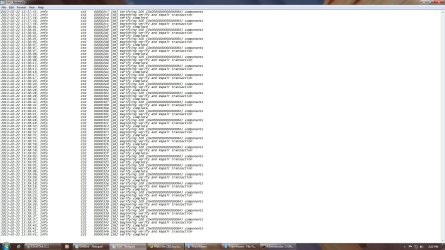
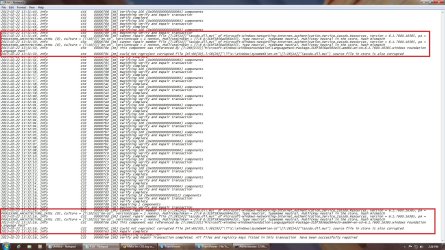
Ok did that heres the results, I highlihted the errors it found on the last picture

log.jpg log2.jpglog 3.jpglog4.jpg
 

My Computer My Computer

Computer type
PC/Desktop
Computer Manufacturer/Model Number
Dell Optiplex 990
OS
Windows 7 Ultimate x64
CPU
Intel i7 2600 3.4ghz
Motherboard
Dell OVNP2H
Memory
16GB
Graphics Card(s)
[ASUS] Nvidia GTX970 4GB (Mini Direct)
Sound Card
Intergraded
Monitor(s) Displays
3 Monitors 1# ViewSonic 23'" 2# ViewSonic 23'" 3# DELL 23"
Screen Resolution
1920X1080P X 3
Hard Drives
3 Internal Satas's (Two 7200RPM 1TB (WD) (1 Sata Velocirapto 10,000RPM 500GB)
1 External Mybook 4TB USB. 1External Passport 2TB.
PSU
650W
Internet Speed
50up 50down Fios
Results from pictures above (post78) says something about Intel architectural and something about a language pack or iassdo.dll Not sure what that means??:rolleyes:
 

My Computer My Computer

Computer type
PC/Desktop
Computer Manufacturer/Model Number
Dell Optiplex 990
OS
Windows 7 Ultimate x64
CPU
Intel i7 2600 3.4ghz
Motherboard
Dell OVNP2H
Memory
16GB
Graphics Card(s)
[ASUS] Nvidia GTX970 4GB (Mini Direct)
Sound Card
Intergraded
Monitor(s) Displays
3 Monitors 1# ViewSonic 23'" 2# ViewSonic 23'" 3# DELL 23"
Screen Resolution
1920X1080P X 3
Hard Drives
3 Internal Satas's (Two 7200RPM 1TB (WD) (1 Sata Velocirapto 10,000RPM 500GB)
1 External Mybook 4TB USB. 1External Passport 2TB.
PSU
650W
Internet Speed
50up 50down Fios
Run SFC several more times to see if it can repair the files. If not and performance problems arise you can run a Repair Install.

I would reinstall with a focus on getting a perfect install, this time save a backup image after setup to use in place of future reinstalls. This is the modern method: You only need to get one perfect install then can use it anywhere.
 
Back
Top