
Windows Sleep Mode

kodakjack

New member
Member
VIP
Local time
4:38 AM
Messages
127
I boot up my desktop in the morning but don't leave it open and running all day. I put it into Sleep Mode using the button on the upper right. When I want to use the computer again, I hit the Windows button and turn on the monitor. I have a heck of a time/ long wait to get this thing to wake up and do anything, especially getting on the Internet. I also have the problem when going into a spreadsheet or other applications not involving the Internet. Is this typical? Should I be doing something other than putting it into Sleep Mode? Thanks.
 

My Computer

Computer type
PC/Desktop
Computer Manufacturer/Model Number
Dell
OS
Windows 7 64 bit
CPU
Intel(R) Celeron(R) CPU G465 @ 1.90GHz
Motherboard
Dell Inc. 0478VN
Memory
8 gig
Graphics Card(s)
Intel(R) HD Graphics
Sound Card
(1) Intel(R) Display Audio (2) Realtek High Definition Aud
Monitor(s) Displays
Dell 19"
Hard Drives
(1) ST500DM002-1BD142 (2) Generic- Multi-Card USB Device
Mouse
Logitech marble mouse
Internet Speed
100
Antivirus
Spybot Search and Destroy, Malwarebytes,Security Essentials
Browser
Chrome with Duck Duck Go
Hi kodakjack,

I use sleep mode and no it is not typical, what do you mean "Sleep Mode using the button on the upper right."
I click :orb: then choose sleep mode, which places the monitor and desktop pc in sleep mode. Orange lights on both. I have the mouse wake disabled and can touch any key on the keyboard to wake. It takes a second or two for both to wake and the net access a few seconds later.

Prevent a Mouse or USB Device from Waking Windows from ...

Snick
 

My Computer

Computer type
PC/Desktop
Computer Manufacturer/Model Number
HP Desktop & Compaq Laptop
OS
Win 10 x64, Linux Lite, Win 7 x64, BlackArch, & Kali
Hard Drives
Samsung 850 Pro 256Gb,
Hitachi HDD 1Tb,
Crucial MX SSD 250Gb
Segate 3Tb USB 3.0 Ext. Backup HDD
Internet Speed
150Mbps dn, 20Mbps up
Antivirus
Avast Free, Malwarebytes Anti-Exploit & Anti-Ransomware
Browser
Firefox, Chrome, Opera, & VPN
There is a key on my keyboard at the upper right that sure looks like the sleep mode button( Dell ). I was told the key you refer to in your reply is referred to as the Windows button. So, I hit the sleep mode button to put it into sleep mode and wake it up by hitting the Windows button. I used to just hit the space bar, but was told that can invoke an unwanted response. I am not saying the computer doesn’t wake up quickly, what I am saying is that once it is awake, it takes forever to get it to perform whatever I ask it to do, especially going to a site on the Internet. I’d bet it takes almost a full minute of waiting before it gets its act together. If the computer is doing nothing and I hit the key you showed, I don’t get anything that gives me a choice of what I’d like to do. I am running a standard Windows 7 64 bit machine.
 

My Computer

Computer type
PC/Desktop
Computer Manufacturer/Model Number
Dell
OS
Windows 7 64 bit
CPU
Intel(R) Celeron(R) CPU G465 @ 1.90GHz
Motherboard
Dell Inc. 0478VN
Memory
8 gig
Graphics Card(s)
Intel(R) HD Graphics
Sound Card
(1) Intel(R) Display Audio (2) Realtek High Definition Aud
Monitor(s) Displays
Dell 19"
Hard Drives
(1) ST500DM002-1BD142 (2) Generic- Multi-Card USB Device
Mouse
Logitech marble mouse
Internet Speed
100
Antivirus
Spybot Search and Destroy, Malwarebytes,Security Essentials
Browser
Chrome with Duck Duck Go
Thanks for the clarification.
 

My Computer

Computer type
PC/Desktop
Computer Manufacturer/Model Number
HP Desktop & Compaq Laptop
OS
Win 10 x64, Linux Lite, Win 7 x64, BlackArch, & Kali
Hard Drives
Samsung 850 Pro 256Gb,
Hitachi HDD 1Tb,
Crucial MX SSD 250Gb
Segate 3Tb USB 3.0 Ext. Backup HDD
Internet Speed
150Mbps dn, 20Mbps up
Antivirus
Avast Free, Malwarebytes Anti-Exploit & Anti-Ransomware
Browser
Firefox, Chrome, Opera, & VPN
I’ll admit that the computer has some age on it, but does this slow response at wake up point to any problems or is just the way it is? Thanks.
 

My Computer

Computer type
PC/Desktop
Computer Manufacturer/Model Number
Dell
OS
Windows 7 64 bit
CPU
Intel(R) Celeron(R) CPU G465 @ 1.90GHz
Motherboard
Dell Inc. 0478VN
Memory
8 gig
Graphics Card(s)
Intel(R) HD Graphics
Sound Card
(1) Intel(R) Display Audio (2) Realtek High Definition Aud
Monitor(s) Displays
Dell 19"
Hard Drives
(1) ST500DM002-1BD142 (2) Generic- Multi-Card USB Device
Mouse
Logitech marble mouse
Internet Speed
100
Antivirus
Spybot Search and Destroy, Malwarebytes,Security Essentials
Browser
Chrome with Duck Duck Go
There is a key on my keyboard at the upper right that sure looks like the sleep mode button. (Dell)

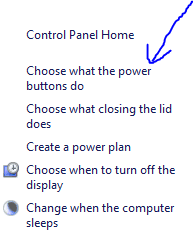
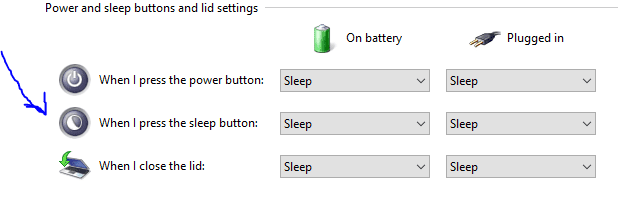
Well, I think I may know the solution to this. Try going to Power Options and then on the sidebar there should be an option to change which buttons do what on the computer.

Then you should see an option to change what the sleep button does on your computer.

I will attach some screenshots that you can view.

1st.PNG

here.PNG

thenhere.PNG
 

My Computer

OS
N/A
Sorry, I'm not following what you're trying to tell me here. My keyboard has a button with a crescent moon on it. When I am going to be away from my desktop for a while, I hit that button and the computer does go into sleep mode. I then hit the Windows button to wake it up and it does wake up. The problem is that once I tell it to wake up, it takes forever and a day to get it to do anything. It is not limited to the Internet, I have it sit there doing who knows what when I want to work on a spreadsheet that is completely internal to the machine.
 

My Computer

Computer type
PC/Desktop
Computer Manufacturer/Model Number
Dell
OS
Windows 7 64 bit
CPU
Intel(R) Celeron(R) CPU G465 @ 1.90GHz
Motherboard
Dell Inc. 0478VN
Memory
8 gig
Graphics Card(s)
Intel(R) HD Graphics
Sound Card
(1) Intel(R) Display Audio (2) Realtek High Definition Aud
Monitor(s) Displays
Dell 19"
Hard Drives
(1) ST500DM002-1BD142 (2) Generic- Multi-Card USB Device
Mouse
Logitech marble mouse
Internet Speed
100
Antivirus
Spybot Search and Destroy, Malwarebytes,Security Essentials
Browser
Chrome with Duck Duck Go

My Computer

Computer type
PC/Desktop
Computer Manufacturer/Model Number
HP Desktop & Compaq Laptop
OS
Win 10 x64, Linux Lite, Win 7 x64, BlackArch, & Kali
Hard Drives
Samsung 850 Pro 256Gb,
Hitachi HDD 1Tb,
Crucial MX SSD 250Gb
Segate 3Tb USB 3.0 Ext. Backup HDD
Internet Speed
150Mbps dn, 20Mbps up
Antivirus
Avast Free, Malwarebytes Anti-Exploit & Anti-Ransomware
Browser
Firefox, Chrome, Opera, & VPN
Has your machine always been that way or just recently?
dell, celeron, what what is the model, below is our page with automated tool to find and post your info. :D

System Info - See Your System Specs - Windows 7 Help Forums


Thanks for the file. I have updated my information.
The computer has always acted this way since I started using the sleep mode. As I said, it doesn't just affect Internet activity, it affects everything I try to do once I wake it up.
I thought I had downloaded Service Pack 2, but this says it's only on pack 1. Is that because it's a 64 bit system?
Thanks for your help.
 

My Computer

Computer type
PC/Desktop
Computer Manufacturer/Model Number
Dell
OS
Windows 7 64 bit
CPU
Intel(R) Celeron(R) CPU G465 @ 1.90GHz
Motherboard
Dell Inc. 0478VN
Memory
8 gig
Graphics Card(s)
Intel(R) HD Graphics
Sound Card
(1) Intel(R) Display Audio (2) Realtek High Definition Aud
Monitor(s) Displays
Dell 19"
Hard Drives
(1) ST500DM002-1BD142 (2) Generic- Multi-Card USB Device
Mouse
Logitech marble mouse
Internet Speed
100
Antivirus
Spybot Search and Destroy, Malwarebytes,Security Essentials
Browser
Chrome with Duck Duck Go
Read what I just posted here. Especially after you said this:

The computer has always acted this way since I started using the sleep mode.

Bottom line, just don't use these low power modes. You'll be far, far better off and save yourself a headache. Besides, if you have a relatively new computer using an SSD or NVMe dive, it'll be pretty inconsequential to regular boot up time versus sleep mode. The use of NVMe should start a computer from BIOS/UEFI to Windows in about, oh, 7 seconds or less. This much I know from an online gaming friend that updated to an NVMe drive in their desktop.


The golden rule applies here. Just because you can, doesn't mean you should. Those low power modes are kinda like hit and miss. As I already stated in that post I linked to, it may work for some, with others it doesn't, and I've read that all over for years and years.
 

My Computer

Computer type
PC/Desktop
OS
Windows 7 Ultimate x64
I am trying not to shut down/ reboot my computer every time I walk away from it. My computer is 9 years old and only gives me problems coming out of sleep mode. I have no idea what NVME is. I was under the impression that using sleep mode did just that; it puts it in a state where there isn't communications from the outside world but isn't completely shut down either.
If I go down to the bottom of this page, there are "Similar Threads For: Windows Sleep Mode". In some cases, depending on whether it is a desktop versus a laptop, users have had problems with it even going into sleep mode versus coming out of it. To reiterate, my Dell keyboard has a button on the upper right in the shape of a crescent moon. That is what I am using to go into sleep mode. If I'm not mistaken, I got that tip here. When I want it to come out of sleep mode, I hit another key at the bottom left that I was told is called the Windows key. I was told that just hitting the space bar might throw me into something that I didn't intend to get into. I do NOT have a problem with the system itself waking up, but when I try to do just about anything, it takes, in my opinion, a very long time to start doing the task. In most cases, I want to get on the Internet. The address where I want to go is sitting in the address area of Chrome and nothing happens until I highlight the address and hit Enter. Even then, it can sit there doing nothing for quite a while. Let me also say that it isn't just the Internet. If I want to work on a spreadsheet, it will tell me that Excel isn't responding, but then, it will pop up and come to life. That says it isn't Internet or browser related, right?
 

My Computer

Computer type
PC/Desktop
Computer Manufacturer/Model Number
Dell
OS
Windows 7 64 bit
CPU
Intel(R) Celeron(R) CPU G465 @ 1.90GHz
Motherboard
Dell Inc. 0478VN
Memory
8 gig
Graphics Card(s)
Intel(R) HD Graphics
Sound Card
(1) Intel(R) Display Audio (2) Realtek High Definition Aud
Monitor(s) Displays
Dell 19"
Hard Drives
(1) ST500DM002-1BD142 (2) Generic- Multi-Card USB Device
Mouse
Logitech marble mouse
Internet Speed
100
Antivirus
Spybot Search and Destroy, Malwarebytes,Security Essentials
Browser
Chrome with Duck Duck Go
My solution-as I always have sleep mode on-is to regularly "restart" your PC 1-2X per week. This gets rid of unwanted processes in the background. Might as well go to "task manager" and disable the processes that are not important such as certain app updates that are always on, etc.
 

My Computer

Computer type
PC/Desktop
Computer Manufacturer/Model Number
Lenovo
OS
win7 64bit Pro
CPU
2.4
Memory
8G
Hard Drives
1T SSD
I get up in the morning and start/ boot up my computer. I do my usual daily routine. Rather than shutting it down, I hit the button shaped like a crescent moon and turn off the monitor. At any time between the initial boot up and shut down at night, I hit the Windows key, turn on the monitor and put in my password ( admin) to do whatever I want to do. The only thing is, it takes forever to get it to do anything whenever it is coming out of sleep mode. I think you guys are over- analyzing the annoying way it acts on wake up. I just don’t understand why it doesn’t want to react to my wishes once the screen and other basic functions come to life. When I click on an icon or call up a program, it’s like it’s deaf or ignoring me. If an address is in the search bar, I have to highlight it and hit enter to get it to go search. If I want to work on a spreadsheet, it takes forever for the program to do anything. I even get a response saying it is not responding, but if I wait, it will eventually get moving. I only go into sleep mode to avoid the long boot up process. Should I be shutting it down after every use and restarting all of the time?
 

My Computer

Computer type
PC/Desktop
Computer Manufacturer/Model Number
Dell
OS
Windows 7 64 bit
CPU
Intel(R) Celeron(R) CPU G465 @ 1.90GHz
Motherboard
Dell Inc. 0478VN
Memory
8 gig
Graphics Card(s)
Intel(R) HD Graphics
Sound Card
(1) Intel(R) Display Audio (2) Realtek High Definition Aud
Monitor(s) Displays
Dell 19"
Hard Drives
(1) ST500DM002-1BD142 (2) Generic- Multi-Card USB Device
Mouse
Logitech marble mouse
Internet Speed
100
Antivirus
Spybot Search and Destroy, Malwarebytes,Security Essentials
Browser
Chrome with Duck Duck Go
I use the same power button for on and off sleep, not the windows butt.
Do a sfc /scannow to see if you have a CBS log (corruption).
 

My Computer

Computer type
PC/Desktop
Computer Manufacturer/Model Number
Lenovo
OS
win7 64bit Pro
CPU
2.4
Memory
8G
Hard Drives
1T SSD
"...Should I be shutting it down after every use and restarting all of the time?" Absolutely not. I turn on my laptops in the morning, they stay on (screensavers kick in), they get powered off just before movie night-time. On average, once on, once off during any particular day. As indicated by an earlier poster, once or twice weekly is also a good way to go.
 

My Computer

Computer type
PC/Desktop
Computer Manufacturer/Model Number
Antec desktop; Acer Aspire laptops
OS
Windows 7 Professional 64-bit
CPU
Desktop i5; Acers i5 & i7
Memory
desktop 16GB; 1 Acer 8GB & 1 Acer 16GB
Hard Drives
1TB split into 2 equal partitions [OS and data] usable by RJS
Internet Speed
AT&T DSL
Browser
FF, GChrome, msIE
Other Info
Windows 7 Firewall, Emsisoft AM/AV, MSE [scan-only], SpywareBlaster, Ruiware/BillP combine
Without getting into elfen magic, let me just say that there are things that Windows does during the boot-up process that cannot be done at any other time. So restarting your PC at least once daily, is a Good Thing!

On my own PC, I purposely run a Cleanup program, and a script that forces a new System Restore Point to be made, from the Startup Folder. It does slow the boot up by a few seconds, but it also gives me some system maintenance that otherwise would not be done. And, it keeps my PC free of temp files and other misc. junk.

Good biz Rolland!

:cool:

OH, I almost forgot....since the day that MS invented the infamous SLEEP Mode, it's had problems.
There have been hundreds, or maybe even thousands, of posts on forums about the problems with SLEEP. For that reason it's one of the first things I ALWAYS disable when setting up Windows.
Ditto with Hibernate.
 

My Computer

Computer type
PC/Desktop
Computer Manufacturer/Model Number
Various
OS
Win 7 Pro, SP1, x86, Win-11/Pro/64
CPU
AMD
Motherboard
Various
Memory
8GB Crucial
Graphics Card(s)
Various
Sound Card
OnBoard
Monitor(s) Displays
Acer 21.5"
Hard Drives
Crucial SSD, 500 GB
PSU
OEM
Case
SFF Slim Line Case
Cooling
OEM
Keyboard
eMachines
Mouse
Logitech Wireless
Internet Speed
varies
Antivirus
Windows Defender/Super Anti-Spyware
Browser
Firefox
Back
Top