Windows Slow working of: Copying, or Deleting Files

ariespaan

New member
Member
Local time
3:27 AM
Messages
71
HI,

I still work with Windows-7 and i see that the last year Copying or deleting from files is very, very slow
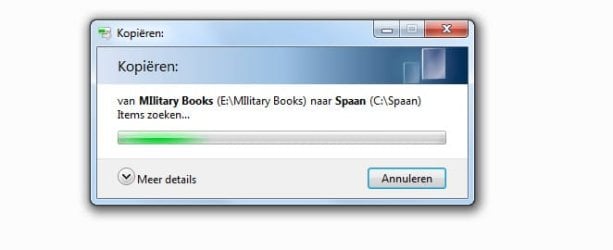
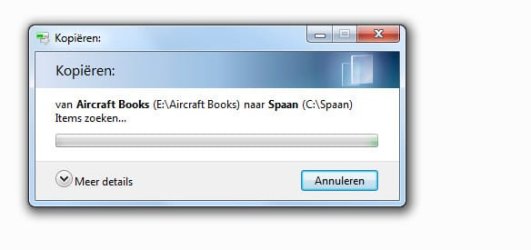
When i copy or delete files, with File-Explorer, Qdir. or Xyplorer, i see a small window with the text: Copying or Deleting file (filename)... But the actual copying or deleting will now start after some 2 or 3 minutes!!!
I do not know why the system is waiting before it starts copying or deleting
Has anyone some suggestions?

Thanks
 

My Computer My Computer

At a glance

Windows-7 64 Bits Home PremiumIntel I5
Computer type
Laptop
Computer Manufacturer/Model Number
Sony
OS
Windows-7 64 Bits Home Premium
CPU
Intel I5
I would suggest going to Accessories, System Tools. Run the Disk Cleanup utility. When it says how much space it can recover, make sure that the boxes for Temporary Files and Recycle Bin are checked. After it runs, reboot. If you have an SSD, I suggest running the Trim function.

Out of curiosity, how much free space do you have on your C: drive?
 

My Computer My Computer

At a glance

Windows 7 Pro SP1 64 bit8 GB
Computer type
Laptop
Computer Manufacturer/Model Number
Dell M6500 Precision Work Station
OS
Windows 7 Pro SP1 64 bit
Memory
8 GB
Screen Resolution
1920x
Internet Speed
30 Mbps
Antivirus
Norton Security
Browser
IE 11
Disk Cleanup Utility Shows: 7.5 Mb Free to recover

I have a Hard disk, no SSD in use

Total Disk C-drive is 500GB, Used: 87 GB, Free: 365 GB
I already have used: Disk-Defragmention etc,

Is it possible that Windows-Indexing could be the problem?
(If so, what can i change in Indexing-settings?)
 

My Computer My Computer

At a glance

Windows-7 64 Bits Home PremiumIntel I5
Computer type
Laptop
Computer Manufacturer/Model Number
Sony
OS
Windows-7 64 Bits Home Premium
CPU
Intel I5
I turned off my Windows and any 3rd party utility indexing long ago. I use FileFind utility in place of indexed search utilities. I also have that behavior in my explorer much like yours.
 

My Computer My Computer

At a glance

Windows 7 Professional 64-bitDesktop i5; Acers i5 & i7desktop 16GB; 1 Acer 8GB & 1 Acer 16GB
Computer type
PC/Desktop
Computer Manufacturer/Model Number
Antec desktop; Acer Aspire laptops
OS
Windows 7 Professional 64-bit
CPU
Desktop i5; Acers i5 & i7
Memory
desktop 16GB; 1 Acer 8GB & 1 Acer 16GB
Hard Drives
1TB split into 2 equal partitions [OS and data] usable by RJS
Internet Speed
AT&T DSL
Browser
FF, GChrome, msIE
Other Info
Windows 7 Firewall, Emsisoft AM/AV, MSE [scan-only], SpywareBlaster, Ruiware/BillP combine
Disk Cleanup Utility Shows: 7.5 Mb Free to recover

I have a Hard disk, no SSD in use

Total Disk C-drive is 500GB, Used: 87 GB, Free: 365 GB
I already have used: Disk-Defragmention etc,

Is it possible that Windows-Indexing could be the problem?
(If so, what can i change in Indexing-settings?)

Did you mean 7.5 MB or GB? 7.5 MB is miniscule.

You would want to defrag the hard drive after doing the disk cleanup.
 

My Computer My Computer

At a glance

Windows 7 Pro SP1 64 bit8 GB
Computer type
Laptop
Computer Manufacturer/Model Number
Dell M6500 Precision Work Station
OS
Windows 7 Pro SP1 64 bit
Memory
8 GB
Screen Resolution
1920x
Internet Speed
30 Mbps
Antivirus
Norton Security
Browser
IE 11
Dear RolandJS,

You say: You turned Windows off, and any 3rd party utility indexing.
Could you explain how you did that, because i do not know anything about Indexing.
And where can i find: Filefind utility? what you have in use

Thanks for your advice already
 

My Computer My Computer

At a glance

Windows-7 64 Bits Home PremiumIntel I5
Computer type
Laptop
Computer Manufacturer/Model Number
Sony
OS
Windows-7 64 Bits Home Premium
CPU
Intel I5
I doubt it's indexing, it could, but I doubt it. Especially since RonaldJS indicates he has the issue and turned off indexing.

What might be happening here are two things, and I already mentioned this in another thread that RonaldJS was in.

1) Your hard drive is dying.

2) You have some software there that is interrupting the Explorer process or read/write IOPS.


For the first possible case, you want to check SMART data of the hard drive. This may not be a tell all at all, but it's worth looking at. To do that use Crystal Disk Info. CrystalDiskInfo – Crystal Dew World The standard version will suffice unless your into Anime. LOL

I would also do a chkdsk on the drive. Read this

There's another tool that's quite good called Hard Drive Sentinel. You just want to perform a read test, not a write test. A write test would of course write over your hard drive. That option is to test hard drives where you don't carte about the data on them or blank hard drives.

Moving on to #2. I'd need to see your computer environment with Autoruns. Autoruns can tell me what is all loading on computer boot, services, DLLs, etc and if I see something that may be an issue you can temporally disable it, restart the computer, perform a copy operation and see if the issue is fixed. If the hard drive reports back as being fine, then I'm assuming it's a software issue. For me to see what you have running on your computer with Autoruns, run Autoruns, go to File and save the ARN file. Zip the ARN file and upload that zip file here. Autoruns for Windows - Windows Sysinternals | Microsoft Docs First test your hard drives for issues.
 

My Computer My Computer

At a glance

Windows 7 Ultimate x64
Computer type
PC/Desktop
OS
Windows 7 Ultimate x64
MajorGeeks carries FileFind. I'm at school, if memory serves me, I went into Explorer's last tab on the right[?], somewhere is a click box to either turn on or turn off indexing. When I get home, I can re-look up that tab and guide you better.
 

My Computer My Computer

At a glance

Windows 7 Professional 64-bitDesktop i5; Acers i5 & i7desktop 16GB; 1 Acer 8GB & 1 Acer 16GB
Computer type
PC/Desktop
Computer Manufacturer/Model Number
Antec desktop; Acer Aspire laptops
OS
Windows 7 Professional 64-bit
CPU
Desktop i5; Acers i5 & i7
Memory
desktop 16GB; 1 Acer 8GB & 1 Acer 16GB
Hard Drives
1TB split into 2 equal partitions [OS and data] usable by RJS
Internet Speed
AT&T DSL
Browser
FF, GChrome, msIE
Other Info
Windows 7 Firewall, Emsisoft AM/AV, MSE [scan-only], SpywareBlaster, Ruiware/BillP combine
Follow F22SimPilot's advice, such is good as gold! We can worry about indexing later, after other things have been explored/fixed.
 
Last edited:

My Computer My Computer

At a glance

Windows 7 Professional 64-bitDesktop i5; Acers i5 & i7desktop 16GB; 1 Acer 8GB & 1 Acer 16GB
Computer type
PC/Desktop
Computer Manufacturer/Model Number
Antec desktop; Acer Aspire laptops
OS
Windows 7 Professional 64-bit
CPU
Desktop i5; Acers i5 & i7
Memory
desktop 16GB; 1 Acer 8GB & 1 Acer 16GB
Hard Drives
1TB split into 2 equal partitions [OS and data] usable by RJS
Internet Speed
AT&T DSL
Browser
FF, GChrome, msIE
Other Info
Windows 7 Firewall, Emsisoft AM/AV, MSE [scan-only], SpywareBlaster, Ruiware/BillP combine
As to turning of indexing, you can do that by going to search, enter the word services and find the Windows Search service. Now stop and select disabled. In replace of Windows Search I personally use Everything.exe. With Everything it'll build its database in about 30 seconds or less and you can find ANYTHING on the current drive or attached drive in milliseconds. Also, in Everything you can use the advanced option to search for text withen files. But for that I prefer FileSeek.

Downloads - voidtools

FileSeek: Lightning Fast File Search by Binary Fortress Software

I think there's not a day that goes by I don't recommend Everything. LOL
 

My Computer My Computer

At a glance

Windows 7 Ultimate x64
Computer type
PC/Desktop
OS
Windows 7 Ultimate x64
In my first Post i mentioned that, when i use copy/delete of files, i first get a message saying copy/delete, but the action does not start immediately but some 1 or 2 minutes later
I attached a couple of these messages, where you can see, that the system is waiting to execute the action
What also is interested, that these problems only occurs, of filetypes: PDF
All other filetypes (Jpg. txt. exe) don't have that problem. In those cases the action is executed immedediately
 

Attachments

  • Fs Cap 0516.jpg
    Fs Cap 0516.jpg
    15 KB · Views: 11
  • Fs Cap 0517.jpg
    Fs Cap 0517.jpg
    14.7 KB · Views: 11

My Computer My Computer

At a glance

Windows-7 64 Bits Home PremiumIntel I5
Computer type
Laptop
Computer Manufacturer/Model Number
Sony
OS
Windows-7 64 Bits Home Premium
CPU
Intel I5
Are you selecting more than one file at a time when doing the copy or delete or doesn't it matter. Not sure why PDF would be a problem unless they're large files.
 

My Computer My Computer

At a glance

Windows 7 Pro SP1 64 bit8 GB
Computer type
Laptop
Computer Manufacturer/Model Number
Dell M6500 Precision Work Station
OS
Windows 7 Pro SP1 64 bit
Memory
8 GB
Screen Resolution
1920x
Internet Speed
30 Mbps
Antivirus
Norton Security
Browser
IE 11
Adobe?

Ditch that once and see if the action works faster.

And thanks for ignoring everything I said...
 

My Computer My Computer

At a glance

Windows 7 Ultimate x64
Computer type
PC/Desktop
OS
Windows 7 Ultimate x64
Do I detect some sarcasm? ;)
 

My Computer My Computer

At a glance

Windows 7 Pro SP1 64 bit8 GB
Computer type
Laptop
Computer Manufacturer/Model Number
Dell M6500 Precision Work Station
OS
Windows 7 Pro SP1 64 bit
Memory
8 GB
Screen Resolution
1920x
Internet Speed
30 Mbps
Antivirus
Norton Security
Browser
IE 11
Dear F22 Simpilot

I have done, all what you asked for.
For instance i have tested my hard disk with several programs (HDtune Pro, Chkdsk, Hd Sentinel etc. A;so with the win7-Software
I also checked with Smart-report. I found no problems all worked fine (The HD is some 2 years old)

Dear Wither 2:

The copy and delete files: I have done this by one-at-a-time and also with more than one the same time
The problem is in both cases the same

About, what i said by the filetype: PDF:
Might it be possible, that during the copy or delete, the PDF is tested by Microsoft defender or mine Mcafee virus-checker
(It might be that deleting a pdf-file, it could be tested again, because it is transferred to the garbage ban?

By he way: Has anywone also seen the images in post: 11. showing the system is waiting for some time?
 

My Computer My Computer

At a glance

Windows-7 64 Bits Home PremiumIntel I5
Computer type
Laptop
Computer Manufacturer/Model Number
Sony
OS
Windows-7 64 Bits Home Premium
CPU
Intel I5
I had looked at your images and, via translation, it looked like the system is "searching" for the files. I never understood that and had intended to ask you about it.

I had thought about AV before but couldn't see how the anti-virus would affect the transfers but, I'm no expert.

I also looked at the settings in Acrobat Reader and, depending on some settings when a file is saved, there may be issues with transfers/deletions. For instance, if you open Reader and click on Edit, Protection, Security Settings, there's Time Stamps, Digital ID's, Encryption, etc. I don't pretend to understand all that and I never looked at them when saving files. I don't know the source of your files. I assume you're not using your laptop on a network at work.

I don't know how personal your files are but, if you wanted to upload a couple to a website such as one drive, dropbox, etc.; share them; and get a link, you could post the link and we could download and test on our systems. I had done a copy of 1/2 dozen PDFs, albeit small, at one time from one partition to another last night and didn't see the problem you're having.
 

My Computer My Computer

At a glance

Windows 7 Pro SP1 64 bit8 GB
Computer type
Laptop
Computer Manufacturer/Model Number
Dell M6500 Precision Work Station
OS
Windows 7 Pro SP1 64 bit
Memory
8 GB
Screen Resolution
1920x
Internet Speed
30 Mbps
Antivirus
Norton Security
Browser
IE 11
Thanks Wither 2 for your detailed explanation

I have tested, till now, with a lot of files, and i see that the problems, i talked about, is not always the same
Sometimes, the system is waiting for execution the action (as i mentioned before) and in other cases the system is executed the action immediately without waiting (very confusing)

Also i used smal and big files, copy/delete to internal HD and external HD/USB-keys,
Sometimes the system is waiting before executing en in other cases very fast
So, i cannot think what i can do anymore at the moment. so i think i can better stop searching furthermore

The last thing i will try is: to turn off the Windows-searching service, see if that give any result

Everybody: Thanks for all your advices
 

My Computer My Computer

At a glance

Windows-7 64 Bits Home PremiumIntel I5
Computer type
Laptop
Computer Manufacturer/Model Number
Sony
OS
Windows-7 64 Bits Home Premium
CPU
Intel I5
If it's happening to only certain PDFs, those PDFs may have a load of macros and crap and/or contain a canary token. Doubtful, but I'll just throw that out there. Scan the problematic PDFs at Virus Total once and see what that says. Quite curios.
 

My Computer My Computer

At a glance

Windows 7 Ultimate x64
Computer type
PC/Desktop
OS
Windows 7 Ultimate x64
Is the problem the worst when using USB keys? They're slower than a standard HDD/SSD.
 

My Computer My Computer

At a glance

Windows 7 Pro SP1 64 bit8 GB
Computer type
Laptop
Computer Manufacturer/Model Number
Dell M6500 Precision Work Station
OS
Windows 7 Pro SP1 64 bit
Memory
8 GB
Screen Resolution
1920x
Internet Speed
30 Mbps
Antivirus
Norton Security
Browser
IE 11
Back
Top