
Solved Windows storing "Documents" folders in wrong place

Seven64bit

New member
Member
Local time
4:53 AM
Messages
32
So I recently upgraded to an SSD, I moved the Location of the Documents folder to my HDD, now when I play games it stores files, where they should normally be in the Documents Folder, in the E:\ drive rather than E:\Documents.

My "Document Properties" look like this:

doct.png


So shouldn't those folders be going to the Documents folder? They already exist in that folder but are from before I transitioned to an SSD.

Any ideas?

Thanks!
 

My Computer My Computer

Computer Manufacturer/Model Number
Custom
OS
Windows 7 Ultimate x64
CPU
Intel Core i5 2500k @ 4.5GHz 1.35v
Motherboard
Asus P8Z68 V-Pro/Gen3 Socket 1155 ATX
Memory
8GB G.Skill Ripjaws X DDR3 @ 1600MHz
Graphics Card(s)
EVGA GeForce GTX 670
Sound Card
On-board Realtek HD audio
Monitor(s) Displays
Acer 22" A221HQV & Dell 19" LCD Monitor
Screen Resolution
1920x1080 & 1440x900
Hard Drives
Intel 520 SSD 240GB
Western Digital Caviar Black 1.5TB 7200rpm SATA III 6Gb/s
PSU
Corsair HX850
Case
Cooler Master HAF 932 Advanced
Cooling
Cooler Master Hyper 212+ CPU cooler; 3x 250mm & 1x 230mm
Keyboard
Microsoft Sidewinder x4
Mouse
Logitech G700 Wireless Gaming Mouse
Internet Speed
20MB up, 5MB down
Other Info
- NETGEAR N600 Dual-band Ethernet Router
- Motorola SURFboard SB6121 DOCSIS 3.0 Cable Modem
- Western Digital 2TB MyBook Essential External HDD
- HP Photosmart C5280 All-in-One Printer/Scanner/Copier
- Cyber Acoustics CA-3602 2.1 Speaker System
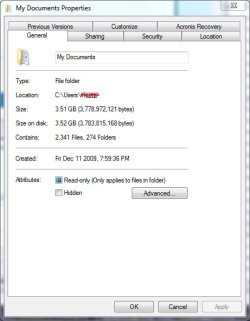
It looks like you moved the Libraries pointer to Documents and not the actual Documents folder which is under

C:\Users\xxxxxxxx\Documents

Properties should look something like this:

My Documents Properties Win 7.jpg
 

My Computer My Computer

Computer type
PC/Desktop
Computer Manufacturer/Model Number
Lenovo IdeaCenter 450
OS
Windows 10 Pro X64
CPU
Intel Quad Core i7-4770 @ 3.4Ghz
Memory
16.0GB PC3-12800 DDR3 SDRAM 1600 MHz
Graphics Card(s)
Intel Integrated HD Graphics
Sound Card
Realtek HD Audio
Monitor(s) Displays
HP 22" LCD
Screen Resolution
1680 x 1050
Hard Drives
250GB Samsung EVO SATA-3 SSD
2TB Seagate ST2000DM001 SATA-2
1.5TB Seagate ST3150041AS SATA
Keyboard
Dell USB
Mouse
Lenovo USB
Internet Speed
Cable via Road Runner 3MB Upload, 30MB Download
Antivirus
Windows Defender, MBAM Pro, MBAE
Browser
Seamonkey
Other Info
UEFI/GPT
PLDS DVD-RW DH16AERSH
seven64bit,
Create a folder on your E: called Documents.

Include that folder.
then
remove the E:\ folder which is the root folder of the E: drive.
 

My Computer My Computer

Computer Manufacturer/Model Number
Toshiba Satellite S875D-S7239 laptop
OS
MS Windows 7 Ultimate SP1 64-bit
CPU
AMD A10-4600M
Motherboard
AMD Pumori (Socket FT1)
Memory
6.00 GB Dual-Channel DDR3 @ 798MHz (11-11-12-28)
Graphics Card(s)
AMD Radeon HD 7660G
Sound Card
High Definition Audio Device
Monitor(s) Displays
Generic PnP Monitor (1600x900@60Hz)
Screen Resolution
1600x900@60Hz
Hard Drives
SSD 119GB Corsair CSSD-V128GB2 ATA Device
Keyboard
Standard PS/2 Keyboard
Mouse
HP Wireless Optical Mobile Mouse Model FHA-3410
Internet Speed
What the local pub, local coffee shop offers.
Other Info
Optical Drive:MATSHITA BD-CMB UJ160B ATA Device


Also have an Asus ha1002xp netbook with Win 7 Ultimate installed.
seven64bit,
Create a folder on your E: called Documents.

Include that folder.
then
remove the E:\ folder which is the root folder of the E: drive.
Well I've already included an E:\Documents folder and that doesn't seem to work..
And even after changing the documents folder location some programs still store their files/folders on the C: drive where the documents folder was previously.
 

My Computer My Computer

Computer Manufacturer/Model Number
Custom
OS
Windows 7 Ultimate x64
CPU
Intel Core i5 2500k @ 4.5GHz 1.35v
Motherboard
Asus P8Z68 V-Pro/Gen3 Socket 1155 ATX
Memory
8GB G.Skill Ripjaws X DDR3 @ 1600MHz
Graphics Card(s)
EVGA GeForce GTX 670
Sound Card
On-board Realtek HD audio
Monitor(s) Displays
Acer 22" A221HQV & Dell 19" LCD Monitor
Screen Resolution
1920x1080 & 1440x900
Hard Drives
Intel 520 SSD 240GB
Western Digital Caviar Black 1.5TB 7200rpm SATA III 6Gb/s
PSU
Corsair HX850
Case
Cooler Master HAF 932 Advanced
Cooling
Cooler Master Hyper 212+ CPU cooler; 3x 250mm & 1x 230mm
Keyboard
Microsoft Sidewinder x4
Mouse
Logitech G700 Wireless Gaming Mouse
Internet Speed
20MB up, 5MB down
Other Info
- NETGEAR N600 Dual-band Ethernet Router
- Motorola SURFboard SB6121 DOCSIS 3.0 Cable Modem
- Western Digital 2TB MyBook Essential External HDD
- HP Photosmart C5280 All-in-One Printer/Scanner/Copier
- Cyber Acoustics CA-3602 2.1 Speaker System

My Computer My Computer

Computer type
PC/Desktop
Computer Manufacturer/Model Number
Lenovo IdeaCenter 450
OS
Windows 10 Pro X64
CPU
Intel Quad Core i7-4770 @ 3.4Ghz
Memory
16.0GB PC3-12800 DDR3 SDRAM 1600 MHz
Graphics Card(s)
Intel Integrated HD Graphics
Sound Card
Realtek HD Audio
Monitor(s) Displays
HP 22" LCD
Screen Resolution
1680 x 1050
Hard Drives
250GB Samsung EVO SATA-3 SSD
2TB Seagate ST2000DM001 SATA-2
1.5TB Seagate ST3150041AS SATA
Keyboard
Dell USB
Mouse
Lenovo USB
Internet Speed
Cable via Road Runner 3MB Upload, 30MB Download
Antivirus
Windows Defender, MBAM Pro, MBAE
Browser
Seamonkey
Other Info
UEFI/GPT
PLDS DVD-RW DH16AERSH
did you create a folder on E: called Documents?
Go to a command prompt.
type
cd /d e:\
dir *. | CLIP
exit

the clipboard now contains a directory of the folders on the E: drive.

Paste, you use Ctrl + V, the clipboard contents into your next post.
 

My Computer My Computer

Computer Manufacturer/Model Number
Toshiba Satellite S875D-S7239 laptop
OS
MS Windows 7 Ultimate SP1 64-bit
CPU
AMD A10-4600M
Motherboard
AMD Pumori (Socket FT1)
Memory
6.00 GB Dual-Channel DDR3 @ 798MHz (11-11-12-28)
Graphics Card(s)
AMD Radeon HD 7660G
Sound Card
High Definition Audio Device
Monitor(s) Displays
Generic PnP Monitor (1600x900@60Hz)
Screen Resolution
1600x900@60Hz
Hard Drives
SSD 119GB Corsair CSSD-V128GB2 ATA Device
Keyboard
Standard PS/2 Keyboard
Mouse
HP Wireless Optical Mobile Mouse Model FHA-3410
Internet Speed
What the local pub, local coffee shop offers.
Other Info
Optical Drive:MATSHITA BD-CMB UJ160B ATA Device


Also have an Asus ha1002xp netbook with Win 7 Ultimate installed.
Actually I think I may have figured it out. I found a registry edit file from the Vista forum which restored the original Documents folder, I then changed the Location and now it seems to be working.

Personal User Folder - Restore Missing Folder - Vista Forums

Option 2 you'll find the Documents restore file.

Thanks!
 

My Computer My Computer

Computer Manufacturer/Model Number
Custom
OS
Windows 7 Ultimate x64
CPU
Intel Core i5 2500k @ 4.5GHz 1.35v
Motherboard
Asus P8Z68 V-Pro/Gen3 Socket 1155 ATX
Memory
8GB G.Skill Ripjaws X DDR3 @ 1600MHz
Graphics Card(s)
EVGA GeForce GTX 670
Sound Card
On-board Realtek HD audio
Monitor(s) Displays
Acer 22" A221HQV & Dell 19" LCD Monitor
Screen Resolution
1920x1080 & 1440x900
Hard Drives
Intel 520 SSD 240GB
Western Digital Caviar Black 1.5TB 7200rpm SATA III 6Gb/s
PSU
Corsair HX850
Case
Cooler Master HAF 932 Advanced
Cooling
Cooler Master Hyper 212+ CPU cooler; 3x 250mm & 1x 230mm
Keyboard
Microsoft Sidewinder x4
Mouse
Logitech G700 Wireless Gaming Mouse
Internet Speed
20MB up, 5MB down
Other Info
- NETGEAR N600 Dual-band Ethernet Router
- Motorola SURFboard SB6121 DOCSIS 3.0 Cable Modem
- Western Digital 2TB MyBook Essential External HDD
- HP Photosmart C5280 All-in-One Printer/Scanner/Copier
- Cyber Acoustics CA-3602 2.1 Speaker System
Back
Top