Windows system image on my ssd

Rfore44

New member
Local time
2:53 PM
Messages
19
Im trying to set up my 120GB ssd to be my main drive. After formatting my ssd I made a system image using the windows 7 tool. The image went onto my new ssd is there a way to just open it on the ssd and then set it up as my main boot drive or do I have to do something different. Thank you for your help.
 

My Computer

OS
Windows 7 Home Premium 64bit
CPU
Intel core i5 760 @ 2.80 GHz
Motherboard
Gigabyte GA-H55M-S2
Memory
G.Skill 16Gb DDR3-1333
Graphics Card(s)
Nvidia GeForce GTX 560 Ti
Monitor(s) Displays
HannsG HZ201
Screen Resolution
1920x1080
For the SSD to boot it must be an active partition. If you are not sure how to do this refer to this tutorial. Good luck and be sure to ask if you have any further questions.
 

My Computer

Computer Manufacturer/Model Number
Samsung Chronos 7
OS
windows 7 Pro 64Bit
CPU
2.2 GHz Intel Core i7-2675QM
Memory
8GB
Graphics Card(s)
Intel HD Graphics 3000/Radeon HD 6490M
Sound Card
Realtek High Definition Audio
Monitor(s) Displays
Built in LCD and external Dell 22 inch LCD
Screen Resolution
1600x900
Hard Drives
1 TB HDD
Internet Speed
20 MBPS Down 1500 KBPS Up
Im trying to set up my 120GB ssd to be my main drive. After formatting my ssd I made a system image using the windows 7 tool. The image went onto my new ssd is there a way to just open it on the ssd and then set it up as my main boot drive or do I have to do something different. Thank you for your help.

Please supply following:
HOW TO POST A SNAPSHOT OF DISK MANAGEMENT DISPLAY
Run disk management:
WIN |
type DISKMGMT.MSC | ENTER
WIN=
key with Microsoft logo on top.


Maximize the output of Disk Management:
ALT-Spacebar
key combo | X key (selects Maximize) |
Drag the field separators (such as between Status and Capacity) to show entire field.


Make a snapshot:
WIN |
type SNIPPING | ENTER | New
Drag the cursor around the area you want to snip.
File | Save as | select save location and name | Save


Post the snapshot:
Post a File or Screenshot in Seven Forums

=========================================
thanks,
karl
 

My Computer

Computer Manufacturer/Model Number
Toshiba Satellite S875D-S7239 laptop
OS
MS Windows 7 Ultimate SP1 64-bit
CPU
AMD A10-4600M
Motherboard
AMD Pumori (Socket FT1)
Memory
6.00 GB Dual-Channel DDR3 @ 798MHz (11-11-12-28)
Graphics Card(s)
AMD Radeon HD 7660G
Sound Card
High Definition Audio Device
Monitor(s) Displays
Generic PnP Monitor (1600x900@60Hz)
Screen Resolution
1600x900@60Hz
Hard Drives
SSD 119GB Corsair CSSD-V128GB2 ATA Device
Keyboard
Standard PS/2 Keyboard
Mouse
HP Wireless Optical Mobile Mouse Model FHA-3410
Internet Speed
What the local pub, local coffee shop offers.
Other Info
Optical Drive:MATSHITA BD-CMB UJ160B ATA Device


Also have an Asus ha1002xp netbook with Win 7 Ultimate installed.
I'm not sure what you have done, but it sounds like you may have just made a system image file of C, storing that image file on your SSD.

That won't work if that's what you did. Image files by themselves do nothing.

You need to "restore" that image file before it will work. The image file should be stored on some other hard drive and then "restored" to the SSD.

It's difficult to tell what you actually did from the way your post is worded.

So we need to see the screen shot as Karl requested.
 

My Computer

Computer type
PC/Desktop
Computer Manufacturer/Model Number
Ignatz Special; 4 speed manual gearbox; factory air conditioning; one of one
OS
Windows 7 Home Premium SP1, 64-bit
CPU
Intel Skylake i5-6600K, not overclocked
Motherboard
AsRock Z170M Extreme 4, micro ATX
Memory
8 GB HyperX DDR4-2666 (2 x 4 GB)
Graphics Card(s)
none; graphics are integrated on CPU
Sound Card
onboard: Realtek ALC1150; external: USB Behringer UF0-202
Monitor(s) Displays
Dell S2340M 23 inch IPS
Screen Resolution
1600 x 900
Hard Drives
System: Crucial MX100 series SSD, 128 GB;
Data: Samsung Spinpoint 103SJ, 1 TB;
Backup: WD Caviar Green WD30EZRX-00D8PB0, 3 TB
PSU
Rosewill SilentNight 500 watt fanless, semi-modular
Case
Antec Solo II
Cooling
Noctua NH-U12S; Noctua F12 intake, Noctua S12A exhaust
Keyboard
Microsoft 200 6JH-00001 USB
Mouse
Dell or Microsoft optical wired; USB
Antivirus
Microsoft Security Essentials and Malwarebytes Premium
Browser
Pale Moon
Other Info
All fans PWM; speeds at idle: CPU circa 500 rpm; intake circa 600 rpm; exhaust circa 600 rpm; CPU temps 27 idle and 47 C load in a warm room (27 C/81 F) when running Intel Extreme Tuning Utility stress test.
I'm not sure what you have done, but it sounds like you may have just made a system image file of C, storing that image file on your SSD.

That won't work if that's what you did. You need to "restore" that image file before it will work. The image file should be stored on some other hard drive and then "restored" to the SSD.

It's difficult to tell what you actually did from the way your post is worded.

So we need to see the screen shot as Karl requested.


Yea it is a a image of C that was placed on my ssd. So I can't just open that image on the ssd so that the ssd and C are the exact same thing? Then use my ssd as my new C drive.
 

My Computer

OS
Windows 7 Home Premium 64bit
CPU
Intel core i5 760 @ 2.80 GHz
Motherboard
Gigabyte GA-H55M-S2
Memory
G.Skill 16Gb DDR3-1333
Graphics Card(s)
Nvidia GeForce GTX 560 Ti
Monitor(s) Displays
HannsG HZ201
Screen Resolution
1920x1080
No.

Let's say you have a C partition on a regular hard drive.

The proper procedure would be to:

1: Use an imaging program to make an image file of that C partition, storing it on some other drive, such as an external.

2: Restore that image file to the SSD.

You can't "open" the image file itself and do anything with it. You have to "restore" it to the SSD.

Another option is to "clone" the C partition to the SSD, but imaging is more commonly used.
 

My Computer

Computer type
PC/Desktop
Computer Manufacturer/Model Number
Ignatz Special; 4 speed manual gearbox; factory air conditioning; one of one
OS
Windows 7 Home Premium SP1, 64-bit
CPU
Intel Skylake i5-6600K, not overclocked
Motherboard
AsRock Z170M Extreme 4, micro ATX
Memory
8 GB HyperX DDR4-2666 (2 x 4 GB)
Graphics Card(s)
none; graphics are integrated on CPU
Sound Card
onboard: Realtek ALC1150; external: USB Behringer UF0-202
Monitor(s) Displays
Dell S2340M 23 inch IPS
Screen Resolution
1600 x 900
Hard Drives
System: Crucial MX100 series SSD, 128 GB;
Data: Samsung Spinpoint 103SJ, 1 TB;
Backup: WD Caviar Green WD30EZRX-00D8PB0, 3 TB
PSU
Rosewill SilentNight 500 watt fanless, semi-modular
Case
Antec Solo II
Cooling
Noctua NH-U12S; Noctua F12 intake, Noctua S12A exhaust
Keyboard
Microsoft 200 6JH-00001 USB
Mouse
Dell or Microsoft optical wired; USB
Antivirus
Microsoft Security Essentials and Malwarebytes Premium
Browser
Pale Moon
Other Info
All fans PWM; speeds at idle: CPU circa 500 rpm; intake circa 600 rpm; exhaust circa 600 rpm; CPU temps 27 idle and 47 C load in a warm room (27 C/81 F) when running Intel Extreme Tuning Utility stress test.
That changes things a little, you would have to restore that image to the SSD with a windows 7 recovery disk for this to work. A simpler route would be to image the drive with a free tool like Marcum Reflect.
 

My Computer

Computer Manufacturer/Model Number
Samsung Chronos 7
OS
windows 7 Pro 64Bit
CPU
2.2 GHz Intel Core i7-2675QM
Memory
8GB
Graphics Card(s)
Intel HD Graphics 3000/Radeon HD 6490M
Sound Card
Realtek High Definition Audio
Monitor(s) Displays
Built in LCD and external Dell 22 inch LCD
Screen Resolution
1600x900
Hard Drives
1 TB HDD
Internet Speed
20 MBPS Down 1500 KBPS Up
That changes things a little, you would have to restore that image to the SSD with a windows 7 recovery disk for this to work. A simpler route would be to image the drive with a free tool like Marcum Reflect.

So I would have to delete the image off of my ssd, then run marcum reflect to clone my current C: drive then put it on my ssd?
 

My Computer

OS
Windows 7 Home Premium 64bit
CPU
Intel core i5 760 @ 2.80 GHz
Motherboard
Gigabyte GA-H55M-S2
Memory
G.Skill 16Gb DDR3-1333
Graphics Card(s)
Nvidia GeForce GTX 560 Ti
Monitor(s) Displays
HannsG HZ201
Screen Resolution
1920x1080
That changes things a little, you would have to restore that image to the SSD with a windows 7 recovery disk for this to work. A simpler route would be to image the drive with a free tool like Marcum Reflect.

So I would have to delete the image off of my ssd, then run marcum reflect to clone my current C: drive then put it on my ssd?

When you clone to the SSD it will be wiped automatically, all contents will be deleted before the operation starts.
 

My Computer

Computer Manufacturer/Model Number
Samsung Chronos 7
OS
windows 7 Pro 64Bit
CPU
2.2 GHz Intel Core i7-2675QM
Memory
8GB
Graphics Card(s)
Intel HD Graphics 3000/Radeon HD 6490M
Sound Card
Realtek High Definition Audio
Monitor(s) Displays
Built in LCD and external Dell 22 inch LCD
Screen Resolution
1600x900
Hard Drives
1 TB HDD
Internet Speed
20 MBPS Down 1500 KBPS Up
That changes things a little, you would have to restore that image to the SSD with a windows 7 recovery disk for this to work. A simpler route would be to image the drive with a free tool like Marcum Reflect.

So I would have to delete the image off of my ssd, then run marcum reflect to clone my current C: drive then put it on my ssd?

When you clone to the SSD it will be wiped automatically, all contents will be deleted before the operation starts.

Ok so all it will be is downloading the program and cloning then done?
 

My Computer

OS
Windows 7 Home Premium 64bit
CPU
Intel core i5 760 @ 2.80 GHz
Motherboard
Gigabyte GA-H55M-S2
Memory
G.Skill 16Gb DDR3-1333
Graphics Card(s)
Nvidia GeForce GTX 560 Ti
Monitor(s) Displays
HannsG HZ201
Screen Resolution
1920x1080
It's best that you post a screenshot of Disk Management as requested.

But if you have done what I think you have done, yes, you should wipe out whatever is on the SSD.

Then make a new image file with something like Macrium, putting the image file on an external.

Then restore that image file from the external to the SSD.

This is NOT a clone.

Cloning is different and does NOT use an image.

Cloning is a real time transfer without using an external or an image file of any type.

I'd try imaging first. If it fails, try cloning. If that fails, do a clean install. Many would advise you to do a clean install anyway.


If you have a "System Reserved" partition on your hard drive, it needs to be included in any image of C.

Post the screen shot.
 

My Computer

Computer type
PC/Desktop
Computer Manufacturer/Model Number
Ignatz Special; 4 speed manual gearbox; factory air conditioning; one of one
OS
Windows 7 Home Premium SP1, 64-bit
CPU
Intel Skylake i5-6600K, not overclocked
Motherboard
AsRock Z170M Extreme 4, micro ATX
Memory
8 GB HyperX DDR4-2666 (2 x 4 GB)
Graphics Card(s)
none; graphics are integrated on CPU
Sound Card
onboard: Realtek ALC1150; external: USB Behringer UF0-202
Monitor(s) Displays
Dell S2340M 23 inch IPS
Screen Resolution
1600 x 900
Hard Drives
System: Crucial MX100 series SSD, 128 GB;
Data: Samsung Spinpoint 103SJ, 1 TB;
Backup: WD Caviar Green WD30EZRX-00D8PB0, 3 TB
PSU
Rosewill SilentNight 500 watt fanless, semi-modular
Case
Antec Solo II
Cooling
Noctua NH-U12S; Noctua F12 intake, Noctua S12A exhaust
Keyboard
Microsoft 200 6JH-00001 USB
Mouse
Dell or Microsoft optical wired; USB
Antivirus
Microsoft Security Essentials and Malwarebytes Premium
Browser
Pale Moon
Other Info
All fans PWM; speeds at idle: CPU circa 500 rpm; intake circa 600 rpm; exhaust circa 600 rpm; CPU temps 27 idle and 47 C load in a warm room (27 C/81 F) when running Intel Extreme Tuning Utility stress test.
Rfore,
To accurately advise you, that disk management snapshot is a necessity.

Awaiting the disk management snapshot.
thanks, karl
 

My Computer

Computer Manufacturer/Model Number
Toshiba Satellite S875D-S7239 laptop
OS
MS Windows 7 Ultimate SP1 64-bit
CPU
AMD A10-4600M
Motherboard
AMD Pumori (Socket FT1)
Memory
6.00 GB Dual-Channel DDR3 @ 798MHz (11-11-12-28)
Graphics Card(s)
AMD Radeon HD 7660G
Sound Card
High Definition Audio Device
Monitor(s) Displays
Generic PnP Monitor (1600x900@60Hz)
Screen Resolution
1600x900@60Hz
Hard Drives
SSD 119GB Corsair CSSD-V128GB2 ATA Device
Keyboard
Standard PS/2 Keyboard
Mouse
HP Wireless Optical Mobile Mouse Model FHA-3410
Internet Speed
What the local pub, local coffee shop offers.
Other Info
Optical Drive:MATSHITA BD-CMB UJ160B ATA Device


Also have an Asus ha1002xp netbook with Win 7 Ultimate installed.
rfore,
to accurately advise you, that disk management snapshot is a necessity.

Awaiting the disk management snapshot.
Thanks, karl

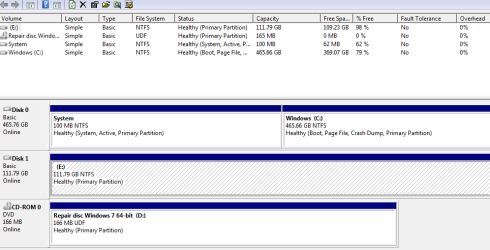
here
 

Attachments

  • Capture.PNG
    Capture.PNG
    14.5 KB · Views: 63

My Computer

OS
Windows 7 Home Premium 64bit
CPU
Intel core i5 760 @ 2.80 GHz
Motherboard
Gigabyte GA-H55M-S2
Memory
G.Skill 16Gb DDR3-1333
Graphics Card(s)
Nvidia GeForce GTX 560 Ti
Monitor(s) Displays
HannsG HZ201
Screen Resolution
1920x1080
You don't appear to have done anything useful to the SSD. It has no boot files. There is something about 2 GB on it, probably that image file you made or?

I'd start over.

If you decide to use imaging, you have to include both of those partitions on disk 0 in the image file--the small system partition and C.

Save the image file on an external. Then disconnect the drive that now has Windows on it. Plug the SSD into the same spot on the motherboard and restore the image to the SSD from the external.

C currently has about 97 GB occupied. That should be restorable to the 120 GB SSD as is, when combined with the tiny System partition.

It may be simpler for you to just do a clean install.
 

My Computer

Computer type
PC/Desktop
Computer Manufacturer/Model Number
Ignatz Special; 4 speed manual gearbox; factory air conditioning; one of one
OS
Windows 7 Home Premium SP1, 64-bit
CPU
Intel Skylake i5-6600K, not overclocked
Motherboard
AsRock Z170M Extreme 4, micro ATX
Memory
8 GB HyperX DDR4-2666 (2 x 4 GB)
Graphics Card(s)
none; graphics are integrated on CPU
Sound Card
onboard: Realtek ALC1150; external: USB Behringer UF0-202
Monitor(s) Displays
Dell S2340M 23 inch IPS
Screen Resolution
1600 x 900
Hard Drives
System: Crucial MX100 series SSD, 128 GB;
Data: Samsung Spinpoint 103SJ, 1 TB;
Backup: WD Caviar Green WD30EZRX-00D8PB0, 3 TB
PSU
Rosewill SilentNight 500 watt fanless, semi-modular
Case
Antec Solo II
Cooling
Noctua NH-U12S; Noctua F12 intake, Noctua S12A exhaust
Keyboard
Microsoft 200 6JH-00001 USB
Mouse
Dell or Microsoft optical wired; USB
Antivirus
Microsoft Security Essentials and Malwarebytes Premium
Browser
Pale Moon
Other Info
All fans PWM; speeds at idle: CPU circa 500 rpm; intake circa 600 rpm; exhaust circa 600 rpm; CPU temps 27 idle and 47 C load in a warm room (27 C/81 F) when running Intel Extreme Tuning Utility stress test.
Do you desire to put your present C on to the SSD or
install Win 7 to the SSD (which will be easier and quicker)?
 

My Computer

Computer Manufacturer/Model Number
Toshiba Satellite S875D-S7239 laptop
OS
MS Windows 7 Ultimate SP1 64-bit
CPU
AMD A10-4600M
Motherboard
AMD Pumori (Socket FT1)
Memory
6.00 GB Dual-Channel DDR3 @ 798MHz (11-11-12-28)
Graphics Card(s)
AMD Radeon HD 7660G
Sound Card
High Definition Audio Device
Monitor(s) Displays
Generic PnP Monitor (1600x900@60Hz)
Screen Resolution
1600x900@60Hz
Hard Drives
SSD 119GB Corsair CSSD-V128GB2 ATA Device
Keyboard
Standard PS/2 Keyboard
Mouse
HP Wireless Optical Mobile Mouse Model FHA-3410
Internet Speed
What the local pub, local coffee shop offers.
Other Info
Optical Drive:MATSHITA BD-CMB UJ160B ATA Device


Also have an Asus ha1002xp netbook with Win 7 Ultimate installed.
Would just like windows 7 on it so I can use it as my main drive but when I bought this computer it didn't come with a windows 7 disk, it was pre loaded on its current HD. So I thought the only way would be copying the whole HDD to my ssd.
 

My Computer

OS
Windows 7 Home Premium 64bit
CPU
Intel core i5 760 @ 2.80 GHz
Motherboard
Gigabyte GA-H55M-S2
Memory
G.Skill 16Gb DDR3-1333
Graphics Card(s)
Nvidia GeForce GTX 560 Ti
Monitor(s) Displays
HannsG HZ201
Screen Resolution
1920x1080
You can easily download a legal Windows ISO file from mydigitallife.info, burn that ISO to a DVD, and install from that. Activate it with your existing product key.

You need to download the exact same version of Windows as came on the PC.
 

My Computer

Computer type
PC/Desktop
Computer Manufacturer/Model Number
Ignatz Special; 4 speed manual gearbox; factory air conditioning; one of one
OS
Windows 7 Home Premium SP1, 64-bit
CPU
Intel Skylake i5-6600K, not overclocked
Motherboard
AsRock Z170M Extreme 4, micro ATX
Memory
8 GB HyperX DDR4-2666 (2 x 4 GB)
Graphics Card(s)
none; graphics are integrated on CPU
Sound Card
onboard: Realtek ALC1150; external: USB Behringer UF0-202
Monitor(s) Displays
Dell S2340M 23 inch IPS
Screen Resolution
1600 x 900
Hard Drives
System: Crucial MX100 series SSD, 128 GB;
Data: Samsung Spinpoint 103SJ, 1 TB;
Backup: WD Caviar Green WD30EZRX-00D8PB0, 3 TB
PSU
Rosewill SilentNight 500 watt fanless, semi-modular
Case
Antec Solo II
Cooling
Noctua NH-U12S; Noctua F12 intake, Noctua S12A exhaust
Keyboard
Microsoft 200 6JH-00001 USB
Mouse
Dell or Microsoft optical wired; USB
Antivirus
Microsoft Security Essentials and Malwarebytes Premium
Browser
Pale Moon
Other Info
All fans PWM; speeds at idle: CPU circa 500 rpm; intake circa 600 rpm; exhaust circa 600 rpm; CPU temps 27 idle and 47 C load in a warm room (27 C/81 F) when running Intel Extreme Tuning Utility stress test.
How do I find my product key? Sorry for the noob question.
 

My Computer

OS
Windows 7 Home Premium 64bit
CPU
Intel core i5 760 @ 2.80 GHz
Motherboard
Gigabyte GA-H55M-S2
Memory
G.Skill 16Gb DDR3-1333
Graphics Card(s)
Nvidia GeForce GTX 560 Ti
Monitor(s) Displays
HannsG HZ201
Screen Resolution
1920x1080
Next question is: Do you have your Win 7 product key?
Is there a sticker on your computer showing the product key?

Please note that both Speccy and SIW can show you your 25 character product id which goes by different names within Microsoft and speccy and siw. The clue is 25 character.

Do NOT post your product id. That's what you paid for. ISOs are available everywhere, including legit isos.

Do NOT ever post your Windows Product ID/Serial Number which is available under:
Speccy | Operating System | Serial Number and under
SIW | Software | Licenses | Windows Product Key
Do NOT ever post your Windows Product ID/Serial Number.
==========================================

links to speccy and siw in my signature.
 

My Computer

Computer Manufacturer/Model Number
Toshiba Satellite S875D-S7239 laptop
OS
MS Windows 7 Ultimate SP1 64-bit
CPU
AMD A10-4600M
Motherboard
AMD Pumori (Socket FT1)
Memory
6.00 GB Dual-Channel DDR3 @ 798MHz (11-11-12-28)
Graphics Card(s)
AMD Radeon HD 7660G
Sound Card
High Definition Audio Device
Monitor(s) Displays
Generic PnP Monitor (1600x900@60Hz)
Screen Resolution
1600x900@60Hz
Hard Drives
SSD 119GB Corsair CSSD-V128GB2 ATA Device
Keyboard
Standard PS/2 Keyboard
Mouse
HP Wireless Optical Mobile Mouse Model FHA-3410
Internet Speed
What the local pub, local coffee shop offers.
Other Info
Optical Drive:MATSHITA BD-CMB UJ160B ATA Device


Also have an Asus ha1002xp netbook with Win 7 Ultimate installed.
Rfore,
After all of this time, and you still haven't filled in your system specs. Now that is not wise.

Update your SevenForums System Specs
User CP (located on the top menu bar) |
Your Profile | Edit System Spec
(left-hand column)

To gather info, use Speccy (my favorite) or SIW or System Info

Add the word laptop or desktop or netbook to the
“system manufacturer” block, for example,
Toshiba Satellite L305D notebook.

Provide full windows version info, for example:
MS Windows 7 Ultimate SP1 64-bit

Use the “Other Info” block for Optical Reader,
Mouse, touchpad, wifi adapter, speakers, monitor, etc

Scroll down and click on SAVE CHANGES.
 

My Computer

Computer Manufacturer/Model Number
Toshiba Satellite S875D-S7239 laptop
OS
MS Windows 7 Ultimate SP1 64-bit
CPU
AMD A10-4600M
Motherboard
AMD Pumori (Socket FT1)
Memory
6.00 GB Dual-Channel DDR3 @ 798MHz (11-11-12-28)
Graphics Card(s)
AMD Radeon HD 7660G
Sound Card
High Definition Audio Device
Monitor(s) Displays
Generic PnP Monitor (1600x900@60Hz)
Screen Resolution
1600x900@60Hz
Hard Drives
SSD 119GB Corsair CSSD-V128GB2 ATA Device
Keyboard
Standard PS/2 Keyboard
Mouse
HP Wireless Optical Mobile Mouse Model FHA-3410
Internet Speed
What the local pub, local coffee shop offers.
Other Info
Optical Drive:MATSHITA BD-CMB UJ160B ATA Device


Also have an Asus ha1002xp netbook with Win 7 Ultimate installed.
Back
Top