
Windows takes a long time to shut down

Danny1

New member
Local time
1:55 PM
Messages
19
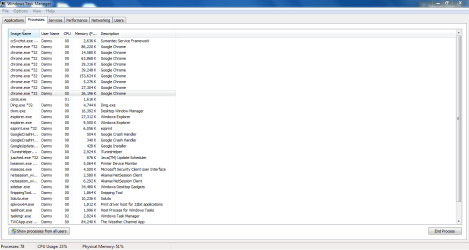
I have a Toshiba Satellite C655 running Windows 7 64 bit. A week and a half ago it started taking over a minute to shut down. It started around the time I installed optional updates for Microsoft Security Essentials, my anti-virus program. I uninstalled it, shut the computer down and it still takes over a minute to shut down. Went into safe mode and reinistalled it there, still took over a minute to shut down. My drivers are all up to date. I think that it may have something to do with an application taking to long to finish uo what it's doing. When looking at processes under task manager, there are 9 separate processes for Google Chrome. I'm attaching a screen shot of task manager.
 

Attachments
  • Task Manager.PNG
    Task Manager.PNG
    31 KB · Views: 37

My Computer My Computer

At a glance

Microsoft Windows 7 Home Premium 64-bit 7601 ...AMD Athlon(tm) II P340 Dual-Core Processor4.00 GBATI Mobility Radeon HD 4200 Series
Computer type
PC/Desktop
OS
Microsoft Windows 7 Home Premium 64-bit 7601 Multiprocessor Free Service Pack 1
CPU
AMD Athlon(tm) II P340 Dual-Core Processor
Motherboard
TOSHIBA Portable PC
Memory
4.00 GB
Graphics Card(s)
ATI Mobility Radeon HD 4200 Series
Sound Card
Conexant CX20671 SmartAudio HD
Screen Resolution
1366 x 768 x 32 bits (4294967296 colors) @ 59 Hz
Hard Drives
ST9250315AS ATA Device
This is when Chrome is open. When it's not, the task manager shows one process from Chrome at 5,316 KB.
 

My Computer My Computer

At a glance

Microsoft Windows 7 Home Premium 64-bit 7601 ...AMD Athlon(tm) II P340 Dual-Core Processor4.00 GBATI Mobility Radeon HD 4200 Series
Computer type
PC/Desktop
OS
Microsoft Windows 7 Home Premium 64-bit 7601 Multiprocessor Free Service Pack 1
CPU
AMD Athlon(tm) II P340 Dual-Core Processor
Motherboard
TOSHIBA Portable PC
Memory
4.00 GB
Graphics Card(s)
ATI Mobility Radeon HD 4200 Series
Sound Card
Conexant CX20671 SmartAudio HD
Screen Resolution
1366 x 768 x 32 bits (4294967296 colors) @ 59 Hz
Hard Drives
ST9250315AS ATA Device
I have a Toshiba Satellite C655 running Windows 7 64 bit. A week and a half ago it started taking over a minute to shut down. It started around the time I installed optional updates for Microsoft Security Essentials, my anti-virus program. I uninstalled it, shut the computer down and it still takes over a minute to shut down. Went into safe mode and reinistalled it there, still took over a minute to shut down. My drivers are all up to date. I think that it may have something to do with an application taking to long to finish uo what it's doing. When looking at processes under task manager, there are 9 separate processes for Google Chrome. I'm attaching a screen shot of task manager.

How long was the shutdown process prior to the now more lengthly time?
 

My Computer My Computer

At a glance

Windows 7 Professional x64Intel i5 quad processor16 GBRadeon HD 5770
Computer type
PC/Desktop
Computer Manufacturer/Model Number
Custom Built
OS
Windows 7 Professional x64
CPU
Intel i5 quad processor
Motherboard
DP67BG
Memory
16 GB
Graphics Card(s)
Radeon HD 5770
Sound Card
Realtek High Definition Audio
Monitor(s) Displays
Samsung SyncMaster
Screen Resolution
1920X1080
Hard Drives
WD 2TB (SATA Internal)
WD 1TB (USB External)
PSU
Corsair GS800
Case
Tower (Generic)
Cooling
3 Internal Fans
Keyboard
MS Wireless
Mouse
MS Optical Wired
Internet Speed
54 mbps
Antivirus
Emsisoft
Browser
IE-Version 9, Palemoon-Version 24.2.0
Usually 15-20 seconds. I looked at event viewer and there are two administrative events at the same time I shut down. They are:
User Profile service
Windows detected your registry file is still in use by other applications or services. The file will be unloaded now. The applications or services that hold your registry file may not function properly afterwards.

DETAIL -
1 user registry handles leaked from \Registry\User\S-1-5-21-4196284055-3908763261-3142770655-1001:
Process 2980 (\Device\HarddiskVolume2\Windows\SysWOW64\svchost.exe) has opened key \REGISTRY\USER\S-1-5-21-4196284055-3908763261-3142770655-1001

WLAN AutoConfig
WLAN AutoConfig service has successfully stopped.

Both events occur every time I shut down and there are entries for both dating back to August and September but it's been taking forever to shut down since a week and half ago.
 

My Computer My Computer

At a glance

Microsoft Windows 7 Home Premium 64-bit 7601 ...AMD Athlon(tm) II P340 Dual-Core Processor4.00 GBATI Mobility Radeon HD 4200 Series
Computer type
PC/Desktop
OS
Microsoft Windows 7 Home Premium 64-bit 7601 Multiprocessor Free Service Pack 1
CPU
AMD Athlon(tm) II P340 Dual-Core Processor
Motherboard
TOSHIBA Portable PC
Memory
4.00 GB
Graphics Card(s)
ATI Mobility Radeon HD 4200 Series
Sound Card
Conexant CX20671 SmartAudio HD
Screen Resolution
1366 x 768 x 32 bits (4294967296 colors) @ 59 Hz
Hard Drives
ST9250315AS ATA Device
I don't get why you have chrome.exe running when the browser is not in use. It should be a bunch of chrome.exe running or none. I would concentrate my efforts there. I've been using chromium snapshots over a year and I never see orphan chrome.exe just hanging around. If you kill one they all go away.
 

My Computer My Computer

At a glance

Windows 7 32 bitAMD 5200+ dual core2 GBNVidia GeForce 6150SE 128 MB
Computer Manufacturer/Model Number
HP Media Center
OS
Windows 7 32 bit
CPU
AMD 5200+ dual core
Memory
2 GB
Graphics Card(s)
NVidia GeForce 6150SE 128 MB
Monitor(s) Displays
CRT
Screen Resolution
1280x1024
Hard Drives
500 GB Sata internal :

SIIG USB 3.0 docking stations w/WD Caviar Black 6 Gb/s drives
Keyboard
PS/2
Mouse
PS/2 Wheel Mouse
Other Info
SIIG USB 3.0 PCIexpress card.
Usually 15-20 seconds. I looked at event viewer and there are two administrative events at the same time I shut down. They are:
User Profile service
Windows detected your registry file is still in use by other applications or services. The file will be unloaded now. The applications or services that hold your registry file may not function properly afterwards.

DETAIL -
1 user registry handles leaked from \Registry\User\S-1-5-21-4196284055-3908763261-3142770655-1001:
Process 2980 (\Device\HarddiskVolume2\Windows\SysWOW64\svchost.exe) has opened key \REGISTRY\USER\S-1-5-21-4196284055-3908763261-3142770655-1001

WLAN AutoConfig
WLAN AutoConfig service has successfully stopped.

Both events occur every time I shut down and there are entries for both dating back to August and September but it's been taking forever to shut down since a week and half ago.

This is a shot in the dark. The system's cached memory may have been changed, I wouldn't know how, to flush on shutdown. You can check it as follows;

1. Start Registry Editor (Regedt32.exe).
2. Change the data value of the ClearPageFileAtShutdown value in the following registry key to a value of 0:
HKEY_LOCAL_MACHINE\SYSTEM\CurrentControlSet\Control\Session Manager\Memory Management
If the value does not exist, add the following value:
Value Name: ClearPageFileAtShutdown
Value Type: REG_DWORD
Value: 0
This change does not take effect until you restart the computer.

HTH
 

My Computer My Computer

At a glance

Windows 7 Professional x64Intel i5 quad processor16 GBRadeon HD 5770
Computer type
PC/Desktop
Computer Manufacturer/Model Number
Custom Built
OS
Windows 7 Professional x64
CPU
Intel i5 quad processor
Motherboard
DP67BG
Memory
16 GB
Graphics Card(s)
Radeon HD 5770
Sound Card
Realtek High Definition Audio
Monitor(s) Displays
Samsung SyncMaster
Screen Resolution
1920X1080
Hard Drives
WD 2TB (SATA Internal)
WD 1TB (USB External)
PSU
Corsair GS800
Case
Tower (Generic)
Cooling
3 Internal Fans
Keyboard
MS Wireless
Mouse
MS Optical Wired
Internet Speed
54 mbps
Antivirus
Emsisoft
Browser
IE-Version 9, Palemoon-Version 24.2.0
Same problem

I have the same problem I have the same specs as you and the same laptop.
 

My Computer My Computer

At a glance

Windows 7 Ultimate x64Intel(R) Celeron(R) CPU 900 @ 2.20GHzMemory:2.00 GB Maker:Samsung Part#:M471B5673F...Mobile Intel(R) 4 Series Express Chipset Family
Computer type
Laptop
Computer Manufacturer/Model Number
Toshiba Satellite C655
OS
Windows 7 Ultimate x64
CPU
Intel(R) Celeron(R) CPU 900 @ 2.20GHz
Motherboard
TOSHIBABase BoardPortablePC
Memory
Memory:2.00 GB Maker:Samsung Part#:M471B5673FH0-CF8
Graphics Card(s)
Mobile Intel(R) 4 Series Express Chipset Family
Sound Card
Conexant CX20671 SmartAudio HD
Monitor(s) Displays
Laptop Screen
Screen Resolution
1366 x 768
Hard Drives
TOSHIBA MK2565GSXV Serial Number: 8 H0S6B3SL Size:232.88 GB
PSU
Laptop
Case
Laptop
Cooling
Laptop Fan
Keyboard
HP Keyboard
Mouse
?
Internet Speed
40-50? mbps
Antivirus
Varies
Browser
Chrome and Firefox
Other Info
BIOS:InsydeH2O Version 1.70 Network Card: Manufacturer: Atheros Communications Inc. Name :Atheros AR9285 Wireless Network Adapter Enabled:True
Back
Top