Windows Task Scheduler stays active after it runned a batch file

JustBe

New member
Local time
4:08 AM
Messages
16
Hi small question,

My batch file runs quite well in windows task scheduler, but it stays active.

How can I make sure Task Scheduler finishes this?


I am closing VLC player with a command ending with --play-and-exit

and then vlc:quit (to kill the processes in the task manager).

But in task scheduler the status stays active.

Any tips?
 

My Computer My Computer

OS
Windows 7 Home Premium 64 bit
Hello JustBe, welcome to Seven Forums!


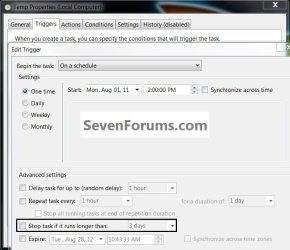
Have a look at this in the "Triggers, Edit" tab and be sure to post back with any further questions you may have and to keep us informed.


click to enlarge
stop.jpg
 

My Computer My Computer

Computer Manufacturer/Model Number
* BFK Customs *
OS
W 7 64-bit Ultimate
CPU
Intel Q9550 Yorkfield
Motherboard
ASUS P5Q Pro
Memory
8GB Dominator 8500C5D
Graphics Card(s)
ATI : XFX 5870
Sound Card
Realtek HD Audio 7-1
Monitor(s) Displays
1x 47" LCD HDMI & 3x 26" LCD HDMI
Screen Resolution
1920x1080P & 1920x1200
Hard Drives
1x 80GB Intel X25-M G2 SSD : 1x 500GB & 1x 640GB WD Caviar Black(s)
PSU
Corsair 620HX
Case
Cooler Master RC-690
Cooling
Tuniq Tower 120, 2x 140mm and 3x 120mm case fans
Keyboard
Microsoft 500
Mouse
Razer Diamondback 3G
Internet Speed
14 Mb/s
Other Info
1x Koutech 3Gb/s SATA HDD Hot Swap Rack
I am opening VLC player, let it play a playlist and close it in a batch file.

vlc.exe "path\my playlist" --fullscreen --play-and-exit
vlc:quit

Is there not another solution?
 

My Computer My Computer

OS
Windows 7 Home Premium 64 bit
How do you change status with a command in a batch file?

So, not in the GUI as in the attached file, but with a command of this?
 

My Computer My Computer

OS
Windows 7 Home Premium 64 bit
Back
Top