Windows theme menu not loading

parkerdmartin

New member
Local time
11:17 AM
Messages
8
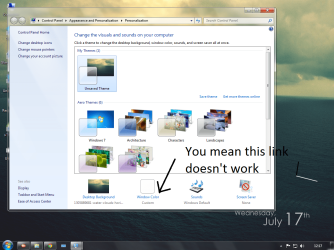
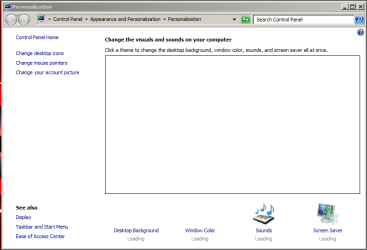
Ok so when i open my personalization menu at the bottom where you can select windows color and background and stuff. When i click on Windows color to change my theme nothing happens. Can someone help?
 

My Computer

Computer type
Laptop
Computer Manufacturer/Model Number
HP
OS
AK
CPU
AMD Turion(tm) X2 Dual-Core Mobile RM-72
Memory
3.00 GB RAM
Hard Drives
500 GB
Antivirus
McAfee Internet Security
Browser
Google Chrome
Welcome to Seven Forums parkerdmartin. What version of w7 are you using?
 

My Computer

Computer type
PC/Desktop
Computer Manufacturer/Model Number
Home Built Desktop By DataTech
OS
Windows 7 Ultimate X64 SP1
CPU
Intel i5-2550K, Differing ~4.4-4.8GHz No built in GPU
Motherboard
ASUS P8Z68-V PRO/GEN3
Memory
16GB G.Skill Sniper 1866MHz @ 2133MHz 2x8GB
Graphics Card(s)
ASUS GTX650TIB-DC2OC-2GD5, (650TI Boost)
Sound Card
Onboard Realtek 5-1
Monitor(s) Displays
Samsung P2570HD
Screen Resolution
1920x1080
Hard Drives
Samsung 840 Pro 256GB SSD for OS, 500GB Seagate Constellation (Enterprise drive) for Data
PSU
Corsair HX650W
Case
Inwin Dragon Rider
Cooling
Hyper 212 EVO w/two Noctua fans, push-pull, @1300 RPM
Keyboard
E-Z Eyes, bright yellow keys with large characters
Mouse
steelseries SENSEI Laser Pro Gaming
Internet Speed
48-51Mbs Mbs down, 11 Mbs up Xfinity Cable
Antivirus
Norton Internet Security 2013
Browser
IE 10, Opera, Pale Moon if needed
Other Info
4 case fans, LG BluRay-RE, ASUS DVD-RW, Mr. Fusion power supply, 1.21 gigawatts.
Do you mean your this Windows doesn't open?


Untitled.png
 

My Computer

Computer type
PC/Desktop
OS
Microsoft Windows 7 Ultimate 32-bit 7601 Multiprocessor Free Service Pack 1
CPU
Intel(R) Pentium(R) Dual CPU E2160 @ 1.80GHz
Motherboard
Intel DL-G41MX3-LT
Memory
2.00 GB
Graphics Card(s)
Intel(R) G41 Express Chipset
Sound Card
Realtek High Definition Audio
Screen Resolution
1024 x 768 x 32 bits (4294967296 colors) @ 75 Hz
Hard Drives
ST500DM002-1BD142 ATA Device
I am using Home Premium
 

My Computer

Computer type
Laptop
Computer Manufacturer/Model Number
HP
OS
AK
CPU
AMD Turion(tm) X2 Dual-Core Mobile RM-72
Memory
3.00 GB RAM
Hard Drives
500 GB
Antivirus
McAfee Internet Security
Browser
Google Chrome
Amithapase no in the personalization menu before that one
 

My Computer

Computer type
Laptop
Computer Manufacturer/Model Number
HP
OS
AK
CPU
AMD Turion(tm) X2 Dual-Core Mobile RM-72
Memory
3.00 GB RAM
Hard Drives
500 GB
Antivirus
McAfee Internet Security
Browser
Google Chrome
Amithapase no in the personalization menu before that one

But you said, "When i click on Windows color to change my theme nothing happens". It means the window in my given screenshot doesn't open.
 

My Computer

Computer type
PC/Desktop
OS
Microsoft Windows 7 Ultimate 32-bit 7601 Multiprocessor Free Service Pack 1
CPU
Intel(R) Pentium(R) Dual CPU E2160 @ 1.80GHz
Motherboard
Intel DL-G41MX3-LT
Memory
2.00 GB
Graphics Card(s)
Intel(R) G41 Express Chipset
Sound Card
Realtek High Definition Audio
Screen Resolution
1024 x 768 x 32 bits (4294967296 colors) @ 75 Hz
Hard Drives
ST500DM002-1BD142 ATA Device

My Computer

Computer type
Laptop
Computer Manufacturer/Model Number
HP
OS
AK
CPU
AMD Turion(tm) X2 Dual-Core Mobile RM-72
Memory
3.00 GB RAM
Hard Drives
500 GB
Antivirus
McAfee Internet Security
Browser
Google Chrome
d.png

Do you mean this link doesn't work ? Does other links work?
 

My Computer

Computer type
PC/Desktop
OS
Microsoft Windows 7 Ultimate 32-bit 7601 Multiprocessor Free Service Pack 1
CPU
Intel(R) Pentium(R) Dual CPU E2160 @ 1.80GHz
Motherboard
Intel DL-G41MX3-LT
Memory
2.00 GB
Graphics Card(s)
Intel(R) G41 Express Chipset
Sound Card
Realtek High Definition Audio
Screen Resolution
1024 x 768 x 32 bits (4294967296 colors) @ 75 Hz
Hard Drives
ST500DM002-1BD142 ATA Device
Try opening for Control panel. Control Panel\All Control Panel Items\Personalization
 

My Computer

Computer type
PC/Desktop
Computer Manufacturer/Model Number
Home Built Desktop By DataTech
OS
Windows 7 Ultimate X64 SP1
CPU
Intel i5-2550K, Differing ~4.4-4.8GHz No built in GPU
Motherboard
ASUS P8Z68-V PRO/GEN3
Memory
16GB G.Skill Sniper 1866MHz @ 2133MHz 2x8GB
Graphics Card(s)
ASUS GTX650TIB-DC2OC-2GD5, (650TI Boost)
Sound Card
Onboard Realtek 5-1
Monitor(s) Displays
Samsung P2570HD
Screen Resolution
1920x1080
Hard Drives
Samsung 840 Pro 256GB SSD for OS, 500GB Seagate Constellation (Enterprise drive) for Data
PSU
Corsair HX650W
Case
Inwin Dragon Rider
Cooling
Hyper 212 EVO w/two Noctua fans, push-pull, @1300 RPM
Keyboard
E-Z Eyes, bright yellow keys with large characters
Mouse
steelseries SENSEI Laser Pro Gaming
Internet Speed
48-51Mbs Mbs down, 11 Mbs up Xfinity Cable
Antivirus
Norton Internet Security 2013
Browser
IE 10, Opera, Pale Moon if needed
Other Info
4 case fans, LG BluRay-RE, ASUS DVD-RW, Mr. Fusion power supply, 1.21 gigawatts.
Capture.PNG
This is my screen
 

My Computer

Computer type
Laptop
Computer Manufacturer/Model Number
HP
OS
AK
CPU
AMD Turion(tm) X2 Dual-Core Mobile RM-72
Memory
3.00 GB RAM
Hard Drives
500 GB
Antivirus
McAfee Internet Security
Browser
Google Chrome

My Computer

Computer type
Laptop
Computer Manufacturer/Model Number
HP
OS
AK
CPU
AMD Turion(tm) X2 Dual-Core Mobile RM-72
Memory
3.00 GB RAM
Hard Drives
500 GB
Antivirus
McAfee Internet Security
Browser
Google Chrome

My Computer

Computer type
PC/Desktop
OS
Microsoft Windows 7 Ultimate 32-bit 7601 Multiprocessor Free Service Pack 1
CPU
Intel(R) Pentium(R) Dual CPU E2160 @ 1.80GHz
Motherboard
Intel DL-G41MX3-LT
Memory
2.00 GB
Graphics Card(s)
Intel(R) G41 Express Chipset
Sound Card
Realtek High Definition Audio
Screen Resolution
1024 x 768 x 32 bits (4294967296 colors) @ 75 Hz
Hard Drives
ST500DM002-1BD142 ATA Device

Did you try to download a theme online ?:sarc:
Yes i did

Try sfc /scannow.

1] Open Command Prompt as an administrator.
2] Once Command Prompt is open, type the following command and then press Enter.

sfc /scannow

3] System File Checker will now verify the integrity of every protected operating system file on your computer.

4] Restart your computer.

If sfc /scannow did actually repair any files, your prob. may solve.

And If it doesn't work,

You may have to try to do a system restore to a point before the problem began occurring.
 

My Computer

Computer type
PC/Desktop
OS
Microsoft Windows 7 Ultimate 32-bit 7601 Multiprocessor Free Service Pack 1
CPU
Intel(R) Pentium(R) Dual CPU E2160 @ 1.80GHz
Motherboard
Intel DL-G41MX3-LT
Memory
2.00 GB
Graphics Card(s)
Intel(R) G41 Express Chipset
Sound Card
Realtek High Definition Audio
Screen Resolution
1024 x 768 x 32 bits (4294967296 colors) @ 75 Hz
Hard Drives
ST500DM002-1BD142 ATA Device
Did you try to download a theme online ?:sarc:
Yes i did

Try sfc /scannow.

1] Open Command Prompt as an administrator.
2] Once Command Prompt is open, type the following command and then press Enter.

sfc /scannow

3] System File Checker will now verify the integrity of every protected operating system file on your computer.

4] Restart your computer.

If sfc /scannow did actually repair any files, your prob. may solve.

And If it doesn't work,

You may have to try to do a system restore to a point before the problem began occurring.
that didnt work
 

My Computer

Computer type
Laptop
Computer Manufacturer/Model Number
HP
OS
AK
CPU
AMD Turion(tm) X2 Dual-Core Mobile RM-72
Memory
3.00 GB RAM
Hard Drives
500 GB
Antivirus
McAfee Internet Security
Browser
Google Chrome
Yes i did

Try sfc /scannow.

1] Open Command Prompt as an administrator.
2] Once Command Prompt is open, type the following command and then press Enter.

sfc /scannow

3] System File Checker will now verify the integrity of every protected operating system file on your computer.

4] Restart your computer.

If sfc /scannow did actually repair any files, your prob. may solve.

And If it doesn't work,

You may have to try to do a system restore to a point before the problem began occurring.
that didnt work

Then try :

1] Repair your system using installation dvd. Or if you have created system repaire disc then repair by using it by inserting it and rebooting pc.

If it doesn't work,

2] Then try to remember If you have created earlier system image using Action center>backup and restore>create system image. And if you have created system image before your problem then restore your pc by using your created system image.

else last and good option :

Clean Reinstall.
 

My Computer

Computer type
PC/Desktop
OS
Microsoft Windows 7 Ultimate 32-bit 7601 Multiprocessor Free Service Pack 1
CPU
Intel(R) Pentium(R) Dual CPU E2160 @ 1.80GHz
Motherboard
Intel DL-G41MX3-LT
Memory
2.00 GB
Graphics Card(s)
Intel(R) G41 Express Chipset
Sound Card
Realtek High Definition Audio
Screen Resolution
1024 x 768 x 32 bits (4294967296 colors) @ 75 Hz
Hard Drives
ST500DM002-1BD142 ATA Device
Back
Top