Windows trying to install a "Disk Drive" I never plugged in.

nums

New member
Member
Local time
9:53 AM
Messages
52
Heya. Windows7 recently popped up saying it was installing a Disk Drive, only problem is that I hadn't plugged anything in. Now in the device manage an Unknown device is listed.

Does anyone know of anything that could cause this and if there's any way to remove it?
 

My Computer My Computer

At a glance

Windows 7 Home 64biti5-4670 Quad Core @ 3.40GHz8 GBGTX 780
Computer type
PC/Desktop
OS
Windows 7 Home 64bit
CPU
i5-4670 Quad Core @ 3.40GHz
Motherboard
Gigabyte H87-D3H
Memory
8 GB
Graphics Card(s)
GTX 780
Hard Drives
Samsung SSD 840 EVO 250GB | OZC-VERTEX2 120GB
PSU
SST-ST75F-P
Hello nums. Welcome to the Forum.

Things that can usually causes that is a device that is part of your system that does not have proper Plug-and-Play capabilities and does not have the correct driver installed for it, or a phantom device that was not removed from the system properly.

But before anyone here can begin to think about what it could be we will need to know what we are working with. Could you fill out your "My System Specs" under your forum profile for us? Include somewhere whether this is a laptop or desktop and don't forget to mention any connected devices or peripherals on your system.
That will help us help you.
 

My Computer My Computer

At a glance

Windows 7 64 Bit Home Premium SP1i7-3820GSkill F3-14900CL9Q - 16GBEVGA GeForce GTX660 - Driver 352.86
Computer type
PC/Desktop
Computer Manufacturer/Model Number
Home Built - Jan 2013
OS
Windows 7 64 Bit Home Premium SP1
CPU
i7-3820
Motherboard
Asus P9X79-PRO - Bios 4608
Memory
GSkill F3-14900CL9Q - 16GB
Graphics Card(s)
EVGA GeForce GTX660 - Driver 352.86
Sound Card
On board Realtek ALC898
Monitor(s) Displays
Acer S271HL
Screen Resolution
1920 x 1080
Hard Drives
#1- Samsung 840 Pro Series
#2- Western Digital WD1002FAEX Sata3 Black
#3- Western Digital WD1002FAEX Sata3 Black
PSU
Corsair CMPSU-850TX-V2 - 850 watt (by Seasonic)
Case
Corsair Obsidian 550D
Cooling
Standard 3 120mm case fans, Cooler Master Hyper 212 EVO
Keyboard
MS KC-0405
Mouse
Intellimouse 5-button
Internet Speed
56 Mbits/Sec (on a good day)
Antivirus
Avast & Malwarebytes
Browser
Firefox
Other Info
Asus DVD - DRW-24B1ST 24X
Thanks for the reply. I have filled out the My Specs page.
I have used my current rig for the last 6-7 months or so without any problems until yesterday.

Not sure if its related, recently this message has been showing up in the Event Viewer.
The device, \Device\Ide\iaStor0, did not respond within the timeout period.
I have tried updating the drivers, it still happens.
 
Last edited:

My Computer My Computer

At a glance

Windows 7 Home 64biti5-4670 Quad Core @ 3.40GHz8 GBGTX 780
Computer type
PC/Desktop
OS
Windows 7 Home 64bit
CPU
i5-4670 Quad Core @ 3.40GHz
Motherboard
Gigabyte H87-D3H
Memory
8 GB
Graphics Card(s)
GTX 780
Hard Drives
Samsung SSD 840 EVO 250GB | OZC-VERTEX2 120GB
PSU
SST-ST75F-P
The iastor is Intel Matrix Storage Manager driver

Do you have a printer or another device attached with USB ports in it? your 3.3V CMOS motherboard battery may have run down in the interim of non-use too.
 

My Computer My Computer

At a glance

Windows 7 Ultimate X64 SP1Intel i5-2550K, Differing ~4.4-4.8GHz No buil...16GB G.Skill Sniper 1866MHz @ 2133MHz 2x8GBASUS GTX650TIB-DC2OC-2GD5, (650TI Boost)
Computer type
PC/Desktop
Computer Manufacturer/Model Number
Home Built Desktop By DataTech
OS
Windows 7 Ultimate X64 SP1
CPU
Intel i5-2550K, Differing ~4.4-4.8GHz No built in GPU
Motherboard
ASUS P8Z68-V PRO/GEN3
Memory
16GB G.Skill Sniper 1866MHz @ 2133MHz 2x8GB
Graphics Card(s)
ASUS GTX650TIB-DC2OC-2GD5, (650TI Boost)
Sound Card
Onboard Realtek 5-1
Monitor(s) Displays
Samsung P2570HD
Screen Resolution
1920x1080
Hard Drives
Samsung 840 Pro 256GB SSD for OS, 500GB Seagate Constellation (Enterprise drive) for Data
PSU
Corsair HX650W
Case
Inwin Dragon Rider
Cooling
Hyper 212 EVO w/two Noctua fans, push-pull, @1300 RPM
Keyboard
E-Z Eyes, bright yellow keys with large characters
Mouse
steelseries SENSEI Laser Pro Gaming
Internet Speed
48-51Mbs Mbs down, 11 Mbs up Xfinity Cable
Antivirus
Norton Internet Security 2013
Browser
IE 10, Opera, Pale Moon if needed
Other Info
4 case fans, LG BluRay-RE, ASUS DVD-RW, Mr. Fusion power supply, 1.21 gigawatts.
I do have an external HDD but its only connected when needed. There is also a camera (rarely ever connected) and the occasional thumb drive.
 

My Computer My Computer

At a glance

Windows 7 Home 64biti5-4670 Quad Core @ 3.40GHz8 GBGTX 780
Computer type
PC/Desktop
OS
Windows 7 Home 64bit
CPU
i5-4670 Quad Core @ 3.40GHz
Motherboard
Gigabyte H87-D3H
Memory
8 GB
Graphics Card(s)
GTX 780
Hard Drives
Samsung SSD 840 EVO 250GB | OZC-VERTEX2 120GB
PSU
SST-ST75F-P
Try this:
In Device Manager > Unknown Device > Properties
Go to the Details Tab > Drop Down Box > Hardware Ids

And note the listing in the first line and post that here, or better, a screen shot.

Note: you can attach your snip to your post using the paperclip icon on the top of the post window).

Let's see what that tells us.
 

My Computer My Computer

At a glance

Windows 7 64 Bit Home Premium SP1i7-3820GSkill F3-14900CL9Q - 16GBEVGA GeForce GTX660 - Driver 352.86
Computer type
PC/Desktop
Computer Manufacturer/Model Number
Home Built - Jan 2013
OS
Windows 7 64 Bit Home Premium SP1
CPU
i7-3820
Motherboard
Asus P9X79-PRO - Bios 4608
Memory
GSkill F3-14900CL9Q - 16GB
Graphics Card(s)
EVGA GeForce GTX660 - Driver 352.86
Sound Card
On board Realtek ALC898
Monitor(s) Displays
Acer S271HL
Screen Resolution
1920 x 1080
Hard Drives
#1- Samsung 840 Pro Series
#2- Western Digital WD1002FAEX Sata3 Black
#3- Western Digital WD1002FAEX Sata3 Black
PSU
Corsair CMPSU-850TX-V2 - 850 watt (by Seasonic)
Case
Corsair Obsidian 550D
Cooling
Standard 3 120mm case fans, Cooler Master Hyper 212 EVO
Keyboard
MS KC-0405
Mouse
Intellimouse 5-button
Internet Speed
56 Mbits/Sec (on a good day)
Antivirus
Avast & Malwarebytes
Browser
Firefox
Other Info
Asus DVD - DRW-24B1ST 24X
Try this:
In Device Manager > Unknown Device > Properties
Go to the Details Tab > Drop Down Box > Hardware Ids

And note the listing in the first line and post that here, or better, a screen shot.

Note: you can attach your snip to your post using the paperclip icon on the top of the post window).

Let's see what that tells us.

Attached the screenshot.
 

Attachments

  • hardwareid.png
    hardwareid.png
    4.1 KB · Views: 10

My Computer My Computer

At a glance

Windows 7 Home 64biti5-4670 Quad Core @ 3.40GHz8 GBGTX 780
Computer type
PC/Desktop
OS
Windows 7 Home 64bit
CPU
i5-4670 Quad Core @ 3.40GHz
Motherboard
Gigabyte H87-D3H
Memory
8 GB
Graphics Card(s)
GTX 780
Hard Drives
Samsung SSD 840 EVO 250GB | OZC-VERTEX2 120GB
PSU
SST-ST75F-P
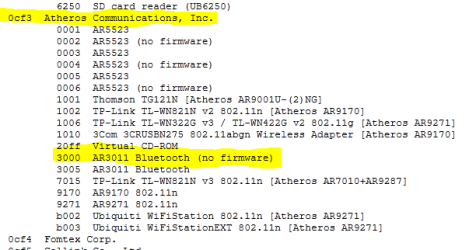
OK. I did a quick web check and USB device code
VID - OCF3
PID - 3000

comes up as an Atheros Valkarie BootROM device

Most likely suspects:

  • USB Universal Serial Bus
  • Bluetooth device driver
  • Touchchip Fingerprint Reader
If you've never installed a bluetooth device or a fingerprint reader then I would guess it's the USB controller itself.

Can we get a look at your USB tree in Device Manager?

EDIT: Looks like a Bluetooth Device
http://www.linux-usb.org/usb.ids
 

Attachments

  • Capture2.PNG
    Capture2.PNG
    10.4 KB · Views: 15

My Computer My Computer

At a glance

Windows 7 64 Bit Home Premium SP1i7-3820GSkill F3-14900CL9Q - 16GBEVGA GeForce GTX660 - Driver 352.86
Computer type
PC/Desktop
Computer Manufacturer/Model Number
Home Built - Jan 2013
OS
Windows 7 64 Bit Home Premium SP1
CPU
i7-3820
Motherboard
Asus P9X79-PRO - Bios 4608
Memory
GSkill F3-14900CL9Q - 16GB
Graphics Card(s)
EVGA GeForce GTX660 - Driver 352.86
Sound Card
On board Realtek ALC898
Monitor(s) Displays
Acer S271HL
Screen Resolution
1920 x 1080
Hard Drives
#1- Samsung 840 Pro Series
#2- Western Digital WD1002FAEX Sata3 Black
#3- Western Digital WD1002FAEX Sata3 Black
PSU
Corsair CMPSU-850TX-V2 - 850 watt (by Seasonic)
Case
Corsair Obsidian 550D
Cooling
Standard 3 120mm case fans, Cooler Master Hyper 212 EVO
Keyboard
MS KC-0405
Mouse
Intellimouse 5-button
Internet Speed
56 Mbits/Sec (on a good day)
Antivirus
Avast & Malwarebytes
Browser
Firefox
Other Info
Asus DVD - DRW-24B1ST 24X
OK. I did a quick web check and USB device code
VID - OCF3
PID - 3000

comes up as an Atheros Valkarie BootROM device

Most likely suspects:

  • USB Universal Serial Bus
  • Bluetooth device driver
  • Touchchip Fingerprint Reader
If you've never installed a bluetooth device or a fingerprint reader then I would guess it's the USB controller itself.

Can we get a look at your USB tree in Device Manager?

EDIT: Looks like a Bluetooth Device
http://www.linux-usb.org/usb.ids


I've never installed any bluetooth devices though my motherboard has wireless BT built in.
ASUSTeK Computer Inc. - Motherboards- ASUS P8P67 PRO

If that's the case why would it be listed as an unknown device? (and why did it suddenly turn on?)
 

Attachments

  • usb.png
    usb.png
    3.6 KB · Views: 7

My Computer My Computer

At a glance

Windows 7 Home 64biti5-4670 Quad Core @ 3.40GHz8 GBGTX 780
Computer type
PC/Desktop
OS
Windows 7 Home 64bit
CPU
i5-4670 Quad Core @ 3.40GHz
Motherboard
Gigabyte H87-D3H
Memory
8 GB
Graphics Card(s)
GTX 780
Hard Drives
Samsung SSD 840 EVO 250GB | OZC-VERTEX2 120GB
PSU
SST-ST75F-P
I've never installed any bluetooth devices though my motherboard has wireless BT built in.
If that's the case why would it be listed as an unknown device?

Most likely because the on-board Bluetooth device is enabled in the BIOS settings but the Bluetooth driver was never installed.

A Bluetooth driver (Atheros AW_AR3011 for W7) is offered on your motherboard website. You could install this driver to fully enable the device, or you could go into the BIOS settings and see if you can disable the Bluetooth features there - then you would not need the driver.

(and why did it suddenly turn on?)

Hard to say. I'll guess that some other connected device triggered a bluetooth feature call and switched a setting on somewhere. But that is just a WAG!
 

My Computer My Computer

At a glance

Windows 7 64 Bit Home Premium SP1i7-3820GSkill F3-14900CL9Q - 16GBEVGA GeForce GTX660 - Driver 352.86
Computer type
PC/Desktop
Computer Manufacturer/Model Number
Home Built - Jan 2013
OS
Windows 7 64 Bit Home Premium SP1
CPU
i7-3820
Motherboard
Asus P9X79-PRO - Bios 4608
Memory
GSkill F3-14900CL9Q - 16GB
Graphics Card(s)
EVGA GeForce GTX660 - Driver 352.86
Sound Card
On board Realtek ALC898
Monitor(s) Displays
Acer S271HL
Screen Resolution
1920 x 1080
Hard Drives
#1- Samsung 840 Pro Series
#2- Western Digital WD1002FAEX Sata3 Black
#3- Western Digital WD1002FAEX Sata3 Black
PSU
Corsair CMPSU-850TX-V2 - 850 watt (by Seasonic)
Case
Corsair Obsidian 550D
Cooling
Standard 3 120mm case fans, Cooler Master Hyper 212 EVO
Keyboard
MS KC-0405
Mouse
Intellimouse 5-button
Internet Speed
56 Mbits/Sec (on a good day)
Antivirus
Avast & Malwarebytes
Browser
Firefox
Other Info
Asus DVD - DRW-24B1ST 24X
I've never installed any bluetooth devices though my motherboard has wireless BT built in.
If that's the case why would it be listed as an unknown device?

Most likely because the on-board Bluetooth device is enabled in the BIOS settings but the Bluetooth driver was never installed.

A Bluetooth driver (Atheros AW_AR3011 for W7) is offered on your motherboard website. You could install this driver to fully enable the device, or you could go into the BIOS settings and see if you can disable the Bluetooth features there - then you would not need the driver.

(and why did it suddenly turn on?)

Hard to say. I'll guess that some other connected device triggered a bluetooth feature call and switched a setting on somewhere. But that is just a WAG!

I've disabled it in the device manager, should be fine if I leave it like that?

Thanks for your help TVeblen :)
 

My Computer My Computer

At a glance

Windows 7 Home 64biti5-4670 Quad Core @ 3.40GHz8 GBGTX 780
Computer type
PC/Desktop
OS
Windows 7 Home 64bit
CPU
i5-4670 Quad Core @ 3.40GHz
Motherboard
Gigabyte H87-D3H
Memory
8 GB
Graphics Card(s)
GTX 780
Hard Drives
Samsung SSD 840 EVO 250GB | OZC-VERTEX2 120GB
PSU
SST-ST75F-P
Yes, that should work fine for the most part. Does it eliminate the issue?

If you can disable the device in the BIOS settings that would be the best, because then it can't be mysteriously re-enabled by software or human error.

But now that you know what it is and how to stop the behavior then you can just re-do it the way you have again.
 

My Computer My Computer

At a glance

Windows 7 64 Bit Home Premium SP1i7-3820GSkill F3-14900CL9Q - 16GBEVGA GeForce GTX660 - Driver 352.86
Computer type
PC/Desktop
Computer Manufacturer/Model Number
Home Built - Jan 2013
OS
Windows 7 64 Bit Home Premium SP1
CPU
i7-3820
Motherboard
Asus P9X79-PRO - Bios 4608
Memory
GSkill F3-14900CL9Q - 16GB
Graphics Card(s)
EVGA GeForce GTX660 - Driver 352.86
Sound Card
On board Realtek ALC898
Monitor(s) Displays
Acer S271HL
Screen Resolution
1920 x 1080
Hard Drives
#1- Samsung 840 Pro Series
#2- Western Digital WD1002FAEX Sata3 Black
#3- Western Digital WD1002FAEX Sata3 Black
PSU
Corsair CMPSU-850TX-V2 - 850 watt (by Seasonic)
Case
Corsair Obsidian 550D
Cooling
Standard 3 120mm case fans, Cooler Master Hyper 212 EVO
Keyboard
MS KC-0405
Mouse
Intellimouse 5-button
Internet Speed
56 Mbits/Sec (on a good day)
Antivirus
Avast & Malwarebytes
Browser
Firefox
Other Info
Asus DVD - DRW-24B1ST 24X
Back
Top