Windows Update Agent 7.6.7600.320

matoond

New member
Local time
9:45 AM
Messages
4
So my brother-in-law asked me to take a look at his laptop computer (Acer Aspire 5810TG) that would not boot. After doing so I believe a couple of things happened 1) Someone spilled something on the KB and 2) it was dropped. I have tried multiple tasks with the HDD and finally gave up with it as it does not respond, BIOS and windows do not recognize it. The KB had multiple keys that did not function so I replaced both and proceeded with a clean win 7 x64 home premium install. Everything was fine until win update installed "Windows Update Agent 7.6.7600.320" and from that point on no further updates could be found/installed. So after a second clean install I posted the below information on the microsoft community forum;

So, I have read other posts regarding this update and here is what has happened to me as I have been unable to add to any other thread. I have rebuilt a older acer laptop for my brother-in. Twice now I have completed the windows 7 home premium install and all updates to service pack 1 with no issues. On both occasions windows has updated windows agent to v7.6.7600.320 and suddenly a further updated hang at "checking for updates". I get no error message, nothing it just sits there. I have NOT installed ANY software on this computer at all other than windows 7 64 bit home premium. I also tried the "fix it"......right.

I am not getting anywhere with them and this is the second time I've looked for assistance so I'm coming here. I am a but upset with the fact that they dance around what I ask without reading what is posted. Here is a link so you can see everything that has been said to help.

http://answers.microsoft.com/en-us/...67600320/7b9f254d-f1e2-45f9-a8b7-2b035f41ba6b

All I ask is you read before responding, thank you!
 

My Computer My Computer

Computer Manufacturer/Model Number
Custom
OS
Windows 7 Home Premium 32bit
CPU
AMD
Motherboard
Asus
Memory
3.4Gb
Graphics Card(s)
ATI
Sound Card
Onboard
Monitor(s) Displays
Samsung (1 ea)
Hard Drives
1 Western Digital 250Gb SATA
PSU
Corsair 750w
Case
Alien
Cooling
Yes

My Computer My Computer

Computer type
PC/Desktop
Computer Manufacturer/Model Number
Self built custom
OS
64-bit Windows 11 Pro for Workstations
CPU
Intel i7-8700K OC'd to 5 GHz
Motherboard
ASUS ROG Maximus XI Formula Z390
Memory
64 GB (4x16GB) G.SKILL TridentZ RGB DDR4 3600 MHz
Graphics Card(s)
ASUS ROG-STRIX-GTX1080TI-O11G-GAMING
Sound Card
Integrated
Monitor(s) Displays
2 x Samsung Odyssey G7 27"
Screen Resolution
2560x1440
Hard Drives
1TB Samsung 990 PRO M.2,
4TB Samsung 990 PRO PRO M.2,
TerraMaster F8 SSD Plus NAS
PSU
Seasonic Prime Titanium 850W
Case
Thermaltake Core P3
Cooling
Corsair Hydro H115i
Keyboard
Logitech wireless K800
Mouse
Logitech MX Master 4
Internet Speed
2 Gb/s Download and 100 Mb/s Upload
Antivirus
Malwarebyte Anti-Malware Premium
Browser
Google Chrome
Other Info
Logitech Z625 speaker system,
Logitech BRIO 4K Pro webcam,
HP Color LaserJet Pro MFP M477fdn,
APC SMART-UPS RT 1000 XL - SURT1000XLI,
Galaxy S23 Plus phone
Thank you Brink,

Having just re-installed for the 3rd time per the microsoft community suggestion, I am currently sitting at windows 7 x64 and SP1. Those are what I told it to install, additionally it also installed Windows Agent 7.6.7600.256 and KB2533552 and KB2534336 with my setting set for "Check for updates but let me choose whether to download and install them". So at this point if everything goes the same as the 2 previous attempts windows update will continue to work until it updates Windows Agent to v7.6.7600.320. At that time it will begin to just sit there and say "checking for updates". So do I try your suggestion knw or wait until windows update stops working? FYI, there has been NOTHING besides the above content installed at this time.

Dennis
 

My Computer My Computer

Computer Manufacturer/Model Number
Custom
OS
Windows 7 Home Premium 32bit
CPU
AMD
Motherboard
Asus
Memory
3.4Gb
Graphics Card(s)
ATI
Sound Card
Onboard
Monitor(s) Displays
Samsung (1 ea)
Hard Drives
1 Western Digital 250Gb SATA
PSU
Corsair 750w
Case
Alien
Cooling
Yes
I'd try it when Windows Update is not working properly. Sometimes it may sit on "Checking for updates" for a while though, so it wouldn't hurt to let it sit like that for up to a few hours to see if continues first. :)
 

My Computer My Computer

Computer type
PC/Desktop
Computer Manufacturer/Model Number
Self built custom
OS
64-bit Windows 11 Pro for Workstations
CPU
Intel i7-8700K OC'd to 5 GHz
Motherboard
ASUS ROG Maximus XI Formula Z390
Memory
64 GB (4x16GB) G.SKILL TridentZ RGB DDR4 3600 MHz
Graphics Card(s)
ASUS ROG-STRIX-GTX1080TI-O11G-GAMING
Sound Card
Integrated
Monitor(s) Displays
2 x Samsung Odyssey G7 27"
Screen Resolution
2560x1440
Hard Drives
1TB Samsung 990 PRO M.2,
4TB Samsung 990 PRO PRO M.2,
TerraMaster F8 SSD Plus NAS
PSU
Seasonic Prime Titanium 850W
Case
Thermaltake Core P3
Cooling
Corsair Hydro H115i
Keyboard
Logitech wireless K800
Mouse
Logitech MX Master 4
Internet Speed
2 Gb/s Download and 100 Mb/s Upload
Antivirus
Malwarebyte Anti-Malware Premium
Browser
Google Chrome
Other Info
Logitech Z625 speaker system,
Logitech BRIO 4K Pro webcam,
HP Color LaserJet Pro MFP M477fdn,
APC SMART-UPS RT 1000 XL - SURT1000XLI,
Galaxy S23 Plus phone
Brink,

I'm getting ready for work so when I get home I'll finish with whatever windows updates will work and try it once it gets to that point.
 

My Computer My Computer

Computer Manufacturer/Model Number
Custom
OS
Windows 7 Home Premium 32bit
CPU
AMD
Motherboard
Asus
Memory
3.4Gb
Graphics Card(s)
ATI
Sound Card
Onboard
Monitor(s) Displays
Samsung (1 ea)
Hard Drives
1 Western Digital 250Gb SATA
PSU
Corsair 750w
Case
Alien
Cooling
Yes
Brink,

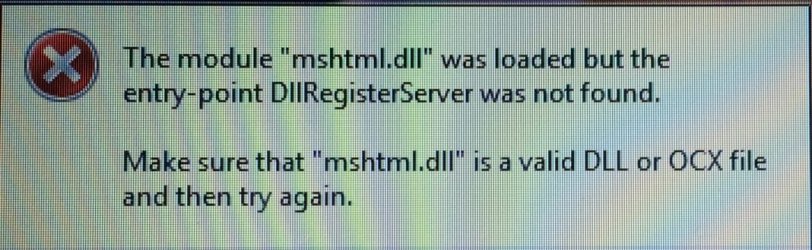
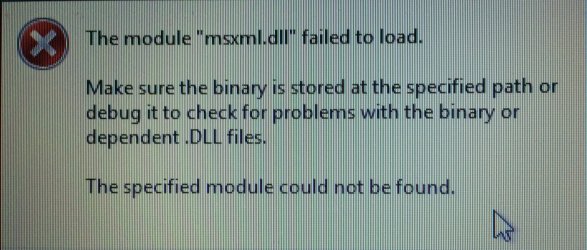
Sorry it took so long to get back to you but it has been a busy week. I tried option 3 and it did not work So I attempted to run Mr. Fixit which says it fixed errors. However when trying again to check for updates nothing has changed, keep checking....Is there a file created when running the Reset_Windows_Update_Full.bat?I've tried to take a screen shot of what it says (an error) but it disappears to fast. I also tried the "Manually reset Windows Update components" with the exception of step 4 as it was the first time trying. In step 6 almost 50% of the .dll's failed to register and I've added a .jpg with the error messages I got (it was on or the other and I have pics of each one if needed). The only part I can't do is uninstall the last "windows update agent" and re-install it...So after all this nothing has changed :-(
 

Attachments

  • IMG_1228.JPG
    IMG_1228.JPG
    99 KB · Views: 0
  • IMG_1231.JPG
    IMG_1231.JPG
    198 KB · Views: 0
Last edited:

My Computer My Computer

Computer Manufacturer/Model Number
Custom
OS
Windows 7 Home Premium 32bit
CPU
AMD
Motherboard
Asus
Memory
3.4Gb
Graphics Card(s)
ATI
Sound Card
Onboard
Monitor(s) Displays
Samsung (1 ea)
Hard Drives
1 Western Digital 250Gb SATA
PSU
Corsair 750w
Case
Alien
Cooling
Yes
See this post:

http://www.sevenforums.com/windows-...-updates-forever-post3233001.html#post3233001

Particularly read throught the entire page here:

Sticking with Windows 7? The forecast calls for pain | ZDNet

and here:

http://www.sevenforums.com/news/393...ecast-calls-pain-post3232261.html#post3232261

RE: Dll's failed to register.

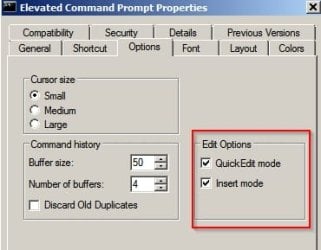
Personally I run that script using Elevated Command Prompt and for those steps that fail to work or where there are error messages I switch to Powershell for those steps.

From Elevated Command Prompt type Powershell and wait for the PS prompt to appear then copy/ paste:

Code:
regsvr32.exe /s atl.dll
regsvr32.exe /s urlmon.dll
regsvr32.exe /s mshtml.dll
regsvr32.exe /s shdocvw.dll
regsvr32.exe /s browseui.dll
regsvr32.exe /s jscript.dll
regsvr32.exe /s vbscript.dll
regsvr32.exe /s scrrun.dll
regsvr32.exe /s msxml.dll
regsvr32.exe /s msxml3.dll
regsvr32.exe /s msxml6.dll
regsvr32.exe /s actxprxy.dll
regsvr32.exe /s softpub.dll
regsvr32.exe /s wintrust.dll
regsvr32.exe /s dssenh.dll
regsvr32.exe /s rsaenh.dll
regsvr32.exe /s gpkcsp.dll
regsvr32.exe /s sccbase.dll
regsvr32.exe /s slbcsp.dll
regsvr32.exe /s cryptdlg.dll
regsvr32.exe /s oleaut32.dll
regsvr32.exe /s ole32.dll
regsvr32.exe /s shell32.dll
regsvr32.exe /s initpki.dll
regsvr32.exe /s wuapi.dll
regsvr32.exe /s wuaueng.dll
regsvr32.exe /s wuaueng1.dll
regsvr32.exe /s wucltui.dll
regsvr32.exe /s wups.dll
regsvr32.exe /s wups2.dll
regsvr32.exe /s wuweb.dll
regsvr32.exe /s qmgr.dll
regsvr32.exe /s qmgrprxy.dll
regsvr32.exe /s wucltux.dll
regsvr32.exe /s muweb.dll
regsvr32.exe /s wuwebv.dll
regsvr32.exe /s wudriver.dll

Administrator_ Elevated Command Prompt - Powershell.jpg

To exit Powershell type Exit then Press Enter

I've always found it best after running such fixes to disable Windows Update Service via services.msc then wait 24 hours until after the next daily scheduled update check time has passed befrore re-enablin Windows Update Service then rebooting and running a manual check for updates. The first one possibly takes hours. Subsequent checks typically take less than one minute.
 
Last edited:

My Computer My Computer

Computer type
Laptop
Computer Manufacturer/Model Number
ASUS
OS
Microsoft Windows 7 Home Premium 64-bit 7601 Multiprocessor Free Service Pack 1
CPU
AMD C-60 APU with Radeon(tm) HD Graphics
Motherboard
ASUSTeK COMPUTER INC. X501U
Memory
4.00 GB
Graphics Card(s)
AMD Radeon HD 6290 Graphics
Sound Card
(1) AMD High Definition Audio Device (2) Realtek High Defi
Screen Resolution
1366 x 768 x 32 bits (4294967296 colors) @ 60 Hz
Hard Drives
Hitachi HTS545050A7E380 SATA Disk Device
Antivirus
Comodo CIS & FW, SecureAplus App Whitelisting, Threatfire
Browser
Cyberfox 64bit, Opera 64bit, Airfox
Other Info
Spy-The-Spy, HitmanPro.Alert, Norton Connect Safe, MJRegWatcher, BitDefender TrafficLight, Voodoo Shield, Zemana AntiMalware

My Computer My Computer

Computer type
Laptop
Computer Manufacturer/Model Number
ASUS
OS
Microsoft Windows 7 Home Premium 64-bit 7601 Multiprocessor Free Service Pack 1
CPU
AMD C-60 APU with Radeon(tm) HD Graphics
Motherboard
ASUSTeK COMPUTER INC. X501U
Memory
4.00 GB
Graphics Card(s)
AMD Radeon HD 6290 Graphics
Sound Card
(1) AMD High Definition Audio Device (2) Realtek High Defi
Screen Resolution
1366 x 768 x 32 bits (4294967296 colors) @ 60 Hz
Hard Drives
Hitachi HTS545050A7E380 SATA Disk Device
Antivirus
Comodo CIS & FW, SecureAplus App Whitelisting, Threatfire
Browser
Cyberfox 64bit, Opera 64bit, Airfox
Other Info
Spy-The-Spy, HitmanPro.Alert, Norton Connect Safe, MJRegWatcher, BitDefender TrafficLight, Voodoo Shield, Zemana AntiMalware
Back
Top