Windows update balloon keeps reappearing

redbirdpat

New member
Local time
9:21 AM
Messages
12
Windows keeps popping up the Windows Update balloon telling me that Windows update is turned off. Every time I click on it and turn it back on, it resets maybe 10 minutes later, and the balloon pops up again, informing me that the Windows Update it turned off again.

I scanned my computer with AVG and Windows Defender, and it came up clean. So I don't know why clicking on the balloon won't "take". It has worked fine for about 9 months, until the last couple of days.

Any ideas? Thanks.
 

My Computer My Computer

OS
Windows 7 Home Premium 64bit
Run cmd.exe with elevated previlliges (right click on cmd.exe and choose "run as admin")
and type:

winmgmt /resetrepository

if this command return any error or message "repository is INCONSISTENT" please let me know.If no errors,restart computer to apply changes.
 

My Computer My Computer

Computer Manufacturer/Model Number
Custom made
OS
Windows 7 Professional x64 PL
CPU
AMD Athlon 4450e
Motherboard
Giga-Byte GA-MA69G-S3H
Memory
GoodRam DDR2 2x2048MB (FSB 800MHz)
Graphics Card(s)
nVidia GeForce 9600GT (G94-300) 1024 MB
Monitor(s) Displays
SAMSUNG SyncMaster HS2P301688
Hard Drives
Seagate ST3750330AS 750GB
PSU
Corsair 550W
Cooling
AeroCool ExtremeEngine 3T
Thanks. I tried that, but the balloon still pops up. Any other ideas?
 

My Computer My Computer

OS
Windows 7 Home Premium 64bit
Click Start orb and then click Control Panel.

Double-click Security Center.

In the Security Center, under Resources, click Change the way Security Center alerts me.

In the Alert Settings dialog box, clear the Automatic Updates check box, and then click OK.
 

My Computer My Computer

Computer Manufacturer/Model Number
Too many to describe...
OS
Windows 7 x64 pro/ Windows 7 x86 Pro/ XP SP3 x86
I don't have anything called Security Center in my Control Panel. They are listed alphabetically, and there is a "RemoteApp and Desktop Connections" followed by "Sound". I would think "Security Center" would be between those 2.
 

My Computer My Computer

OS
Windows 7 Home Premium 64bit
Oops sorry, i went into xp mode. In control panel, click on Action Center, then click on "Change action center settings", then under "Security settings", uncheck the box labelled "Windows Update".
 

My Computer My Computer

Computer Manufacturer/Model Number
Too many to describe...
OS
Windows 7 x64 pro/ Windows 7 x86 Pro/ XP SP3 x86
Thanks. My concern with your solution is that it looks like it just turns the message off. But it seems that the same thing will be happening in the background. I just won't be notified of it.

I'm really looking for a solution that will keep my Windows Update from being disabled. If I'm misreading your solution, let me know.
 

My Computer My Computer

OS
Windows 7 Home Premium 64bit
Wait a sec. You mean automatic updates are enabled and you get the balloon OR auto updates are disabled and you get the balloon?
 

My Computer My Computer

Computer Manufacturer/Model Number
Too many to describe...
OS
Windows 7 x64 pro/ Windows 7 x86 Pro/ XP SP3 x86
I turn automatic updates on, then about 10 minutes later, they are turned off somehow, and the balloon shows up, telling me that automatic updates are turned off. I turn them on again (by clicking on the balloon), and everything is fine for about another 10 minutes, when automatic updates are again turned off. So the balloon keeps popping up telling me that automatic updates are turned off. Not matter how many times I turn them on, something keeps turning them off (causing the balloon to show up).

My first thought was a virus, but I have yet to detect one. I'm running a couple of other virus scans, but so far, nothing.
 

My Computer My Computer

OS
Windows 7 Home Premium 64bit
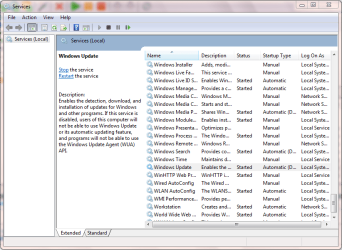
You may want to check if the Windows Update service is running. Type services into the start menu and click 'Component Services' then click 'Services' when it appears. Scroll down to Windows Update and either 'Start' or 'Restart' the service.

Capture.PNG

I'd advise the 'Restart' then reboot your machine and see if that has helped.

Also, can you start task manager? (right-click taskbar then click 'Task Manager')


OS
 

My Computer My Computer

Computer Manufacturer/Model Number
Compaq Desktop
OS
Windows 7 Ultimate x64
CPU
AMD Sempron Dual Core
Memory
3GB
Graphics Card(s)
NVIDIA GeForce 6150SE nForce 430
Screen Resolution
1024x768
Hard Drives
150GB Sata
I will try that, but before I do, I'll just list what's in the services. The Windows Update status is blank (which I assume means not started), and it has a Startup Type of "Automatic (Delayed Start)". Does this sound right.

And yes, I can start the task manager.
 

My Computer My Computer

OS
Windows 7 Home Premium 64bit
You may want to check if the Windows Update service is running. Type services into the start menu and click 'Component Services' then click 'Services' when it appears. Scroll down to Windows Update and either 'Start' or 'Restart' the service.

View attachment 112410

I'd advise the 'Restart' then reboot your machine and see if that has helped.

Also, can you start task manager? (right-click taskbar then click 'Task Manager')


OS

I tried that, but the same thing happens. Everything seems to be working, then all of a sudden the balloon pops up telling me I need to activate Windows Update service.
 

My Computer My Computer

OS
Windows 7 Home Premium 64bit
I've read that sometimes Antivirus/AntiMalware software that you've previously uninstalled can cause issue with the Windows Update service. If you have previously been using any 'Anti' software and then uninstalled it thenThis article from microsoft may help you completely remove all remnants of the previously uninstalled software.
 

My Computer My Computer

Computer Manufacturer/Model Number
Compaq Desktop
OS
Windows 7 Ultimate x64
CPU
AMD Sempron Dual Core
Memory
3GB
Graphics Card(s)
NVIDIA GeForce 6150SE nForce 430
Screen Resolution
1024x768
Hard Drives
150GB Sata
Okay. I will give that a try. I think I removed and reinstalled AVG about a month ago, but this just started recently. I'm running the Microsoft Malicious Software Removal Tool right now. I will try the suggestions in your link after that. Thanks.
 

My Computer My Computer

OS
Windows 7 Home Premium 64bit
Sorry to say but I'm up early in the morning and have to log off. I'm sure other members will be able to assist further and I hope you get it sorted :D
 

My Computer My Computer

Computer Manufacturer/Model Number
Compaq Desktop
OS
Windows 7 Ultimate x64
CPU
AMD Sempron Dual Core
Memory
3GB
Graphics Card(s)
NVIDIA GeForce 6150SE nForce 430
Screen Resolution
1024x768
Hard Drives
150GB Sata
I did the uninstall. Now my task manager will not start. Also, when using Chrome, I can go to some sites, but not others. This is totally new behavior after uninstalling AVG.
 

My Computer My Computer

OS
Windows 7 Home Premium 64bit
Okay. I got the Chrome thing straightened out. I can start my task manager again. I had to uninstall/reinstall Chrome. Maybe something with uninstalling AVG was causing a problem.

However, after uninstalling AVG, my Windows Updates keeps getting turned off still. So that didn't help things. Also the Microsoft Malicious Software Removal tool didn't find anything.

Any other ideas why my Windows Updates keep getting turned off?
 

My Computer My Computer

OS
Windows 7 Home Premium 64bit
Go into the Window's event viewer, right click and then clear the following logs: system, application, security. Turn Automatic-Updates back on and wait for that pop up to show again. The next step would be to go back to the event viewer and see what kind of errors / useful messages appeared relating to Window's Update is present. Event viewer can be useful as it gives you detailed information on what is happening in the foreground/background and what specific software is acting up etc.

Okay. I got the Chrome thing straightened out. I can start my task manager again. I had to uninstall/reinstall Chrome. Maybe something with uninstalling AVG was causing a problem.

However, after uninstalling AVG, my Windows Updates keeps getting turned off still. So that didn't help things. Also the Microsoft Malicious Software Removal tool didn't find anything.

Any other ideas why my Windows Updates keep getting turned off?
 

My Computer My Computer

Computer Manufacturer/Model Number
HP DV6 1330sa
OS
Windows 7 Professional 64 Bit SP1
CPU
INTEL DUAL CORE 2.1Ghz
Motherboard
N/A
Memory
4GB DDR3
Graphics Card(s)
INTEL
Sound Card
LAPTOP
Monitor(s) Displays
2
Screen Resolution
3200x1080
Hard Drives
250GB
PSU
LAPTOP
Case
LAPTOP
Cooling
LAPTOP
Keyboard
SOLID YEAR 260U
Mouse
USB
Internet Speed
20 MB/S
There wasn't anything that I could see about Windows Update in the logs. However, at the same time as the Windows Update was disabled, there was a message in the System log. "The Windows Error Reporting Service service entered the stopped state.". Event ID 7036. Not sure if that means anything though.
 

My Computer My Computer

OS
Windows 7 Home Premium 64bit
Okay. I went back and looked through the logs again. There is something about Windows Update. At the same time I re-enable Windows Update, there are a LOT of errors in the System log. Here they are.

The Application Information service terminated unexpectedly. It has done this 3 time(s).
The Background Intelligent Transfer Service service terminated unexpectedly. It has done this 4 time(s).
The Computer Browser service terminated unexpectedly. It has done this 1 time(s). The following corrective action will be taken in 120000 milliseconds: Restart the service.
The Extensible Authentication Protocol service terminated unexpectedly. It has done this 3 time(s).
The Group Policy Client service terminated unexpectedly. It has done this 3 time(s).
The IKE and AuthIP IPsec Keying Modules service terminated unexpectedly. It has done this 3 time(s).
The IP Helper service terminated unexpectedly. It has done this 3 time(s).
The Server service terminated unexpectedly. It has done this 4 time(s).
The User Profile Service service terminated unexpectedly. It has done this 3 time(s).
The System Event Notification Service service terminated unexpectedly. It has done this 3 time(s).
The Windows Management Instrumentation service terminated unexpectedly. It has done this 4 time(s).
The Windows Update service terminated unexpectedly. It has done this 4 time(s).


All of these errors have the exact same timestamp. And it happened exactly when I re-enabled Windows Update.
 

My Computer My Computer

OS
Windows 7 Home Premium 64bit
Back
Top