
Solved Windows Update Breaks RealTek Audio

I did see something that has been happening since the beginning of the problem: the Sound window with the four tabs, Playback, Recording, Sounds, and Communications, never lists the headphones or microphone. That may be why the Realtek HD Audio Manager keeps dropping them and picking them back up again.
 

My Computer My Computer

Computer type
PC/Desktop
Computer Manufacturer/Model Number
Home-build
OS
Windows 7 Ultimate 64-bit (I'm trying out W 10 Pro)
CPU
AMD FX8350
Motherboard
ASUS Sabertooth 990FX R2.0, chipset 990FX/SB950
Memory
16 GB (four G.Skill F3-1866C9Q-32GZH)
Graphics Card(s)
Gigabyte GEForce 660
Sound Card
On-Board RealTek ALC892
Monitor(s) Displays
NEC MultiSync 90GX2 on KVM switch
Screen Resolution
1280 X 1024
Hard Drives
Western Digital WD2002FAEX-2TB 7200 RPM SATA 3 (two, boot and data)
PSU
Rosewill CAPSTONE-1000-M, 1000W, single 12 Volt rail
Case
Rosewill Thor
Cooling
AMD fan that came with FX8350, PS and case fans
Keyboard
Cherry RS 6000 M on ATEN CS1734B KVM switch
Mouse
Kensington Expert Mouse Pro (Trackball) via USB on KVM switc
Internet Speed
25 MB/s up/down
Antivirus
Norton 360 Premier
Browser
Firefox
Other Info
Home Build as of December 3, replaced motherboard on January 29, 2014. Have Corsair H80I liquid cooler but didn't use it.
Intel motherboard sound troubleshooter

Hi. It might be worth a shot at running the sound troubleshooter for intel motherboards. It fixed issues with the Realtek drivers on my old machine. It should be able to detect what drivers are installed and update or install the correct drivers.

Desktop Boards — Troubleshooting audio issues
 

My Computer My Computer

Computer type
Laptop
Computer Manufacturer/Model Number
ASUS
OS
Microsoft Windows 7 Home Premium 64-bit 7601 Multiprocessor Free Service Pack 1
CPU
AMD C-60 APU with Radeon(tm) HD Graphics
Motherboard
ASUSTeK COMPUTER INC. X501U
Memory
4.00 GB
Graphics Card(s)
AMD Radeon HD 6290 Graphics
Sound Card
(1) AMD High Definition Audio Device (2) Realtek High Defi
Screen Resolution
1366 x 768 x 32 bits (4294967296 colors) @ 60 Hz
Hard Drives
Hitachi HTS545050A7E380 SATA Disk Device
Antivirus
Comodo CIS & FW, SecureAplus App Whitelisting, Threatfire
Browser
Cyberfox 64bit, Opera 64bit, Airfox
Other Info
Spy-The-Spy, HitmanPro.Alert, Norton Connect Safe, MJRegWatcher, BitDefender TrafficLight, Voodoo Shield, Zemana AntiMalware
Hi. It might be worth a shot at running the sound troubleshooter for intel motherboards. It fixed issues with the Realtek drivers on my old machine. It should be able to detect what drivers are installed and update or install the correct drivers.

Desktop Boards — Troubleshooting audio issues
No joy. I couldn't find the "mixer" for the Realtek sound manager, which looks entirely different from the screenshot on the Intel troubleshooter page, but I did find the Speakers with test buttons, which produce no sound.

Note that I have noticed that the system Sound window does not pick up the headphones or microphone when they are plugged in, which may be why the Realtek HD Audio Manager keeps dropping them and picking them back up again. When I un-installed the Realtek drivers, Microsoft installed something on boot which *did* see my headphones and microphone - but no sound out the jacks.
 
Last edited:

My Computer My Computer

Computer type
PC/Desktop
Computer Manufacturer/Model Number
Home-build
OS
Windows 7 Ultimate 64-bit (I'm trying out W 10 Pro)
CPU
AMD FX8350
Motherboard
ASUS Sabertooth 990FX R2.0, chipset 990FX/SB950
Memory
16 GB (four G.Skill F3-1866C9Q-32GZH)
Graphics Card(s)
Gigabyte GEForce 660
Sound Card
On-Board RealTek ALC892
Monitor(s) Displays
NEC MultiSync 90GX2 on KVM switch
Screen Resolution
1280 X 1024
Hard Drives
Western Digital WD2002FAEX-2TB 7200 RPM SATA 3 (two, boot and data)
PSU
Rosewill CAPSTONE-1000-M, 1000W, single 12 Volt rail
Case
Rosewill Thor
Cooling
AMD fan that came with FX8350, PS and case fans
Keyboard
Cherry RS 6000 M on ATEN CS1734B KVM switch
Mouse
Kensington Expert Mouse Pro (Trackball) via USB on KVM switc
Internet Speed
25 MB/s up/down
Antivirus
Norton 360 Premier
Browser
Firefox
Other Info
Home Build as of December 3, replaced motherboard on January 29, 2014. Have Corsair H80I liquid cooler but didn't use it.
Some quick info before i have time to look further

I see you nVidia graphics card has HD audio (it has an HDMI port) if that could suit your needs. But the HD device on nVidia is running the MS generic HD driver. Install the nVidia HD audio driver for your graphics card.

Everything looks OK when Realtek is installed. But I find it odd that when uninstalled, the Realtek devices disappear (don't seem to be detected). I'd still expect it to (probably) be able to run with the generic MS audio driver and be listed under Sound, video with a generic sounding name like "High Definition Audio Device" or you see a device under Other category with a yellow icon. With MS generic audio, we should still be able to hear sound when Realtek uninstalled. Will follow up later with instructions on we might "coerce" those chips to be found when Realtek uninstalled (so would then also be interesting to see how jacks work when no Realtek driver)
 

My Computer My Computer

Computer type
PC/Desktop
Computer Manufacturer/Model Number
Dell Optiplex 360 and Optiplex 755
OS
Desk 1: Win 7 Pro x32; Desk 2: Windows 10 x64
Hard Drives
500GB Crucial SSD in both Desktops
Other Info
Buffalo 6TB NAS, Raid 1
Sorry for double post, but here's an example of what I'm talking about using my own PC which has a webcam, onboard audio and addon nVidia graphics w/HDMI. When I uninstall the Soundmax driver the HD audio device is still detected and listed in DevMgr

It would be interesting to test the jacks when Realtek is uninstalled. But will have to follow up later

http://www.sevenforums.com/attachment.php?attachmentid=297529&stc=1&d=1387144728
 

Attachments

  • HD Audio devices.JPG
    HD Audio devices.JPG
    29.7 KB · Views: 18

My Computer My Computer

Computer type
PC/Desktop
Computer Manufacturer/Model Number
Dell Optiplex 360 and Optiplex 755
OS
Desk 1: Win 7 Pro x32; Desk 2: Windows 10 x64
Hard Drives
500GB Crucial SSD in both Desktops
Other Info
Buffalo 6TB NAS, Raid 1
The speaker jack has no sound with the Microsoft driver, either. Neither does the headphone jack.

My speakers are truly ancient. I bought them off the shelf at Fry's in the L.A. area sometime in the late 1980's. They are Altec Lansing ACS51 Computer Speaker System "with Phantom Bass." They are the oldest component still in use. I did try them on my cell phone yesterday and they played a YouTube video about a Pontiac Fiero with a supercharged 383 cid (6.3 liter) V8, replete with exhaust sounds that fully exercised the "Phantom Bass." That cringe-worthy performance left no doubt about the performance of the speakers, although I do have my doubts as to the performance of the Fiero. But I have no way to use an HDMI output without constructing an all-new project. If my wife ever figures out that I can operate our TV with my computer, I am doomed; the TV is right through a wall and a simple feed-through would do it, probably with ordinary three-foot cables. The monitor is operated through a KVM switch that uses VGA connectors, and I use a DVI to VGA converter at the video card. I need the analog speaker jack output.

I suspect that the extra High Definition Audio Device is the HDMI output driver. There are four of them listed in the Sound window playback list, all marked not-plugged-in, along with Realtek digital output, electrical and optical, which have bar charts next to them. Speakers is checked and marked as Default, and when I run the speaker test the bar chart moves on the Speakers output but not on the digital outputs.

I just turned the speaker volume all the way up, which is enough gain to hear the electrical noise of the power supply ripple at a medium level, say, 50-60 dBa. It's a high whine punctuated by a busy modulation and other lower-frequency noise that seems to be vaguely in time with the blinking of the lights on my FIOS modem/router next to the right speaker. I can actually hear the speaker test sounds, very faintly, below the electrical noise!

Plugging in the headphone jack brings up the RealTek HD Audio Manager and a message window that tells me that I have plugged in a headphone. The electrical noise in the speakers doesn't change. And, the headphones don't appear as a Playback device, either. But I can no longer hear the speaker test sounds under the electrical noise. Unplugging the headphones, I get pop-ups from Windows and from the Audio Manager that it is unplugged, and once again I can hear, faintly, the speaker test sounds under the electrical noise.

This time I did NOT get the endless loop of the Audio Manager dropping the headphones and picking them up again.

Something is working in there. But the speaker jack output driver isn't enabled because all I can hear is the background noise from a highly amplified non-enabled output; at a reasonable volume setting it is inaudible. And, most of the time, the Audio Manager keeps dropping the headphones and picking them up again. And, the Sound window output devices do not pick up the headphones; with the Microsoft drivers the headphones are added to the list, even though no sound is output to the headphone jack, either.
 

My Computer My Computer

Computer type
PC/Desktop
Computer Manufacturer/Model Number
Home-build
OS
Windows 7 Ultimate 64-bit (I'm trying out W 10 Pro)
CPU
AMD FX8350
Motherboard
ASUS Sabertooth 990FX R2.0, chipset 990FX/SB950
Memory
16 GB (four G.Skill F3-1866C9Q-32GZH)
Graphics Card(s)
Gigabyte GEForce 660
Sound Card
On-Board RealTek ALC892
Monitor(s) Displays
NEC MultiSync 90GX2 on KVM switch
Screen Resolution
1280 X 1024
Hard Drives
Western Digital WD2002FAEX-2TB 7200 RPM SATA 3 (two, boot and data)
PSU
Rosewill CAPSTONE-1000-M, 1000W, single 12 Volt rail
Case
Rosewill Thor
Cooling
AMD fan that came with FX8350, PS and case fans
Keyboard
Cherry RS 6000 M on ATEN CS1734B KVM switch
Mouse
Kensington Expert Mouse Pro (Trackball) via USB on KVM switc
Internet Speed
25 MB/s up/down
Antivirus
Norton 360 Premier
Browser
Firefox
Other Info
Home Build as of December 3, replaced motherboard on January 29, 2014. Have Corsair H80I liquid cooler but didn't use it.
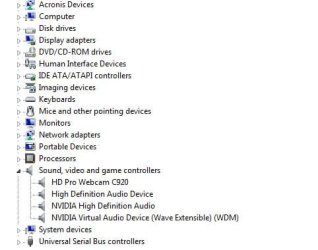
At this point, i think is probably best and easiest to plan on using the new sound card you ordered.

That said, I have a theory. May or may not be true but seems to fit the scenarios you describe. The Realtek audio chip is probably flaking (could also be controller or HD Audio bus - but i'd guess the audio device)
> Windows talks to the audio controller
> The controller talks to the Realtek audio chip and,
> Your jacks connect to and are controlled by the realtek audio device

Your jacks appear when the Realtek chip is working and detected. When it falls "offline" Windows can no longer see them as the end-to-end comm path is broken.

Use DevManView to check. (You;ll need to monitor it and check for yourself in real-time).

Here's what to do/look for. Run DevManView. We only care about two columns: Device Instance ID and Connected.http://www.sevenforums.com/images/smilies/sleepy.gif

Device names can change. The constant that uniquely identifies each chip is Device Instance ID. Click the column header to sort by ID. Now scroll down to find IDs that start with HDAUDIO\.
  • ID of your Nvidia chip starts HDAUDIO\FUNC_01&VEN_10DE. You can ignore that one
  • ID of your Realtek audio starts HDAUDIO\FUNC_01&VEN_10EC. That's the only one we care about
Also note there's a Connected column to the right of ID

Windows can only see the jacks IF {the Realtek chip appears in DevManView} AND {Connected=Yes}

The jacks won't appear if either {the Realtek chip no longer appears in DevManView} OR {it's there but Connected=No}

As you watch the Realtek HDAUDIO ID, you'll need hit F5 to refresh the data to see any change when jacks appear and go

/EDIT/
p.s. When you uninstalled Realtek and rebooted, what you saw may have been Windows, re-detecting the audio chip and then install the generic audio driver (its only choice since Realtek was gone). But the jacks still fall online/offline as chip detection works/fails
 

My Computer My Computer

Computer type
PC/Desktop
Computer Manufacturer/Model Number
Dell Optiplex 360 and Optiplex 755
OS
Desk 1: Win 7 Pro x32; Desk 2: Windows 10 x64
Hard Drives
500GB Crucial SSD in both Desktops
Other Info
Buffalo 6TB NAS, Raid 1
well motorfingers; I do agree with what you mentioned as well; you should not need the driver for windows to detect the device; because as long as the device is plug n play; then yes windows should detect it and install a different form of driver per say; but one which wont give it full functionality; but enough function to at least give you some sort of indication that it is partially working. And yes the audio controller does play a part in this as well.
 

My Computer My Computer

Computer type
PC/Desktop
Computer Manufacturer/Model Number
custom built
OS
Windows 7 ultimate 64-bit
CPU
Intel I7 2600K 3.4ghz
Motherboard
Asus Evo P8P67
Memory
Corsair 16gb ddr3 1600mhz
Graphics Card(s)
Nvidia Geforce gt 430
Sound Card
Sound Blaster Titanium x-fi pci express
Monitor(s) Displays
Dell E198WFP
Hard Drives
1 western digital 2TB drive.
PSU
Antec 1200 watt
Case
Inwin Dragon Rider
Cooling
6 case supplied cooling fans
Keyboard
logitech mk700
Mouse
logitech m705
Internet Speed
25-50mbps download; 10mbps upload(i think)
Antivirus
avg free 2014
Browser
mozilla firefox
Other Info
Also have a pretty bad speaker setup which is a klipsch promedia 5.1 surround speaker setup with huge subwoofer and lg blu ray player/writer. Also a hp officejet pro 8600 plus wireless all in one and a logitech s7500 webcam.
I too have a motherboard with realtek on-board audio; but I dont use the onboard audio; as i had a better sound setup with the sound blaster pci express titanium sound card i have in my system. So while yes i could have just gone with the onboard audo; why bother when the sound blaster is better imo.
 

My Computer My Computer

Computer type
PC/Desktop
Computer Manufacturer/Model Number
custom built
OS
Windows 7 ultimate 64-bit
CPU
Intel I7 2600K 3.4ghz
Motherboard
Asus Evo P8P67
Memory
Corsair 16gb ddr3 1600mhz
Graphics Card(s)
Nvidia Geforce gt 430
Sound Card
Sound Blaster Titanium x-fi pci express
Monitor(s) Displays
Dell E198WFP
Hard Drives
1 western digital 2TB drive.
PSU
Antec 1200 watt
Case
Inwin Dragon Rider
Cooling
6 case supplied cooling fans
Keyboard
logitech mk700
Mouse
logitech m705
Internet Speed
25-50mbps download; 10mbps upload(i think)
Antivirus
avg free 2014
Browser
mozilla firefox
Other Info
Also have a pretty bad speaker setup which is a klipsch promedia 5.1 surround speaker setup with huge subwoofer and lg blu ray player/writer. Also a hp officejet pro 8600 plus wireless all in one and a logitech s7500 webcam.
The post office has the card now, according to the tracking. Last time they had a computer part in town, they shipped it to Cape May before delivering it, presumably for the view, and it arrived two days late, with the tracking scan "down the shore" deleted from the tracking record.

I have an appointment and will come back here in an hour or two and complete the checks with DevManView. I did use the DVD that came with the video card (Gigabyte GEForce 660) and got the NVIDIA sound driver. I have thee now, one from the Logitech C920 webcam with microphone, one for NVIDIA, and the RealTek. There is a fourth driver that I see in most people's screen shots that is not there. I do recall that before I re-installed Windows that there were four in my system too.

I've had the feeling for some time that it was the sound card hardware. It's full Azelia spec with all the exorbitant bandwidth and word length available, and my stop-gap sound card is not top-of-the-line. I'll look into RMA-ing my motherboard if we do come to that conclusion firmly enough to convince ASUS USA. IMHO, a bad ASUS motherboard is pretty rare, the recent demise of my aged DSGC-DW notwithstanding. It's probably a chip on the board somewhere. I would rather find that and change it than RMA the motherboard, if it is socketed.
 

My Computer My Computer

Computer type
PC/Desktop
Computer Manufacturer/Model Number
Home-build
OS
Windows 7 Ultimate 64-bit (I'm trying out W 10 Pro)
CPU
AMD FX8350
Motherboard
ASUS Sabertooth 990FX R2.0, chipset 990FX/SB950
Memory
16 GB (four G.Skill F3-1866C9Q-32GZH)
Graphics Card(s)
Gigabyte GEForce 660
Sound Card
On-Board RealTek ALC892
Monitor(s) Displays
NEC MultiSync 90GX2 on KVM switch
Screen Resolution
1280 X 1024
Hard Drives
Western Digital WD2002FAEX-2TB 7200 RPM SATA 3 (two, boot and data)
PSU
Rosewill CAPSTONE-1000-M, 1000W, single 12 Volt rail
Case
Rosewill Thor
Cooling
AMD fan that came with FX8350, PS and case fans
Keyboard
Cherry RS 6000 M on ATEN CS1734B KVM switch
Mouse
Kensington Expert Mouse Pro (Trackball) via USB on KVM switc
Internet Speed
25 MB/s up/down
Antivirus
Norton 360 Premier
Browser
Firefox
Other Info
Home Build as of December 3, replaced motherboard on January 29, 2014. Have Corsair H80I liquid cooler but didn't use it.
DevManView shows the RealTek driver there, enabled, and loaded:

Realtek High Definition Audio Realtek IntcAzAudAddService MEDIA Sound, video and game controllers HDAUDIO\FUNC_01&VEN_10EC&DEV_0892&SUBSYS_10438436&REV_1003\4&1dc8007c&0&0001 Internal High Definition Audio Bus 0x00000000 0x00000000 No Yes 12/16/2013 11:27:37 AM 12/16/2013 6:15:56 AM Realtek High Definition Audio 6.0.1.7023 oem69.inf IntcAzAudModel.NTAMD64 8/21/2013 12/16/2013 6:42:02 AM

The Sound window does show two speaker jacks when the headset is plugged in, but I can't get it to see the microphone jack.

Early this morning I re-installed everything from the ASUS DVD. All the drivers are up-to-date in the sense that none of the drivers on the web site are dated later or have later version numbers. I also loaded the Gigabyte DVD and installed the GEForce 660 drivers from it. During testing with DevManView loaded, I tried turning up the speaker volume all the way again and this time I could not discern the test sounds at all. I found that I could turn the headset volume all the way up and could here the "machinery noise" sound there too, and also could not hear the test sounds below the machinery noise. A YouTube video produces only silence, other than the machinery noise.

At this point I'm going to take the advice of you guys and declare the solution to be the sound card, which should arrive late today. I'll disable the Azelia sound in the BIOS and plug in the case wires to the front panel in the sound card. I've got enough electronics and I&T experience to understand that a chip can go bad on anyone, particularly in the first couple of weeks of use. If the sound card resolves all the problems, I'll approach ASUS about what to do about the motherboard, with my preferred solution to get a replacement audio chip. But, I just pulled off the side cover and see only one socketed chip, an eight-pin job that is probably a driver; I couldn't make out the chip number. It could be a stereo audio driver for the headphone jack but that would not be the RealTek audio chip.

I just looked at available sound cards on NewEgg and decided that the one I have coming, an ASUS Xonar DGX, is not top-of-the-line but is more than adequate for my needs. It is 24-bit, 96 KHz max data rate, and has up to Dolby Surround Sound 5.1 outputs. My current planned usage need only outputs for stereo speakers and headphones.
 

My Computer My Computer

Computer type
PC/Desktop
Computer Manufacturer/Model Number
Home-build
OS
Windows 7 Ultimate 64-bit (I'm trying out W 10 Pro)
CPU
AMD FX8350
Motherboard
ASUS Sabertooth 990FX R2.0, chipset 990FX/SB950
Memory
16 GB (four G.Skill F3-1866C9Q-32GZH)
Graphics Card(s)
Gigabyte GEForce 660
Sound Card
On-Board RealTek ALC892
Monitor(s) Displays
NEC MultiSync 90GX2 on KVM switch
Screen Resolution
1280 X 1024
Hard Drives
Western Digital WD2002FAEX-2TB 7200 RPM SATA 3 (two, boot and data)
PSU
Rosewill CAPSTONE-1000-M, 1000W, single 12 Volt rail
Case
Rosewill Thor
Cooling
AMD fan that came with FX8350, PS and case fans
Keyboard
Cherry RS 6000 M on ATEN CS1734B KVM switch
Mouse
Kensington Expert Mouse Pro (Trackball) via USB on KVM switc
Internet Speed
25 MB/s up/down
Antivirus
Norton 360 Premier
Browser
Firefox
Other Info
Home Build as of December 3, replaced motherboard on January 29, 2014. Have Corsair H80I liquid cooler but didn't use it.
When you talk to ASUS make the case that it's either the sound card or perhaps even the jacks and how they're soldered to the motherboard. But the jacks come on the motherboard so it's gotta be a motherboard issue in either case.

Good luck and Happy Computing!
 

My Computer My Computer

Computer type
PC/Desktop
Computer Manufacturer/Model Number
Dell Optiplex 360 and Optiplex 755
OS
Desk 1: Win 7 Pro x32; Desk 2: Windows 10 x64
Hard Drives
500GB Crucial SSD in both Desktops
Other Info
Buffalo 6TB NAS, Raid 1
Well, I now have sound, thanks to my new ASUS Xonar DGX, which is perfect for my limited needs for sound, except that it doesn't take a front-panel microphone. However, the microphone in my Logitech C920 webcam *is* enabled and I have worked with that before. With the headset, I can avoid the echo effect without trying to do it with the sound software.

The eight-pin DIP chip is, according to the ASUS motherboard manual, a BIOS chip. The RealTek ALC 892 is on the layout diagram and it is surface-mount soldered, so fixing that is an RMA and a factory rework/rebuild, not something for the customer.

I knew I had won when, after installing the drivers from the sound card CD-ROM, I heard the shutdown sound through the speakers.

I have marked this thread as SOLVED.
 

My Computer My Computer

Computer type
PC/Desktop
Computer Manufacturer/Model Number
Home-build
OS
Windows 7 Ultimate 64-bit (I'm trying out W 10 Pro)
CPU
AMD FX8350
Motherboard
ASUS Sabertooth 990FX R2.0, chipset 990FX/SB950
Memory
16 GB (four G.Skill F3-1866C9Q-32GZH)
Graphics Card(s)
Gigabyte GEForce 660
Sound Card
On-Board RealTek ALC892
Monitor(s) Displays
NEC MultiSync 90GX2 on KVM switch
Screen Resolution
1280 X 1024
Hard Drives
Western Digital WD2002FAEX-2TB 7200 RPM SATA 3 (two, boot and data)
PSU
Rosewill CAPSTONE-1000-M, 1000W, single 12 Volt rail
Case
Rosewill Thor
Cooling
AMD fan that came with FX8350, PS and case fans
Keyboard
Cherry RS 6000 M on ATEN CS1734B KVM switch
Mouse
Kensington Expert Mouse Pro (Trackball) via USB on KVM switc
Internet Speed
25 MB/s up/down
Antivirus
Norton 360 Premier
Browser
Firefox
Other Info
Home Build as of December 3, replaced motherboard on January 29, 2014. Have Corsair H80I liquid cooler but didn't use it.
UPDATE: ASUS contacted me through the vendor *and* directly and authorized an RMA for a new or refurbished motherboard. The new motherboard has been in place now for about nine weeks and it is solid as a brick. The sound card is available for an old ABIT board for AMD Socked 939 that never did have sound that worked. It's running Debian so that's all you will hear about it here.

"My System Specs" updated some time ago.
 

My Computer My Computer

Computer type
PC/Desktop
Computer Manufacturer/Model Number
Home-build
OS
Windows 7 Ultimate 64-bit (I'm trying out W 10 Pro)
CPU
AMD FX8350
Motherboard
ASUS Sabertooth 990FX R2.0, chipset 990FX/SB950
Memory
16 GB (four G.Skill F3-1866C9Q-32GZH)
Graphics Card(s)
Gigabyte GEForce 660
Sound Card
On-Board RealTek ALC892
Monitor(s) Displays
NEC MultiSync 90GX2 on KVM switch
Screen Resolution
1280 X 1024
Hard Drives
Western Digital WD2002FAEX-2TB 7200 RPM SATA 3 (two, boot and data)
PSU
Rosewill CAPSTONE-1000-M, 1000W, single 12 Volt rail
Case
Rosewill Thor
Cooling
AMD fan that came with FX8350, PS and case fans
Keyboard
Cherry RS 6000 M on ATEN CS1734B KVM switch
Mouse
Kensington Expert Mouse Pro (Trackball) via USB on KVM switc
Internet Speed
25 MB/s up/down
Antivirus
Norton 360 Premier
Browser
Firefox
Other Info
Home Build as of December 3, replaced motherboard on January 29, 2014. Have Corsair H80I liquid cooler but didn't use it.
I saw an email notice of a reply on this thread with a link to eightforums about using a DMI cable, which would not have helped my bad motherboard. It's weird, referring to post#20, etc.

I also notice that my signature photo is down. That's OK; it was a macro photo of my LGA 771 motherboard, which was replaced with the AMD motherboard that was replaced on RMA - and is now just fine.
 

My Computer My Computer

Computer type
PC/Desktop
Computer Manufacturer/Model Number
Home-build
OS
Windows 7 Ultimate 64-bit (I'm trying out W 10 Pro)
CPU
AMD FX8350
Motherboard
ASUS Sabertooth 990FX R2.0, chipset 990FX/SB950
Memory
16 GB (four G.Skill F3-1866C9Q-32GZH)
Graphics Card(s)
Gigabyte GEForce 660
Sound Card
On-Board RealTek ALC892
Monitor(s) Displays
NEC MultiSync 90GX2 on KVM switch
Screen Resolution
1280 X 1024
Hard Drives
Western Digital WD2002FAEX-2TB 7200 RPM SATA 3 (two, boot and data)
PSU
Rosewill CAPSTONE-1000-M, 1000W, single 12 Volt rail
Case
Rosewill Thor
Cooling
AMD fan that came with FX8350, PS and case fans
Keyboard
Cherry RS 6000 M on ATEN CS1734B KVM switch
Mouse
Kensington Expert Mouse Pro (Trackball) via USB on KVM switc
Internet Speed
25 MB/s up/down
Antivirus
Norton 360 Premier
Browser
Firefox
Other Info
Home Build as of December 3, replaced motherboard on January 29, 2014. Have Corsair H80I liquid cooler but didn't use it.
Back
Top