Windows Update cannot currently check for updates

Ddvogt

New member
Local time
1:45 AM
Messages
6
Hello Everyone:
I am unable to receive Windows updates. Even manual updates won't work. This seems to have started when I upgrade my Hard Drive to a Momentus xt 750GB (Hybrid Drive)

I combed the network and try all solution suggested. I reverted to drive images made at various time. No luck.

The first message when I click is Windows Update Checjk for update for your computer. Then Windows Update cannot currently check for updates, because the service is not running. You may need to restart your computer,

It doesn't appear to be a virus: Fresh installs won't clear the and my Norton has always been up to date. I even run Windows Malicious detector. Zero issues.

What I come to think of is a compatibility issue: 512b then, 4kb now? I know there has been a patch and I use routinely external HD of High capacity.

I would appreciate some help if you can. Again, I don't think it is a virus.

Windows 7 Ultimate
Sony Vaio VGN Z890F with 6 GB

Many thanks.
DV
 

My Computer My Computer

Computer Manufacturer/Model Number
Sony vaio vgn z890f
OS
Windows 7 64 Ultimate
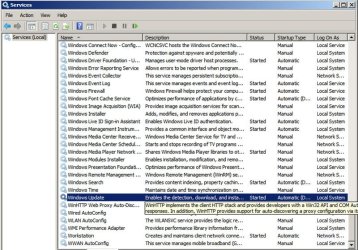
Is your Windows Update service in fact running?
 

Attachments

  • Windows services.jpg
    Windows services.jpg
    129.2 KB · Views: 1,487

My Computer My Computer

Computer type
PC/Desktop
Computer Manufacturer/Model Number
Ignatz Special; 4 speed manual gearbox; factory air conditioning; one of one
OS
Windows 7 Home Premium SP1, 64-bit
CPU
Intel Skylake i5-6600K, not overclocked
Motherboard
AsRock Z170M Extreme 4, micro ATX
Memory
8 GB HyperX DDR4-2666 (2 x 4 GB)
Graphics Card(s)
none; graphics are integrated on CPU
Sound Card
onboard: Realtek ALC1150; external: USB Behringer UF0-202
Monitor(s) Displays
Dell S2340M 23 inch IPS
Screen Resolution
1600 x 900
Hard Drives
System: Crucial MX100 series SSD, 128 GB;
Data: Samsung Spinpoint 103SJ, 1 TB;
Backup: WD Caviar Green WD30EZRX-00D8PB0, 3 TB
PSU
Rosewill SilentNight 500 watt fanless, semi-modular
Case
Antec Solo II
Cooling
Noctua NH-U12S; Noctua F12 intake, Noctua S12A exhaust
Keyboard
Microsoft 200 6JH-00001 USB
Mouse
Dell or Microsoft optical wired; USB
Antivirus
Microsoft Security Essentials and Malwarebytes Premium
Browser
Pale Moon
Other Info
All fans PWM; speeds at idle: CPU circa 500 rpm; intake circa 600 rpm; exhaust circa 600 rpm; CPU temps 27 idle and 47 C load in a warm room (27 C/81 F) when running Intel Extreme Tuning Utility stress test.
Many thanks for your question. That was my first search. It is working. At some point in time, I turned on everything that could be put to start. To no avail
 

My Computer My Computer

Computer Manufacturer/Model Number
Sony vaio vgn z890f
OS
Windows 7 64 Ultimate
I also used the Microsoft Fixit. One resulted in deleted the list of updates currently in the system and I will have to revert to a back-up
 

My Computer My Computer

Computer Manufacturer/Model Number
Sony vaio vgn z890f
OS
Windows 7 64 Ultimate
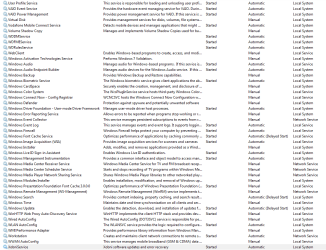
And the log to confirm it:Capture.PNG
 

My Computer My Computer

Computer Manufacturer/Model Number
Sony vaio vgn z890f
OS
Windows 7 64 Ultimate

My Computer My Computer

Computer type
PC/Desktop
Computer Manufacturer/Model Number
Ignatz Special; 4 speed manual gearbox; factory air conditioning; one of one
OS
Windows 7 Home Premium SP1, 64-bit
CPU
Intel Skylake i5-6600K, not overclocked
Motherboard
AsRock Z170M Extreme 4, micro ATX
Memory
8 GB HyperX DDR4-2666 (2 x 4 GB)
Graphics Card(s)
none; graphics are integrated on CPU
Sound Card
onboard: Realtek ALC1150; external: USB Behringer UF0-202
Monitor(s) Displays
Dell S2340M 23 inch IPS
Screen Resolution
1600 x 900
Hard Drives
System: Crucial MX100 series SSD, 128 GB;
Data: Samsung Spinpoint 103SJ, 1 TB;
Backup: WD Caviar Green WD30EZRX-00D8PB0, 3 TB
PSU
Rosewill SilentNight 500 watt fanless, semi-modular
Case
Antec Solo II
Cooling
Noctua NH-U12S; Noctua F12 intake, Noctua S12A exhaust
Keyboard
Microsoft 200 6JH-00001 USB
Mouse
Dell or Microsoft optical wired; USB
Antivirus
Microsoft Security Essentials and Malwarebytes Premium
Browser
Pale Moon
Other Info
All fans PWM; speeds at idle: CPU circa 500 rpm; intake circa 600 rpm; exhaust circa 600 rpm; CPU temps 27 idle and 47 C load in a warm room (27 C/81 F) when running Intel Extreme Tuning Utility stress test.
Many thanks. This is ok eventually I will find someone that will be able to help. This has the attribute of a virus, but I really do not think it is, having reverted to fresh install. I just run for the 5th time SFc /scannow.
This is strange but must be a combination of hardware software issue. It happened after I replaced the drive. If I still had the old drive, I would check.
 

My Computer My Computer

Computer Manufacturer/Model Number
Sony vaio vgn z890f
OS
Windows 7 64 Ultimate
Hello Everyone:
I am unable to receive Windows updates. Even manual updates won't work. This seems to have started when I upgrade my Hard Drive to a Momentus xt 750GB (Hybrid Drive)

I combed the network and try all solution suggested. I reverted to drive images made at various time. No luck.

The first message when I click is Windows Update Checjk for update for your computer. Then Windows Update cannot currently check for updates, because the service is not running. You may need to restart your computer,

It doesn't appear to be a virus: Fresh installs won't clear the and my Norton has always been up to date. I even run Windows Malicious detector. Zero issues.

What I come to think of is a compatibility issue: 512b then, 4kb now? I know there has been a patch and I use routinely external HD of High capacity.

I would appreciate some help if you can. Again, I don't think it is a virus.

Windows 7 Ultimate
Sony Vaio VGN Z890F with 6 GB

Many thanks.
DV


I too had this exact same problem after I installed the Momentus XT750* in my Fujitsu T900 Tablet. I found the solution here:
Windows Update failure after clone drive Momentus ... - Seagate Community Forums

Basicly just Google (not Bing, I hate Bing!!) this driver:
Intel Rapid Storage Technology driver 10.8.0.1003

After it downloads, extract the files from the .zip folder.
Go to device manager and look for something that says "IDE ATA/ATPI Controllers"
Next find one that has AHCI in the name.
Right click it and go to "update driver software"
Browse to the location on your computer that has the extracted files from the .zip you downloaded.
Start the install and restart your computer.

Good luck!!
 

My Computer My Computer

OS
win 7 64 bit SP1
Issue Resolved

Thanks longroundtip!

Many thanks for providing an excellent solution. I spent days on this issue. I bought a software that was supposed to replace any corrupted file. That did not work.
I worked directly with Microsoft. We got it to work using an in-place reinstall (Upgrade using the same version of the OS will correct errors), but eventually drivers issues have now surfaced. They are fixable but annoying, and I am glad to return to the original imaged drive that worked so well with the older drive.

Many thanks!
 

My Computer My Computer

Computer Manufacturer/Model Number
Sony vaio vgn z890f
OS
Windows 7 64 Ultimate
A week ago my laptop's HDD was dying so I had it replaced (with a same-size Seagate model, i.e. 500GB). Fresh Win7 x64 install and everything. I just finished putting in MSE and updating it, full scan worked fine. Then Windows Update was my next stop... and I found out I have this problem.

Tried the solution above - to my dismay, it didn't seem to work. So I googled up "windows update cannot currently check for updates" and tried the advice on this page:

How to fix “Windows Update cannot currently check for updates, because the service is not running” | Michal's Notes

Summary in case the link dies:
Basically the guy thinks the Windows Updates download(s) got corrupt somewhere, so he tells you to stop the Windows Update service, delete all the files in C:\Windows\SoftwareDistribution\, then re-enable the service. I rebooted my machine but it probably wasn't necessary.

I lucked out, it was the second thing I tried and it worked :D

Not sure whether the first step (updating that Intel driver) helped or not, but I figure a driver update can't hurt. Now I'm back to reading net news while I wait for the 90+ odd updates to download, lol.
 

My Computer My Computer

Computer Manufacturer/Model Number
Self-built rig
OS
Win7 Pro x64
CPU
Koa i5-2550K
Memory
8 GB
Graphics Card(s)
Sapphire ATI 6870 1GB GDDR5
Sound Card
RealTek HD Audio / ATI HDMI Audio
Monitor(s) Displays
Samsung HDTV Monitor T23A350
Screen Resolution
1920 x 1080
Hard Drives
- SSD (C:)
- HDD (D:)
- BD-ROM (E:)
Keyboard
Logitech G110
Internet Speed
Unifi home (5mbps)
Updates Working again

This! Went down too many roads with MS and this was it for me :-) :party::party::party:

How to fix “Windows Update cannot currently check for updates, because the service is not running” | Michal's Notes

Summary in case the link dies:
Basically the guy thinks the Windows Updates download(s) got corrupt somewhere, so he tells you to stop the Windows Update service, delete all the files in C:\Windows\SoftwareDistribution\, then re-enable the service. I rebooted my machine but it probably wasn't necessary.
 

My Computer My Computer

OS
Home Premium x64

My Computer My Computer

Computer type
PC/Desktop
Computer Manufacturer/Model Number
Home Built Desktop By DataTech
OS
Windows 7 Ultimate X64 SP1
CPU
Intel i5-2550K, Differing ~4.4-4.8GHz No built in GPU
Motherboard
ASUS P8Z68-V PRO/GEN3
Memory
16GB G.Skill Sniper 1866MHz @ 2133MHz 2x8GB
Graphics Card(s)
ASUS GTX650TIB-DC2OC-2GD5, (650TI Boost)
Sound Card
Onboard Realtek 5-1
Monitor(s) Displays
Samsung P2570HD
Screen Resolution
1920x1080
Hard Drives
Samsung 840 Pro 256GB SSD for OS, 500GB Seagate Constellation (Enterprise drive) for Data
PSU
Corsair HX650W
Case
Inwin Dragon Rider
Cooling
Hyper 212 EVO w/two Noctua fans, push-pull, @1300 RPM
Keyboard
E-Z Eyes, bright yellow keys with large characters
Mouse
steelseries SENSEI Laser Pro Gaming
Internet Speed
48-51Mbs Mbs down, 11 Mbs up Xfinity Cable
Antivirus
Norton Internet Security 2013
Browser
IE 10, Opera, Pale Moon if needed
Other Info
4 case fans, LG BluRay-RE, ASUS DVD-RW, Mr. Fusion power supply, 1.21 gigawatts.
I am having the same problem with a friends laptop a sony VPCF126FM. His HD crashed so I am installing a brand new WD hard drive. I too have tried reformatting to no avail. I have also tried all of the above solutions and even gone to the intel website to get the latest drivers for the rapid tech stuff. Still getting same error message about service not running. I have yet to try the solution from the post above mine.

has anyone had the opportunity to attempt it?

the system was win7 home premium and i used a win7 home premium disc oem with sp1.
 

My Computer My Computer

Computer Manufacturer/Model Number
Self built
OS
64bit win7 ultimate
CPU
Intel quad core 6700
Motherboard
780i
Memory
8gb gskill
Graphics Card(s)
670 nvidia
Sound Card
audigy 2
Monitor(s) Displays
samsung
Hard Drives
western digital 1tb
PSU
corsair 750w
Case
antec 900
I am having the same problem with a friends laptop a sony VPCF126FM. His HD crashed so I am installing a brand new WD hard drive. I too have tried reformatting to no avail. I have also tried all of the above solutions and even gone to the intel website to get the latest drivers for the rapid tech stuff. Still getting same error message about service not running. I have yet to try the solution from the post above mine.

has anyone had the opportunity to attempt it?

the system was win7 home premium and i used a win7 home premium disc oem with sp1.
Yes I did, it worked on my system as I stated.
 

My Computer My Computer

Computer type
PC/Desktop
Computer Manufacturer/Model Number
Home Built Desktop By DataTech
OS
Windows 7 Ultimate X64 SP1
CPU
Intel i5-2550K, Differing ~4.4-4.8GHz No built in GPU
Motherboard
ASUS P8Z68-V PRO/GEN3
Memory
16GB G.Skill Sniper 1866MHz @ 2133MHz 2x8GB
Graphics Card(s)
ASUS GTX650TIB-DC2OC-2GD5, (650TI Boost)
Sound Card
Onboard Realtek 5-1
Monitor(s) Displays
Samsung P2570HD
Screen Resolution
1920x1080
Hard Drives
Samsung 840 Pro 256GB SSD for OS, 500GB Seagate Constellation (Enterprise drive) for Data
PSU
Corsair HX650W
Case
Inwin Dragon Rider
Cooling
Hyper 212 EVO w/two Noctua fans, push-pull, @1300 RPM
Keyboard
E-Z Eyes, bright yellow keys with large characters
Mouse
steelseries SENSEI Laser Pro Gaming
Internet Speed
48-51Mbs Mbs down, 11 Mbs up Xfinity Cable
Antivirus
Norton Internet Security 2013
Browser
IE 10, Opera, Pale Moon if needed
Other Info
4 case fans, LG BluRay-RE, ASUS DVD-RW, Mr. Fusion power supply, 1.21 gigawatts.
The fix did not work in my case. What did work was something i had read earlier relating to the Intel Rapid drivers. I uninstalled them completely and voila. All updates came through. I realize this is only a fix for windows updates, and it now presents a new problem of not having the intel drivers installed for the rapid tech stuff, but at least i can get updates.
 

My Computer My Computer

Computer Manufacturer/Model Number
Self built
OS
64bit win7 ultimate
CPU
Intel quad core 6700
Motherboard
780i
Memory
8gb gskill
Graphics Card(s)
670 nvidia
Sound Card
audigy 2
Monitor(s) Displays
samsung
Hard Drives
western digital 1tb
PSU
corsair 750w
Case
antec 900

My Computer My Computer

Computer type
Laptop
Computer Manufacturer/Model Number
Asus K52F or Lenovo B51-80
OS
Win 7 x64 Home Premium (and x86 VirtualBox VM)/Win10
CPU
i3 370M/i7 6500U
Motherboard
Asus/Lenovo
Memory
8GB - finally :)/8GB
Graphics Card(s)
it's an i3, dude!/dual Intel&nVidia
Sound Card
onboard
Monitor(s) Displays
15.6" built-in
Screen Resolution
1366x768/1920x1080
Hard Drives
750GB Seagate internal
Sundry external drives attached to other computers on the local network
1TB SSD on the Lenovo
PSU
n/a
Internet Speed
as much as I can get - usually on a dongle/phone, so <1MB/s
Antivirus
MSE/Defender
Browser
IE11/12/Edge/Chrome/FF(if I must)
Back
Top