Windows Update Error 0x8007057 - How Do I Fix This?

Hey Man

New member
Local time
2:31 PM
Messages
27
Greetings,

I wasn't able to do an update, so I downloaded the Window Update Diagnostic Tool and while trying to fix problems found with Windows Update - the tool couldn't fix the problem and I got this message:

Windows Update Error 0x8007057

I am not that computer literate when it comes to registry fixes, so I would appreciate the easiest way in simple steps to fix this.

Thank you very much.

HM
 

My Computer My Computer

Computer type
PC/Desktop
OS
Windows 7 Professional - 64 Bit
Hi HeyMan,
That error usually relates to a server error, its either busy or using an invalid proxy.
I suspect the 1st as its the last day to update to W10 for free.
Try again in a while, if problem still occurs can you post a copy of the windowsUpdate log. (todats entries only)

Roy
 

My Computer My Computer

Computer type
PC/Desktop
Computer Manufacturer/Model Number
medionl/Aspire 6930G/acer x55a
OS
W7 home premium 32bit/W7HP 64bit/w10 tp insider ring
CPU
E5300 dual core
Motherboard
medion MS7366
Memory
3gb
Graphics Card(s)
Nvidia Geforce 7100 Nforce 630i
Monitor(s) Displays
avixc
Internet Speed
n (isp resticted to 72)
Antivirus
mse/pands
Browser
palemoon
Other Info
Belkin Fd7050 n USB using Railink RT2870 drivers, more upto date
Hi HeyMan,
That error usually relates to a server error, its either busy or using an invalid proxy.
I suspect the 1st as its the last day to update to W10 for free.
Try again in a while, if problem still occurs can you post a copy of the windowsUpdate log. (todats entries only)

Roy

Hey Roy,

Thanks for getting back to me.

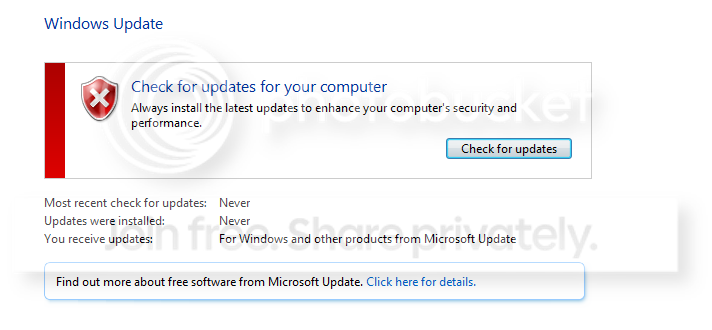
One other thing is that now the update section looks like this with the red X and stating that I have never checked for updates and that updates have never been installed, which isn't the case at all.

Do you think this will change once the server issues are no longer a problem and Windows can do a search for updates?

I have it set to - inform me of updates and let me decide if I want to download and install them. Look below at the screenshot.

Thanks,

HM

Untitled_1.png
 

My Computer My Computer

Computer type
PC/Desktop
OS
Windows 7 Professional - 64 Bit

My Computer My Computer

Computer type
PC/Desktop
Computer Manufacturer/Model Number
medionl/Aspire 6930G/acer x55a
OS
W7 home premium 32bit/W7HP 64bit/w10 tp insider ring
CPU
E5300 dual core
Motherboard
medion MS7366
Memory
3gb
Graphics Card(s)
Nvidia Geforce 7100 Nforce 630i
Monitor(s) Displays
avixc
Internet Speed
n (isp resticted to 72)
Antivirus
mse/pands
Browser
palemoon
Other Info
Belkin Fd7050 n USB using Railink RT2870 drivers, more upto date
Hi and welcome to SevenForums,
Reset the update system with Option 3 here,
http://www.sevenforums.com/tutorials/91738-windows-update-reset.html


When manually installing updates you need to switch your update settings to Never check for updates and restart the machine first.

Make sure KB3020369 is installed if not manually install it,
Win-7 32 bit
https://www.microsoft.com/en-us/download/details.aspx?id=46827
Win-7 64 bit
https://www.microsoft.com/en-us/download/details.aspx?id=46817

Then manually install KB3172605
https://support.microsoft.com/en-us/kb/3172605
Win-7 32 bit,
https://www.microsoft.com/en-us/download/details.aspx?id=53335
Win-7 64 bit,
https://www.microsoft.com/en-us/download/details.aspx?id=53332

After switch your windows update settings back to what you had prior and manually check for updates and the rest should show up shortly.
 

My Computer My Computer

Computer type
PC/Desktop
Computer Manufacturer/Model Number
Custom assembled by me :}
OS
Win-7-Pro64bit 7-H-Prem-64bit
CPU
i7-5930K 2nd i9-9940x both water blocked VRM's too
Motherboard
ASUS SABERTOOTH X99 2nd ASUS x299 Apex
Memory
Trident-z 3200C14 2nd Trident-z 3600C16
Graphics Card(s)
EVGA 1080ti ftw3 2nd Titan Xp both water blocked
Sound Card
Built-in Realtek
Monitor(s) Displays
1-AOC G2460PG 24"G-Sync 144Hz/ 2nd 1-ASUS VG248QE 24" 144Hz
Screen Resolution
1920 x 1080 144Hz
Hard Drives
2-Samsung M.2 Evo & Evo Plus
2-Samsung 850 EVO 500GB SSD's/ 3-2.5 W.D. Black 1tb-&3-1tb/3-3.5 WD Black 1tb hdd's
PSU
EVGA SuperNOVA 1000-P2 2nd 1200-P2
Case
2-Corsair Obsidian Series 450D Black ATX Mid Tower
Cooling
Custom water loops
Keyboard
Logitech G710+/ 2nd Logitech G910
Mouse
2-RedDragon M901 Perdition 16400 dpi Gaming mouse = wired
Internet Speed
Comcast Ping 19ms 89.31mbps download speed 6.12mbps upload
Antivirus
Malwarebytes Pro/ Superantispyware Pro
Browser
FireFox & Pale moon
Other Info
2nd ASUS X299 Apex/Intel i9-9940x with Custom water loop/7H-Prem-x64/Corsair 450D case/Ram Trident-z 3600C16 4x8gb / Samsung970Evo plus 500gb SSD/Dual ssd EZ swap evo/PSU EVGA SuperNova 1200w-P2 80+Platinum/GPU Titan Xp /8-ML-140 on push-pull on 2-280GTX rads
Hi HM,
The tool that you ran, (in aggressive mode) clears the update file history , thats why the "never".
NOTHING to worry about there.

Lets dig a little deeper see if something else is causing it.
(assuming you still cant update)

can you copy/paste the results of these tools
http://go.microsoft.com/fwlink/?LinkID=52012
http://www.sysnative.com/niemiro/apps/SFCFix.exe

Roy

I am first checking to see if I can update - will it stop if it can't find anything to update or go on searching forever? How long should it take more or less to search for updates, before I know that there is a problem.

Thanks Roy.
 

My Computer My Computer

Computer type
PC/Desktop
OS
Windows 7 Professional - 64 Bit
Back
Top