
Windows Update Error 80072EE2

I'm using Avira Premium Security Suite and I have no problem updating.

BTW, have you activated Windows yet?

I don't know which version you have (32 or 64 bit) so here's instrctions for both.

For 32-bit Windows, open a command prompt (run as Administrator) and enter the following lines:

net stop wuauserv
regsvr32 %windir%\system32\wups2.dll
net start wuauserv


For 64-bit Windows, the second line differs due to the location of the DLL file:

net stop wuauserv
regsvr32 %windir%\syswow64\wups2.dll
net start wuauserv


In each case, the first and last commands stop and then restart the Windows Update service. This is a precaution to keep the service from becoming unstable.
on a 32-bit system,a single short command — regsvr32 wups2.dll — solved the problem without confusing the WU/AU service.
 

My Computer

Computer type
PC/Desktop
Computer Manufacturer/Model Number
Bruce ... somewhere in his 40's
OS
Windows 7 Ultimate 32bit SP1
CPU
Intel(R) Core(TM)2 Quad CPU @ 2.40GHz, 2400 MHz
Motherboard
INTEL/D975XBX2
Memory
4 GB
Graphics Card(s)
ATI Radeon HD 2600 Pro
Monitor(s) Displays
Samsung SyncMaster 914v
Screen Resolution
1280 x 1024
Hard Drives
2/500GB each ... ST3500630AS ATA Device.
One is not connected
PSU
Rocketfish 700 W
Case
G.Skill Gigabyte Chassis
Keyboard
Standard PS/2 Keyboard
Mouse
Microsoft PS/2 Mouse
Internet Speed
DSL
Antivirus
Avira Internet Security
Browser
IE 11
Other Info
ATI HDMI Audio
Still no luck =/ and yes it is activated
 

My Computer

Computer Manufacturer/Model Number
Acer Aspire 6935G
OS
Windows 7
Graphics Card(s)
Nvidia Geforce 9600M GS
Anyone? T_T
 

My Computer

Computer Manufacturer/Model Number
Acer Aspire 6935G
OS
Windows 7
Graphics Card(s)
Nvidia Geforce 9600M GS
Hey Lumpy,

It looks like we both have the same problem. I too have tried all the methods posted here and other forums but no luck. Anyone to help us out?
 

My Computer

OS
Windows 7 Ultimate 32bit
Graphics Card(s)
NVIDIA GeForce 8400 GS
Screen Resolution
1366x768
Here's a question - if you run a wireshark capture whilst attempting to contact Windows Update, and then save the resulting session out to a .cap file, can you upload it here? Make a note of your client IP address, and we can see if we see the problem on the wire. Also, does your network require a proxy configured in your browser to get to the internet, or no?
 

My Computer

Computer type
PC/Desktop
Computer Manufacturer/Model Number
Custom
OS
Windows 10 Pro x64
CPU
Intel Core i7 4790K @ 4.5GHz
Motherboard
Asus Maximus Hero VII
Memory
32GB DDR3
Graphics Card(s)
Nvidia GeForce GTX970
Sound Card
Realtek HD Audio
Screen Resolution
1920x1200
Hard Drives
1x Samsung 250GB SSD
4x WD RE 2TB (RAIDZ)
PSU
Corsair AX760i
Case
Fractal Design Define R4
Cooling
Noctua NH-D15
@cluberti - Please explain me what to do as I am not able to understand what you are trying to say.
 

My Computer

OS
Windows 7 Ultimate 32bit
Graphics Card(s)
NVIDIA GeForce 8400 GS
Screen Resolution
1366x768

My Computer

Computer type
PC/Desktop
Computer Manufacturer/Model Number
Bruce ... somewhere in his 40's
OS
Windows 7 Ultimate 32bit SP1
CPU
Intel(R) Core(TM)2 Quad CPU @ 2.40GHz, 2400 MHz
Motherboard
INTEL/D975XBX2
Memory
4 GB
Graphics Card(s)
ATI Radeon HD 2600 Pro
Monitor(s) Displays
Samsung SyncMaster 914v
Screen Resolution
1280 x 1024
Hard Drives
2/500GB each ... ST3500630AS ATA Device.
One is not connected
PSU
Rocketfish 700 W
Case
G.Skill Gigabyte Chassis
Keyboard
Standard PS/2 Keyboard
Mouse
Microsoft PS/2 Mouse
Internet Speed
DSL
Antivirus
Avira Internet Security
Browser
IE 11
Other Info
ATI HDMI Audio
@cluberti - Please explain me what to do as I am not able to understand what you are trying to say.

  1. Install Wireshark
  2. Open Wireshark, and click Capture > Interfaces
  3. Click the "Start" button next to your network adapter
  4. Open Windows Update and reproduce the error
  5. Go back to the Wireshark window, and click Capture > Stop
  6. Click File > Save As..., give the file a name in the "File name" box, and then click the "Save" button.
That will create a file with the name you specified with a .cap file extension, that you can zip or rar up and then upload somewhere for us to download and analyze.
 

My Computer

Computer type
PC/Desktop
Computer Manufacturer/Model Number
Custom
OS
Windows 10 Pro x64
CPU
Intel Core i7 4790K @ 4.5GHz
Motherboard
Asus Maximus Hero VII
Memory
32GB DDR3
Graphics Card(s)
Nvidia GeForce GTX970
Sound Card
Realtek HD Audio
Screen Resolution
1920x1200
Hard Drives
1x Samsung 250GB SSD
4x WD RE 2TB (RAIDZ)
PSU
Corsair AX760i
Case
Fractal Design Define R4
Cooling
Noctua NH-D15
The problem is that when you request from DNS the address of www.update.microsoft.com, your DNS server at 192.168.1.1 (probably your router?) is returning 72.14.205.100, which is *not* the correct address of www.update.microsoft.com. This causes your system to send a SYN packet to 72.14.205.100 to try and set up a TCP connection, but because that host does not respond (it is actually an IP address registered to Google), you never get to Windows Update (the error WU is giving you is correct - this is timing out). The error is with your router, or with the upstream DNS server your router is using to get it's addresses. If rebooting your router doesn't fix it, contact whomever is your DNS provider (perhaps your ISP?) to get this fixed, or configure your router to use different DNS servers on a different service (like OpenDNS). Something is sending you to Google (and it appears this machine does not respond to TCP requests) instead of Microsoft for that DNS name, which is causing the failure. Check your router, and go from there - the problem is not WU, or even anything on your system. It's your router, or the DNS servers that you have configured your router to use.
 

My Computer

Computer type
PC/Desktop
Computer Manufacturer/Model Number
Custom
OS
Windows 10 Pro x64
CPU
Intel Core i7 4790K @ 4.5GHz
Motherboard
Asus Maximus Hero VII
Memory
32GB DDR3
Graphics Card(s)
Nvidia GeForce GTX970
Sound Card
Realtek HD Audio
Screen Resolution
1920x1200
Hard Drives
1x Samsung 250GB SSD
4x WD RE 2TB (RAIDZ)
PSU
Corsair AX760i
Case
Fractal Design Define R4
Cooling
Noctua NH-D15
Hi,

I have spent close to 30 hours trying to figure out this same problem with the 80072EE2 error code, not allowing me to search for Windows updates. I called Dell (my laptop's manufacturer) and spent hours on the phone, no help. Disabled Anti-virus and then connected my laptop directly to the Verizon box (modem?), suddenly it worked. Connected it back to the router and again, no hope.
I read your response and called my ISP, who claims it has nothing to do with them or the router. I have Verizon as ISP and Actiontec as my router. Please shed some light, I am out of ideas. Thank you!
 

My Computer

Computer Manufacturer/Model Number
Dell XPS15
OS
Windows 7 Home Premium 64 bit
Motherboard
[email protected]
Memory
8gb
Hard Drives
600 gb
What is your Anti-virus program?
 

My Computer

Computer type
PC/Desktop
Computer Manufacturer/Model Number
Bruce ... somewhere in his 40's
OS
Windows 7 Ultimate 32bit SP1
CPU
Intel(R) Core(TM)2 Quad CPU @ 2.40GHz, 2400 MHz
Motherboard
INTEL/D975XBX2
Memory
4 GB
Graphics Card(s)
ATI Radeon HD 2600 Pro
Monitor(s) Displays
Samsung SyncMaster 914v
Screen Resolution
1280 x 1024
Hard Drives
2/500GB each ... ST3500630AS ATA Device.
One is not connected
PSU
Rocketfish 700 W
Case
G.Skill Gigabyte Chassis
Keyboard
Standard PS/2 Keyboard
Mouse
Microsoft PS/2 Mouse
Internet Speed
DSL
Antivirus
Avira Internet Security
Browser
IE 11
Other Info
ATI HDMI Audio
Jacee,

I run Norton 360, but have uninstalled it and only had a one-time luck after plugging the laptop directly into the modem, bypassing the router. When I connected back to the router (even before re-installing norton), got the same problem, can't search for updates.
 

My Computer

Computer Manufacturer/Model Number
Dell XPS15
OS
Windows 7 Home Premium 64 bit
Motherboard
[email protected]
Memory
8gb
Hard Drives
600 gb
Hi,

I have spent close to 30 hours trying to figure out this same problem with the 80072EE2 error code, not allowing me to search for Windows updates. I called Dell (my laptop's manufacturer) and spent hours on the phone, no help. Disabled Anti-virus and then connected my laptop directly to the Verizon box (modem?), suddenly it worked. Connected it back to the router and again, no hope.
I read your response and called my ISP, who claims it has nothing to do with them or the router. I have Verizon as ISP and Actiontec as my router. Please shed some light, I am out of ideas. Thank you!
I'm going to suggest you do what I told this thread's starter to do in post 28.
 

My Computer

Computer type
PC/Desktop
Computer Manufacturer/Model Number
Custom
OS
Windows 10 Pro x64
CPU
Intel Core i7 4790K @ 4.5GHz
Motherboard
Asus Maximus Hero VII
Memory
32GB DDR3
Graphics Card(s)
Nvidia GeForce GTX970
Sound Card
Realtek HD Audio
Screen Resolution
1920x1200
Hard Drives
1x Samsung 250GB SSD
4x WD RE 2TB (RAIDZ)
PSU
Corsair AX760i
Case
Fractal Design Define R4
Cooling
Noctua NH-D15

My Computer

Computer type
PC/Desktop
Computer Manufacturer/Model Number
Bruce ... somewhere in his 40's
OS
Windows 7 Ultimate 32bit SP1
CPU
Intel(R) Core(TM)2 Quad CPU @ 2.40GHz, 2400 MHz
Motherboard
INTEL/D975XBX2
Memory
4 GB
Graphics Card(s)
ATI Radeon HD 2600 Pro
Monitor(s) Displays
Samsung SyncMaster 914v
Screen Resolution
1280 x 1024
Hard Drives
2/500GB each ... ST3500630AS ATA Device.
One is not connected
PSU
Rocketfish 700 W
Case
G.Skill Gigabyte Chassis
Keyboard
Standard PS/2 Keyboard
Mouse
Microsoft PS/2 Mouse
Internet Speed
DSL
Antivirus
Avira Internet Security
Browser
IE 11
Other Info
ATI HDMI Audio
Cluberti

I have contacted Dell, Microsoft, Verizon (ISP) and Norton. It seems like there is just no hope. any other suggestions?

Jacee, tried the Fix it... no luck. Absolutely frustrating.
 

My Computer

Computer Manufacturer/Model Number
Dell XPS15
OS
Windows 7 Home Premium 64 bit
Motherboard
[email protected]
Memory
8gb
Hard Drives
600 gb
There is always 'hope' ....

Let's see if flushing the DNS cache and and restoring MS's Hosts file help:

Copy and paste these lines in Note pad. Don't use wordpad or any other app.

@Echo on
pushd\windows\system32\drivers\etc
attrib -h -s -r hosts
echo 127.0.0.1 localhost>HOSTS
attrib +r +h +s hosts
popd
ipconfig /release
ipconfig /renew
ipconfig /flushdns
netsh winsock reset all
netsh int ip reset all
shutdown -r -t 1
del %0

Save as flush.bat to your desktop. Right click to run as Administrator. Your computer will reboot itself.

Tell me if this worked or not.
 

My Computer

Computer type
PC/Desktop
Computer Manufacturer/Model Number
Bruce ... somewhere in his 40's
OS
Windows 7 Ultimate 32bit SP1
CPU
Intel(R) Core(TM)2 Quad CPU @ 2.40GHz, 2400 MHz
Motherboard
INTEL/D975XBX2
Memory
4 GB
Graphics Card(s)
ATI Radeon HD 2600 Pro
Monitor(s) Displays
Samsung SyncMaster 914v
Screen Resolution
1280 x 1024
Hard Drives
2/500GB each ... ST3500630AS ATA Device.
One is not connected
PSU
Rocketfish 700 W
Case
G.Skill Gigabyte Chassis
Keyboard
Standard PS/2 Keyboard
Mouse
Microsoft PS/2 Mouse
Internet Speed
DSL
Antivirus
Avira Internet Security
Browser
IE 11
Other Info
ATI HDMI Audio

My Computer

Computer type
PC/Desktop
Computer Manufacturer/Model Number
Custom
OS
Windows 10 Pro x64
CPU
Intel Core i7 4790K @ 4.5GHz
Motherboard
Asus Maximus Hero VII
Memory
32GB DDR3
Graphics Card(s)
Nvidia GeForce GTX970
Sound Card
Realtek HD Audio
Screen Resolution
1920x1200
Hard Drives
1x Samsung 250GB SSD
4x WD RE 2TB (RAIDZ)
PSU
Corsair AX760i
Case
Fractal Design Define R4
Cooling
Noctua NH-D15
This helped me re 80072ee2 error

Got a new Dell XPS 15 and one of the first things I wanted to do was update my OS (Win7 Home Prem 64). So I go: start> search = "update"> windows update. Then the update window would open and I would click on "check for updates" in the column on the left. It would chug away (green progress bar moving but w/o any real progress) for about a minute and then give me the 80072ee2 error every time. Did this about 15 times over about 10 days - hoping it was just high traffic, etc causing the error.

I uninstalled my antivirus (Microsoft Security Essentials), Spybot, uninstalled/reinstalled my NIC driver, checked my firewall settings (only have Win7 firewall) and made various changes. Also, the whole IE/Firefox Internet options> LAN settings thing mentioned earlier in this thread. Then tried updating, all with no success.

What solved it was clicking "check online for updates" which appears below the error notice. See attached pic.

On my first trip to the Win update window I jumped all over the "update" on the left of the screen and kept going back to it (and/or the "Try again" button once the error appeared). For 10 days. I didn't notice the "check online" bit, even after all those repeated error windows. Stupid, I know. Don't know what I was thinking, since stuff on the left is usually for navigation and not functionality. :o Still, you figure the "Try again" button should work. :mad: Anyway, when I finally clicked "check online", below the error, it connected and there were 36 updates waiting.
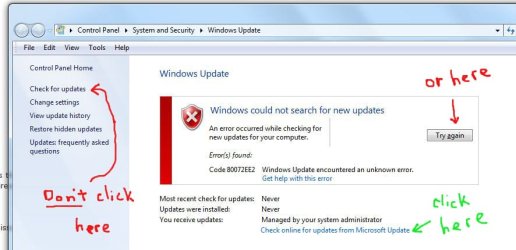
I don't mind so much, I hate Automatic updates/installation. I like for Win to check automatically, then notify me and let me choose what to install (that's what I had Win7 set to do what used to work for me in Vista). However, I think mine has a problem connecting automatically and checking what I need. Hence no notification and hence the 36 updates waiting for me. Anyway, just glad to be up to date now.
 

Attachments

  • update-error.jpg
    update-error.jpg
    45.7 KB · Views: 826

My Computer

OS
Win 7 Home Prem x64
Back
Top