- Local time
- 1:34 AM
- Messages
- 8,608
I'm using Avira Premium Security Suite and I have no problem updating.
BTW, have you activated Windows yet?
I don't know which version you have (32 or 64 bit) so here's instrctions for both.
For 32-bit Windows, open a command prompt (run as Administrator) and enter the following lines:
net stop wuauserv
regsvr32 %windir%\system32\wups2.dll
net start wuauserv
For 64-bit Windows, the second line differs due to the location of the DLL file:
net stop wuauserv
regsvr32 %windir%\syswow64\wups2.dll
net start wuauserv
In each case, the first and last commands stop and then restart the Windows Update service. This is a precaution to keep the service from becoming unstable.
on a 32-bit system,a single short command — regsvr32 wups2.dll — solved the problem without confusing the WU/AU service.
BTW, have you activated Windows yet?
I don't know which version you have (32 or 64 bit) so here's instrctions for both.
For 32-bit Windows, open a command prompt (run as Administrator) and enter the following lines:
net stop wuauserv
regsvr32 %windir%\system32\wups2.dll
net start wuauserv
For 64-bit Windows, the second line differs due to the location of the DLL file:
net stop wuauserv
regsvr32 %windir%\syswow64\wups2.dll
net start wuauserv
In each case, the first and last commands stop and then restart the Windows Update service. This is a precaution to keep the service from becoming unstable.
on a 32-bit system,a single short command — regsvr32 wups2.dll — solved the problem without confusing the WU/AU service.
My Computer
- Computer type
- PC/Desktop
- Computer Manufacturer/Model Number
- Bruce ... somewhere in his 40's
- OS
- Windows 7 Ultimate 32bit SP1
- CPU
- Intel(R) Core(TM)2 Quad CPU @ 2.40GHz, 2400 MHz
- Motherboard
- INTEL/D975XBX2
- Memory
- 4 GB
- Graphics Card(s)
- ATI Radeon HD 2600 Pro
- Monitor(s) Displays
- Samsung SyncMaster 914v
- Screen Resolution
- 1280 x 1024
- Hard Drives
- 2/500GB each ... ST3500630AS ATA Device.
One is not connected
- PSU
- Rocketfish 700 W
- Case
- G.Skill Gigabyte Chassis
- Keyboard
- Standard PS/2 Keyboard
- Mouse
- Microsoft PS/2 Mouse
- Internet Speed
- DSL
- Antivirus
- Avira Internet Security
- Browser
- IE 11
- Other Info
- ATI HDMI Audio


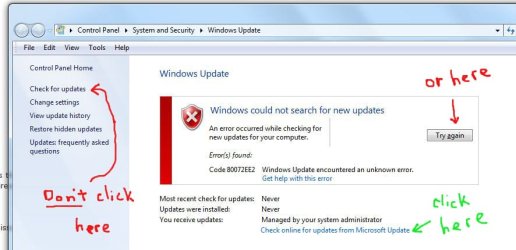
 Still, you figure the "Try again" button should work.
  Anyway, when I finally clicked "check online", below the error, it connected and there were 36 updates waiting.