Solved Windows Update Error 80073712 - KB3074543

urbanclassic

New member
Local time
10:09 PM
Messages
14
Hey So I've tried my hand in everything i can from windows update fix, windows.net fix, and so on. I was close to my solution from this:

http://www.sevenforums.com/windows-updates-activation/380967-corrupt-windows-update-kb3074543.html
But Noel's one drive file "neeaa.zip" does not exist

I've tried sfcscannow and still to no avail.

So the main problem is I cannot update KB3074543 and when i shutdown the computer it constantly tries to update something before completely shutting down. Please help.
 

My Computer My Computer

Computer type
PC/Desktop
OS
New York
Lets take a look by running SFC:

SFC Scan
1. Click on Start
startorb.gif
and type cmd. When Command Prompt appears, right-click on it, and click Run as Administrator2. When command prompt opens, Copy (Ctrl+C) and Paste (Right-click > Paste) the following command into it, then press Enter
Code:
sfc /scannow
3. Once it finishes, copy and paste the following into the command-prompt window and press Enter.
Code:
copy %windir%\logs\cbs\cbs.log "%userprofile%\Desktop\cbs.txt"
4. Once this has completed please go to your Desktop and you will find CBS.txt => Right-click on this file and choose Send To...Compressed (zipped folder). Please upload this zipped file CBS.zip to this thread
Please Note:: if the file is too big to upload to your next post please upload via a service such as Dropbox or One Drive or SendSpace and just provide the link.

-CKing
 

My Computer My Computer

Computer type
Laptop
Computer Manufacturer/Model Number
HP Pavilion TS 14 Notebook PC
OS
Windows 10 x64
CPU
AMD A4-5000 APU
Motherboard
N/A
Memory
6GB DDR3 RAM
Graphics Card(s)
Integrated Radeon HD 8330 (in the APU)
Hard Drives
600GB Hard Disk
Antivirus
Windows Defender
Browser
Google Chrome
But Noel's one drive file "neeaa.zip" does not exist
SFC and CheckSUR fixes are highly specific for a computer, and running a fix meant for other computer could result to damage to your OS.

-CKing
 

My Computer My Computer

Computer type
Laptop
Computer Manufacturer/Model Number
HP Pavilion TS 14 Notebook PC
OS
Windows 10 x64
CPU
AMD A4-5000 APU
Motherboard
N/A
Memory
6GB DDR3 RAM
Graphics Card(s)
Integrated Radeon HD 8330 (in the APU)
Hard Drives
600GB Hard Disk
Antivirus
Windows Defender
Browser
Google Chrome
SFC did not report any errors. Time to run SURT:

System Update Readiness Tool (SURT)
1. Download and run the following file.
2. When it asks you if you wish to install, please answer yes. Note: It could take 15 minutes or more to run. Please don't cancel.
3. You will get an Installation Complete screen when it's done running.
4. Please attach the log from the following location. C:\Windows\Logs\CBS\CheckSUR.log

-CKing
 

My Computer My Computer

Computer type
Laptop
Computer Manufacturer/Model Number
HP Pavilion TS 14 Notebook PC
OS
Windows 10 x64
CPU
AMD A4-5000 APU
Motherboard
N/A
Memory
6GB DDR3 RAM
Graphics Card(s)
Integrated Radeon HD 8330 (in the APU)
Hard Drives
600GB Hard Disk
Antivirus
Windows Defender
Browser
Google Chrome
Lets do a fix:

SFCFix Fix
This fix is very specific for urbanclassic's computer. Trying this fix on your own computer might damage your computer. If you are after assistance, create a new thread, and you will be assisted shortly.

Download SFCFix.exe (by niemiro) and move the executable on your Desktop.
Download the attached SFCFix.zip and move the archive to your Desktop
Note: Make sure that the file is named SFCFix.zip, do not rename it.
Save any work you have open, and close every programs
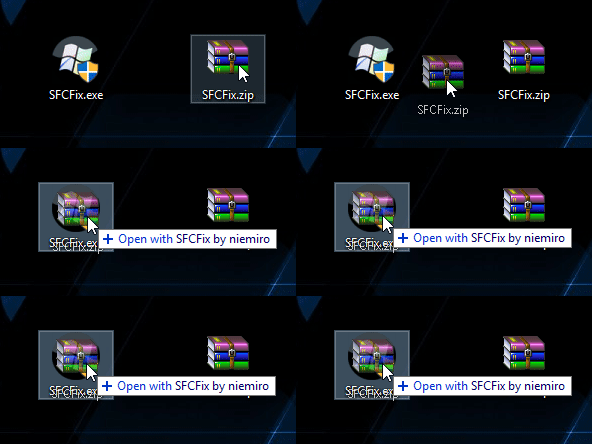
Drag the SFCFix.zip file over the SFCFix.exe executable and release it
mMabJGT.gif
SFCFix will launch, let it complete
Once done, a file will appear on your Desktop, called SFCFix.txt
Open the file, then copy and paste its content in your next reply

Now, run SURT again and post the new CheckSUR log

-CKing
 

Attachments

My Computer My Computer

Computer type
Laptop
Computer Manufacturer/Model Number
HP Pavilion TS 14 Notebook PC
OS
Windows 10 x64
CPU
AMD A4-5000 APU
Motherboard
N/A
Memory
6GB DDR3 RAM
Graphics Card(s)
Integrated Radeon HD 8330 (in the APU)
Hard Drives
600GB Hard Disk
Antivirus
Windows Defender
Browser
Google Chrome
Hi

Did you run the SFCFix script? If you did, do it again, and post the SFCFix log, and immediately after, run SURT again

-CKing
 

My Computer My Computer

Computer type
Laptop
Computer Manufacturer/Model Number
HP Pavilion TS 14 Notebook PC
OS
Windows 10 x64
CPU
AMD A4-5000 APU
Motherboard
N/A
Memory
6GB DDR3 RAM
Graphics Card(s)
Integrated Radeon HD 8330 (in the APU)
Hard Drives
600GB Hard Disk
Antivirus
Windows Defender
Browser
Google Chrome
Hi

Thanks for the logs! I figured out a mistake in the script :(

Here is the new fix:

Lets do a fix:

SFCFix Fix
This fix is very specific for urbanclassic's computer. Trying this fix on your own computer might damage your computer. If you are after assistance, create a new thread, and you will be assisted shortly.

Download SFCFix.exe (by niemiro) and move the executable on your Desktop.
Download the attached SFCFix.zip and move the archive to your Desktop
Note: Make sure that the file is named SFCFix.zip, do not rename it.
Save any work you have open, and close every programs
Drag the SFCFix.zip file over the SFCFix.exe executable and release it
mMabJGT.gif
SFCFix will launch, let it complete
Once done, a file will appear on your Desktop, called SFCFix.txt
Open the file, then copy and paste its content in your next reply

Now, run SURT again and post the new CheckSUR log

-CKing
 

Attachments

My Computer My Computer

Computer type
Laptop
Computer Manufacturer/Model Number
HP Pavilion TS 14 Notebook PC
OS
Windows 10 x64
CPU
AMD A4-5000 APU
Motherboard
N/A
Memory
6GB DDR3 RAM
Graphics Card(s)
Integrated Radeon HD 8330 (in the APU)
Hard Drives
600GB Hard Disk
Antivirus
Windows Defender
Browser
Google Chrome
Alright, just 4 files left

SFCFix Fix
This fix is very specific for urbanclassic's computer. Trying this fix on your own computer might damage your computer. If you are after assistance, create a new thread, and you will be assisted shortly.

Download SFCFix.exe (by niemiro) and move the executable on your Desktop.
Download the attached SFCFix.zip and move the archive to your Desktop
Note: Make sure that the file is named SFCFix.zip, do not rename it.
Save any work you have open, and close every programs
Drag the SFCFix.zip file over the SFCFix.exe executable and release it
mMabJGT.gif
SFCFix will launch, let it complete
Once done, a file will appear on your Desktop, called SFCFix.txt
Open the file, then copy and paste its content in your next reply

Now, run SURT again and post the new CheckSUR log

-CKing
 

Attachments

My Computer My Computer

Computer type
Laptop
Computer Manufacturer/Model Number
HP Pavilion TS 14 Notebook PC
OS
Windows 10 x64
CPU
AMD A4-5000 APU
Motherboard
N/A
Memory
6GB DDR3 RAM
Graphics Card(s)
Integrated Radeon HD 8330 (in the APU)
Hard Drives
600GB Hard Disk
Antivirus
Windows Defender
Browser
Google Chrome
The SFCFix Text File. Everything seems good, but on the CheckSur update the 4 errors are still there.

SFCFix version 3.0.0.0 by niemiro.
Start time: 2016-08-25 13:03:58.304
Microsoft Windows 7 Service Pack 1 - x86
Using .zip script file at C:\Users\Arrow Army Navy\Desktop\SFCFix.zip [2]


PowerCopy::
Successfully took permissions for file or folder C:\Windows\Temp\CheckSUR\winsxs\Manifests\msil_system.directoryser..protocols.resources_b03f5f7f11d50a3a_6.1.7601.18923_ko-kr_ec1afeb0059f97eb.manifest
Successfully took permissions for file or folder C:\Windows\Temp\CheckSUR\winsxs\Manifests\msil_system.directoryser..protocols.resources_b03f5f7f11d50a3a_6.1.7601.23126_ko-kr_d54d16c21f473f22.manifest
Successfully took permissions for file or folder C:\Windows\Temp\CheckSUR\winsxs\Manifests\msil_system.drawing.resources_b03f5f7f11d50a3a_6.1.7601.18923_ko-kr_ce0ba567a76410c7.manifest
Successfully took permissions for file or folder C:\Windows\Temp\CheckSUR\winsxs\Manifests\msil_system.drawing.resources_b03f5f7f11d50a3a_6.1.7601.23126_ko-kr_b73dbd79c10bb7fe.manifest

WARNING: File C:\Windows\Temp\CheckSUR\winsxs\Manifests\msil_system.directoryser..protocols.resources_b03f5f7f11d50a3a_6.1.7601.18923_ko-kr_ec1afeb0059f97eb.manifest was not backed up as that would replace the current backup.
Successfully copied file C:\Users\Arrow Army Navy\AppData\Local\niemiro\Archive\msil_system.directoryser..protocols.resources_b03f5f7f11d50a3a_6.1.7601.18923_ko-kr_ec1afeb0059f97eb.manifest to C:\Windows\Temp\CheckSUR\winsxs\Manifests\msil_system.directoryser..protocols.resources_b03f5f7f11d50a3a_6.1.7601.18923_ko-kr_ec1afeb0059f97eb.manifest.
WARNING: File C:\Windows\Temp\CheckSUR\winsxs\Manifests\msil_system.directoryser..protocols.resources_b03f5f7f11d50a3a_6.1.7601.23126_ko-kr_d54d16c21f473f22.manifest was not backed up as that would replace the current backup.
Successfully copied file C:\Users\Arrow Army Navy\AppData\Local\niemiro\Archive\msil_system.directoryser..protocols.resources_b03f5f7f11d50a3a_6.1.7601.23126_ko-kr_d54d16c21f473f22.manifest to C:\Windows\Temp\CheckSUR\winsxs\Manifests\msil_system.directoryser..protocols.resources_b03f5f7f11d50a3a_6.1.7601.23126_ko-kr_d54d16c21f473f22.manifest.
WARNING: File C:\Windows\Temp\CheckSUR\winsxs\Manifests\msil_system.drawing.resources_b03f5f7f11d50a3a_6.1.7601.18923_ko-kr_ce0ba567a76410c7.manifest was not backed up as that would replace the current backup.
Successfully copied file C:\Users\Arrow Army Navy\AppData\Local\niemiro\Archive\msil_system.drawing.resources_b03f5f7f11d50a3a_6.1.7601.18923_ko-kr_ce0ba567a76410c7.manifest to C:\Windows\Temp\CheckSUR\winsxs\Manifests\msil_system.drawing.resources_b03f5f7f11d50a3a_6.1.7601.18923_ko-kr_ce0ba567a76410c7.manifest.
WARNING: File C:\Windows\Temp\CheckSUR\winsxs\Manifests\msil_system.drawing.resources_b03f5f7f11d50a3a_6.1.7601.23126_ko-kr_b73dbd79c10bb7fe.manifest was not backed up as that would replace the current backup.
Successfully copied file C:\Users\Arrow Army Navy\AppData\Local\niemiro\Archive\msil_system.drawing.resources_b03f5f7f11d50a3a_6.1.7601.23126_ko-kr_b73dbd79c10bb7fe.manifest to C:\Windows\Temp\CheckSUR\winsxs\Manifests\msil_system.drawing.resources_b03f5f7f11d50a3a_6.1.7601.23126_ko-kr_b73dbd79c10bb7fe.manifest.

Successfully restored ownership for C:\Windows\Temp\CheckSUR\winsxs\Manifests\msil_system.directoryser..protocols.resources_b03f5f7f11d50a3a_6.1.7601.18923_ko-kr_ec1afeb0059f97eb.manifest
Successfully restored permissions on C:\Windows\Temp\CheckSUR\winsxs\Manifests\msil_system.directoryser..protocols.resources_b03f5f7f11d50a3a_6.1.7601.18923_ko-kr_ec1afeb0059f97eb.manifest
Successfully restored ownership for C:\Windows\Temp\CheckSUR\winsxs\Manifests\msil_system.directoryser..protocols.resources_b03f5f7f11d50a3a_6.1.7601.23126_ko-kr_d54d16c21f473f22.manifest
Successfully restored permissions on C:\Windows\Temp\CheckSUR\winsxs\Manifests\msil_system.directoryser..protocols.resources_b03f5f7f11d50a3a_6.1.7601.23126_ko-kr_d54d16c21f473f22.manifest
Successfully restored ownership for C:\Windows\Temp\CheckSUR\winsxs\Manifests\msil_system.drawing.resources_b03f5f7f11d50a3a_6.1.7601.18923_ko-kr_ce0ba567a76410c7.manifest
Successfully restored permissions on C:\Windows\Temp\CheckSUR\winsxs\Manifests\msil_system.drawing.resources_b03f5f7f11d50a3a_6.1.7601.18923_ko-kr_ce0ba567a76410c7.manifest
Successfully restored ownership for C:\Windows\Temp\CheckSUR\winsxs\Manifests\msil_system.drawing.resources_b03f5f7f11d50a3a_6.1.7601.23126_ko-kr_b73dbd79c10bb7fe.manifest
Successfully restored permissions on C:\Windows\Temp\CheckSUR\winsxs\Manifests\msil_system.drawing.resources_b03f5f7f11d50a3a_6.1.7601.23126_ko-kr_b73dbd79c10bb7fe.manifest
PowerCopy:: directive completed successfully.


Successfully processed all directives.
SFCFix version 3.0.0.0 by niemiro has completed.
Currently storing 30 datablocks.
Finish time: 2016-08-25 13:03:58.889
Script hash: h9aPEtKdpIUhjkv1XjvxaWCFJXY+Y6AmIfE8qcZNjWI=
----------------------EOF-----------------------
 

My Computer My Computer

Computer type
PC/Desktop
OS
New York
Hello I think we found the issue here, but to be able to fix it, we need the Components Hive:

Retrieve Components Hive
1. Navigate to C:\Windows\System32\Config and locate the COMPONENTS file.
2. Please copy this file to your desktop.
Note: If you receive an error that this file is in-use, simply reboot your computer and try again.
3. Right-click on this file on your desktop and select Send To...Compressed (zipped) folder. This will create a file named COMPONENTS.ZIP on your desktop.
4. The file will likely be too large to upload here so please upload to SendSpace and just provide the link here.

-CKing
 

My Computer My Computer

Computer type
Laptop
Computer Manufacturer/Model Number
HP Pavilion TS 14 Notebook PC
OS
Windows 10 x64
CPU
AMD A4-5000 APU
Motherboard
N/A
Memory
6GB DDR3 RAM
Graphics Card(s)
Integrated Radeon HD 8330 (in the APU)
Hard Drives
600GB Hard Disk
Antivirus
Windows Defender
Browser
Google Chrome
Alright, now it should work:

SFCFix Fix
This fix is very specific for urbanclassic's computer. Trying this fix on your own computer might damage your computer. If you are after assistance, create a new thread, and you will be assisted shortly.

Download SFCFix.exe (by niemiro) and move the executable on your Desktop.
Download the attached SFCFix.zip and move the archive to your Desktop
Note: Make sure that the file is named SFCFix.zip, do not rename it.
Save any work you have open, and close every programs
Drag the SFCFix.zip file over the SFCFix.exe executable and release it
mMabJGT.gif
SFCFix will launch, let it complete
Once done, a file will appear on your Desktop, called SFCFix.txt
Open the file, then copy and paste its content in your next reply

Run SURT again and post the new CheckSUR log

-CKing
 

Attachments

My Computer My Computer

Computer type
Laptop
Computer Manufacturer/Model Number
HP Pavilion TS 14 Notebook PC
OS
Windows 10 x64
CPU
AMD A4-5000 APU
Motherboard
N/A
Memory
6GB DDR3 RAM
Graphics Card(s)
Integrated Radeon HD 8330 (in the APU)
Hard Drives
600GB Hard Disk
Antivirus
Windows Defender
Browser
Google Chrome
SFCText file:

SFCFix version 3.0.0.0 by niemiro.
Start time: 2016-08-31 13:40:28.983
Microsoft Windows 7 Service Pack 1 - x86
Using .zip script file at C:\Users\Arrow Army Navy\Desktop\SFCFix.zip [0]


PowerCopy::
Successfully took permissions for file or folder C:\Windows\Temp

Successfully created directory tree \\?\C:\Windows\Temp\CheckSUR\winsxs\Manifests.

Successfully copied file C:\Users\Arrow Army Navy\AppData\Local\niemiro\Archive\msil_system.directoryser..protocols.resources_b03f5f7f11d50a3a_6.1.7601.18923_ko-kr_ec1afeb0059f97eb.manifest to C:\Windows\Temp\CheckSUR\winsxs\Manifests\msil_system.directoryser..protocols.resources_b03f5f7f11d50a3a_6.1.7601.18923_ko-kr_ec1afeb0059f97eb.manifest.
Successfully copied file C:\Users\Arrow Army Navy\AppData\Local\niemiro\Archive\msil_system.directoryser..protocols.resources_b03f5f7f11d50a3a_6.1.7601.23126_ko-kr_d54d16c21f473f22.manifest to C:\Windows\Temp\CheckSUR\winsxs\Manifests\msil_system.directoryser..protocols.resources_b03f5f7f11d50a3a_6.1.7601.23126_ko-kr_d54d16c21f473f22.manifest.
Successfully copied file C:\Users\Arrow Army Navy\AppData\Local\niemiro\Archive\msil_system.drawing.resources_b03f5f7f11d50a3a_6.1.7601.18923_ko-kr_ce0ba567a76410c7.manifest to C:\Windows\Temp\CheckSUR\winsxs\Manifests\msil_system.drawing.resources_b03f5f7f11d50a3a_6.1.7601.18923_ko-kr_ce0ba567a76410c7.manifest.
Successfully copied file C:\Users\Arrow Army Navy\AppData\Local\niemiro\Archive\msil_system.drawing.resources_b03f5f7f11d50a3a_6.1.7601.23126_ko-kr_b73dbd79c10bb7fe.manifest to C:\Windows\Temp\CheckSUR\winsxs\Manifests\msil_system.drawing.resources_b03f5f7f11d50a3a_6.1.7601.23126_ko-kr_b73dbd79c10bb7fe.manifest.

Successfully restored ownership for C:\Windows\Temp
Successfully restored permissions on C:\Windows\Temp
PowerCopy:: directive completed successfully.


Successfully processed all directives.
SFCFix version 3.0.0.0 by niemiro has completed.
Currently storing 31 datablocks.
Finish time: 2016-08-31 13:40:29.974
Script hash: Z5GCo2uCnvkUICMbN7vvL1ht29eZ8GqYi2hYNMbC5S0=
----------------------EOF-----------------------
 

My Computer My Computer

Computer type
PC/Desktop
OS
New York
Back
Top