
Solved Windows Update error 800F081F - a tough one!

johnyzero

New member
Local time
7:17 AM
Messages
7
I'm working on a Windows 7 machine that just won't run Windows Update. I've fixed lots of Windows Update problems before, but this one's got me stumped.

Here's the chronology:

1) If I try to run Windows Update, I get this result:
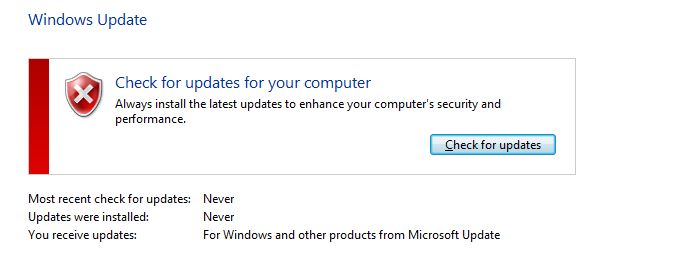
WU__hell_1.jpg


2) I choose "Check For Updates", and I get this result:

WU__hell_2.jpg


3) I choose "Install Now", Windows Update closes momentarily and then re-opens with this error message:
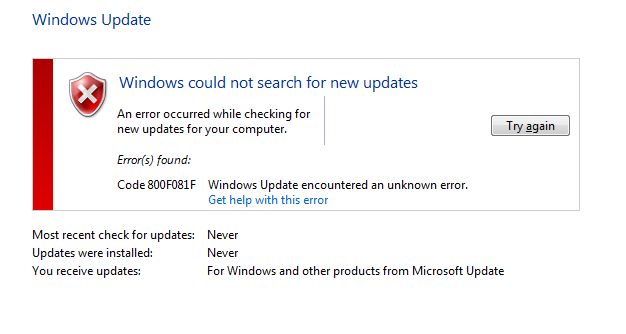
WU__hell_3.jpg


I've tried running the Windows Update Troubleshooter (WindowsUpdateDiagnostic.diagcab) numerous times, and it doesn't fix it. I get this result:
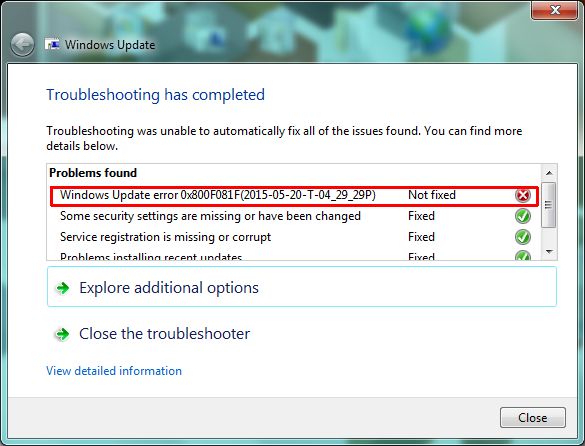
WU__hell_DiagResult.jpg


Curiously, if I choose "View Detailed Information", it says that it DID fix the 800f081f issue (which, of course, it hasn't):
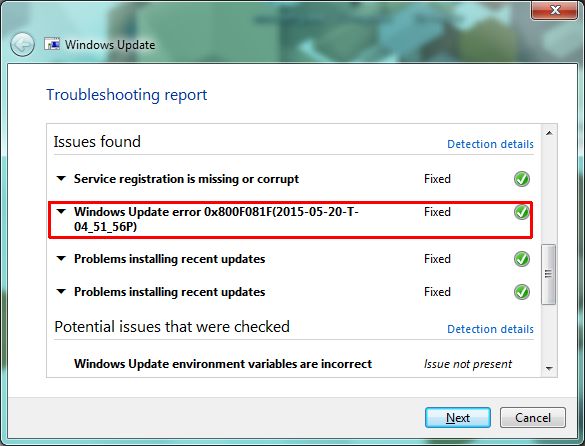
WU__hell_DiagDetails.jpg


Some additional info:

I've run the System Update Readiness Tool (KB947821) numerous times. CheckSUR.log indicates that no errors were found. All my logs are located in a .zip file here:

http://www.frontiernet.net/~johnnyzero/WU_hell/CBS.zip

Also, I've run SFC /scannow (no integrity errors found), and I've also run chkdsk /f on my hard drive.


Any help with this nightmare will be MUCH appreciated.
 
Last edited:

My Computer My Computer

OS
Win7 Professional

My Computer My Computer

Computer type
Laptop
Computer Manufacturer/Model Number
Asus K52F or Lenovo B51-80
OS
Win 7 x64 Home Premium (and x86 VirtualBox VM)/Win10
CPU
i3 370M/i7 6500U
Motherboard
Asus/Lenovo
Memory
8GB - finally :)/8GB
Graphics Card(s)
it's an i3, dude!/dual Intel&nVidia
Sound Card
onboard
Monitor(s) Displays
15.6" built-in
Screen Resolution
1366x768/1920x1080
Hard Drives
750GB Seagate internal
Sundry external drives attached to other computers on the local network
1TB SSD on the Lenovo
PSU
n/a
Internet Speed
as much as I can get - usually on a dongle/phone, so <1MB/s
Antivirus
MSE/Defender
Browser
IE11/12/Edge/Chrome/FF(if I must)
Thanks for the reply. I'm usually reluctant to perform a Repair Install, since it can create other problems - and you have to then go back and apply a gazillion Windows Updates to bring the system back "up-to-date".

I performed a Repair Install as per your suggestion, and it did indeed repair Windows Update.

Everything saeems to work ok, with one big exception: the computer now takes 3-4 minutes to boot up when trying to connect to my client's Windows Server 2008 R2 (domain-based) network. After much research, I'm gonna try applying the MS Hotfix rollup described here:

Slow Boot Slow Login (SBSL) Hotfix Rollup for Windows 7 and Server 2008 R2 Available Today! - Ask Premier Field Engineering (PFE) Platforms - Site Home - TechNet Blogs

I'm guessing that the hotfix had previously been installed, but it got nuked (rolled back) when I did the Repair Install.

I'll report back the results here.
 

My Computer My Computer

OS
Win7 Professional
That rollup was released in 2013 - I'm not certain it's still necessary (or even possible). I don't think trying it would hurt anything though.

Make sure that you follow it with the necessary patches afterwards (if they aren't already installed!)
 

My Computer My Computer

Computer type
Laptop
Computer Manufacturer/Model Number
Asus K52F or Lenovo B51-80
OS
Win 7 x64 Home Premium (and x86 VirtualBox VM)/Win10
CPU
i3 370M/i7 6500U
Motherboard
Asus/Lenovo
Memory
8GB - finally :)/8GB
Graphics Card(s)
it's an i3, dude!/dual Intel&nVidia
Sound Card
onboard
Monitor(s) Displays
15.6" built-in
Screen Resolution
1366x768/1920x1080
Hard Drives
750GB Seagate internal
Sundry external drives attached to other computers on the local network
1TB SSD on the Lenovo
PSU
n/a
Internet Speed
as much as I can get - usually on a dongle/phone, so <1MB/s
Antivirus
MSE/Defender
Browser
IE11/12/Edge/Chrome/FF(if I must)
That rollup was released in 2013 - I'm not certain it's still necessary (or even possible). I don't think trying it would hurt anything though.

Yes, I'm wondering the same thing. I can't imagine that Microsoft wouldn't have since released such a seemingly critical rollup (or its equivalent) via Windows Update.

However, the KB article doesn't mention that it's been superceded or anything like that. And the "Last Review" date is August 13, 2014.

Make sure that you follow it with the necessary patches afterwards (if they aren't already installed!)

Yes, I noticed that and I'll certainly apply the other 3 patches afterwards.

I'll post my results here. Here goes nothin...
 

My Computer My Computer

OS
Win7 Professional
Update: I applied the SBSL rollup (and the other patches) and the boot time went from about 4 minutes down to about 1:20. A big improvement, and probably acceptable for this particular machine. My client usually boots it up when he comes into the office in the morning, and leaves it on all day. Still, 1:20 is an awfully long time to be staring at the Welcome screen... but certainly better than 4 minutes.

(btw, I'm defining "boot time" as the elapsed time from when I enter the Windows password until the Desktop appears.)

I've read that it's best to apply this rollup to both the client machine AND the Windows 2008 R2 Server. I was reluctant to try that, since I'm not very Windows Server-savvy and didn't want to break anything. If I feel brave, maybe I'll try that and see if it makes a difference.
 

My Computer My Computer

OS
Win7 Professional
I can understand your caution - screwing up one machine is bad enough, but screwing up 20-100 peoples server doesn't bear thinking about! Luckily I've never had that problem since I'm usually pretty restricted to the end-user 'market'.

Good luck!
 

My Computer My Computer

Computer type
Laptop
Computer Manufacturer/Model Number
Asus K52F or Lenovo B51-80
OS
Win 7 x64 Home Premium (and x86 VirtualBox VM)/Win10
CPU
i3 370M/i7 6500U
Motherboard
Asus/Lenovo
Memory
8GB - finally :)/8GB
Graphics Card(s)
it's an i3, dude!/dual Intel&nVidia
Sound Card
onboard
Monitor(s) Displays
15.6" built-in
Screen Resolution
1366x768/1920x1080
Hard Drives
750GB Seagate internal
Sundry external drives attached to other computers on the local network
1TB SSD on the Lenovo
PSU
n/a
Internet Speed
as much as I can get - usually on a dongle/phone, so <1MB/s
Antivirus
MSE/Defender
Browser
IE11/12/Edge/Chrome/FF(if I must)
Back
Top