Windows Update Errors 80073712 800F0900 80070002 - Giant cbs log

Breezy9401

New member
Local time
5:28 PM
Messages
8
Hello!

I've been having some trouble with windows updates recently. I'm failing several updates and getting errors. SFC /scannow doesn't seem to be able to fix anything. It claims it has fixed the max number of files and to rerun scannow, but I have done it about 15-20 times and still it is ongoing and with no visible improvements.

Additionally dxdiag will not run at all. Not sure if that is related...

Here is the screenshot from Windows Update:
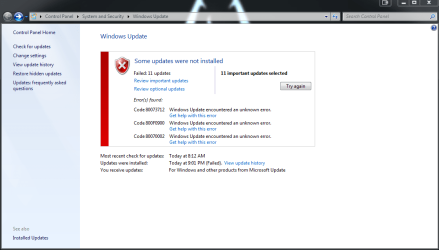
Windows Update Error.PNG

I would include my cbs log file but it is 224 Mb in size after zipping it down. 2.7Gb before zipping....

I have run SURT and fixit to no avail.
I hope you can help.
 

My Computer My Computer

At a glance

Windows 7 Ultimate x64 SP1Intel i7-3770k 3.5GHz16GNVIDIA GeForce GTX660
Computer type
PC/Desktop
Computer Manufacturer/Model Number
Custom Build
OS
Windows 7 Ultimate x64 SP1
CPU
Intel i7-3770k 3.5GHz
Memory
16G
Graphics Card(s)
NVIDIA GeForce GTX660
Hard Drives
Kingston 120G SSD
Seagate 1T HDD
Antivirus
Norton
Browser
Chrome
PLease post the CheckSUR.log file - we can at least try and fix the errors it should have found. (C:\Windows\Logs\CBS\Checksur.log)
 

My Computer My Computer

At a glance

Win 7 x64 Home Premium (and x86 VirtualBox VM...i3 370M/i7 6500U8GB - finally :)/8GBit's an i3, dude!/dual Intel&nVidia
Computer type
Laptop
Computer Manufacturer/Model Number
Asus K52F or Lenovo B51-80
OS
Win 7 x64 Home Premium (and x86 VirtualBox VM)/Win10
CPU
i3 370M/i7 6500U
Motherboard
Asus/Lenovo
Memory
8GB - finally :)/8GB
Graphics Card(s)
it's an i3, dude!/dual Intel&nVidia
Sound Card
onboard
Monitor(s) Displays
15.6" built-in
Screen Resolution
1366x768/1920x1080
Hard Drives
750GB Seagate internal
Sundry external drives attached to other computers on the local network
1TB SSD on the Lenovo
PSU
n/a
Internet Speed
as much as I can get - usually on a dongle/phone, so <1MB/s
Antivirus
MSE/Defender
Browser
IE11/12/Edge/Chrome/FF(if I must)

My Computer My Computer

At a glance

Windows 7 Ultimate x64 SP1Intel i7-3770k 3.5GHz16GNVIDIA GeForce GTX660
Computer type
PC/Desktop
Computer Manufacturer/Model Number
Custom Build
OS
Windows 7 Ultimate x64 SP1
CPU
Intel i7-3770k 3.5GHz
Memory
16G
Graphics Card(s)
NVIDIA GeForce GTX660
Hard Drives
Kingston 120G SSD
Seagate 1T HDD
Antivirus
Norton
Browser
Chrome
You have a fair amount of corruption there!

Code:
Summary:
Seconds executed: 246
 Found 503 errors
  CSI Manifest Failed Catalog Check Total count: 123
  CSI Missing Identity Total count: 116
  CSI Payload File Missing Total count: 4
  CSI Payload File Corrupt Total count: 65
  CBS MUM Corrupt Total count: 58
  CBS Catalog Corrupt Total count: 137

I need to have a look at your COMPONENTS registry hive

Please copy the C:\Windows\System32\config\COMPONENTS file (no extension) to your desktop and then compress it - upload the compressed file to your favoured fileshare site (preferably Dropbox or OneDrive) and post a link.
 

My Computer My Computer

At a glance

Win 7 x64 Home Premium (and x86 VirtualBox VM...i3 370M/i7 6500U8GB - finally :)/8GBit's an i3, dude!/dual Intel&nVidia
Computer type
Laptop
Computer Manufacturer/Model Number
Asus K52F or Lenovo B51-80
OS
Win 7 x64 Home Premium (and x86 VirtualBox VM)/Win10
CPU
i3 370M/i7 6500U
Motherboard
Asus/Lenovo
Memory
8GB - finally :)/8GB
Graphics Card(s)
it's an i3, dude!/dual Intel&nVidia
Sound Card
onboard
Monitor(s) Displays
15.6" built-in
Screen Resolution
1366x768/1920x1080
Hard Drives
750GB Seagate internal
Sundry external drives attached to other computers on the local network
1TB SSD on the Lenovo
PSU
n/a
Internet Speed
as much as I can get - usually on a dongle/phone, so <1MB/s
Antivirus
MSE/Defender
Browser
IE11/12/Edge/Chrome/FF(if I must)

My Computer My Computer

At a glance

Windows 7 Ultimate x64 SP1Intel i7-3770k 3.5GHz16GNVIDIA GeForce GTX660
Computer type
PC/Desktop
Computer Manufacturer/Model Number
Custom Build
OS
Windows 7 Ultimate x64 SP1
CPU
Intel i7-3770k 3.5GHz
Memory
16G
Graphics Card(s)
NVIDIA GeForce GTX660
Hard Drives
Kingston 120G SSD
Seagate 1T HDD
Antivirus
Norton
Browser
Chrome
That hive is rather larger than usual! (Do you have Language Packs installed??)

A quick scan for corruption shows nothing too terrible.

The problem I have is that if I start trying to fix this manually, the likelihood is that it's going to pop up even more errors as we get these ones fixed - and it's better to try and work out what caused the corruption first to ensure that it doesn't happen again!

I was expecting to see obvious corruption there, but I can't, so it's unlikely to be a RAM problem.

I think I'd better have a look at the Event logs and see what's there...

Open Event Viewer

click on theWindows logs entry in the left pane to expand it.

Now click on theApplication entry - wait while it loads.

Click on 'File'in the menu bar and select Save...

Save the file asAppevt.evtx

Repeat for theSystem log

then zip both,and upload them.


My Computer My Computer

At a glance

Win 7 x64 Home Premium (and x86 VirtualBox VM...i3 370M/i7 6500U8GB - finally :)/8GBit's an i3, dude!/dual Intel&nVidia
Computer type
Laptop
Computer Manufacturer/Model Number
Asus K52F or Lenovo B51-80
OS
Win 7 x64 Home Premium (and x86 VirtualBox VM)/Win10
CPU
i3 370M/i7 6500U
Motherboard
Asus/Lenovo
Memory
8GB - finally :)/8GB
Graphics Card(s)
it's an i3, dude!/dual Intel&nVidia
Sound Card
onboard
Monitor(s) Displays
15.6" built-in
Screen Resolution
1366x768/1920x1080
Hard Drives
750GB Seagate internal
Sundry external drives attached to other computers on the local network
1TB SSD on the Lenovo
PSU
n/a
Internet Speed
as much as I can get - usually on a dongle/phone, so <1MB/s
Antivirus
MSE/Defender
Browser
IE11/12/Edge/Chrome/FF(if I must)
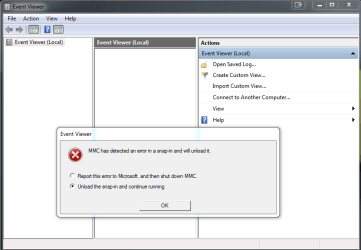
When I went to open event viewer I got: Event Viewer Error.PNG

I hit unload the snap-in and continue running and got error that said:

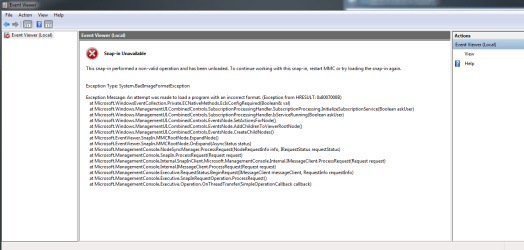
FX:{b05566ad-fe9c-4363-be05-7a4cbb7cb510}

An attempt was made to load a program with an incorrect format. (Exception from HRESULT: 0x8007000B)

Exception type:
System.BadImageFormatException

Exception Stack Trace:
at Microsoft.WindowsEventCollection.Private.ECNativeMethods.EcIsConfigRequired(Boolean& val)
at Microsoft.Windows.ManagementUI.CombinedControls.SubscriptionProcessingHandler.SubscriptionProcessing.InitializeSubscriptionService(Boolean askUser)
at Microsoft.Windows.ManagementUI.CombinedControls.SubscriptionProcessingHandler.IsServiceRunning(Boolean askUser)
at Microsoft.Windows.ManagementUI.CombinedControls.EventsNode.SetActionsForNode()
at Microsoft.Windows.ManagementUI.CombinedControls.EventsNode.AddChildrenToViewerRootNode()
at Microsoft.Windows.ManagementUI.CombinedControls.EventsNode.CreateChildNodes()
at Microsoft.EventViewer.SnapIn.MMCRootNode.ExpandNode()
at Microsoft.EventViewer.SnapIn.MMCRootNode.OnExpand(AsyncStatus status)
at Microsoft.ManagementConsole.NodeSyncManager.ProcessRequest(NodeRequestInfo info, IRequestStatus requestStatus)
at Microsoft.ManagementConsole.SnapIn.ProcessRequest(Request request)
at Microsoft.ManagementConsole.Internal.SnapInClient.Microsoft.ManagementConsole.Internal.IMessageClient.ProcessRequest(Request request)
at Microsoft.ManagementConsole.Internal.IMessageClient.ProcessRequest(Request request)
at Microsoft.ManagementConsole.Executive.RequestStatus.BeginRequest(IMessageClient messageClient, RequestInfo requestInfo)
at Microsoft.ManagementConsole.Executive.SnapInRequestOperation.ProcessRequest()
at Microsoft.ManagementConsole.Executive.Operation.OnThreadTransfer(SimpleOperationCallback callback)

--------------------------
Hit OK and then Event Viewer came up with: Event viewer error 2.PNG
 

My Computer My Computer

At a glance

Windows 7 Ultimate x64 SP1Intel i7-3770k 3.5GHz16GNVIDIA GeForce GTX660
Computer type
PC/Desktop
Computer Manufacturer/Model Number
Custom Build
OS
Windows 7 Ultimate x64 SP1
CPU
Intel i7-3770k 3.5GHz
Memory
16G
Graphics Card(s)
NVIDIA GeForce GTX660
Hard Drives
Kingston 120G SSD
Seagate 1T HDD
Antivirus
Norton
Browser
Chrome
I was afraid that would happen - we'll have to go the other way at it then.

Please copy the following files to your desktop, then zip then and upload them.
C:\Windows\System32\winevt\Logs\Application.evtx and ...System.evtx
 

My Computer My Computer

At a glance

Win 7 x64 Home Premium (and x86 VirtualBox VM...i3 370M/i7 6500U8GB - finally :)/8GBit's an i3, dude!/dual Intel&nVidia
Computer type
Laptop
Computer Manufacturer/Model Number
Asus K52F or Lenovo B51-80
OS
Win 7 x64 Home Premium (and x86 VirtualBox VM)/Win10
CPU
i3 370M/i7 6500U
Motherboard
Asus/Lenovo
Memory
8GB - finally :)/8GB
Graphics Card(s)
it's an i3, dude!/dual Intel&nVidia
Sound Card
onboard
Monitor(s) Displays
15.6" built-in
Screen Resolution
1366x768/1920x1080
Hard Drives
750GB Seagate internal
Sundry external drives attached to other computers on the local network
1TB SSD on the Lenovo
PSU
n/a
Internet Speed
as much as I can get - usually on a dongle/phone, so <1MB/s
Antivirus
MSE/Defender
Browser
IE11/12/Edge/Chrome/FF(if I must)

My Computer My Computer

At a glance

Windows 7 Ultimate x64 SP1Intel i7-3770k 3.5GHz16GNVIDIA GeForce GTX660
Computer type
PC/Desktop
Computer Manufacturer/Model Number
Custom Build
OS
Windows 7 Ultimate x64 SP1
CPU
Intel i7-3770k 3.5GHz
Memory
16G
Graphics Card(s)
NVIDIA GeForce GTX660
Hard Drives
Kingston 120G SSD
Seagate 1T HDD
Antivirus
Norton
Browser
Chrome
The Application Log is corrupt - I don't think I'm going to be able to decipher the content too much :(
The System log looks OK - the occasional error but nothing really nasty.


Please boot to Safe Mode, and delete the file
C:\Windows\System32\winevt\Logs\Application.evtx


use the system for an hour or so, and then post a new Application event log.
 

My Computer My Computer

At a glance

Win 7 x64 Home Premium (and x86 VirtualBox VM...i3 370M/i7 6500U8GB - finally :)/8GBit's an i3, dude!/dual Intel&nVidia
Computer type
Laptop
Computer Manufacturer/Model Number
Asus K52F or Lenovo B51-80
OS
Win 7 x64 Home Premium (and x86 VirtualBox VM)/Win10
CPU
i3 370M/i7 6500U
Motherboard
Asus/Lenovo
Memory
8GB - finally :)/8GB
Graphics Card(s)
it's an i3, dude!/dual Intel&nVidia
Sound Card
onboard
Monitor(s) Displays
15.6" built-in
Screen Resolution
1366x768/1920x1080
Hard Drives
750GB Seagate internal
Sundry external drives attached to other computers on the local network
1TB SSD on the Lenovo
PSU
n/a
Internet Speed
as much as I can get - usually on a dongle/phone, so <1MB/s
Antivirus
MSE/Defender
Browser
IE11/12/Edge/Chrome/FF(if I must)
Ok, I had time today to boot in safe mode and give this a try.

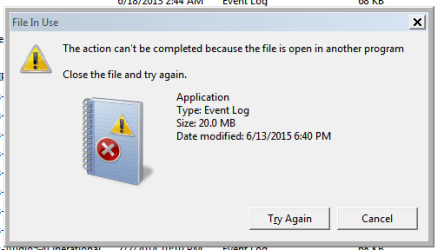
When I went to delete the application event log file, I got this:
Event log error.PNG

Is there a way around it or should I try something else? (This is immediately as Windows boots, no other programs running)
 

My Computer My Computer

At a glance

Windows 7 Ultimate x64 SP1Intel i7-3770k 3.5GHz16GNVIDIA GeForce GTX660
Computer type
PC/Desktop
Computer Manufacturer/Model Number
Custom Build
OS
Windows 7 Ultimate x64 SP1
CPU
Intel i7-3770k 3.5GHz
Memory
16G
Graphics Card(s)
NVIDIA GeForce GTX660
Hard Drives
Kingston 120G SSD
Seagate 1T HDD
Antivirus
Norton
Browser
Chrome
OK- try this instead...

In Safe Mode Windows
Open an Elevated Command Prompt, and run the following commands:

NET STOP Schedule
NET STOP WECSVC
NET STOP Eventlog

(If required, answer Y to the do you want to continue? question)
Then run the following command:

DEL C:\Windows\System32\winevt\Logs\Application.evtx

With luck, That'll work!
 

My Computer My Computer

At a glance

Win 7 x64 Home Premium (and x86 VirtualBox VM...i3 370M/i7 6500U8GB - finally :)/8GBit's an i3, dude!/dual Intel&nVidia
Computer type
Laptop
Computer Manufacturer/Model Number
Asus K52F or Lenovo B51-80
OS
Win 7 x64 Home Premium (and x86 VirtualBox VM)/Win10
CPU
i3 370M/i7 6500U
Motherboard
Asus/Lenovo
Memory
8GB - finally :)/8GB
Graphics Card(s)
it's an i3, dude!/dual Intel&nVidia
Sound Card
onboard
Monitor(s) Displays
15.6" built-in
Screen Resolution
1366x768/1920x1080
Hard Drives
750GB Seagate internal
Sundry external drives attached to other computers on the local network
1TB SSD on the Lenovo
PSU
n/a
Internet Speed
as much as I can get - usually on a dongle/phone, so <1MB/s
Antivirus
MSE/Defender
Browser
IE11/12/Edge/Chrome/FF(if I must)

My Computer My Computer

At a glance

Windows 7 Ultimate x64 SP1Intel i7-3770k 3.5GHz16GNVIDIA GeForce GTX660
Computer type
PC/Desktop
Computer Manufacturer/Model Number
Custom Build
OS
Windows 7 Ultimate x64 SP1
CPU
Intel i7-3770k 3.5GHz
Memory
16G
Graphics Card(s)
NVIDIA GeForce GTX660
Hard Drives
Kingston 120G SSD
Seagate 1T HDD
Antivirus
Norton
Browser
Chrome
That one appears to be corrupted also! :(
I was hoping it was a simple file problem, but it appears to be much more - and I don't think I'm qualified to deal with it.
You may have to be thinking in terms of a repair install- or a clean install.
 

My Computer My Computer

At a glance

Win 7 x64 Home Premium (and x86 VirtualBox VM...i3 370M/i7 6500U8GB - finally :)/8GBit's an i3, dude!/dual Intel&nVidia
Computer type
Laptop
Computer Manufacturer/Model Number
Asus K52F or Lenovo B51-80
OS
Win 7 x64 Home Premium (and x86 VirtualBox VM)/Win10
CPU
i3 370M/i7 6500U
Motherboard
Asus/Lenovo
Memory
8GB - finally :)/8GB
Graphics Card(s)
it's an i3, dude!/dual Intel&nVidia
Sound Card
onboard
Monitor(s) Displays
15.6" built-in
Screen Resolution
1366x768/1920x1080
Hard Drives
750GB Seagate internal
Sundry external drives attached to other computers on the local network
1TB SSD on the Lenovo
PSU
n/a
Internet Speed
as much as I can get - usually on a dongle/phone, so <1MB/s
Antivirus
MSE/Defender
Browser
IE11/12/Edge/Chrome/FF(if I must)
Aye aye captain!
Thanks for all your help anyways.

I'll look into doing a repair install or possibly clean install.
 

My Computer My Computer

At a glance

Windows 7 Ultimate x64 SP1Intel i7-3770k 3.5GHz16GNVIDIA GeForce GTX660
Computer type
PC/Desktop
Computer Manufacturer/Model Number
Custom Build
OS
Windows 7 Ultimate x64 SP1
CPU
Intel i7-3770k 3.5GHz
Memory
16G
Graphics Card(s)
NVIDIA GeForce GTX660
Hard Drives
Kingston 120G SSD
Seagate 1T HDD
Antivirus
Norton
Browser
Chrome
Back
Top