Windows Update - Extract an Update

How to Extract a Windows Update

   Information
This tutorial will show you how to extract a Windows Update file to release the contents, using both the manual and automatic methods. You might consider doing this if you are a technical expert trying to find a replacement for a corrupt file. Extracting the contents of the update already identified to be the one containing the correct version of the file in question is often the most efficient way of sourcing this replacement.
   Note
This process is intended for advanced users only.
   Warning
It is imperative that you do not use any 3rd Party tool to extract Windows Update .cab files, such as 7-Zip or Win-Zip, as these tools incompletely extract such archives. However, due to different formatting in service packs, these tools often will extract service pack .cab files completely, but to be sure, you are better off using one of the below methods anyway.


Method One

Automatic method using KB_Extractor


   Warning
Please do not mirror or directly link to KB_Extractor. You may only link to this tutorial. To negotiate the use of this tool, please contact me.
   Note
If you are using this tool on a machine not running Windows Vista, you may need to install the .net Framework 2.0. Download details: Microsoft .NET Framework 2.0 Service Pack 2

However, this is already included in Windows Vista, and so if you are running Windows Vista, downloading this package is not required.


Download KB_Extractor version 1.2 (dated: 26/06/2011) to your Desktop.
Download


This tool has two modes.

To extract an update:

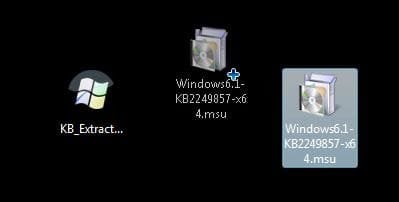
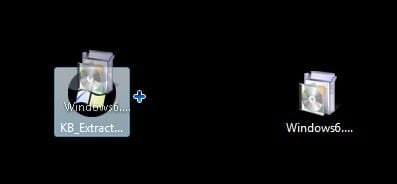
Simply drag the update you wish to extract onto the pre-saved executable, and wait for the extraction to complete.
   Note
Please be aware that large updates such as service packs can take around ten minutes to extract.
   Tip
This tool should successfully extract most types of Windows Update related packages, including packages with the following file extension: .msu, .cab, .exe. Most types of packages, including standard Windows Update packages, service packs, pre-extracted .cab files, Microsoft Security Essentials installers, and Internet Explorer installers, including the extraction of packages containing sub packages, such as language packs will be extracted perfectly. However, if you find any bugs, or any updates which are incompletely extracted, please do contact me giving full details.
Once the extraction has completed, the folder containing the extracted contents will open.

To drag an update onto the executable, first select the update:1.JPG
Then drag the update:2.JPG
over the executable, and release:3.JPG
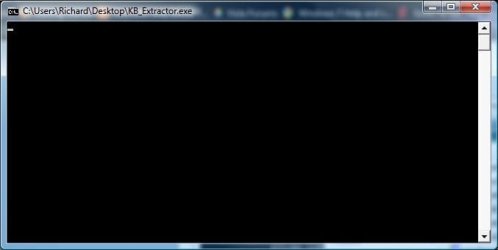
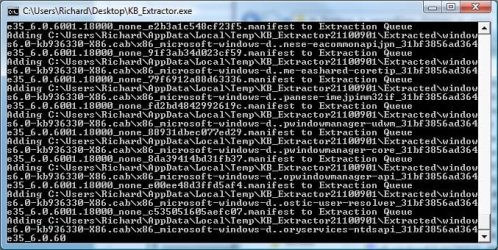
During the extraction, there are three distinct phases:

Phase 1. This phase will normally only appear for large service packs:4.JPG
Phase 2:5.JPG
Phase 3:6.JPG
   Tip
Simply click on any of these images for an enlarged view.
   Note
If a package contains several sub-packages, phases 2 and 3 will loop around once for each package.


To Clean up your Temporary files:

   Warning
All extracted updates are extracted to sub-directories in the %TEMP% folder (commonly located in your %UserProfile%\AppData\Local\Temp folder, which would for me, as an example, be C:\Users\Richard\AppData\Local\Temp) However, particularly if you extract a lot of service packs, this folder can become very bloated in size.

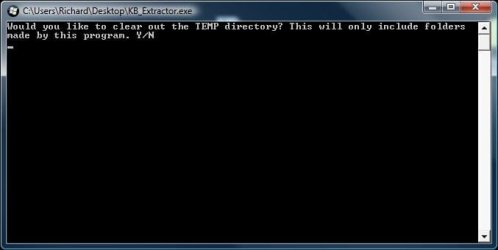
To empty this, simply double click on the executable:7.JPG
type in "y", and press ENTER or RETURN on your keyboard. Again, you can click on any screenshot to enlarge it.8.JPG
KB_Extractor will close when it has finished emptying your temporary folder.


   Note

  • KB_Extractor will only empty the temporary folder of sub-directories in the format of those created by this tool.
  • This process can take up to ten minutes if this tool has extracted several service packs.


Method Two

Manual Method using expand.exe


   Warning
This method is considerably harder, and far more time consuming. However, it only uses tools included in a standard Windows installation. Also, different styles of packages may require additional extraction, but using the same techniques. Unfortunately, I cannot document every single different package style here.
NOTE: You can open a command prompt by typing cmd in the Start Menu Search box and pressing Enter.

The general formula for an update is:

expand -f:*{update name}.msu {destination folder}
expand -f:*{update name}.cab {destination folder}

and for a Service Pack:

{service pack name} /x:{destination folder}
expand -f:* {service pack name} {destination folder}

Therefore, to unpack Windows6.1-KB980302-x86.msu which is already in C:\Temp you must type these two commands:

expand -f:* C:\TEMP\Windows6.1-KB980302-x86.msu C:\TEMP
expand -f:* C:\TEMP\Windows6.1-KB980302-x86.cab C:\TEMP

and for a Service Pack, such as this Vista SP2, already in C:\TEMP:

C:\Temp\Windows6.0-KB948465-X86.exe /x:C:\Temp
expand -f:* C:\Temp\Windows6.0-KB948465-X86.cab C:\Temp

Previous Versions:

   Warning
Please be aware that these versions are out of date, may contain bugs, and are no longer supported.
Version 1.0 (dated: 21/02/2011):
Download


Version 1.1 (dated: 04/June/2011):
Download


That's it,
Richard


Attachments

Last edited by a moderator:
Version 1.1 is now signed off, dated 4th June 2011.

Changelog:

Code:
1.0:
Initial Release

1.1:
FIXED: Incomplete extraction of .cab files with only a single file in them.
FIXED: Incomplete extraction of renamed .msu files.
FIXED: Faulty logic leading to files named with specific names passing into the wrong extraction category.
ADDED: Custom error message for attempting to extract 64bit .exes on a 32bit computer.
Version 2.0 is planned, and will extract update packages in rarer formats and styles.
 
Last edited:

My Computer

Computer Manufacturer/Model Number
Dell XPS 420
OS
Vista Home Premium x86 SP2
CPU
Intel Core 2 Quad Q9300 2.50GHz
Motherboard
Stock Dell 0TP406
Memory
4 gb (DDR2 800) 400MHz
Graphics Card(s)
ATI Radeon HD 3870 (512 MBytes)
Monitor(s) Displays
1 x Dell 2007FP and 1 x (old) Sonic flat screen
Screen Resolution
1600 x 1200 and 1280 x 1204
Hard Drives
1 x 640Gb (SATA 300) Western Digital: WDC WD6400AAKS-75A7B0 1 x 1Tb (SATA 600) Western Digital: Caviar Black, SATA 6GB/S, 64Mb cache, 8ms Western Digital: WDC WD1002FAEX-00Z3A0 ATA Device
Case
Dell XPS 420
Cooling
Stock Fan
Keyboard
Dell Bluetooth
Mouse
Advent Optical ADE-WG01 (colour change light up)
Internet Speed
Varies from 10kb/s to 170kb/s. So unreliable it is not funny
Other Info
ASUS USB 3.0 5Gbps/SATA 6Gbps - PCI-Express Combo Controller Card (U3S6)
I'm trying to use this on Win7, x64, but I keep getting the error that I can't extract a 64bit exe on a 32bit computer. ???
 

My Computer

Computer type
PC/Desktop
OS
Windows 7 Pro x64 SP1
CPU
AMD Phenom II x6 1090T Black Edition 3.2GHz
Motherboard
ASUS M4A88TD-V EVO/USB3
Memory
Patriot G ‘Sector 5’ Edition 8GB (2 x 4GB) 1600MHz
Sound Card
(onboard) Realtek® ALC 892 8-Channel High Definition Audio
Monitor(s) Displays
ViewSonic VX2253 22"
Screen Resolution
1920x1080
Hard Drives
Transcend SSD720 2.5" SATAIII 64GB SSD; Western Digital Caviar Green WD20EARS 2TB 64MB 3.5" HDD
LG WH10LS30 10X Blu-ray Burner with LightScribe
PSU
CORSAIR TX Series 950W ATX12V 80 Plus Bronze
Case
Cooler Master HAF X NVidia Edition; 5 Green LED Fans!
Cooling
CORSAIR A70 120mm Dual-Fan
Keyboard
Verbatim 97472 Mini Wireless Slim
Mouse
bundled Verbatim 97472 Wireless
Antivirus
Avast
Browser
Chrome
Other Info
Ultraportable/Desktop Replacement Laptop:
circa Oct 2006,
Dell XPS M1210,
Windows 7 Professional 32-bit,
Intel Core 2 Duo T7200 2.0GHz,
3.25 (4) GB of RAM,
NVidia GeForce Go 7400,
500GB Seagate Momentus 7200RPM HDD
I'm trying to use this on Win7, x64, but I keep getting the error that I can't extract a 64bit exe on a 32bit computer. ???

Hello!

I am sorry that you are having this problem. This is partially caused by a bug in version 1.1. In the erranous scenario, this error message masks a different underlying error message. This has been fixed in version 1.2, set to be released next weekend, or so.

However, there is still the other, masked error message (which comes through properly in 1.2)

Which updates are you trying to extract?

Thanks a lot!

Richard
 

My Computer

Computer Manufacturer/Model Number
Dell XPS 420
OS
Vista Home Premium x86 SP2
CPU
Intel Core 2 Quad Q9300 2.50GHz
Motherboard
Stock Dell 0TP406
Memory
4 gb (DDR2 800) 400MHz
Graphics Card(s)
ATI Radeon HD 3870 (512 MBytes)
Monitor(s) Displays
1 x Dell 2007FP and 1 x (old) Sonic flat screen
Screen Resolution
1600 x 1200 and 1280 x 1204
Hard Drives
1 x 640Gb (SATA 300) Western Digital: WDC WD6400AAKS-75A7B0 1 x 1Tb (SATA 600) Western Digital: Caviar Black, SATA 6GB/S, 64Mb cache, 8ms Western Digital: WDC WD1002FAEX-00Z3A0 ATA Device
Case
Dell XPS 420
Cooling
Stock Fan
Keyboard
Dell Bluetooth
Mouse
Advent Optical ADE-WG01 (colour change light up)
Internet Speed
Varies from 10kb/s to 170kb/s. So unreliable it is not funny
Other Info
ASUS USB 3.0 5Gbps/SATA 6Gbps - PCI-Express Combo Controller Card (U3S6)
Version 1.2 is now signed off, dated 26/06/2011.

Changelog:

Code:
1.0: 
Initial Release    
 
1.1:  
FIXED: Incomplete extraction of .cab files with only a single file in them.  
FIXED: Incomplete extraction of renamed .msu files. 
FIXED: Faulty logic leading to files named with specific names passing into the wrong extraction category.  
ADDED: Custom error message for attempting to extract 64bit .exes on a 32bit computer.  
 
1.2: 
FIXED: Faulty logic which caused the custom error message for attempting to extract 64bit .exes on a 32bit computer to appear more often than it should, masking other errors. 
FIXED: Empty "Extracted" folders. 
ADDED: Support for packages using rarer extraction arguments.

I didn't actually originally intend to release this version, but it provides a few new bug fixes and features, so in the end I did.
 
Last edited:

My Computer

Computer Manufacturer/Model Number
Dell XPS 420
OS
Vista Home Premium x86 SP2
CPU
Intel Core 2 Quad Q9300 2.50GHz
Motherboard
Stock Dell 0TP406
Memory
4 gb (DDR2 800) 400MHz
Graphics Card(s)
ATI Radeon HD 3870 (512 MBytes)
Monitor(s) Displays
1 x Dell 2007FP and 1 x (old) Sonic flat screen
Screen Resolution
1600 x 1200 and 1280 x 1204
Hard Drives
1 x 640Gb (SATA 300) Western Digital: WDC WD6400AAKS-75A7B0 1 x 1Tb (SATA 600) Western Digital: Caviar Black, SATA 6GB/S, 64Mb cache, 8ms Western Digital: WDC WD1002FAEX-00Z3A0 ATA Device
Case
Dell XPS 420
Cooling
Stock Fan
Keyboard
Dell Bluetooth
Mouse
Advent Optical ADE-WG01 (colour change light up)
Internet Speed
Varies from 10kb/s to 170kb/s. So unreliable it is not funny
Other Info
ASUS USB 3.0 5Gbps/SATA 6Gbps - PCI-Express Combo Controller Card (U3S6)
I'm trying to use this on Win7, x64, but I keep getting the error that I can't extract a 64bit exe on a 32bit computer. ???

This has now been fully fixed in version 1.2 :)
 

My Computer

Computer Manufacturer/Model Number
Dell XPS 420
OS
Vista Home Premium x86 SP2
CPU
Intel Core 2 Quad Q9300 2.50GHz
Motherboard
Stock Dell 0TP406
Memory
4 gb (DDR2 800) 400MHz
Graphics Card(s)
ATI Radeon HD 3870 (512 MBytes)
Monitor(s) Displays
1 x Dell 2007FP and 1 x (old) Sonic flat screen
Screen Resolution
1600 x 1200 and 1280 x 1204
Hard Drives
1 x 640Gb (SATA 300) Western Digital: WDC WD6400AAKS-75A7B0 1 x 1Tb (SATA 600) Western Digital: Caviar Black, SATA 6GB/S, 64Mb cache, 8ms Western Digital: WDC WD1002FAEX-00Z3A0 ATA Device
Case
Dell XPS 420
Cooling
Stock Fan
Keyboard
Dell Bluetooth
Mouse
Advent Optical ADE-WG01 (colour change light up)
Internet Speed
Varies from 10kb/s to 170kb/s. So unreliable it is not funny
Other Info
ASUS USB 3.0 5Gbps/SATA 6Gbps - PCI-Express Combo Controller Card (U3S6)
How Can I install the extracted *.msu files ?

Once the files been extracted in Temp folder, how i can install them ?
Thanks in advance
 

My Computer

OS
Windows 2008 R2

My Computer

Computer type
PC/Desktop
Computer Manufacturer/Model Number
Self built custom
OS
64-bit Windows 11 Pro for Workstations
CPU
Intel i7-8700K OC'd to 5 GHz
Motherboard
ASUS ROG Maximus XI Formula Z390
Memory
64 GB (4x16GB) G.SKILL TridentZ RGB DDR4 3600 MHz
Graphics Card(s)
ASUS ROG-STRIX-GTX1080TI-O11G-GAMING
Sound Card
Integrated
Monitor(s) Displays
2 x Samsung Odyssey G7 27"
Screen Resolution
2560x1440
Hard Drives
1TB Samsung 990 PRO M.2,
4TB Samsung 990 PRO PRO M.2,
TerraMaster F8 SSD Plus NAS
PSU
Seasonic Prime Titanium 850W
Case
Thermaltake Core P3
Cooling
Corsair Hydro H115i
Keyboard
Logitech wireless K800
Mouse
Logitech MX Master 4
Internet Speed
2 Gb/s Download and 100 Mb/s Upload
Antivirus
Malwarebyte Anti-Malware Premium
Browser
Google Chrome
Other Info
Logitech Z625 speaker system,
Logitech BRIO 4K Pro webcam,
HP Color LaserJet Pro MFP M477fdn,
APC SMART-UPS RT 1000 XL - SURT1000XLI,
Galaxy S23 Plus phone
Hi Shawn, thanks for your reply.

But thats not I am looking for. I have downloaded the hotfixes, (for Exchange 2010 CAS role) and extracted according to the steps mentioned above..but now I am unsure how to install them.

Any idea would be greatly appreciated.

Many Thanks
 

My Computer

OS
Windows 2008 R2
Hi..No need for further information..I have figured it out ! Thanks for all your help...
 

My Computer

OS
Windows 2008 R2
That's great news. :party:
 

My Computer

Computer type
PC/Desktop
Computer Manufacturer/Model Number
Self built custom
OS
64-bit Windows 11 Pro for Workstations
CPU
Intel i7-8700K OC'd to 5 GHz
Motherboard
ASUS ROG Maximus XI Formula Z390
Memory
64 GB (4x16GB) G.SKILL TridentZ RGB DDR4 3600 MHz
Graphics Card(s)
ASUS ROG-STRIX-GTX1080TI-O11G-GAMING
Sound Card
Integrated
Monitor(s) Displays
2 x Samsung Odyssey G7 27"
Screen Resolution
2560x1440
Hard Drives
1TB Samsung 990 PRO M.2,
4TB Samsung 990 PRO PRO M.2,
TerraMaster F8 SSD Plus NAS
PSU
Seasonic Prime Titanium 850W
Case
Thermaltake Core P3
Cooling
Corsair Hydro H115i
Keyboard
Logitech wireless K800
Mouse
Logitech MX Master 4
Internet Speed
2 Gb/s Download and 100 Mb/s Upload
Antivirus
Malwarebyte Anti-Malware Premium
Browser
Google Chrome
Other Info
Logitech Z625 speaker system,
Logitech BRIO 4K Pro webcam,
HP Color LaserJet Pro MFP M477fdn,
APC SMART-UPS RT 1000 XL - SURT1000XLI,
Galaxy S23 Plus phone
Hi Folks,
I have downloaded and extracted Windows6.1-KB968211-x64-RefreshPkg (1) via KB_Extractor. I know have a folder of 1.15GB on my b drive named KB_Extractor18143444. Can you please explain what tool or steps I now utilise to extract the .CAB files within this file, so I can execute the package.
Many Thanks
 

My Computer

OS
Win 7 Ultimate N X64
Hi Folks,
I have downloaded and extracted Windows6.1-KB968211-x64-RefreshPkg (1) via KB_Extractor. I know have a folder of 1.15GB on my b drive named KB_Extractor18143444. Can you please explain what tool or steps I now utilise to extract the .CAB files within this file, so I can execute the package.
Many Thanks

Hello, and welcome to the Seven Forums!

The .cab files should have already been extracted for you by the tool, into a new folder called KB_Extractor18143444\Extracted.

Do you have this folder?

Thanks a lot, and the very best of luck.

Richard
 

My Computer

Computer Manufacturer/Model Number
Dell XPS 420
OS
Vista Home Premium x86 SP2
CPU
Intel Core 2 Quad Q9300 2.50GHz
Motherboard
Stock Dell 0TP406
Memory
4 gb (DDR2 800) 400MHz
Graphics Card(s)
ATI Radeon HD 3870 (512 MBytes)
Monitor(s) Displays
1 x Dell 2007FP and 1 x (old) Sonic flat screen
Screen Resolution
1600 x 1200 and 1280 x 1204
Hard Drives
1 x 640Gb (SATA 300) Western Digital: WDC WD6400AAKS-75A7B0 1 x 1Tb (SATA 600) Western Digital: Caviar Black, SATA 6GB/S, 64Mb cache, 8ms Western Digital: WDC WD1002FAEX-00Z3A0 ATA Device
Case
Dell XPS 420
Cooling
Stock Fan
Keyboard
Dell Bluetooth
Mouse
Advent Optical ADE-WG01 (colour change light up)
Internet Speed
Varies from 10kb/s to 170kb/s. So unreliable it is not funny
Other Info
ASUS USB 3.0 5Gbps/SATA 6Gbps - PCI-Express Combo Controller Card (U3S6)
Hi Richard,
Thank you so much for your reply and assistance. I in fact have got an extracted folder approx 850 mb in size sitting within the KB_Extractor18143444 folder. The files listed are as follows:
Extracted (Folder 853 MB)
Windows6.1-968211-x64-pkgProperties (Text Doc)
Windows6.1-KB968211-x64-RefreshPkg (RAR File 311 mb)
Windows6.1-KB968211-x64-RefreshPkg (XML File)
WSUSSCAN (RAR File)
Can you please advise next steps with the extracted files or have I made an error along the path so far.
Many Thanks for your assistance and knowledge.
 

My Computer

OS
Win 7 Ultimate N X64
Hi Richard,
Thank you so much for your reply and assistance. I in fact have got an extracted folder approx 850 mb in size sitting within the KB_Extractor18143444 folder. The files listed are as follows:
Extracted (Folder 853 MB)
Windows6.1-968211-x64-pkgProperties (Text Doc)
Windows6.1-KB968211-x64-RefreshPkg (RAR File 311 mb)
Windows6.1-KB968211-x64-RefreshPkg (XML File)
WSUSSCAN (RAR File)
Can you please advise next steps with the extracted files or have I made an error along the path so far.
Many Thanks for your assistance and knowledge.

Hello again!

You are most welcome :)

These files:

Windows6.1-968211-x64-pkgProperties (Text Doc)
Windows6.1-KB968211-x64-RefreshPkg (RAR File 311 mb)
Windows6.1-KB968211-x64-RefreshPkg (XML File)
WSUSSCAN (RAR File)

Are created by the tool as intermediary extraction files. You do not need these, and can safely ignore them for the time being.

The actual contents of the update is inside the Extracted folder. If you look inside it, you will see very many files are folders. These are the contents of the Windows Update.

How you use them really depends on what you wish to do with the update. If you are attempting to install the update, you do not need to perform a manual extraction of the package, or use this tool at all. Simply double click on the original .msu file which you downloaded from Microsoft, and an installer will pop up.

However, if you are experiencing a Windows Update error, and have identified the cause as a corrupt file, originating from this update, then you need to use my tool to extract a replacement. In this case, I will guide you through the process to safely replacing a corrupt file.

If you can tell me what you hope to achieve, I shall do my best to assist you further.

The very best of luck to you,

Richard
 

My Computer

Computer Manufacturer/Model Number
Dell XPS 420
OS
Vista Home Premium x86 SP2
CPU
Intel Core 2 Quad Q9300 2.50GHz
Motherboard
Stock Dell 0TP406
Memory
4 gb (DDR2 800) 400MHz
Graphics Card(s)
ATI Radeon HD 3870 (512 MBytes)
Monitor(s) Displays
1 x Dell 2007FP and 1 x (old) Sonic flat screen
Screen Resolution
1600 x 1200 and 1280 x 1204
Hard Drives
1 x 640Gb (SATA 300) Western Digital: WDC WD6400AAKS-75A7B0 1 x 1Tb (SATA 600) Western Digital: Caviar Black, SATA 6GB/S, 64Mb cache, 8ms Western Digital: WDC WD1002FAEX-00Z3A0 ATA Device
Case
Dell XPS 420
Cooling
Stock Fan
Keyboard
Dell Bluetooth
Mouse
Advent Optical ADE-WG01 (colour change light up)
Internet Speed
Varies from 10kb/s to 170kb/s. So unreliable it is not funny
Other Info
ASUS USB 3.0 5Gbps/SATA 6Gbps - PCI-Express Combo Controller Card (U3S6)
Hello Richard, Firstly thank you for your reply and all your assistance thus far. I will exclude and delete the following files from the folder as well as any future correspondence:
Windows6.1-968211-x64-pkgProperties (Text Doc)
Windows6.1-KB968211-x64-RefreshPkg (RAR File 311 mb)
Windows6.1-KB968211-x64-RefreshPkg (XML File)
WSUSSCAN (RAR File).
As you have indicated, this leaves just the extracted files. I am using Win 7 Ultimate N and have found myself in wishing to install the windows Media Player & Media pack. I have downloaded the correct Win 7 X64 Update Pack .msu file, but it will not self execute or install, it opens states that it is installing then sits at that point forever, so I thought there would be another method of extracting and installing the files.
What I hope to achieve, is now that I have the files extracted, is a simple form of installing the extracted files (Windows6.1-KB968211-x64-RefreshPkg.msu) onto my system. I have read numerous forums and have tried all the other suggested methods in trying to install this update, but thus far to a Nil result.
If you can advise me further on the next steps to install them I would be most appreciative.
Again, many thanks for your time, assistance and knowledge.
Regards
 

My Computer

OS
Win 7 Ultimate N X64
Hello Richard, Firstly thank you for your reply and all your assistance thus far. I will exclude and delete the following files from the folder as well as any future correspondence:
Windows6.1-968211-x64-pkgProperties (Text Doc)
Windows6.1-KB968211-x64-RefreshPkg (RAR File 311 mb)
Windows6.1-KB968211-x64-RefreshPkg (XML File)
WSUSSCAN (RAR File).
As you have indicated, this leaves just the extracted files. I am using Win 7 Ultimate N and have found myself in wishing to install the windows Media Player & Media pack. I have downloaded the correct Win 7 X64 Update Pack .msu file, but it will not self execute or install, it opens states that it is installing then sits at that point forever, so I thought there would be another method of extracting and installing the files.
What I hope to achieve, is now that I have the files extracted, is a simple form of installing the extracted files (Windows6.1-KB968211-x64-RefreshPkg.msu) onto my system. I have read numerous forums and have tried all the other suggested methods in trying to install this update, but thus far to a Nil result.
If you can advise me further on the next steps to install them I would be most appreciative.
Again, many thanks for your time, assistance and knowledge.
Regards

Hello again!

I am convinced that I replied a few days ago. Must have forgotten to submit :devil: Sorry about that.

Anyway, there is a complicated installation method from Windows6.1-KB968211-x64-RefreshPkg.cab, although I fear that it will suffer from the same problem as normal installation. You cannot install from those extracted files, because those are only files, and are missing a lot of other data (most notably all registry entries).

My first port of call for such a problem would be to clear the folder where Windows Updates are extracted to - maybe it was a bad extraction causing this problem.

Please run both .bat files here: http://www.sevenforums.com/tutorials/91738-windows-update-reset.html

and attempt the installation normally again.

If you still have a problem, please download and install the System Update Readiness Tool: What is the System Update Readiness Tool?

Please store the installer in a convenient location, as it may be needed again later.

Finally, please copy to the Desktop the C:\Windows\Logs\CBS folder, right click on it > Send to > Compressed (zipped) folder, and upload that new .zip file here.

Thanks a lot!

Richard
 

My Computer

Computer Manufacturer/Model Number
Dell XPS 420
OS
Vista Home Premium x86 SP2
CPU
Intel Core 2 Quad Q9300 2.50GHz
Motherboard
Stock Dell 0TP406
Memory
4 gb (DDR2 800) 400MHz
Graphics Card(s)
ATI Radeon HD 3870 (512 MBytes)
Monitor(s) Displays
1 x Dell 2007FP and 1 x (old) Sonic flat screen
Screen Resolution
1600 x 1200 and 1280 x 1204
Hard Drives
1 x 640Gb (SATA 300) Western Digital: WDC WD6400AAKS-75A7B0 1 x 1Tb (SATA 600) Western Digital: Caviar Black, SATA 6GB/S, 64Mb cache, 8ms Western Digital: WDC WD1002FAEX-00Z3A0 ATA Device
Case
Dell XPS 420
Cooling
Stock Fan
Keyboard
Dell Bluetooth
Mouse
Advent Optical ADE-WG01 (colour change light up)
Internet Speed
Varies from 10kb/s to 170kb/s. So unreliable it is not funny
Other Info
ASUS USB 3.0 5Gbps/SATA 6Gbps - PCI-Express Combo Controller Card (U3S6)
Hi Richard, Firstly apologies for the delay in my response I have been offline for the past week. Thank you as always for your ongoing assistance and advice. Lets get started....
I have downloaded and installed and run Reset Windows Update History.bat file as well as Reregister Windows Update Components .bat file. Both ran smoothly, I then tried again to install the update again, but with no success. I then downloaded and saved the System Update Readiness tool, ran that it found I think one update to install, it installed that update without issue. I then rebooted and tried to install again but still no luck.
I have attached a link to both the CBS Log File after today's install episode as well as a screenshot of the installation that starts but then just sits there forever. I could not attach the file as it gets to 17% then re-starts the upload.
Thank you for your support and assistance.

Regards
 

My Computer

OS
Win 7 Ultimate N X64
Back
Top