Windows Update Install throw - error 0x80070057 ?

MDRI

New member
Member
VIP
Local time
5:56 AM
Messages
163
Windows Update Install throw - error 0x80070057 ?
======================================

Thanks for looking into my thread and helping me in my previous issues. My laptop is running with win 7 home premium, SP 1.

I got the message "failure configuring windows update - Reverting changes" on screen. It was with this message for awhile. I checked the update history and invoked update trouble shooting tool.

I got service registration is missing or corrupt 1st time and I ran it again. I am getting

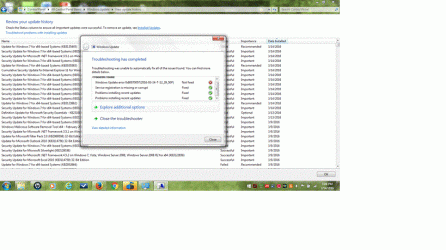
I do see Windows 7 update error 0x80070057 (2016-03-14 ......:confused:

I am attaching the screenshot.

Let me know, whether I need to run SURT/SFC Scan etc.

Thanks for helping.
 

Attachments
  • win7update.gif
    win7update.gif
    57.3 KB · Views: 8

My Computer

Computer type
Laptop
Computer Manufacturer/Model Number
Lenovo IdeaPad Z580, x64-based PC
OS
Win 7 64 bit, 6.1.7601 Service Pack 1 Build 7601
CPU
1 Processor(s) Installed. [01]: Intel64 Family 6 Model 58 St
Memory
8,056 MB
Graphics Card(s)
Intel HD 4000
Antivirus
Windows Security Essential
Browser
FireFox, Chrome

My Computer

Computer type
PC/Desktop
Computer Manufacturer/Model Number
medionl/Aspire 6930G/acer x55a
OS
W7 home premium 32bit/W7HP 64bit/w10 tp insider ring
CPU
E5300 dual core
Motherboard
medion MS7366
Memory
3gb
Graphics Card(s)
Nvidia Geforce 7100 Nforce 630i
Monitor(s) Displays
avixc
Internet Speed
n (isp resticted to 72)
Antivirus
mse/pands
Browser
palemoon
Other Info
Belkin Fd7050 n USB using Railink RT2870 drivers, more upto date
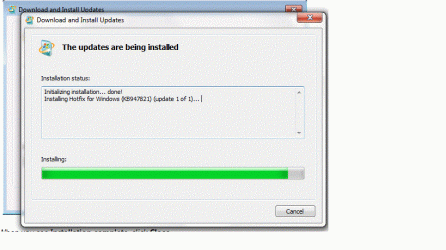
Thanks for your reply. I followed the instruction to download windows SURT. After completing initialization, Installing hotfix KB947821 (update 1 of 1) going on for 5 hours. The screen remain same for 5 hours (no movement). I am attaching screen shot.

I noticed the windows update is also taking longer to go thru.

I did SFC /Scannow Here is the result.

Microsoft Windows [Version 6.1.7601]
Copyright (c) 2009 Microsoft Corporation. All rights reserved.

C:\Windows\system32>sfc /scannow

Beginning system scan. This process will take some time.

Beginning verification phase of system scan.
Verification 100% complete.

Windows Resource Protection did not find any integrity violations.

C:\Windows\system32>

I posted the CBS log in onedrive here is the url

How do I fix this SURT install issue?

Thanks for sharing.

Update

I cancelled the install update & tried to re-install.

I am getting installed encountered an error 0x80240009. I am attaching screen shot.

Update:

I tried again. I am getting following update were not installed - Hotfix for windows (KB947821) .

How do I install Hotfix for windows (KB947821) now?

Thanks for helping.

Update . 3/18 7:46 PM EDT

I tried many times, but finally SURT is successful. I have the latest zipped CBS log at url

I hope this will help you find the issue, I have.

Let me know, whether you need any more details.

Thanks for helping.
 

Attachments

  • windowsSURT.gif
    windowsSURT.gif
    89.4 KB · Views: 1
  • WININSERR.gif
    WININSERR.gif
    17.8 KB · Views: 1
Last edited:

My Computer

Computer type
Laptop
Computer Manufacturer/Model Number
Lenovo IdeaPad Z580, x64-based PC
OS
Win 7 64 bit, 6.1.7601 Service Pack 1 Build 7601
CPU
1 Processor(s) Installed. [01]: Intel64 Family 6 Model 58 St
Memory
8,056 MB
Graphics Card(s)
Intel HD 4000
Antivirus
Windows Security Essential
Browser
FireFox, Chrome

My Computer

Computer type
PC/Desktop
Computer Manufacturer/Model Number
medionl/Aspire 6930G/acer x55a
OS
W7 home premium 32bit/W7HP 64bit/w10 tp insider ring
CPU
E5300 dual core
Motherboard
medion MS7366
Memory
3gb
Graphics Card(s)
Nvidia Geforce 7100 Nforce 630i
Monitor(s) Displays
avixc
Internet Speed
n (isp resticted to 72)
Antivirus
mse/pands
Browser
palemoon
Other Info
Belkin Fd7050 n USB using Railink RT2870 drivers, more upto date
Hi MDRI,
Can you follow this link,
https://www.google.co.uk/url?sa=t&rct=j&q=&esrc=s&source=web&cd=1&cad=rja&uact=8&ved=0ahUKEwj0qeaSzsvLAhUMCpoKHZmFA68QFggdMAA&url=https%3A%2F%2Fsupport.microsoft.com%2Fen-us%2Fkb%2F982736&usg=AFQjCNHMNfD8HDbE4b-GJugdY7WgbxCRSg
Then click on the >> blue Download << box to run the fixit.
run windows update
are any KB's failing now if so which ones


Roy

Dear Roy,

Thanks for your suggestion. I run the fixit "0x80070057" error message when you back up files in Windows 7 " using url. It went OK (no issues)

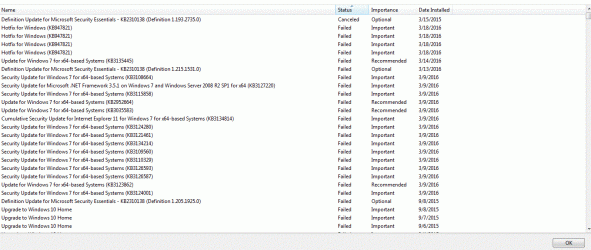
I do find failed KB's. I am attaching a screen shot.

How do I get the full list of failed KBs?

How do I rerun this failed KBs? Do I need to follow update reset tutorial's directions?

I posted the SURT/CBS Log earlier. Did you find any surprises there?

Thanks for your guidance/

Update 3/19 6:21 PM EDT

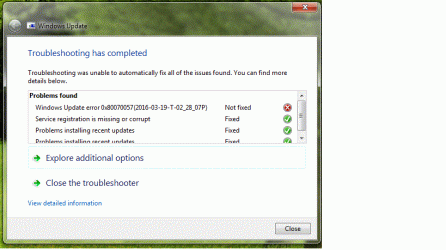
I run the fix win update errors. It shows "Windows update error 0x80070057 not fixed". Screen shot attached.
 

Attachments

  • WINfailedupd.gif
    WINfailedupd.gif
    67.8 KB · Views: 4
  • WIN0057.gif
    WIN0057.gif
    50.2 KB · Views: 1
Last edited:

My Computer

Computer type
Laptop
Computer Manufacturer/Model Number
Lenovo IdeaPad Z580, x64-based PC
OS
Win 7 64 bit, 6.1.7601 Service Pack 1 Build 7601
CPU
1 Processor(s) Installed. [01]: Intel64 Family 6 Model 58 St
Memory
8,056 MB
Graphics Card(s)
Intel HD 4000
Antivirus
Windows Security Essential
Browser
FireFox, Chrome
Hi MDRI,
cant get into the log expands to over 3GB!!.
lets try another way.
Using the windows update log, can you post just the last 2 days, it will also tell me what updates failed.

1 of the updates that failed way back was the w10 upgrade DID YOU STOP/CANCEL it if so how??

Roy
 

My Computer

Computer type
PC/Desktop
Computer Manufacturer/Model Number
medionl/Aspire 6930G/acer x55a
OS
W7 home premium 32bit/W7HP 64bit/w10 tp insider ring
CPU
E5300 dual core
Motherboard
medion MS7366
Memory
3gb
Graphics Card(s)
Nvidia Geforce 7100 Nforce 630i
Monitor(s) Displays
avixc
Internet Speed
n (isp resticted to 72)
Antivirus
mse/pands
Browser
palemoon
Other Info
Belkin Fd7050 n USB using Railink RT2870 drivers, more upto date
Thanks Roy,

I am attaching the windows update long since 3/13/2016 for your review. I did not find any entries prior to 3/13/2016 in windowsupdate.log file.

I did not start win 10 update. I closed the blue box showing win 10 update available dialog box couple of times. I hope that it did not start the win 10 update, by closing the dialog.

I find my CBS log directory is 3.76 GB in size. Is it normal?

Is there a way to trim CBS log directory?


I hope this helps . :rolleyes:
 
Last edited:

My Computer

Computer type
Laptop
Computer Manufacturer/Model Number
Lenovo IdeaPad Z580, x64-based PC
OS
Win 7 64 bit, 6.1.7601 Service Pack 1 Build 7601
CPU
1 Processor(s) Installed. [01]: Intel64 Family 6 Model 58 St
Memory
8,056 MB
Graphics Card(s)
Intel HD 4000
Antivirus
Windows Security Essential
Browser
FireFox, Chrome
Hi MDRI,

Can you turn off the update drivers part of WU, its having a prob with 1 for an HDaudio device.
Then try any 1 update see if that works.

Roy
 

My Computer

Computer type
PC/Desktop
Computer Manufacturer/Model Number
medionl/Aspire 6930G/acer x55a
OS
W7 home premium 32bit/W7HP 64bit/w10 tp insider ring
CPU
E5300 dual core
Motherboard
medion MS7366
Memory
3gb
Graphics Card(s)
Nvidia Geforce 7100 Nforce 630i
Monitor(s) Displays
avixc
Internet Speed
n (isp resticted to 72)
Antivirus
mse/pands
Browser
palemoon
Other Info
Belkin Fd7050 n USB using Railink RT2870 drivers, more upto date
Thanks Roy,

I did turn off the update drivers part of WU. I tried some failed updates one by one. Here is the result.

KB3075226 - Successful,
KB3126446 - Successful
KB2923545 - Successful
KB3020388 - Successful

It looks like WU are going through. How do I make all failed updates to run again as batch process? :geek:

What are the steps required to do that?

I appreciate your insight again.:cool:
 

My Computer

Computer type
Laptop
Computer Manufacturer/Model Number
Lenovo IdeaPad Z580, x64-based PC
OS
Win 7 64 bit, 6.1.7601 Service Pack 1 Build 7601
CPU
1 Processor(s) Installed. [01]: Intel64 Family 6 Model 58 St
Memory
8,056 MB
Graphics Card(s)
Intel HD 4000
Antivirus
Windows Security Essential
Browser
FireFox, Chrome
Hi MDRI,
Thats lookin good,
Just go back to Windows Updates and change the settings to which ever is your choice.
Updates should now work normally.

For the HD driver, go to the HP site for your model No: and check if there are updates there, if not i'd leave it be.

Roy
 

My Computer

Computer type
PC/Desktop
Computer Manufacturer/Model Number
medionl/Aspire 6930G/acer x55a
OS
W7 home premium 32bit/W7HP 64bit/w10 tp insider ring
CPU
E5300 dual core
Motherboard
medion MS7366
Memory
3gb
Graphics Card(s)
Nvidia Geforce 7100 Nforce 630i
Monitor(s) Displays
avixc
Internet Speed
n (isp resticted to 72)
Antivirus
mse/pands
Browser
palemoon
Other Info
Belkin Fd7050 n USB using Railink RT2870 drivers, more upto date
Just go back to Windows Updates and change the settings to which ever is your choice.
Updates should now work normally.

Roy

Thanks. I did not find an option in windows update to reinstall failed updates. Here is what I see under settings.


Any idea?
 

Attachments

  • winupdscr.gif
    winupdscr.gif
    18.9 KB · Views: 1

My Computer

Computer type
Laptop
Computer Manufacturer/Model Number
Lenovo IdeaPad Z580, x64-based PC
OS
Win 7 64 bit, 6.1.7601 Service Pack 1 Build 7601
CPU
1 Processor(s) Installed. [01]: Intel64 Family 6 Model 58 St
Memory
8,056 MB
Graphics Card(s)
Intel HD 4000
Antivirus
Windows Security Essential
Browser
FireFox, Chrome
Hi MDRI,
Windows will do it automatically, on those settings.

Roy
 

My Computer

Computer type
PC/Desktop
Computer Manufacturer/Model Number
medionl/Aspire 6930G/acer x55a
OS
W7 home premium 32bit/W7HP 64bit/w10 tp insider ring
CPU
E5300 dual core
Motherboard
medion MS7366
Memory
3gb
Graphics Card(s)
Nvidia Geforce 7100 Nforce 630i
Monitor(s) Displays
avixc
Internet Speed
n (isp resticted to 72)
Antivirus
mse/pands
Browser
palemoon
Other Info
Belkin Fd7050 n USB using Railink RT2870 drivers, more upto date
Back
Top