Windows Update Manifests - Manually Trace Through Registry

How to Trace what Windows Update a Manifest File Originated From

   Warning
This is an advanced method for solving Windows Update issues (outlined in CheckSUR logs). I would highly advise against doing this unless you're sure about what to do!


In CheckSUR logs, you will sometimes see errors about missing manifests. In this tutorial, I will show you how to trace what update that manifest originated from so that we can source a clean copy. Here is an exemplar CheckSUR log with missing manifests:

Code:
Checking System Update Readiness.
Binary Version 6.0.6002.22574
Package Version 15.0
2012-08-03 20:17
Checking Windows Servicing Packages
Checking Package Manifests and Catalogs
Checking Package Watchlist
Checking Component Watchlist
Checking Packages
Checking Component Store
(f) CSI Manifest Failed Catalog Check 0x00000000  winsxs\Manifests\x86_81a783d915bb6f248faec54858397f60_31bf3856ad364e35_6.0.6000.20895_none_8c1d577eb7f137c2.manifest   x86_81a783d915bb6f248faec54858397f60_31bf3856ad364e35_6.0.6000.20895_none_8c1d577eb7f137c2  
(f) CSI Manifest Failed Catalog Check 0x00000000  winsxs\Manifests\x86_microsoft-windows-ie-htmlactivexcompat_31bf3856ad364e35_6.0.6000.21148_none_15ef6be02bd9d67a.manifest   x86_microsoft-windows-ie-htmlactivexcompat_31bf3856ad364e35_6.0.6000.21148_none_15ef6be02bd9d67a  
(f) CSI Manifest Failed Catalog Check 0x00000000  winsxs\Manifests\x86_microsoft-windows-w..owsupdateclient-aux_31bf3856ad364e35_7.0.6000.381_none_7e2e53603f89ed2f.manifest   x86_microsoft-windows-w..owsupdateclient-aux_31bf3856ad364e35_7.0.6000.381_none_7e2e53603f89ed2f  
(f) CSI Manifest Failed Catalog Check 0x00000000  winsxs\Manifests\x86_microsoft-windows-n..xcorecomp.resources_31bf3856ad364e35_6.0.6001.18145_nl-nl_bc686b561b745721.manifest   x86_microsoft-windows-n..xcorecomp.resources_31bf3856ad364e35_6.0.6001.18145_nl-nl_bc686b561b745721  
(f) CSI Manifest Failed Catalog Check 0x00000000  winsxs\Manifests\x86_microsoft-windows-ieframe_31bf3856ad364e35_6.0.6000.21184_none_62f32a60ca5387bd.manifest   x86_microsoft-windows-ieframe_31bf3856ad364e35_6.0.6000.21184_none_62f32a60ca5387bd  
Summary:
Seconds executed: 5794
Found 5 errors
CSI Manifest Failed Catalog Check Total count: 5
Unavailable repair files:
winsxs\manifests\x86_81a783d915bb6f248faec54858397f60_31bf3856ad364e35_6.0.6000.20895_none_8c1d577eb7f137c2.manifest
winsxs\manifests\x86_microsoft-windows-ie-htmlactivexcompat_31bf3856ad364e35_6.0.6000.21148_none_15ef6be02bd9d67a.manifest
winsxs\manifests\x86_microsoft-windows-w..owsupdateclient-aux_31bf3856ad364e35_7.0.6000.381_none_7e2e53603f89ed2f.manifest
winsxs\manifests\x86_microsoft-windows-n..xcorecomp.resources_31bf3856ad364e35_6.0.6001.18145_nl-nl_bc686b561b745721.manifest
winsxs\manifests\x86_microsoft-windows-ieframe_31bf3856ad364e35_6.0.6000.21184_none_62f32a60ca5387bd.manifest
Source: A few problems after SURT (tried to install SP2) - Vista Forums

For demonstration purposes, I'll be tracing the origin of the following manifest:

C:\Windows\WinSxS\manifests\x86_microsoft-windows-ie-htmlactivexcompat_31bf3856ad364e35_6.0.6000.21148_none_15ef6be02bd9d67a.manifest

Looking at the file name, anyone's guess is as good as mine for which update this originated from. Sometimes a simple Google search will tell you, but you might have to trace it manually through the registry. Here's how to do so:1. Regedit.png
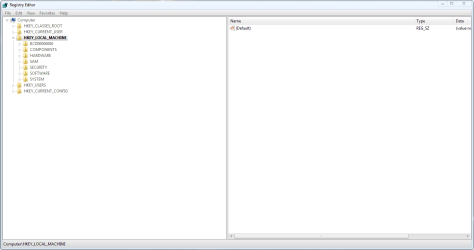
Firstly, open regedit and click on HKEY_LOCAL_MACHINE (I may abbreviate it to HKLM later in this tutorial)2. Load hive.png
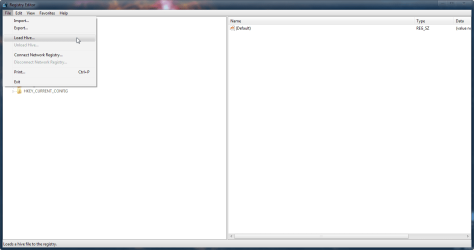
1. By default the COMPONENTS sub-hive isn't loaded. There are ways of forcing it to load when Windows boots, but that's for another day. Click on File > Load Hive... to load another hive.3. Select hive.png
The COMPONENTS sub-hive is located in %WinDir%\system32\config\COMPONENTS. It has no file extension.

2. Navigate to the above directory and open the file called COMPONENTS.4. Name hive.png
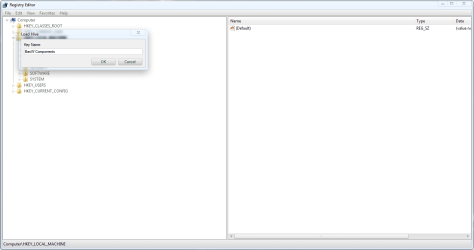
3. It will prompt you for a name, call it COMPONENTS (I used BasW Components because that's the username of the person I was helping; it made it easier to identify the hive as his).5. Regedit.png
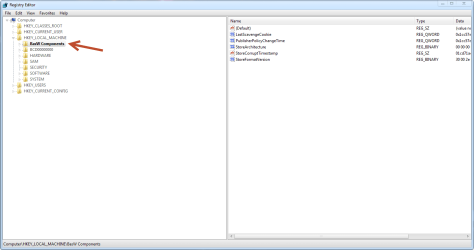
You should now see it in the left panel.6. Find key.png
4. Navigate to HKLM\{Components sub-hive name}\DerivedData\Components then click Edit > Find.

It is crucial that, when searching, you remove the .manifest suffix from the name as the registry keys are just the file name without the extension. Searching for the whole string won't return any results unless you remove the extension from the end. So we are searching for:

x86_microsoft-windows-ie-htmlactivexcompat_31bf3856ad364e35_6.0.6000.21148_none_15ef6be02bd9d67a7. DerivedData String.png
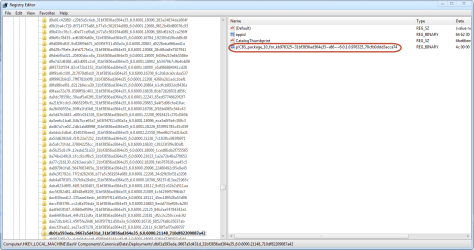
Here are the values for the key that we have found.

5. One of the values will have a name containing the string: 31bf3856ad364e35. If anyone is interested, this is known as a public key - for more information on this, see here

We need the whole string for our next search.8. DerivedData String Paste.png
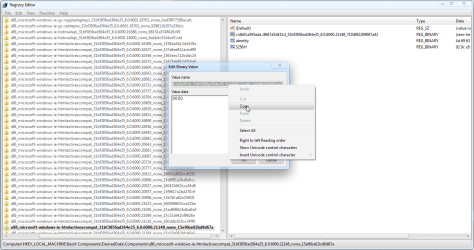
6. Double click on the string that we want to bring up the Edit Binary Value dialog box.

Do not change anything in this menu.

7. Double click on the box titled Value name to select all of the text, then right click and select Copy.

8. Paste this text elsewhere (I would recommend a Notepad window) so that we don't lose it. Here is our string:

db01a593eda..9667a5d431d_31bf3856ad364e35_6.0.6000.21148_710df82209087a42
Don't be alarmed if the first few characters don't copy, this is perfectly normal.

You can now close the Edit Binary Value box.9. Catalogs search.png
9. Now we have the string, we will need to find it's corresponding key in CanonicalData. Navigate to the key:

HKEY_LOCAL_MACHINE\{Components sub-hive name}\CanonicalData\Catalogs

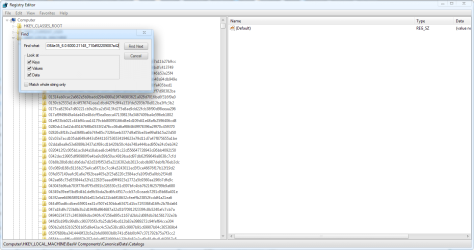
10. Then click Edit > Find and search for our string:

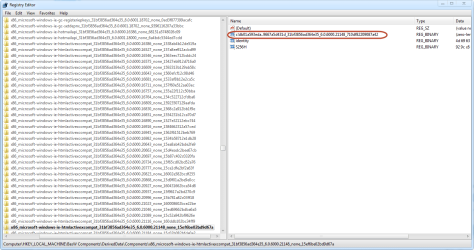
db01a593eda..9667a5d431d_31bf3856ad364e35_6.0.6000.21148_710df82209087a4210. Catalogs search results.png
Our search should find a value named the string that we searched for.11. Catalog rename.png
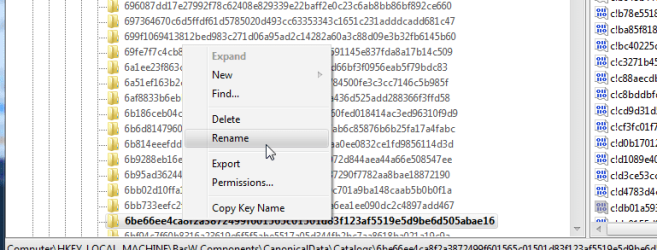
10. We are interested in the name of the key, as we will use it for our next search. To make this text available for copying, right click on the key and select rename. Do so with extreme caution; do not, in any circumstances, rename this key.12. Catalog name copy.png
11. Right click on the text and select Copy. Then click elsewhere to deselect the text and revoke the ability to rename the key. Paste this string in a Notepad window so that we don't lose it. We will be using this for the next search. Here is our string:

6be66ee4ca8f2a3872499f601565c01501d83f123af5519e5d9be6d505abae1613. Deployments search.png
12. Now navigate to the following key:

HKEY_LOCAL_MACHINE\{Components sub-hive name}\CanonicalData\Deployments

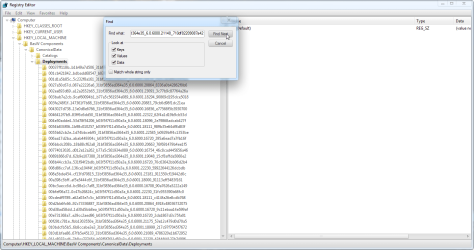
And, once again, click Edit > Find. This time, we will be searching for the string that we just found:

6be66ee4ca8f2a3872499f601565c01501d83f123af5519e5d9be6d505abae1614. Deployments search results.png
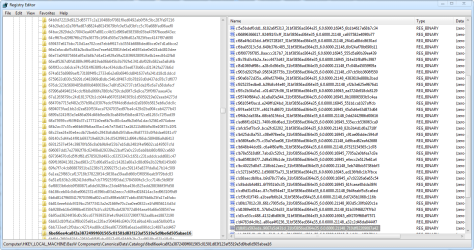
13. This search should find a key with the same name, but it is in the CanonicalData\Deployments key. This key will have several values inside it. One of the values will be called CatalogThumbprint and its data will be the string that we just searched for. You should see a KB article number in the name of another one of the values. This is the number of the update that this manifest came from.

CBS_package_10_for_kb976325~31bf3856ad364e35~x86~~6.0.1.0.976325_13c20f60bc4ede2f

So, in conclusion, we have found that the manifest
x86_microsoft-windows-ie-htmlactivexcompat_31bf3856ad364e35_6.0.6000.21148_none_15ef6be02bd9d67a.manifest comes from KB976325.

To find the web page of a KB article, just go to:

http://support.microsoft.com/kb/{KB article number}

In this case, the page would be MS09-072: Cumulative security update for Internet Explorer

This leads me to the download location: Download: Cumulative Security Update for Internet Explorer 8 in Windows 7 (KB976325) - Microsoft Download Center - Download Details

This link allows us to download the update which we can then extract the files from
smile.gif


If anyone has any questions then feel free to ask!

Tom

 
Last edited:
Updated with numbered steps :)
 

My Computer

Computer type
PC/Desktop
Computer Manufacturer/Model Number
Build #1
OS
Windows 8.1 Pro x64
CPU
Intel i7 3770K @4.5GHz
Motherboard
ASUS P8Z77-V PRO
Memory
Corsair Vengeance 2x4GB DDR3 1600MHz Low Profile (White)
Graphics Card(s)
Gigabyte Radeon HD 7850 (2GB GDDR5)
Sound Card
Integrated on motherboard
Monitor(s) Displays
23" LG LCD/LED IPS
Screen Resolution
1920*1080
Hard Drives
Samsung EVO 128GB SSD
Seagate Barracuda 2GB 7200rpm
2x Seagate FreeAgent [500gb]
PSU
Corsair TX650W V2 (80+ Bronze)
Case
NZXT Phantom 410 White
Cooling
Corsair H100 Water Cooler
Keyboard
Microsoft Desktop 2000 Wireless Keyboard
Mouse
Microsoft Desktop 2000 Wireless Mouse
Internet Speed
95 Mb/s Download 70 Mb/s Upload
Antivirus
MSE + MBAM Pro
Browser
Firefox
After the file is downloaded and extracted you have a clean manifest file You just replace the file and the error goes away?

Its quite the process to find the KB number. Thanks for the tutorial.
 

My Computer

OS
Windows 7 Ultimate x64
Yep, simple as that. Put the manifests that need replacing in here:

C:\Windows\Temp\CheckSur\Winsxs\Manifests

Then run the SURT and it will do all of the work for you (replace the file, then set the ownership and permissions back to TrustedInstaller).

Tom
 

My Computer

Computer type
PC/Desktop
Computer Manufacturer/Model Number
Build #1
OS
Windows 8.1 Pro x64
CPU
Intel i7 3770K @4.5GHz
Motherboard
ASUS P8Z77-V PRO
Memory
Corsair Vengeance 2x4GB DDR3 1600MHz Low Profile (White)
Graphics Card(s)
Gigabyte Radeon HD 7850 (2GB GDDR5)
Sound Card
Integrated on motherboard
Monitor(s) Displays
23" LG LCD/LED IPS
Screen Resolution
1920*1080
Hard Drives
Samsung EVO 128GB SSD
Seagate Barracuda 2GB 7200rpm
2x Seagate FreeAgent [500gb]
PSU
Corsair TX650W V2 (80+ Bronze)
Case
NZXT Phantom 410 White
Cooling
Corsair H100 Water Cooler
Keyboard
Microsoft Desktop 2000 Wireless Keyboard
Mouse
Microsoft Desktop 2000 Wireless Mouse
Internet Speed
95 Mb/s Download 70 Mb/s Upload
Antivirus
MSE + MBAM Pro
Browser
Firefox
I have an easier way :) - for those addicted to fixing this sort of thing....
..... a folder with ALL the manifests/files/packages from ALL windows updates that I've downloaded (including hotfixes, etc.) - so I can just search on that.
Currently, the folder weighs in at around 21GB :D - so not for the faint-hearted - but it does cut down the hassle for 90% of CheckSUR errors - and a similar number of SFC errors.

(Nice tutorial, though, Tom! - only just seen it)
 

My Computer

Computer type
Laptop
Computer Manufacturer/Model Number
Asus K52F or Lenovo B51-80
OS
Win 7 x64 Home Premium (and x86 VirtualBox VM)/Win10
CPU
i3 370M/i7 6500U
Motherboard
Asus/Lenovo
Memory
8GB - finally :)/8GB
Graphics Card(s)
it's an i3, dude!/dual Intel&nVidia
Sound Card
onboard
Monitor(s) Displays
15.6" built-in
Screen Resolution
1366x768/1920x1080
Hard Drives
750GB Seagate internal
Sundry external drives attached to other computers on the local network
1TB SSD on the Lenovo
PSU
n/a
Internet Speed
as much as I can get - usually on a dongle/phone, so <1MB/s
Antivirus
MSE/Defender
Browser
IE11/12/Edge/Chrome/FF(if I must)
Nice! But Richard will make it even easier soon :D How did you rename all of the default packages?

You wouldn't happen to have this one, would you?

amd64_microsoft-windows-t..ceruntime.resources_31bf3856ad364e35_7.1.7601.16398_cs-cz_e9c19b87696f1bb2.manifest

I can find the en-US copy of the manifest but not the cs-CZ one.

Tom
 

My Computer

Computer type
PC/Desktop
Computer Manufacturer/Model Number
Build #1
OS
Windows 8.1 Pro x64
CPU
Intel i7 3770K @4.5GHz
Motherboard
ASUS P8Z77-V PRO
Memory
Corsair Vengeance 2x4GB DDR3 1600MHz Low Profile (White)
Graphics Card(s)
Gigabyte Radeon HD 7850 (2GB GDDR5)
Sound Card
Integrated on motherboard
Monitor(s) Displays
23" LG LCD/LED IPS
Screen Resolution
1920*1080
Hard Drives
Samsung EVO 128GB SSD
Seagate Barracuda 2GB 7200rpm
2x Seagate FreeAgent [500gb]
PSU
Corsair TX650W V2 (80+ Bronze)
Case
NZXT Phantom 410 White
Cooling
Corsair H100 Water Cooler
Keyboard
Microsoft Desktop 2000 Wireless Keyboard
Mouse
Microsoft Desktop 2000 Wireless Mouse
Internet Speed
95 Mb/s Download 70 Mb/s Upload
Antivirus
MSE + MBAM Pro
Browser
Firefox
I do the defaults manually - but since I've never seen a -bf- package referred to in a CheckSUR, I leave those until later (which means 'when I get around to it - which is planned for this weekend, as a blitz).
They are currently foldered per download - which means a LOT of duplication, especially for IE updates. I'll eventually have one folder for manifests, one for cat/mum, and one for files/folders

The ones that really bug me are the VS files - they don't extract nicely with anything that I've found yet (KBExtractor doesn't seem to be able either), and it's easier to install them into a VM and hoick them out of that :(
 

My Computer

Computer type
Laptop
Computer Manufacturer/Model Number
Asus K52F or Lenovo B51-80
OS
Win 7 x64 Home Premium (and x86 VirtualBox VM)/Win10
CPU
i3 370M/i7 6500U
Motherboard
Asus/Lenovo
Memory
8GB - finally :)/8GB
Graphics Card(s)
it's an i3, dude!/dual Intel&nVidia
Sound Card
onboard
Monitor(s) Displays
15.6" built-in
Screen Resolution
1366x768/1920x1080
Hard Drives
750GB Seagate internal
Sundry external drives attached to other computers on the local network
1TB SSD on the Lenovo
PSU
n/a
Internet Speed
as much as I can get - usually on a dongle/phone, so <1MB/s
Antivirus
MSE/Defender
Browser
IE11/12/Edge/Chrome/FF(if I must)
And if the last step returns no results?

I have followed each step multiple times but the last step always returns 0 results.:( And Google did not find anything on a search of any of the CheckSUR strings. I have 42 independent locations with multiple machines and platforms suffering the "failing updates" situation. I have been re-imaging as quickly as I can but I would like to know where all of this is coming from. I'm looking for a common denominator for our situation and was hoping to see recurring KB #'s I could start carrying with me. I know it's probably a pipe-dream but a girl has her hopes. Anyway *other* way to find the KB article number?
 

My Computer

Computer type
PC/Desktop
Computer Manufacturer/Model Number
Lenovo
OS
Windows 7 Pro SP1 64 bit
CPU
Intel i5-3470 @ 3.20GHz 3.20 GHz
Memory
8 GB
Hard Drives
250 GB WD2500AAKX-08ERMA0
Antivirus
Avast Endpoint Protection Suite for Education
Browser
IE 10.0.9200.17054, Chrome 37.0.2062.124 m
I have followed each step multiple times but the last step always returns 0 results.:( And Google did not find anything on a search of any of the CheckSUR strings. I have 42 independent locations with multiple machines and platforms suffering the "failing updates" situation. I have been re-imaging as quickly as I can but I would like to know where all of this is coming from. I'm looking for a common denominator for our situation and was hoping to see recurring KB #'s I could start carrying with me. I know it's probably a pipe-dream but a girl has her hopes. Anyway *other* way to find the KB article number?

There is NO point in following the steps given in ANY other person's thread - all fixes are customized for that specific problem.

Please start a new thread of your own, and post the information requested - http://www.sevenforums.com/windows-...4840-windows-update-posting-instructions.html
 

My Computer

Computer type
Laptop
Computer Manufacturer/Model Number
Asus K52F or Lenovo B51-80
OS
Win 7 x64 Home Premium (and x86 VirtualBox VM)/Win10
CPU
i3 370M/i7 6500U
Motherboard
Asus/Lenovo
Memory
8GB - finally :)/8GB
Graphics Card(s)
it's an i3, dude!/dual Intel&nVidia
Sound Card
onboard
Monitor(s) Displays
15.6" built-in
Screen Resolution
1366x768/1920x1080
Hard Drives
750GB Seagate internal
Sundry external drives attached to other computers on the local network
1TB SSD on the Lenovo
PSU
n/a
Internet Speed
as much as I can get - usually on a dongle/phone, so <1MB/s
Antivirus
MSE/Defender
Browser
IE11/12/Edge/Chrome/FF(if I must)
Back
Top