Solved Windows update never stops checking for updates

It finally finished.....took forever, but update lists seem quicker to install now that all 55 of those things finished installing! Thanks!
 

My Computer

Computer type
PC/Desktop
Computer Manufacturer/Model Number
Custom
OS
Windows 7 Ultimate 64-bit
CPU
Intel Core 2 Duo 3.0ghz
Motherboard
Asus P5K SE/EPU
Memory
6gb DDR2 RAM - 2gb OCZ, 4gb GSkill - both in dual channel
Graphics Card(s)
ASUS Radeon HD7850 2gb
Sound Card
On-board Realtek AC'97 Audio
Monitor(s) Displays
NEC AccuSync LCD71V LCD Monitor
Screen Resolution
1280x1024
Hard Drives
Western Digital 160gb SATA (Master), Western Digital 320gb SATA (Secondary)
PSU
500w Coolmax
Case
iCute 0302-SL-BAL-B
Cooling
top 80mm Exhaust, back 80mm Exhaust, side 80mm Intake
Keyboard
22-year old Compaq RT101 w/ superbright modded blue LEDs
Mouse
Logitech MX510 (blue)
Internet Speed
Eastlink Cable @ 20 Mbps
Antivirus
Avast Antivirus Free
Browser
Mozilla Firefox
Other Info
I also have an MSI Wind U100 netbook running Linux Mint 17 MATE - 1.6ghz Intel Atom, 2gb RAM, 160gb Hard Drive, 128mb Intel Mobile On-board Video, Realtek AC'97 On-board Audio, 9-cell Battery, 1.0G BIOS
Good to hear that it finally finished.
 

My Computer

Computer type
Laptop
Computer Manufacturer/Model Number
Employer provided Dell Latitude
OS
W7 Pro SP1 64bit
CPU
i7
Memory
8GB
Graphics Card(s)
Intel HD Graphics
Hard Drives
crappy SSD
Antivirus
Employer mandated Symantec Endpoint Protection
Browser
Pale Moon 64bit, IE11 64bit & Chrome 64bit
It took about 1.5 hours for the "Scanning for updates" to finish after I installed 3112343 (and 3102810, since I didn't know about 3112343 until afterwards). Not sure how long it too before that since I always gave up after 1/2 and hour or so, assuming it was stuck. The 3112343 udpate itself would stay stuck on "Scanning..." until I rebooted and tried it again.
I just worry that these updates (ie. 3112343) are some way to force Win10 in the future. I read awhile back where some people that were researching some of the udpates offered in Windows Update to Win7 saying they showed signs of being for that reason.

Thanks!
 

My Computer

OS
Windows 7 Home Premium 64bit
You can remove all updates to the Windows Update Client and stick with a version that predates the W10 stuff. You might revert to having long search times.
 

My Computer

Computer type
Laptop
Computer Manufacturer/Model Number
Employer provided Dell Latitude
OS
W7 Pro SP1 64bit
CPU
i7
Memory
8GB
Graphics Card(s)
Intel HD Graphics
Hard Drives
crappy SSD
Antivirus
Employer mandated Symantec Endpoint Protection
Browser
Pale Moon 64bit, IE11 64bit & Chrome 64bit
Yes, a newer update agent version improves the situation a lot! After Windows Update Agent 7.6.7600.320 was installed automatically as soon as I connected my Windows 7 SP1 to the internet and searched for updates, the "update mechanism" got corrupted and searched, and searched, and searched... Then I installed KB3138612 (downloaded with another PC) and after a reboot and searching for updates for about 15minutes Windows finally found ~200 updates.

Here are another interesting topics regarding this issue:

Sticking with Windows 7? The forecast calls for pain | ZDNet
http://answers.microsoft.com/en-us/.../46b72f85-1fec-4445-877f-fc530510cba1?page=12
http://answers.microsoft.com/en-us/.../cf0aefb1-477c-41df-a330-130383581c6d?page=12
https://answers.microsoft.com/en-us.../d675d686-277d-4fcb-a588-229aa36bedc5?page=13
http://answers.microsoft.com/en-us/...rever-to/fe999e95-11ce-4775-94cd-2ad18284f80a
http://answers.microsoft.com/en-us/...40-960afe3e9832?page=5&rtAction=1461522846734
 

My Computer

Computer type
PC/Desktop
OS
Windows 7 Prof. x64

My Computer

Computer type
PC/Desktop
Computer Manufacturer/Model Number
Custom assembled by me :}
OS
Win-7-Pro64bit 7-H-Prem-64bit
CPU
i7-5930K 2nd i9-9940x both water blocked VRM's too
Motherboard
ASUS SABERTOOTH X99 2nd ASUS x299 Apex
Memory
Trident-z 3200C14 2nd Trident-z 3600C16
Graphics Card(s)
EVGA 1080ti ftw3 2nd Titan Xp both water blocked
Sound Card
Built-in Realtek
Monitor(s) Displays
1-AOC G2460PG 24"G-Sync 144Hz/ 2nd 1-ASUS VG248QE 24" 144Hz
Screen Resolution
1920 x 1080 144Hz
Hard Drives
2-Samsung M.2 Evo & Evo Plus
2-Samsung 850 EVO 500GB SSD's/ 3-2.5 W.D. Black 1tb-&3-1tb/3-3.5 WD Black 1tb hdd's
PSU
EVGA SuperNOVA 1000-P2 2nd 1200-P2
Case
2-Corsair Obsidian Series 450D Black ATX Mid Tower
Cooling
Custom water loops
Keyboard
Logitech G710+/ 2nd Logitech G910
Mouse
2-RedDragon M901 Perdition 16400 dpi Gaming mouse = wired
Internet Speed
Comcast Ping 19ms 89.31mbps download speed 6.12mbps upload
Antivirus
Malwarebytes Pro/ Superantispyware Pro
Browser
FireFox & Pale moon
Other Info
2nd ASUS X299 Apex/Intel i9-9940x with Custom water loop/7H-Prem-x64/Corsair 450D case/Ram Trident-z 3600C16 4x8gb / Samsung970Evo plus 500gb SSD/Dual ssd EZ swap evo/PSU EVGA SuperNova 1200w-P2 80+Platinum/GPU Titan Xp /8-ML-140 on push-pull on 2-280GTX rads
Here's what worked for me after having the indefinite "Checking for Updates" and trying but failing to install either KB3102810 or KB3112343 while getting hung up for several hours at "Checking Computer" before I rebooted.

The follwing solution stopped the "Checking Computer" problem. It relates to attempts to access a registry key that does not exist, over and over, forever:

Browsed the registry using REGEDIT to HKEY_LOCAL_MACHINE\SOFTWARE\Microsoft\SQMClient\Windows and
Add/Create a New Reg_DWord(32-bit) called CEIPEnable with a Value of "1"
(Thanks to SteveSims1wa who researched the hang up and posted this solution on answers.microsoft.com)

I then ran the downloaded KB3112343 again which now installed instantly. Went back into Windows Update which then sat at "Checking for Updates" for 25-30 minutes before installing the first set of Windows 7 updates and I am now on my merry way.

Background: I installed a brand new SSD in an HP Omni 120 1333w, purchased a new Windows 7 Pro w/SP1 on CD with product key, installed Windows 7 Pro w/SP1 onto the SSD, activated Windows 7 Pro with no issues, then tried to Upgrade to Windows 10 Pro which hung at "Checking for Updates" for hours. Then tried to install the Windows 7 Updates which were also hung at "Checking for Updates" for hours before finding this combination of solutions.
 

My Computer

Computer Manufacturer/Model Number
Dell Optiplex GX260 Standard Desktop
OS
Windows 7 Professional 32 bit
CPU
Pentium 4 2.0 Ghz
Memory
2Gb
Graphics Card(s)
Dell NVIDIA GeForce FX 5200 AGP 128Mb (half-height)
Monitor(s) Displays
Acer P215H
Screen Resolution
1600 x 900
Hard Drives
Samsung 830 SSD 128Mb (via SA-3114-41R/Silcon Image 3114 PCI Controller) and ST380021A IDE 80Mb
Internet Speed
6Mb
Other Info
A really OLD PC running Windows 7 Pro well.
Hi,
Yep KB3112343 was/ is classified as a Important update and should still abide by
CEIP settings
Click Start and type or paste this into the search box for the opt out or in options
Change Customer Experience Improvement Program settings
 

My Computer

Computer type
PC/Desktop
Computer Manufacturer/Model Number
Custom assembled by me :}
OS
Win-7-Pro64bit 7-H-Prem-64bit
CPU
i7-5930K 2nd i9-9940x both water blocked VRM's too
Motherboard
ASUS SABERTOOTH X99 2nd ASUS x299 Apex
Memory
Trident-z 3200C14 2nd Trident-z 3600C16
Graphics Card(s)
EVGA 1080ti ftw3 2nd Titan Xp both water blocked
Sound Card
Built-in Realtek
Monitor(s) Displays
1-AOC G2460PG 24"G-Sync 144Hz/ 2nd 1-ASUS VG248QE 24" 144Hz
Screen Resolution
1920 x 1080 144Hz
Hard Drives
2-Samsung M.2 Evo & Evo Plus
2-Samsung 850 EVO 500GB SSD's/ 3-2.5 W.D. Black 1tb-&3-1tb/3-3.5 WD Black 1tb hdd's
PSU
EVGA SuperNOVA 1000-P2 2nd 1200-P2
Case
2-Corsair Obsidian Series 450D Black ATX Mid Tower
Cooling
Custom water loops
Keyboard
Logitech G710+/ 2nd Logitech G910
Mouse
2-RedDragon M901 Perdition 16400 dpi Gaming mouse = wired
Internet Speed
Comcast Ping 19ms 89.31mbps download speed 6.12mbps upload
Antivirus
Malwarebytes Pro/ Superantispyware Pro
Browser
FireFox & Pale moon
Other Info
2nd ASUS X299 Apex/Intel i9-9940x with Custom water loop/7H-Prem-x64/Corsair 450D case/Ram Trident-z 3600C16 4x8gb / Samsung970Evo plus 500gb SSD/Dual ssd EZ swap evo/PSU EVGA SuperNova 1200w-P2 80+Platinum/GPU Titan Xp /8-ML-140 on push-pull on 2-280GTX rads
I have the same "searching for updates" issue on my clean install of Win7 pro on my new SSD. I would simply install the KB3112343 file except that it causes the Windows Update Standalone Installer to hang up on "searching for updates in your computer". So I can't even do that. Same for Windows Update Readiness Tool.
"Searching for updates" has continued for over 12 hours......

Please help
 

My Computer

Computer type
PC/Desktop
Computer Manufacturer/Model Number
ZT
OS
Win 7 Pro x64
Hard Drives
Samsung 850 EVO SSD 250 GB, ST500 GB
Antivirus
MSE
Browser
Chrome
I have the same "searching for updates" issue on my clean install of Win7 pro on my new SSD. I would simply install the KB3112343 file except that it causes the Windows Update Standalone Installer to hang up on "searching for updates in your computer". So I can't even do that. Same for Windows Update Readiness Tool.
"Searching for updates" has continued for over 12 hours......

Please help
If you disconnect from the Internet before installing KB3112343 - that should put an end to the search and let the KB install go forward. That said, skip KB3112343 (December 2015) and install KB3138612 (March 2016).

If the search continues - even with no connection to the Internet - then try option three of this tutorial:
http://www.sevenforums.com/tutorials/91738-windows-update-reset.html
 

My Computer

Computer type
Laptop
Computer Manufacturer/Model Number
Employer provided Dell Latitude
OS
W7 Pro SP1 64bit
CPU
i7
Memory
8GB
Graphics Card(s)
Intel HD Graphics
Hard Drives
crappy SSD
Antivirus
Employer mandated Symantec Endpoint Protection
Browser
Pale Moon 64bit, IE11 64bit & Chrome 64bit
Hey,

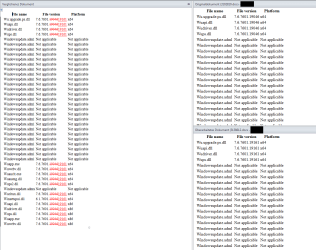
Just an - in my eyes- important note for all of you: As i mentioned above the only update you have to install manually is KB3138612! I don't know why some of you recommend installing KB3102810 and/or KB3112343. The update KB3138612 replaces the other two updates, i.e. they are outdated predecessor updates in my eyes. I compared the system files which get replaced by installing KB3102810 or KB3138612. Both updates replace exactly the same files with newer versions. So it makes no sence at all to install various old upates which were replaced again by a newer update;)
Here is a comparison-screenshot (done with Word):
 

Attachments

  • comparison.PNG
    comparison.PNG
    22.5 KB · Views: 3

My Computer

Computer type
PC/Desktop
OS
Windows 7 Prof. x64
If someone has been running all the updates offered month by month then wouldn't they already have KB 3138612? Or didn't this get offered? My mother in law's laptop is driving us crazy on the updates. It seems for last 3 months approx every time patch Tuesday rolls around it takes hours stuck on checking for updates, and then several hours once found to actually get them downloaded. It's becoming a total pain (as if Windows updates weren't bad enough already). It never used to be as bad as this. But it's now a consistent issue, the laptop literally needs to be left overnight nowadays for patch Tuesday. During the quieter period of month the update check seems to be a bit faster. So it seems MS gives little or no server priority to Windows 7 users of late. For the first few days after patch Tuesday it is literally a nightmare trying to get the updates done. Frustrating when you want to get it done and dusted so one can forget about the updates for another month.

It's the same story tonight, set it checking for updates about 2 and a half hours ago and it's still 'checking for updates'. By comparison our Windows 10 machine found its cumulative updates for today within seconds. They were all downloaded and installed in less than 5 minutes.
 

My Computer

Computer type
Laptop
Computer Manufacturer/Model Number
Alienware M17RX3
OS
Windows 7 Ultimate 64 bit
CPU
Sandybridge 2820 QM 2.3 ghz
Memory
8 gb
Graphics Card(s)
AMD Radeon 6970m
Sound Card
Integrated
Monitor(s) Displays
Laptop 17"
Screen Resolution
1980x1080
Hard Drives
750 gb mechanical (7,200RPM) Seagate Momentous paired with OCZ Synapse 128 gb SSD cache drive
Internet Speed
55 mbits download, 12 mbits download
Antivirus
Microsoft Security Essentials
Browser
IE11, Mozilla
The only update client released as a Important update I'm aware of is KB3112343 and it was released in December of 2015
That one would be odd if it was not installed
All other update clients were really recommended updates so they may or may not be installed depending on the update settings.
 

My Computer

Computer type
PC/Desktop
Computer Manufacturer/Model Number
Custom assembled by me :}
OS
Win-7-Pro64bit 7-H-Prem-64bit
CPU
i7-5930K 2nd i9-9940x both water blocked VRM's too
Motherboard
ASUS SABERTOOTH X99 2nd ASUS x299 Apex
Memory
Trident-z 3200C14 2nd Trident-z 3600C16
Graphics Card(s)
EVGA 1080ti ftw3 2nd Titan Xp both water blocked
Sound Card
Built-in Realtek
Monitor(s) Displays
1-AOC G2460PG 24"G-Sync 144Hz/ 2nd 1-ASUS VG248QE 24" 144Hz
Screen Resolution
1920 x 1080 144Hz
Hard Drives
2-Samsung M.2 Evo & Evo Plus
2-Samsung 850 EVO 500GB SSD's/ 3-2.5 W.D. Black 1tb-&3-1tb/3-3.5 WD Black 1tb hdd's
PSU
EVGA SuperNOVA 1000-P2 2nd 1200-P2
Case
2-Corsair Obsidian Series 450D Black ATX Mid Tower
Cooling
Custom water loops
Keyboard
Logitech G710+/ 2nd Logitech G910
Mouse
2-RedDragon M901 Perdition 16400 dpi Gaming mouse = wired
Internet Speed
Comcast Ping 19ms 89.31mbps download speed 6.12mbps upload
Antivirus
Malwarebytes Pro/ Superantispyware Pro
Browser
FireFox & Pale moon
Other Info
2nd ASUS X299 Apex/Intel i9-9940x with Custom water loop/7H-Prem-x64/Corsair 450D case/Ram Trident-z 3600C16 4x8gb / Samsung970Evo plus 500gb SSD/Dual ssd EZ swap evo/PSU EVGA SuperNova 1200w-P2 80+Platinum/GPU Titan Xp /8-ML-140 on push-pull on 2-280GTX rads
Well it ended up going better than it has done in a long while tonight. After 3 and a half hours it found the available updates (10.30 pm UK time) and to my shock, after instructing them to install, it then downloaded them within about 25 minutes (nearly 200 megs worth). So for the first time in months we got patch Tuesday out the way on Tuesday and not had to wrestle with the task for 2 or 3 days.

So whilst relatively pleased that's over for another 5 weeks am still pretty unimpressed with MS over the delivery of their updates for Windows 7. Guess it's all part of their underhanded tactics to force Windows 10 onto everyone
 

My Computer

Computer type
Laptop
Computer Manufacturer/Model Number
Alienware M17RX3
OS
Windows 7 Ultimate 64 bit
CPU
Sandybridge 2820 QM 2.3 ghz
Memory
8 gb
Graphics Card(s)
AMD Radeon 6970m
Sound Card
Integrated
Monitor(s) Displays
Laptop 17"
Screen Resolution
1980x1080
Hard Drives
750 gb mechanical (7,200RPM) Seagate Momentous paired with OCZ Synapse 128 gb SSD cache drive
Internet Speed
55 mbits download, 12 mbits download
Antivirus
Microsoft Security Essentials
Browser
IE11, Mozilla
I had a similar problem with Windows Update recently.

When I performed a clean install of Windows 7 the updates never showed up in a reasonable period of time.
The solution was to leave the computer on all night. The updates were there the next morning. There were only about 250 updates. Since then updates are appearing normally. IMHO Microsoft should fix this problem. A W7 SP2 is sorely needed.

I hate to admit this but MS seems to not care about W7 anymore. This is in spite of the fact that W7 is the most popular OS today. MS wants everyone to "upgrade" to Windows 10. It seems to me that MS attitude is to hell with W7. This strategy is going to backfire on MS.

Unfortunately for most people Windows is the only OS that they think of. Linux is too complicated for the general public today. But I find Linux more than adequate. Yes there is a learning curve but it's not to hard to figure it out. But techies have to realize that the average user wants an OS that works out of the box.

Maybe, for most users the Chrome OS is the way to go. Most users just want to go on the Internet and send emails plus type a document occasionally.

We could be on the verge of a major change in behavior of OS'es.

I love W7 but think that the handwriting is on the wall for it unfortunately.
 

My Computer

Computer type
Laptop
Computer Manufacturer/Model Number
Dell L701X
OS
Windows 7 Home Premium x64
CPU
Intel Core I5 CPU M460 @ 2.53ghz, 2 Cores, 4 Logic...
Motherboard
Dell
Memory
6 GB
Graphics Card(s)
NVIDIA GE Force GT 435M
Hard Drives
WD 1 TB Blue 5400 RPM
Intel 730 Series SSD
Antivirus
Norton Security with Backup
Browser
Google Chrome, Firefox 46.0.1, IE 11
It worked for me

I just registered to let everyone know that after trying everything I've researched on here & other forums for the past 3 days, I actually fixed windows updates on Win7 HP x64. The standalone windows update installer(s) did the same thing WU did, scanning for updates forever. Some I could cancel, some I couldn't. You can't run them in safe mode. Ran the MrFixIt(?), nothing. Renamed the software distribution & catroot2 folders, SFC found nothing wrong, defragged, chkdsk, no errors found, nothing wrong in DevMan etc. etc. Then I recall someone (maybe on here, sorry icrs) said that after they updated internet explorer from 10 to 11 & rebooted, WU started working correctly, so... after installing, rebooting & selecting the default security recommended for IE11, I closed it, turned WU back on to "let me choose.." however it's worded, & viola! it wasn't 5 minutes later it had 171 critical updates @ 889mb ready to install. It's still installing but it looks like it's fixed for now. So if all is lost like it was for me & you can update IE with the standalone installer, it may work for you. P.S. - I tried letting WU run overnight like others suggested but...big waste of time.
 

My Computer

Computer type
PC/Desktop
Computer Manufacturer/Model Number
custom bulid
OS
Windows 7 HP x64
CPU
AMD Phenom II X6 1100T BE
Motherboard
ECS A890GXM-A v2.0 Black Series
Memory
Corsair XMS3 12GB (4x2GB) (2x2GB) DC DDR3 1333Hz
Graphics Card(s)
EVGA Geforce GTX 950 FTW
Sound Card
Realtek ALC892 8-Channel HD Audio
Monitor(s) Displays
Viewsonic VX2253 - 22" Flat panel - 144Hz
Screen Resolution
1920x1080 (native)
Hard Drives
Samsung 850 Pro 512GB
WD Caviar Black 1TB SATA 7200rpm
PSU
500w Thermaltake TR2
Case
Thermaltake Armor A90
Cooling
2 x 20" Walmart Wind Machines on HIGH
Internet Speed
Spectrum 300/30
Antivirus
Norton 360
Browser
IE 11
Thank you UsernameIssues - SOLVED !!!!

Your recommendation to disconnect from the Internet before installing KB3112343 (actually KB313812 for 64 bit in my case) was just the ticket that solved it for me. Three days of spinning my wheels on this before I came across your simple effective solution.
 

My Computer

Computer type
PC/Desktop
OS
XP 32 Win7 64
It worked for me

That's interesting.

When I clean installed Windows 7 recently, started out with IE 8. I don't remember if the upgrade to IE 11 was installed before or after the first big wave of updates-this took overnight to appear. I am sure that IE 11 was installed after the first stage of over 200 updates. The other ones (I checked WU many times.) appeared quickly. The updates kept on coming.

I think that this is a frustrating process that MS needs to fix.

Thanks for the tip!
 
Last edited:

My Computer

Computer type
Laptop
Computer Manufacturer/Model Number
Dell L701X
OS
Windows 7 Home Premium x64
CPU
Intel Core I5 CPU M460 @ 2.53ghz, 2 Cores, 4 Logic...
Motherboard
Dell
Memory
6 GB
Graphics Card(s)
NVIDIA GE Force GT 435M
Hard Drives
WD 1 TB Blue 5400 RPM
Intel 730 Series SSD
Antivirus
Norton Security with Backup
Browser
Google Chrome, Firefox 46.0.1, IE 11

My Computer

Computer type
PC/Desktop
Computer Manufacturer/Model Number
ebay buy
OS
Windows 7 Professional x64
CPU
i5
Motherboard
asus
Memory
corsair
Graphics Card(s)
gtx 970
Hard Drives
240x2 raid 0
1tb hd
3tb hd
Antivirus
mse
Browser
ie 11
This has worked for me every time:

The solution:

Stop the Windows Update Service (wuauserv).
Download and install KB3050265
reboot
Download and install KB3102810
Reboot and check for updates again. All of our machines found their required updates in less than 5 minutes.
 

My Computer

Computer type
PC/Desktop
Computer Manufacturer/Model Number
hp
OS
windows 7 64-bit
Back
Top