
Windows Update optional updates (incl. language packs) disappeared

szobanov

New member
Local time
5:58 PM
Messages
7
Hello everyone,

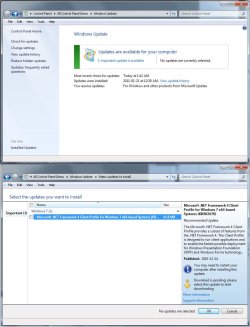
I just came to realize the Windows Update window does not show the usual thirty-something available optional updates (last time I checked it was all the language packs and an ATI driver update), only 1 available important update.

Moreover, if I try to select the updates I want to install, the "Optional" tab is completely missing from that window. I haven't hidden any of those updates, nor are they listed as hidden under the appropriate menu.

Have any of you experienced something like this? What should I try to get them back?

Thanks.

PS: I've attached a screenshot of the situation.

PPS: It's been a month or so since I last checked for updates, so I don't exactly know what might've happened that got those updates disabled.
 

Attachments
  • no_optional_updates.jpg
    no_optional_updates.jpg
    122.6 KB · Views: 521
Last edited:

My Computer My Computer

OS
Windows 7 Ultimate x64
Click on the "View Update history" in the left panel, you might already have installed them.

Also, have you installed the SP1?
 

My Computer My Computer

Computer Manufacturer/Model Number
Too many to describe...
OS
Windows 7 x64 pro/ Windows 7 x86 Pro/ XP SP3 x86
I checked the update history and have no language packs installed. This is also confirmed by the display language settings dialog.

No SP1 either. (Build 7600)
 

My Computer My Computer

OS
Windows 7 Ultimate x64
Hello szobanov and welcome to the Forum.

Have you tried clicking on Restore Hidden Updates?
 

My Computer My Computer

Computer type
Laptop
Computer Manufacturer/Model Number
Sony Vaio VPCEB47GM Laptop
OS
Win 7 Pro 64-bit
CPU
Intel i5 2.4 Ghz
Memory
8GB DDR3
Graphics Card(s)
Intel HD 3000
Sound Card
IDT High Definition
Monitor(s) Displays
15.6 WGXA Anti-Glare LED
Screen Resolution
1280x800
Hard Drives
640Gb 7200rpm
Antivirus
MSE
Browser
Opera (primary) with IE9 backup
Hello and thanks. :)

Yup, I have tried that. All it did was restore the 'Browser choice' update under the 'Important' tab.
 

My Computer My Computer

OS
Windows 7 Ultimate x64
Tough. Wonder whether MS is preparing the new build string updates in anticipation of SP1.

In any case, try restarting the windows update service. In an elevated command prompt, type the following one by one and hit Enter after each.

net stop wuauserv

regservr32 %windir\%system32\wups2.dll

net start wuauserv

Now check again. Are you looking for a particular language?
 

My Computer My Computer

Computer Manufacturer/Model Number
Too many to describe...
OS
Windows 7 x64 pro/ Windows 7 x86 Pro/ XP SP3 x86
Will try that, thank you.

I'm not looking for any particular language pack, it's just the doubt that something might be messed up. Those updates should be there, along with the driver updates I mentioned before and now they're gone.

I'll post my results with the WU service restart.


Tough. Wonder whether MS is preparing the new build string updates in anticipation of SP1.

In any case, try restarting the windows update service. In an elevated command prompt, type the following one by one and hit Enter after each.

net stop wuauserv

regservr32 %windir\%system32\wups2.dll

net start wuauserv

Now check again. Are you looking for a particular language?
 

My Computer My Computer

OS
Windows 7 Ultimate x64
Just noticed you have 64 bit windows. So you need to run regsvr32 from the syswow64 folder. At the elevated command prompt, navigate to the directory syswow64 (c:\windows\syswow64). Then run the regsvr32 command.
 

My Computer My Computer

Computer Manufacturer/Model Number
Too many to describe...
OS
Windows 7 x64 pro/ Windows 7 x86 Pro/ XP SP3 x86
Good news!

After restarting the WU service and checking for new available updates all the optional update packs came back, along with 10 important updates for Windows and 1 for Office.

Whether it was the service's restart, or today being patch Tuesday, or both, I don't know. But anyways, all seems to be okay now.

Thanks for your kind help and all the input.
 

My Computer My Computer

OS
Windows 7 Ultimate x64
Just a quick sidenote: having installed the aforementioned 11 new 'important' updates sent me back to square one, with no optional and language packs visible, again.

The strange thing is that the .NET Framework 4.0 Client Profile update was not among those 11 important ones, however now it is the only one available again.

I'm kind of puzzled right now.
 

My Computer My Computer

OS
Windows 7 Ultimate x64
Just a quick sidenote: having installed the aforementioned 11 new 'important' updates sent me back to square one, with no optional and language packs visible, again.

The strange thing is that the .NET Framework 4.0 Client Profile update was not among those 11 important ones, however now it is the only one available again.

I'm kind of puzzled right now.

That is very strange. Have you considered this alternative? :roflmao:
 

My Computer My Computer

Computer type
Laptop
Computer Manufacturer/Model Number
Sony Vaio VPCEB47GM Laptop
OS
Win 7 Pro 64-bit
CPU
Intel i5 2.4 Ghz
Memory
8GB DDR3
Graphics Card(s)
Intel HD 3000
Sound Card
IDT High Definition
Monitor(s) Displays
15.6 WGXA Anti-Glare LED
Screen Resolution
1280x800
Hard Drives
640Gb 7200rpm
Antivirus
MSE
Browser
Opera (primary) with IE9 backup
Had the same problem. Try this:

1. First, open Windows Update to see what updates you’re receiving. You can easily find it by entering Windows Update in the Start menu search.

2. Look underneath the Windows Update box to see what you’re getting updates for. By default, Windows 7 will only check for updates to Windows and drivers, not other Microsoft products such as Office. To add this, click the Find out more link on the bottom.

3. This will open the Windows Update page in your default browser. Check the I agree box, and then click Install.

4. Accept the UAC prompt, and then after a moment the page will update and show that Microsoft Update is now installed.

5. Check for updates. If MUI doesn't show you might want to wait a day to check again.

OR you might want to check if you're using other than Ultimate or Enterprise edition since those 2 are the only versions that have MUI.

Hope it helps :)
 
Last edited:

My Computer My Computer

OS
windows 7 ultimate x32
There are lot of updates which appear while oppening the windows update. How can be removed. I don't want to install them ever.
 

My Computer My Computer

OS
Windows 7 ultimate 32
There are lot of updates which appear while oppening the windows update. How can be removed. I don't want to install them ever.

Right-click on the update and choose Hide update.
 

My Computer My Computer

OS
windows 7 ultimate x32
Shit!!!!!!!!!!!!! Thx!
Stupid question. After your replay I realised that I knew that.
THX once again.
 

My Computer My Computer

OS
Windows 7 ultimate 32
Back
Top