
Hello All,
Recently discovered this forum and been reading a lot on it. I like this site-tons of info on it and learning every day a bit more!
But now to my actual problem;
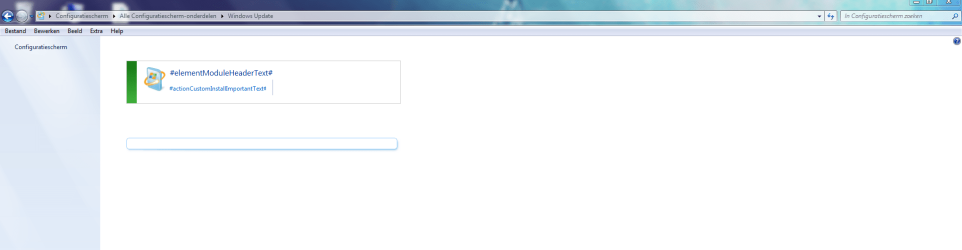
When I go to the windows update page via the configuration screen my update page is empty. I cannot see the installed update here and cannot search for updates as all the options are not there. The screenshot shows much better my problem:

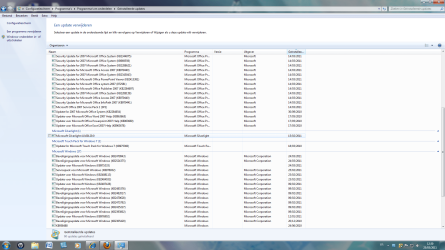
I can see the installed updates on my computer via the installed programs in the config screen and as you can see my computer still does the automatic updates even though I have this problem! (problem noticed a couple of weeks ago) It looks like I got 3 updates yesterday but did not received any notification or info that the updates where actually installed!

The affected computer is a HP Touchsmart which came with Windows 7 64bit and runs further like a baby-no problems with it! I have SP1 installed on it. I dont know when this problem started, sure it must have started after installation of SP1... I dont have a recovery disk, it has a hidden partition on the HD. I do have a backup but would like to avoid using it as this backup is a bit older and the computer further does not have any problems...
Been searching the internet and even have posted this problem on a Dutch computer forum where I received a lot of tips, but none of the tips have worked for me.
Maybe somebody here has the magic trick for me?!
Thanks,
Greetings from France,
Yves
Recently discovered this forum and been reading a lot on it. I like this site-tons of info on it and learning every day a bit more!
But now to my actual problem;
When I go to the windows update page via the configuration screen my update page is empty. I cannot see the installed update here and cannot search for updates as all the options are not there. The screenshot shows much better my problem:

I can see the installed updates on my computer via the installed programs in the config screen and as you can see my computer still does the automatic updates even though I have this problem! (problem noticed a couple of weeks ago) It looks like I got 3 updates yesterday but did not received any notification or info that the updates where actually installed!

The affected computer is a HP Touchsmart which came with Windows 7 64bit and runs further like a baby-no problems with it! I have SP1 installed on it. I dont know when this problem started, sure it must have started after installation of SP1... I dont have a recovery disk, it has a hidden partition on the HD. I do have a backup but would like to avoid using it as this backup is a bit older and the computer further does not have any problems...
Been searching the internet and even have posted this problem on a Dutch computer forum where I received a lot of tips, but none of the tips have worked for me.
Maybe somebody here has the magic trick for me?!
Thanks,
Greetings from France,
Yves
Attachments
My Computer
- Computer Manufacturer/Model Number
- ASUS UL 80VT
- OS
- Microsoft Windows 7 Home Premium 64-bit 7601 Multiprocessor Free Service Pack 1
- CPU
- Genuine Intel(R) CPU U7300 @ 1.30GHz
- Motherboard
- ASUSTeK Computer Inc. UL80VT
- Memory
- 6,00 GB
- Graphics Card(s)
- Mobile Intel(R) 4 Series Express Chipset Family
- Sound Card
- Realtek High Definition Audio
- Monitor(s) Displays
- 14"
- Screen Resolution
- 1366 x 768 x 32 bits (4294967296 colors) @ 60 Hz
- Hard Drives
- OCZ-SOLID3 ATA Device 60GB


